What they do and how
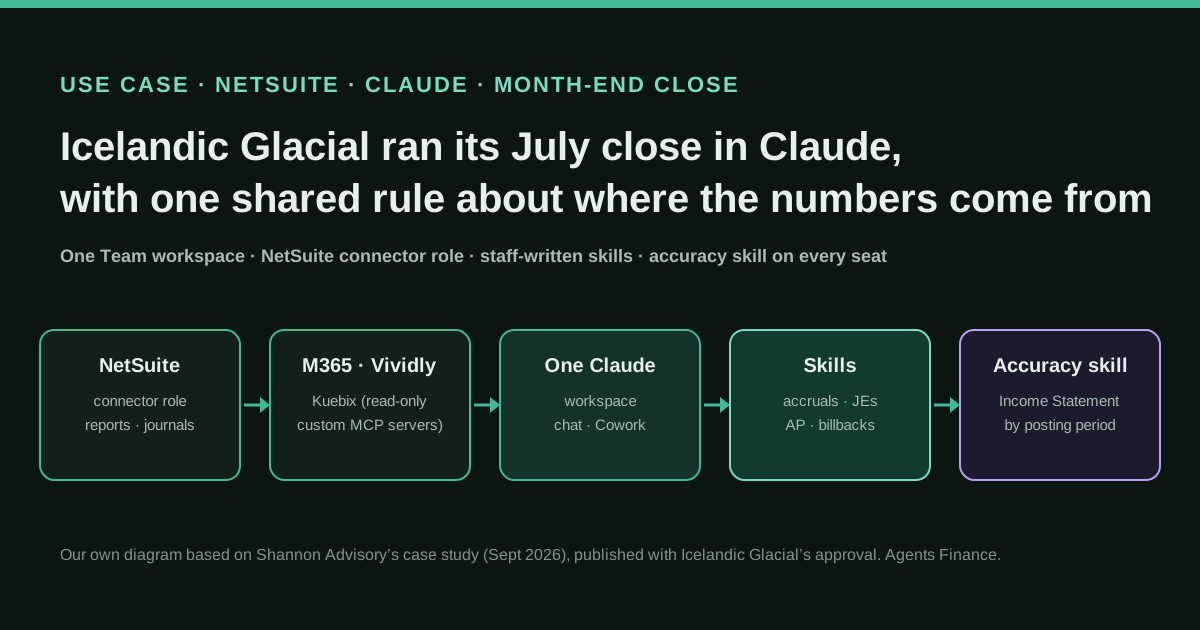
Icelandic Glacial's finance team in Los Angeles and Iceland works in a single Claude Team workspace connected to NetSuite and Microsoft 365, plus two read-only connectors that its implementation partner built for Vividly (trade spend) and Kuebix (transport management). Staff write their own skills for recurring finance work: month-end accruals and journal entries, a weekly payment report, purchase-order and invoice breakouts, a customer billback and a weekly import of transaction-level data that posts journal entries in NetSuite. A shared NetSuite accuracy skill, deployed to every seat, tells Claude to take the income statement from NetSuite's own report by posting period instead of adding up transactions by date.
Reported result
Stated in the partner's case study, published with the company's approval: the July 2026 close ran in Claude with journal entries posted through the NetSuite connector; 47 of 70 seats were active each week and 68 used Claude in the 90 days to 24 September 2026 (260,311 requests, about 2,200 Cowork sessions and 2,900 MCP writes, from Claude's admin analytics); about 158 hours saved over 90 days on Anthropic's default analytics estimate. The Financial Director in Iceland estimates a weekly data import will fall from a full workday to "an hour or two". There are no figures on close length, error rates or audit findings, and nothing is audited.
Stated figures. An identified person or organization states that they have used it. The results are stated by the source; we have not audited them.
What has really been tested
On 22 October 2026 we read the case study, the partner's services pages and its Claude Partner Network profile, Oracle's NetSuite pages on the AI Connector Service, report tools and best practices, the agent skills Oracle publishes in its SuiteCloud SDK repository (commit 0addb92), SeamSet's guide on checking AI figures against NetSuite reports and Anthropic's help pages on organisation-wide skills. We have not seen Icelandic Glacial's skills, connector role or workpapers, have no access to a NetSuite account, and cannot verify any figure. The skill files, role checklist and SuiteQL query under "Copy and adapt" are our own templates and have not been run against a live account.
How to replicate it
Put the finance team on one Claude Team or Enterprise workspace, connect NetSuite through Oracle's AI Connector Service with a dedicated non-administrator role, and write down the rule that the case turned on: financial statements come from NetSuite's standard reports (or a saved search by posting period), never from SuiteQL totals by transaction date. Package that rule as a skill and provision it to every seat. Then let each owner of a recurring task write a skill for it in a working session, keep anything that posts journal entries behind a preview and an explicit confirmation, and tie every output back to NetSuite's own report before the close is signed.
In two sentences
Icelandic Glacial, a mid-size bottled-water company that runs on NetSuite, moved its finance team from scattered personal Claude accounts to one shared workspace in 90 days, and its VP of Finance says she “basically just did the whole close in Claude” for July 2026. The turning point was not a smarter model but a one-page rule: when Claude’s NetSuite numbers would not tie to the income statement, a shared skill told it to read NetSuite’s own report by posting period instead of adding up transactions by date.
Who does it and why it matters
Icelandic Glacial bottles spring water in Iceland and sells it in the United States and abroad, from offices in Los Angeles and Iceland. Its finance stack is ordinary for a company its size: NetSuite as the ledger, Microsoft 365 and SharePoint for files, Vividly for trade spend and Kuebix for freight. In June 2026 management set a 90-day mandate for a “simpler” and “more profitable” business, and hired Shannon Advisory, a New York firm listed in Anthropic’s Claude Partner Network, to roll Claude out across finance and production.
Everything we know comes from Shannon Advisory’s case study, published in September 2026 with the company’s approval. That is the main caveat of this entry: the narrator sells the service it describes. We still think the case is worth a long look, for three reasons:
- It is a named company and a named finance team, not an anonymous “mid-market client”. The VP of Finance & Controller, Jennifer Delaney, and the Financial Director in Iceland, Keira Mayock, are quoted from recorded working sessions.
- The figures are labelled. Seat activity, requests, Cowork sessions and MCP writes come from Claude’s admin analytics; the 158 hours saved are flagged as Anthropic’s default estimate, and the Iceland time saving as a target.
- The technical lesson is confirmed by Oracle. NetSuite’s own best-practice page says not to use SuiteQL or build new reports for financial statements, because standard reports apply business rules that SuiteQL cannot. That is exactly the failure the company hit.
Tools and architecture
The set-up, as the case study describes it:
- One workspace. A single Claude Team workspace with both company domains verified, replacing a five-seat plan in Iceland and individual accounts in finance. Without it there were no shared projects, skills or connectors, and nobody to administer them.
- Systems of record connected early. NetSuite and Microsoft 365 were connected in June with the company’s IT provider; NetSuite went live on 18 June. Six days later a NetSuite permissions rule stopped several finance users from connecting. The finance team created a dedicated connector role that afternoon and the partner wrote a setup guide for everyone else. Oracle’s documentation explains why this happens: the AI Connector Service refuses the Administrator role and any role with full permissions, and the connecting role needs the MCP Server Connection and Log in using OAuth 2.0 Access Tokens permissions (plus REST Web Services for the standard tools that read and write records).
- Custom connectors for the long tail. Vividly and Kuebix had no off-the-shelf Claude connectors, so the partner built a remote MCP server for each on Google Cloud, read-only by design. Within a week finance was using the freight data alongside NetSuite, SharePoint and Vividly in one project.
- Skills owned by the people who do the work. Delaney built her first skill in a July office-hours session; by mid-July she had month-end skills for accruals and journal entries. Others followed: an AP specialist’s weekly payment report, a staff accountant’s PO and invoice breakouts, a monthly case-economics report saved as a plugin, a customer-billback skill shared between colleagues. Mayock’s skills read vendor documents and post journal entries to NetSuite directly.
- One shared accuracy skill. Written by the partner with Delaney and deployed to every seat on 13 August. Its current version tells Claude to take the income statement from Reports > Financial > Income Statement, run by posting period. On Team and Enterprise plans an organisation owner can provision a skill so it appears for every member, which is the documented way to do this.
The problem the accuracy skill solves
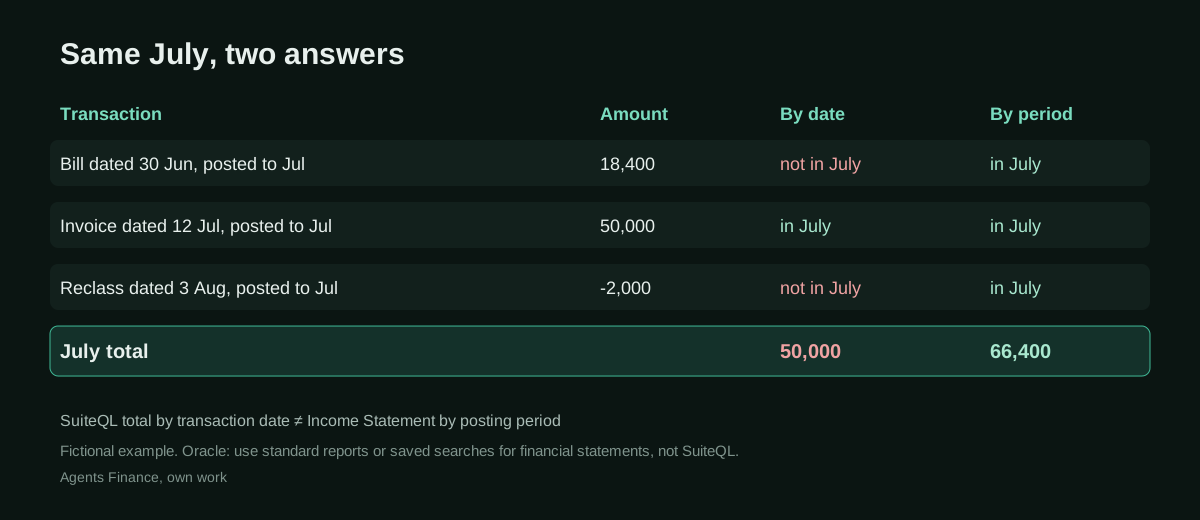
The NetSuite connector gives Claude several ways to answer “what was revenue in July?”. It can run a standard report, run a saved search, or write its own SuiteQL query against the transaction tables. The last option is the most flexible and the most dangerous: a query that sums posted lines whose transaction date falls in July is not the same as NetSuite’s income statement for the July posting period. A vendor bill dated 30 June but posted to July, a reclass booked in the following period, a revaluation or an elimination: each can move a figure from one column to another. The result looks reasonable, and is wrong.
Oracle is explicit on its best-practice page: prefer ns_runReport or ns_runSavedSearch before ns_runCustomSuiteQL, and do not use SuiteQL for financial reports. Oracle’s own agent skill for the connector, published under a permissive licence in its SuiteCloud SDK repository, encodes the same order as a decision tree (reproduced below).
There is a wrinkle the case study does not address. Oracle’s page on the report tools says that accounting periods are not supported by those tools: they ignore the “Report by Period” preference and may treat the calendar year as the fiscal year. SeamSet, a firm that sells NetSuite services, points out that a date range in a report selects by transaction date, so a run through the tools can still differ from the same report by period in the NetSuite UI, and suggests a saved search filtered on the posting period as the most reliable workaround. We do not know how Icelandic Glacial’s skill gets “by posting period” through the connector (an exact date range for clean calendar periods, a saved search, or a person running the report). If your periods are not calendar months, test this before you trust it.
Step by step to replicate the pattern
- Consolidate. One Team or Enterprise workspace, domains verified, an owner who can provision skills and manage connectors. Turn on code execution and skills in the organisation policy.
- Create the connector role in NetSuite. A custom, non-administrator role with the two connector permissions and only the record and report permissions finance needs. Start with no create or edit rights on transactions.
- Connect NetSuite in Claude with the AI Connector Service URL for your account and log in with that role. Write a one-page setup guide for colleagues, as the partner did.
- Write the accuracy skill first. Statements from standard reports or a posting-period saved search; SuiteQL only for investigating differences; every figure carries the report name, filters and subsidiary. Provision it to every seat.
- Run office hours on real work. The case study notes that slide-based training did not land and that working on the team’s own files did. Let the owner of each recurring task write the skill for it.
- Gate anything that posts. Journal-entry skills build a preview with lines, period, subsidiary and backup, and post only after an explicit confirmation, with an external ID to avoid duplicates. Give write rights to the role only when a skill has run cleanly in preview for a full close.
- Tie out before signing. Compare Claude’s statement with NetSuite’s income statement by period; any difference is listed transaction by transaction and explained.
Copy and adapt
Icelandic Glacial’s skills are not public. What follows is Oracle’s published material (under the Universal Permissive License) and our own templates, clearly labelled.
Prerequisites
- NetSuite with Server SuiteScript, OAuth 2.0 and, for the MCP Standard Tools SuiteApp, REST Web Services enabled (Setup > Company > Enable Features > SuiteCloud).
- The MCP Standard Tools SuiteApp installed, and a non-administrator role (see below).
- Claude Team or Enterprise if you want to provision skills to everyone; Pro or Max work for one person. Prices on the Claude tool page.
- A list of the standard reports and saved searches your close already relies on, with their names.
1. Connector URL (Oracle documentation)
The server URL Oracle gives for connecting Claude to the MCP Standard Tools SuiteApp; replace the placeholder with your account ID:
https://<accountid>.suitetalk.api.netsuite.com/services/mcp/v1/suiteapp/com.netsuite.mcpstandardtools2. Connector role checklist (Agents Finance template based on Oracle’s documentation)
Role name:        AI Connector - Finance (read)
Based on:         a custom role, NOT Administrator and NOT any full-permission role
Setup subtab:     MCP Server Connection
                  Log in using OAuth 2.0 Access Tokens   (not "Log in using Access Tokens")
                  REST Web Services                       (needed by the standard tools SuiteApp)
Reports subtab:   Financial Statements, plus the specific reports your close uses
Lists subtab:     only the lists finance needs to read (accounts, vendors, customers, subsidiaries)
Transactions:     View only. No Create/Edit/Full on Journal, Bill or Invoice until a
                  posting skill has run cleanly in preview for a full close
Subsidiaries:     restrict to the entities this team closes
Review:           who holds this role, quarterly; remove MCP Server Connection to switch it off
3. Oracle’s tool-selection rule (literal extract)
From netsuite-ai-connector-instructions/SKILL.md in oracle/netsuite-suitecloud-sdk, commit 0addb92. Copyright (c) Oracle and/or its affiliates. Licensed under the Universal Permissive License (UPL), Version 1.0.
Can a standard report answer this?
  YES → ns_listAllReports → ns_runReport → STOP
  NO  ↓
Is there a saved search for this?
  YES → ns_listSavedSearches → ns_runSavedSearch → STOP
  NO  ↓
Is this a record lookup, create, or update?
  YES → ns_getRecordTypeMetadata → ns_getRecord / ns_createRecord / ns_updateRecord → STOP
  NO  ↓
Has user confirmed a custom SuiteQL query is acceptable?
  YES → ns_getSuiteQLMetadata → ns_runCustomSuiteQL (ROWNUM required)
  NO  → Ask: "I can't find a standard report or saved search for this.
               Would you like me to try a custom SuiteQL query?"
4. The accuracy skill (Agents Finance template based on the Icelandic Glacial case)
Save as netsuite-financials-tie-out/SKILL.md, zip the folder and provision it from Organization settings > Plugins & skills.
---
name: netsuite-financials-tie-out
description: Use whenever the user asks for income statement, P&L, revenue, margin, expense or any financial-statement figure from NetSuite, or for month-end reporting, flux or budget-versus-actual work based on NetSuite. Makes figures tie to NetSuite's own financial reports by posting period.
---

# NetSuite financials that tie

## Rules
1. Financial-statement figures come ONLY from NetSuite standard reports
   (ns_listAllReports, then ns_runReport) or from the saved searches named below.
   Never total transactions with SuiteQL to produce a statement figure.
2. Our books are reported by POSTING PERIOD. Report tools filter by date range,
   which selects by transaction date. For any period figure:
   - prefer saved search "{{SAVED_SEARCH_IS_BY_PERIOD}}" (one per period), run unchanged;
   - if you use ns_runReport, use the exact period dates {{PERIOD_START}} to {{PERIOD_END}}
     and say in the output that the run is by date, not by period.
3. Our fiscal year starts on {{FISCAL_YEAR_START}}. Never assume 1 January.
4. Before any figure, show: report or search name, date range, subsidiary ID and
   whether it is consolidated (negative ID) or single (positive ID), accounting book, currency.
5. If a figure differs from the income statement by period, do not adjust it.
   List the difference and use SuiteQL ONLY to explain it (see query.sql), then stop.
6. If the period is open, label every result PRELIMINARY.
7. Read-only. This skill never creates or updates records.

## Output
- Headline figure, then a table with the source line from rule 4.
- A last line "Tie-out: <figure> vs Income Statement by period <figure>, difference <x>".
5. Posting journal entries with a gate (Agents Finance template)
Based on Oracle’s best practices (set an External ID on every record you create) and the confirmation rules in Oracle’s finance-analyst skill. Use it only with a role that has edit rights on journals, and only after a full close in preview mode.
---
name: netsuite-journal-entry-with-preview
description: Use when the user asks to book an accrual, reclass or recurring journal entry in NetSuite from a workpaper or vendor document. Builds a preview first and posts only after explicit confirmation.
---

# Journal entries with a preview

1. Read the backup (workpaper or document). Extract date, posting period, subsidiary,
   currency, memo and lines (account, debit, credit, department, class, location).
2. Check: debits equal credits; the period is open; every account exists and is active;
   the subsidiary matches the accounts; the amount is within {{MAX_AMOUNT}} per entry.
3. Show a PREVIEW table and the backup reference. Do not call ns_createRecord yet.
4. Ask: "Post this entry to <period> for <subsidiary>? Reply POST to confirm."
5. Only after the reply POST: call ns_getRecordTypeMetadata, then ns_createRecord with
   externalId = "AI-JE-{{PREFIX}}-<period>-<backup reference>".
6. If the call fails, do NOT retry. Ask the user to check NetSuite for the externalId first.
7. Return the journal number and a link to it. Never approve the entry yourself.
6. Explain the gap between date and posting period (Agents Finance template, untested)
SuiteQL, following the conventions in Oracle’s connector skill (ROWNUM, TO_DATE('MM/DD/YYYY'), no CTEs). It lists posted income-statement lines that sit in July by one definition and not the other. Check the field names with ns_getSuiteQLMetadata in your account before running it; we have not run it against a live account.
SELECT t.tranid,
       t.recordtype,
       t.trandate,
       ap.periodname                AS posting_period,
       BUILTIN.DF(tal.account)      AS account,
       NVL(tal.amount, 0)           AS amount
FROM transaction t
JOIN transactionaccountingline tal ON tal.transaction = t.id
JOIN accountingperiod ap ON ap.id = t.postingperiod
JOIN account a ON a.id = tal.account
WHERE t.posting = 'T'
  AND tal.posting = 'T'
  AND a.accttype IN ('Income', 'COGS', 'Expense', 'OthIncome', 'OthExpense')
  AND (
        (ap.periodname = 'Jul 2026'
         AND (t.trandate < TO_DATE('07/01/2026', 'MM/DD/YYYY')
              OR t.trandate > TO_DATE('07/31/2026', 'MM/DD/YYYY')))
     OR (ap.periodname <> 'Jul 2026'
         AND t.trandate >= TO_DATE('07/01/2026', 'MM/DD/YYYY')
         AND t.trandate <= TO_DATE('07/31/2026', 'MM/DD/YYYY'))
      )
  AND ROWNUM <= 1000
7. Package and provision
# from the folder that contains the skill directory
zip -r netsuite-financials-tie-out.zip netsuite-financials-tie-out/
# then: Organization settings > Plugins & skills > Add > Upload a skill
A concrete example (fictional)
Say a freight vendor’s bill is dated 30 June for 18,400 and the AP clerk posts it to the July period because June was already closed. Claude, asked for July freight cost, writes a SuiteQL query that sums posted lines dated 1 to 31 July: the bill is missing. The controller’s income statement for July, run by period, includes it. The two figures differ by exactly 18,400 and both look plausible. With the accuracy skill, Claude runs the period saved search instead, shows the source line, and the tie-out line reads zero. If someone still asks for the SuiteQL figure, query 6 lists the bill as the difference. All numbers here are invented.
Results stated by the source
All figures are from Shannon Advisory’s case study and, it says, from Icelandic Glacial’s Claude admin analytics and spend report:
- July 2026 month-end close run in Claude, journal entries posted through the NetSuite connector.
- 47 of 70 seats active each week (peak of 49 in the week of 21 September); 68 of 70 used in the 90 days to 24 September; 260,311 requests; about 2,200 Cowork sessions and 2,900 MCP writes.
- About 158 hours saved over 90 days, on Anthropic’s default analytics assumptions: an estimate, not a time study.
- In Iceland, a weekly transaction-level import expected to go from a full workday to “an hour or two”; the case study turns that into “about six hours a week” if the estimate holds.
- Qualitative change: on 6 July Delaney said a test journal entry took “longer than if I just did it myself”; on 19 August, after the July close, she said she had done “the whole close in Claude”.
There is nothing on close length in days, errors caught or introduced, audit or reviewer findings, or cost. “MCP writes” covers all connectors, so it is not a count of journal entries.
Limitations and risks
- Single, interested source. The partner wrote the story and sells the service. We found no statement from Icelandic Glacial on its own channels.
- Posting rights. The case study says some skills post journal entries directly. It does not describe approvals, segregation of duties or how posted entries are reviewed. For a company with external auditors, that is the first question to answer.
- Periods through the connector. Oracle says its report tools do not support accounting periods. “By posting period” needs a saved search, exact dates for calendar periods, or a person running the report.
- Skill sprawl. Skills shared between colleagues and plugins built by individuals need an owner, a version and a review, or the close will depend on undocumented prompts.
- Data scope. Every connector widens what Claude can read. The partner made its custom connectors read-only; keep the NetSuite role as narrow.
Common mistakes
- Connecting with the Administrator role (it will not work) or cloning a full-access role (it should not).
- Letting the model choose SuiteQL for statement figures because it is “more flexible”.
- Assuming the fiscal year starts in January and that every period is a calendar month.
- Running a consolidated report with a positive subsidiary ID: Oracle documents that consolidated and context subsidiaries use negative IDs.
- Treating the analytics “hours saved” as a measured saving.
- Giving a posting skill write rights before it has run in preview for a full close.
Conclusions
The interesting part of Icelandic Glacial’s rollout is how unglamorous it is: one workspace, a connector role, a setup guide, office hours on real files, and one shared rule about where financial-statement numbers come from. That rule, which Oracle itself recommends, is what turned Claude’s NetSuite answers from plausible to usable for a close. The evidence is a vendor-told case with measured usage and estimated savings, so treat it as a well-documented pattern, not proof. If you run NetSuite, the accuracy skill and the narrow connector role are where to start, before any skill is allowed to post.
Sources
- Shannon Advisory — How Icelandic Glacial put Claude to work across finance and production in 90 days (Sept 2026) (opens in a new tab) (primary)
- Oracle NetSuite Help Center — Best Practices for MCP Standard Tools SuiteApp (opens in a new tab)
- Oracle NetSuite Help Center — Report Tools (known limitation: accounting periods are not supported) (opens in a new tab)
- Oracle NetSuite Help Center — Required Features and Permissions (NetSuite AI Connector Service) (opens in a new tab)
- GitHub — oracle/netsuite-suitecloud-sdk, agent skill netsuite-ai-connector-instructions (UPL 1.0), commit 0addb92 (opens in a new tab)
- SeamSet (Arnaud de Turckheim) — NetSuite AI prompts for finance: month-end close examples and how to check the numbers (verified 26 Sep 2026) (opens in a new tab)
- Claude Help Center — Provision and manage skills for your organization (opens in a new tab)
- Shannon Advisory — Claude Partner Network directory profile (opens in a new tab)
We wrote this entry in our own words from the sources above and checked that the links worked on October 22, 2026. Is anything incorrect? Tell us.