What they do and how
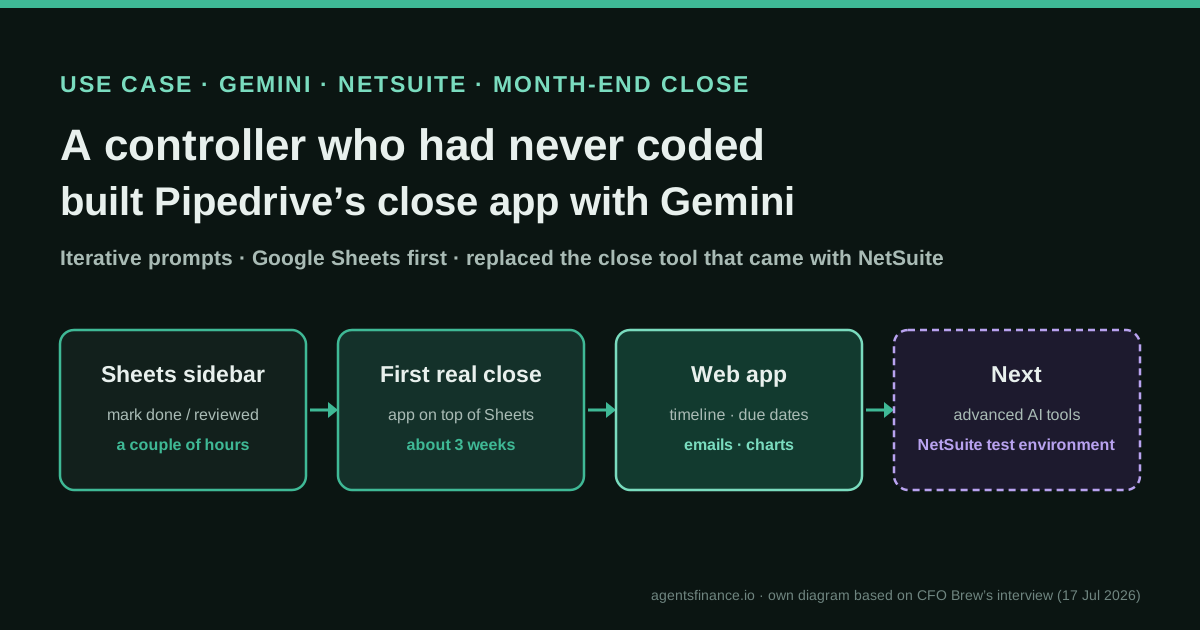
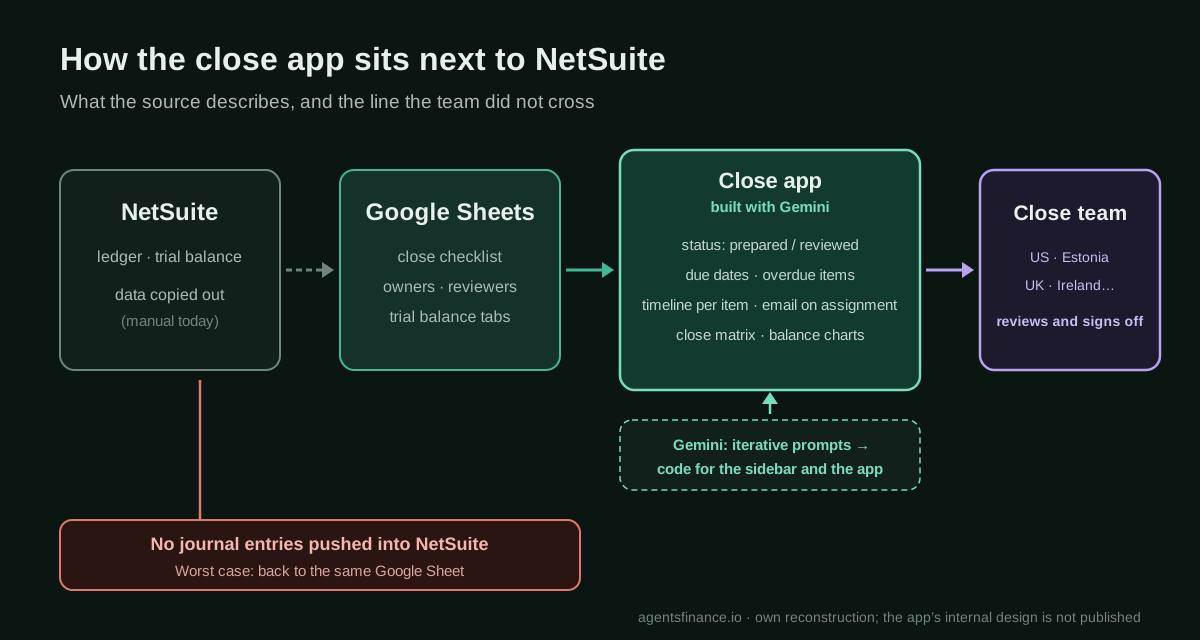
Pipedrive's close team works across the US, Estonia, the UK, Ireland, Portugal and other countries, and people marked close tasks as completed or reviewed on different days. The global controller, with no coding experience, asked Gemini for one small thing at a time: first a sidebar in Google Sheets to mark items as done or reviewed without scrolling past dozens of columns, then an app on top of Sheets and finally a web app with a timeline per item, due dates, overdue tracking, email on assignment, a close matrix and balance charts. Nothing writes to NetSuite.
Reported result
Stated by CFO Regi Vengalil: the team now uses the app instead of the close management tool that came with NetSuite; it does not match that tool's functionality "100%"; and the company "might be spending a couple of thousand a year" in inference and automation costs against "a cost base of something like $30,000 to $40,000". He also says it freed time for "more rigorous reviews" and widened the range of transactions they validate. Dycus says the sidebar took a couple of hours and the first version usable for a close about three weeks. No hours saved or audited figures are given.
Stated figures. An identified person or organization states that they have used it. The results are stated by the source; we have not audited them.
What has really been tested
On 20 October 2026 we read the CFO Brew story of 17 July 2026 and the two newsletter issues that carried it, checked Dycus's public LinkedIn profile, and read Google's Apps Script documentation on sidebars, web apps, quotas and user identity, plus the official Gemini pricing page. We have not seen Pipedrive's app, prompts, code or data, and nobody at Pipedrive has confirmed anything to us. The checklist layout, prompts and code below are our own examples, not Pipedrive's, and we have not run them against a real close.
How to replicate it
Keep your close checklist in a spreadsheet with one row per task, an owner, a reviewer and a due date. Ask your AI assistant for one small, testable feature at a time, starting with a sidebar that stamps who prepared and reviewed a task and when; test each version on a copy and then on a real close. Add due dates, overdue views, email on assignment and charts only after the basics are trusted. Keep the ERP read-only, protect the status columns and write down who maintains the app.
In two sentences
Nathaniel Dycus, VP and global controller at the CRM company Pipedrive, had never written code when he started asking Gemini to help him fix his team’s month-end close; a few months of small, iterative prompts later, the team runs its close on the web app he built instead of the close management tool that came with NetSuite. It is a modest tool on purpose, a shared checklist with timestamps, deadlines, notifications and charts, and its main lesson is about where to build first: next to the ledger, not inside it.
Who does it and why it is interesting
The source is a CFO Brew story by Courtney Vien, published on 17 July 2026, based on interviews with Dycus and with Pipedrive’s CFO, Regi Vengalil. CFO Brew describes Pipedrive as an Estonian CRM software company, 16 years old, valued at $1.5 billion when it became a “unicorn” in 2020, with more than 800 employees. Dycus’s background is accounting, not technology: 11 years at PwC and four years as SVP of accounting at HireVue. Before this project, he says, his use of AI was limited to prompting and asking chatbots for Excel formulas. “He had never coded before,” his CFO told the newsletter.
The story is worth a place in this directory for three reasons:
- It is a real replacement, not a prototype. The CFO says the team uses the app instead of the close tool bundled with NetSuite, and gives a rough cost comparison. Most “I built it with AI” stories stop at a demo.
- Both builder and budget holder speak. The controller explains how he built it; the CFO explains why he accepts something that does less than the commercial tool.
- It shows a sensible boundary. The team deliberately stayed in Google Sheets and never pushed journal entries into NetSuite while learning. That is a pattern any finance team can copy without asking IT for write access to the ledger.
CFO Brew ran it again on 26 September 2026 as one of its three most popular deep dives of the previous three months. We found no other independent coverage, and Pipedrive has not published anything about it, so the whole case rests on what the two executives said in that interview.
The problem: a global close held together by a spreadsheet
The close team is spread across time zones in the US, Estonia, the UK, Ireland, Portugal and other countries. People would mark tasks as completed or reviewed on different days from the rest of the team, which made it hard to see the close “as one consolidated process”, in Dycus’s words. Several steps were manual and, he thought, automatable: copying data from NetSuite into Google Sheets, marking when tasks were completed or reviewed, and updating the trial balance when something changed.
The team did look at commercial close software, but found most of it “too robust”: they did not need “the entire start-to-finish close process”. That is a useful detail. The gap was coordination and visibility, not reconciliation engines or journal-entry automation.
What he built, stage by stage
Dycus describes the build as “iterative prompts that did one thing, and then slightly more, and slightly more”. From the interview:
- A sidebar in Google Sheets (a couple of hours). Its only job was to let people mark an item as completed or reviewed without scrolling horizontally past many columns.
- An app on top of Google Sheets. The sidebar grew. The first version the team could actually use for a close took “probably three or so weeks”.
- A web app refined over the following months, with feedback from the team, who “demoed the tool and tried to make the tool break”. Today it shows a timeline of each item with its status, lets people set due dates, shows what is completed and what is past due, and emails people when someone assigns them a task.
- Visualisation. With Gemini he built a close matrix and a charting feature for data such as balances at different points in time or compared with previous months, so that instead of looking at “500 rows” the team gets a sense of how the close is going against its deadlines.
He also uses the history: the timeline helps “rewind after close and see where our bottlenecks were”.
Tools and architecture: what is known and what is our inference
- AI assistant: Gemini. The source does not say which edition (the Gemini app, Gemini in Google Workspace or Gemini Enterprise) or which model, nor whether Gemini wrote all the code or helped him write it.
- Data layer: Google Sheets, with the close checklist and trial-balance data copied from NetSuite. The interview presents that copying as one of the manual steps he wanted to remove, but does not say it has been automated.
- The sidebar: in Google Sheets, custom sidebars are built with Apps Script’s HTML service (Google’s documentation). The article does not name the technology, so this is our inference, though it is the standard way to do it.
- The web app: not described. Apps Script can publish a script as a web app, which would be the natural next step from a bound script, but we do not know whether Pipedrive did that or moved to another platform.
- Notifications: email when a task is assigned. If you build this with Apps Script, Google’s quotas cap email recipients per day (100 for consumer accounts, 1,500 for Google Workspace accounts at the time we checked).
- Boundary with the ERP: none of this writes to NetSuite. “We weren’t pushing journal entries into NetSuite, we weren’t doing anything that wasn’t resolvable,” Dycus said. “Worst-case scenario, we were back to the same Google Sheet we had.”
Step by step to replicate it
These steps are ours, built from the interview and Google’s documentation.
- Write down the close as rows. One row per task: ID, task, entity, area, owner, reviewer, due date (as a working day of the close or a date), prepared by, prepared at, reviewed by, reviewed at, link to the workpaper and notes. If this sheet does not exist yet, building it is already half the value.
- Ask for the smallest useful feature. A sidebar with two buttons, “Mark prepared” and “Mark reviewed”, that stamps the user and the time on the selected row. Ask the assistant to explain each part of the code it gives you, and keep the code in the spreadsheet’s script project.
- Test on a copy, then on one real close. Try to break it: select the header, select two rows, review a task nobody prepared, review your own task. Fix each failure with a new prompt.
- Protect the evidence. Use protected ranges so that only the script and the close lead can edit the status and timestamp columns; otherwise anyone can type a date and the trail means nothing.
- Add deadlines and the overdue view. A filtered view or a second tab with what is past due, by owner and entity. Then the email on assignment.
- Add the charts last. A close matrix (entities × areas, coloured by status) and the balance trends that reviewers actually look at.
- Decide when it becomes an app. Move from the sidebar to a web app only when the sheet gets in the way; document who maintains it, where the code lives and how a new version is tested before a close.
- Keep the ERP read-only. If you later connect to NetSuite, do it as Pipedrive says it is now doing for more advanced tools: against a secure testing environment first.
Concrete example: the first prompt and the first piece of code
Our own first prompt for an assistant such as Gemini:
I am a controller, not a developer. I have a Google Sheet with a tab called
"Checklist". Row 1 has headers. Columns: A ID, B Task, C Entity, D Area,
E Owner, F Reviewer, G Due date, H Prepared by, I Prepared at, J Reviewed by,
K Reviewed at, L Workpaper link, M Notes.
Write a Google Apps Script bound to this sheet that adds a "Close" menu with an
item that opens a sidebar. The sidebar has two buttons: "Mark prepared" and
"Mark reviewed". They act on the row I have selected:
- Mark prepared writes my email in H and the current date and time in I.
- Mark reviewed writes my email in J and the date and time in K, but only if H
  is filled in and H is not my own email (the preparer cannot review).
- Show a clear message in the sidebar if I am on the wrong tab, on the header
  row, or if a rule blocks the action.
Explain each function in plain English and tell me how to install and test it
on a copy of the sheet.
A minimal version of what that should produce (our code, based on Google’s sidebar example; review it before use):
// Code.gs, bound to the close-checklist spreadsheet
function onOpen() {
  SpreadsheetApp.getUi().createMenu('Close')
    .addItem('Open close sidebar', 'showSidebar').addToUi();
}

function showSidebar() {
  const html = HtmlService.createHtmlOutputFromFile('Sidebar').setTitle('Month-end close');
  SpreadsheetApp.getUi().showSidebar(html);
}

function markSelected(action) {
  const sheet = SpreadsheetApp.getActiveSheet();
  if (sheet.getName() !== 'Checklist') throw new Error('Open the Checklist tab first.');
  const row = sheet.getActiveRange().getRow();
  if (row < 2) throw new Error('Select a task row, not the header.');
  const user = Session.getActiveUser().getEmail();
  if (!user) throw new Error('Your email is not available to the script; ask the sheet owner.');
  if (action === 'review') {
    const preparer = sheet.getRange(row, 8).getValue();
    if (!preparer) throw new Error('This task has not been prepared yet.');
    if (preparer === user) throw new Error('The preparer cannot review the same task.');
    sheet.getRange(row, 10, 1, 2).setValues([[user, new Date()]]);
  } else {
    sheet.getRange(row, 8, 1, 2).setValues([[user, new Date()]]);
  }
  return 'Row ' + row + ' marked ' + (action === 'review' ? 'reviewed' : 'prepared') + '.';
}
<!-- Sidebar.html -->
<button onclick="run('prepare')">Mark prepared</button>
<button onclick="run('review')">Mark reviewed</button>
<p id="msg"></p>
<script>
function run(action) {
google.script.run
.withSuccessHandler(m => document.getElementById('msg').textContent = m)
.withFailureHandler(e => document.getElementById('msg').textContent = e.message)
.markSelected(action);
}
</script>Two details matter more than the code. Google’s documentation warns that getEmail() can return a blank string when security policies do not allow access to the user’s identity, which is why the script refuses to stamp an empty name. And the segregation check (the preparer cannot review) is the kind of rule a close tool should enforce, not just record. The next prompts would be: “add a tab that lists overdue tasks by owner”, “email the owner when I assign a task”, “add a chart of tasks completed per day against the due dates”.
Results, as stated by the source
- Replacement: the team uses the app “instead of the close management tool that came with NetSuite” (Vengalil).
- Scope: “Does it match the functionality 100%? No. It is confined to our needs and our use cases. It’s not apples to apples” (Vengalil).
- Cost: “we might be spending a couple of thousand a year in terms of inference and automation costs relative to a cost base of something like $30,000 to $40,000” (Vengalil). It is a rough, conditional comparison; it does not include the controller’s own build and maintenance time.
- Effort: a couple of hours for the sidebar, about three weeks to the first version used in a close, then several months of refinement (Dycus).
- Benefits claimed: time freed for “more rigorous reviews” and a wider “range of transactions that can be validated” (Vengalil). No hours saved, close days or error rates are given.
Limitations and risks
- One source, two insiders. Everything comes from one interview with the builder and his CFO. Nothing is audited, and we have not seen the app.
- The cost comparison leaves things out. The build took months of a senior controller’s time, and the app needs someone to maintain it whenever Google, the sheet or the close changes. Vengalil acknowledges the team learned the “pain involved in the build phase” compared with buying.
- Key-person risk. A tool built by one person through prompts is only as durable as its documentation and the second person who understands it.
- Controls live in the tool now. If the app is the record of who prepared and reviewed what, auditors may ask how changes to it are approved and tested, who can edit timestamps and how the history is kept. A spreadsheet-based trail is easy to alter unless ranges are protected.
- Data in two places. While figures are copied by hand from NetSuite into Sheets, the trial balance in the sheet can drift from the ledger. The charts are only as good as the last copy.
- Platform limits. Apps Script has daily quotas (for example on email recipients), and features differ between consumer and Workspace accounts.
Common mistakes
- Starting with the hardest part. Pipedrive started with a sidebar to tick boxes, not with automated reconciliations or postings.
- Letting the assistant write to the ERP early. The safe space was the spreadsheet; the NetSuite connection is happening later, in a testing environment.
- Building alone. Dycus built it with continuous feedback, and the team tried to break each version before relying on it.
- Copying a commercial tool feature for feature. The team chose not to match the bundled tool 100%. Decide what you actually use before you rebuild it.
- Skipping the boring rules. Without segregation checks, protected columns and a test copy, a home-made close tracker is a spreadsheet with buttons.
Conclusions
The Pipedrive case is less about Gemini than about method: a finance professional who knows exactly what the close needs, a safe space that cannot damage the books, and many small prompts, each tested before the next. The CFO’s framing is honest: the app does less than the tool it replaced, costs far less to run, and needs a team willing to own what it builds. Pipedrive is also trying to make this less exceptional, with trainings, demos of AI tools built by staff and “build days” when employees start working on business problems in Gemini. For other teams, the replicable part is the order of the steps, and the line they did not cross while learning.
Sources
- CFO Brew (Courtney Vien) — Vibe-coding an accounting tool with AI (17 Jul 2026) (opens in a new tab) (primary)
- CFO Brew newsletter, 17 Jul 2026 — the issue that introduced the story (opens in a new tab)
- CFO Brew newsletter, 26 Sep 2026 — special edition that ran it again among its three most popular deep dives of the quarter (opens in a new tab)
- Nathaniel Dycus — LinkedIn profile (Pipedrive) (opens in a new tab)
- Google for Developers — Dialogs and sidebars in Google Workspace documents (Apps Script) (opens in a new tab)
- Google for Developers — Web apps (Apps Script) (opens in a new tab)
- Google for Developers — Quotas for Google services (Apps Script email limits) (opens in a new tab)
- Google — Gemini subscriptions and plans (official pricing page) (opens in a new tab)
We wrote this entry in our own words from the sources above and checked that the links worked on October 20, 2026. Is anything incorrect? Tell us.