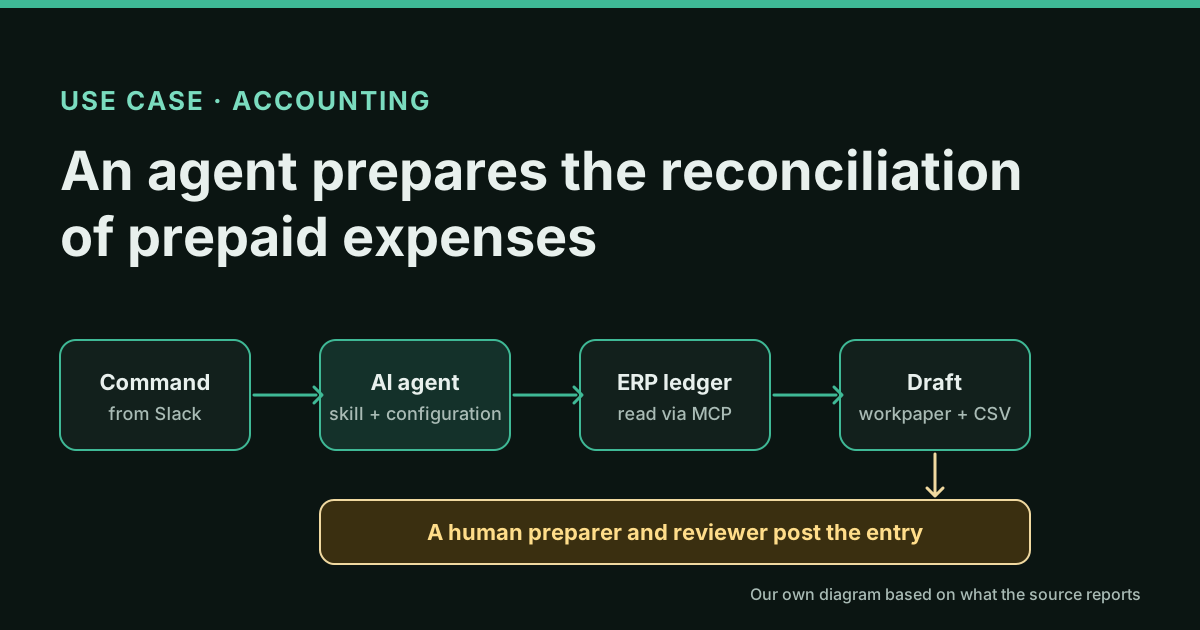
What they do and how
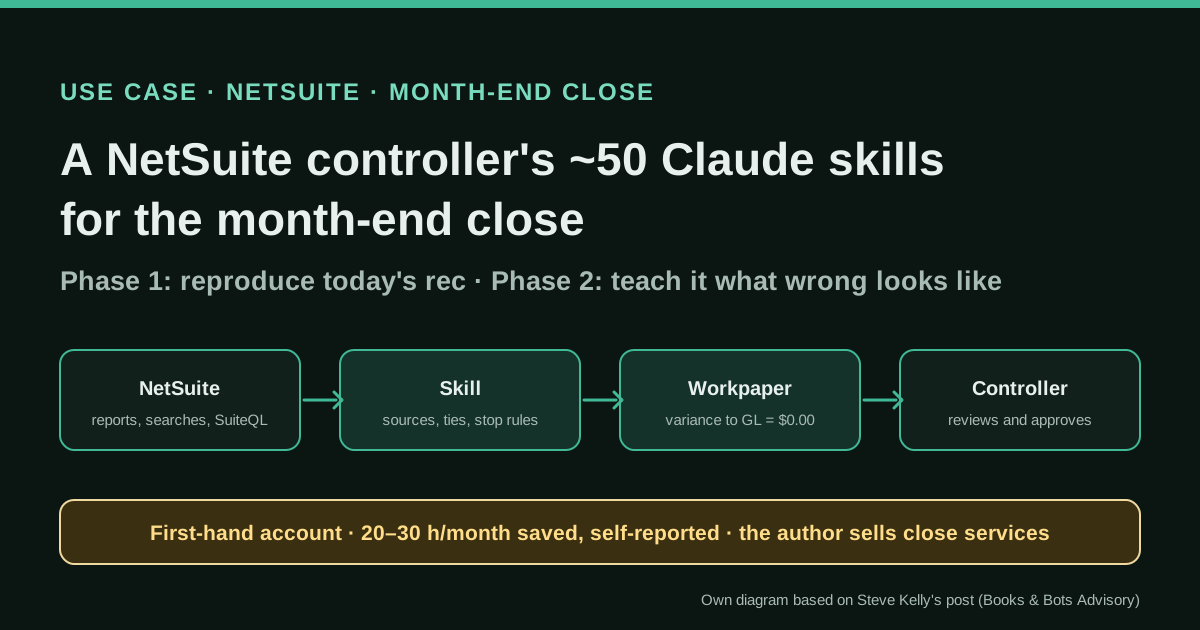
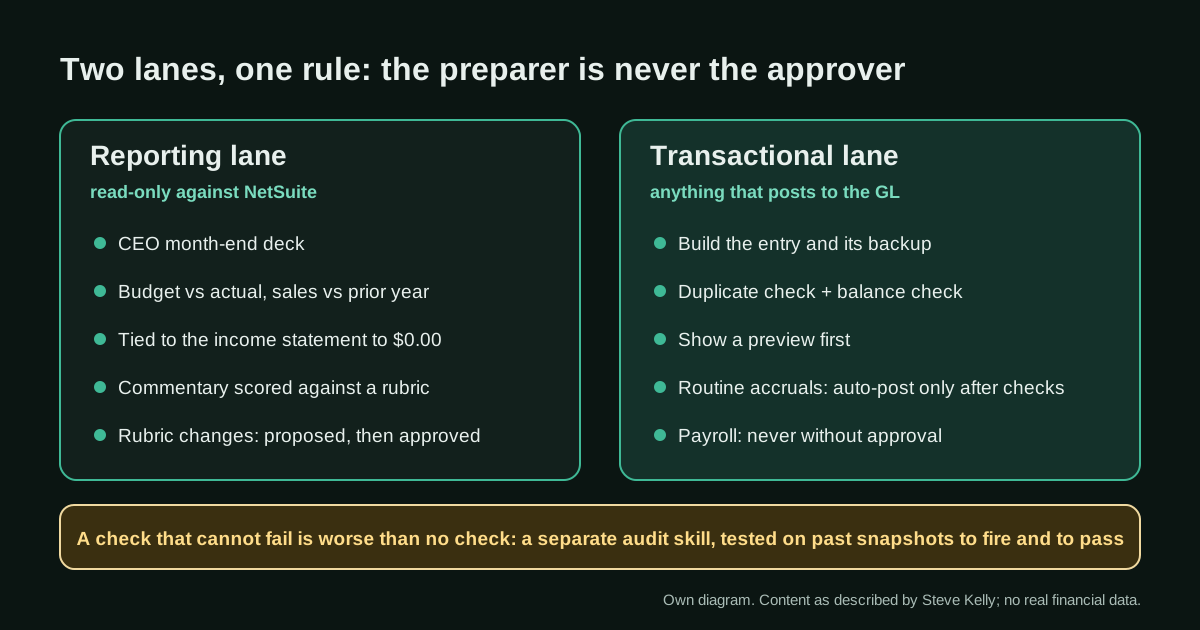
A controller turns each recurring close task into a Claude skill: a written procedure that states where the data comes from (which NetSuite report, saved search or SuiteQL query), the exact output (tabs, columns, file names, folder), what must tie and to what, what to do when it does not tie, and what the model may never do. Phase 1 reproduces the reconciliation the team already prepares, rolling forward from last month's workpaper and tying to the general ledger to $0.00. Phase 2 adds the account-specific traps learned from real mistakes. Reporting skills run read-only; journal-entry skills build a preview with backup and checks, and only routine accruals post on their own.
Reported result
Stated by the author: the skills save him "somewhere around 20 to 30 hours a month", moving his time from building files to reviewing them, and the first skill took "a couple of days" to reach something he trusted. The skills cover balance sheet reconciliations, month-end accruals, the CEO month-end deck, sales versus prior year, budget versus actual and a 13-week cash forecast. There are no audited figures, no error rates and no close-length data for his own company; the "15 days to 5 days" on his website is labelled an example client, not a measured result.
Stated figures. An identified person or organization states that they have used it. The results are stated by the source; we have not audited them.
What has really been tested
On 18 October 2026 we read Kelly's article on his site and on X, including the public replies, his services page, Brian Weisberg's NetSuite connection guide, Oracle's Report Tools, Best Practices and AI Connector FAQ pages, and SeamSet's role-permissions guide. We have not seen Kelly's skills, queries or workbooks, have not run any of this on a NetSuite account, and cannot verify the hours saved. The skill skeleton in this article is ours.
How to replicate it
Connect Claude to NetSuite through Oracle's AI Connector Service with a dedicated role that cannot post or approve. Pick one reconciliation you already prepare every month, write a skill that reproduces it exactly from last month's workpaper (same tabs, same tie-outs, variance to GL of $0.00 with live formulas), and run it in parallel with the manual version. Write every mistake it makes into the skill as a rule with its reason, make every check prove it can fail on past data, keep a separate person or skill as approver, and only then consider letting routine, low-risk entries post after automated checks.
In two sentences
Steve Kelly, a financial controller who “lives in NetSuite”, says he has built about 50 Claude skills that now prepare a large part of his company’s month-end close, from balance sheet reconciliations to a 13-week cash forecast, and that the real work was not the AI but writing down, account by account, what a wrong number looks like. It is a detailed first-hand account with a stated saving of 20 to 30 hours a month, but nothing in it is audited and the author now sells this approach as a service.
Who does it and why it is interesting
Kelly describes himself as a controller with about 21 years in accounting and finance. His website adds that he runs finance at a mid-size company of around $54 million in revenue, which he does not name, and that he is based in Connecticut. In October 2026 he published “Teaching Claude What Wrong Looks Like” on X and on the site of Books & Bots Advisory, the firm he set up to offer AI-assisted month-end close to small and mid-size businesses. That commercial interest matters, and we keep it in view throughout.
Three things make the case worth studying anyway:
- It is about the ERP that many mid-size companies actually use. NetSuite is the system of record; Claude reads from standard reports, saved searches and SuiteQL queries.
- It is specific. He names the accounts (customer deposits, retirement payable), the workbook structure, the failure modes he hit and the rules he wrote to prevent them.
- It separates what works from what does not yet. He calls the reporting side “mind blowingly good” and is openly cautious about anything that posts to the general ledger.
To avoid relying on a single voice, we contrasted his account with Brian Weisberg, a CFO who published a step-by-step guide to connecting Claude to NetSuite with a read-only role (his site now says he has joined Ready Education as CFO), with Oracle’s own documentation for the NetSuite AI Connector Service, and with a permissions guide by SeamSet, a company that sells NetSuite build services.
Tools and architecture
Kelly’s post is about method rather than plumbing, so the stack has to be pieced together carefully:
- NetSuite as the only source of numbers. Every skill names the report, saved search or SuiteQL query it uses.
- Claude and Claude Cowork, used daily, executing about 50 skills.
- Skills as desk instructions. Each one spells out five things: where the data comes from; what the output must look like (tabs, columns, formats, file names, destination folder); what has to tie and to what; what to do when something does not tie; and what the model is never allowed to do. He says the last section turns out to be the most important.
- Excel workpapers in the format the team already reviews, with real formulas rather than pasted values.
- A separate audit skill for the cash forecast that shares no code with the forecast itself.
What the article does not say is how Claude is connected to NetSuite. Oracle’s AI Connector Service, which lets Claude run reports, saved searches and read-only SuiteQL through MCP, matches the data sources he lists, but that is our inference. If you replicate the pattern, Weisberg’s guide is the practical reference: install the NetSuite AI Connector Service SuiteApp, create a dedicated “Netsuite MCP” role as a Web Services Only Role, add no permissions to create, edit, approve or post transactions, assign it to each user, and pick it on the authorisation screen while logged into NetSuite under your normal role. “The protection is enforced by NetSuite, not by hoping Claude behaves,” he writes.
SeamSet’s guide goes stricter. It says the REST Web Services permission is what exposes the record tools, including the only two write tools, and recommends leaving it off a finance role so no standard write tool is even offered. Weisberg’s recipe includes that permission and relies on the absence of transaction permissions instead. Both are defensible; the stricter one is easier to explain to an auditor.
Step by step to replicate the pattern
The order below follows Kelly’s own advice to small businesses, with the NetSuite controls from Weisberg, Oracle and SeamSet added where he is silent.
- Connect read-only first. Set up the AI Connector with a dedicated role that cannot post, approve or pay. Test it by asking for something forbidden (for example, “create a vendor named Test”) and confirm it fails.
- Choose a reconciliation you already produce every month. Kelly started with customer deposits: a high-volume liability where deposits arrive at checkout or order entry and are applied when orders ship.
- Phase 1: reproduce, do not reinvent. The skill opens last month’s workpaper before touching NetSuite, treats it as the source of truth for items already researched and rolls forward. It first checks that its GL query reproduces last month’s ending balance exactly.
- Rebuild the same workbook. In his case, the same four-tab file the team always reviewed, with every open item traced to its sales order (expected ship date, actual ship date, cancel date) and a “variance to GL” row that must show $0.00, built from formulas.
- Run it in parallel with the manual rec until the outputs match. “If it can’t match what a good accountant produces by hand, nothing else matters.”
- Phase 2: write down every mistake as a rule, with its reason. Each time a reviewer catches something, the fix goes into the skill so it does not come back.
- Make every check prove it can fail. Before a diagnostic ships, run it on historical snapshots where you know it should fire and where it should pass.
- Keep preparer and approver separate. Claude prepares; a person approves. Journal-entry skills build a preview with backup, run duplicate and balance checks, and wait.
- Only then, and only for routine items, consider automatic posting after the checks pass and the backup has been filed. Kelly keeps sensitive entries such as payroll behind his approval.
A skill skeleton for a balance sheet reconciliation (ours, not Kelly’s)
Kelly has not published his skills. This skeleton only reorganises the five sections he lists; adapt the account, the sources and the rules to your own books.
SKILL: [ACCOUNT NAME] month-end reconciliation — [ENTITY], period [YYYY-MM]

1. Data sources (read only)
   - Last month's approved workpaper: [FOLDER/FILE PATTERN]. Open it first.
   - GL balance: NetSuite [REPORT OR SAVED SEARCH NAME], account [NUMBER],
     dates [YYYY-MM-DD] to [YYYY-MM-DD], subsidiary [ID].
   - New activity: a separate query limited to the current month only.

2. Output
   - Workbook [FILE NAME PATTERN] in [FOLDER], tabs: [SUMMARY], [ROLL-FORWARD],
     [OPEN ITEMS], [GL DETAIL]. Live formulas only; no pasted totals.

3. What must tie
   - Opening balance = last month's approved closing balance (exactly).
   - Closing balance per workpaper = GL balance; "variance to GL" = 0.00.

4. When something does not tie
   - Stop. Report the gap, the items involved and what you ruled out.
   - Never add a balancing line or "true-up" to force the tie.

5. Never
   - Never post, approve or edit anything in NetSuite.
   - Never re-open items closed in last month's workpaper without flagging them.

6. Known traps for this account (add one line per real mistake, with the reason)
   - [EXAMPLE: items with no customer tag — read the memo, look for pairs
     that net to zero, log what was ruled out.]
A concrete example from the source
Kelly’s best illustration is the retirement payable reconciliation. For a long time it ended in a true-up. When the team wrote out the arithmetic, they found that one part of the employer contribution never appeared on any payroll provider report, so it only reached the ledger when someone keyed it by hand, and a periodic plug cleaned up the difference. The skill now proves the balance as an exact identity, payroll by payroll; if the maths does not close, the reconciliation is not finished and the skill reports the gap and stops. Payroll now adds the missing piece automatically, and the reconciliation catches a miss in the month it happens.
Three other traps he wrote into skills after they went wrong:
- Old items coming back. An early version used a cumulative query to find new items and pulled back balances that had been deliberately excluded the month before; an accountant spotted that the total looked off. The fix was one query for the GL tie-out and a separate current-month-only query for new items, with the reason recorded in the skill.
- Activity with no customer. Some channel sales post without a customer. The skill reads the memos, finds pairs that net to zero and logs what it ruled out instead of carrying them as open items.
- A passed ship date is not automatically a problem. The skill follows the sales order to the fulfilment and the invoice and reports what actually happened.
The lesson that surprised him most came from the 13-week cash forecast. Its built-in sanity panel showed nine of ten checks passing on a forecast whose projected receipts were far above what the same weeks had actually collected the year before. Half of those checks could never fail, because each compared a number with something calculated from that same number. The response was a separate audit skill that shares no code with the forecast. “A check that cannot fail is worse than no check, because it launders a bad forecast as a PASS,” he writes.
Stated results
- Time: “somewhere around 20 to 30 hours a month”, by his own estimate, shifted from building files to reviewing them.
- Coverage: about 50 skills across balance sheet reconciliations, month-end accruals, the CEO deck, sales versus prior year, budget versus actual and the 13-week cash forecast.
- Effort: the first skill took “a couple of days” to reach something he trusted; later ones were faster. Replying to a question on X, he said most skills do not need weekly tweaks and are adjusted when an edge case, a new account or a tighter step appears.
- Quality: budget versus actual and sales versus prior year are tied to the income statement to $0.00, according to him.
What is missing: the company’s name, the length of its close before and after, error rates and any independent review. His website’s “15 business days to 5” is presented as an example client, so we do not treat it as a result.
Limitations and risks
- Self-reported and commercial. The author sells this service; the hours are his estimate.
- Unknown connection details. We do not know which roles, permissions or connector he uses, or how the routine accruals that auto-post are technically allowed to post.
- Periods versus dates. Oracle’s Report Tools page says accounting periods “are not supported” and that the AI client may treat the calendar year as the fiscal year. A report pulled by date range can differ from the same report by posting period. Kelly’s insistence on tying to last month’s approved balance and to the GL is exactly the kind of control that catches this, but you need to build it deliberately.
- SuiteQL is not a financial report. Oracle advises not to use SuiteQL or build new reports for financial statements, because standard reports apply business rules SuiteQL cannot. Use queries for detail and lists, and tie totals to a standard report or saved search.
- Write access is a role decision. Weisberg warns that Claude’s NetSuite integration includes tools that can create and update records; whether they work depends on the role you pick when connecting.
- Auto-posting changes the control environment. Even with checks, an entry posted by an automated process needs a documented approver and evidence your auditor will accept.
Common mistakes
- Starting with a new, “better” report instead of reproducing the one the team already reviews.
- Letting the model re-derive an account from history instead of rolling forward from an approved workpaper.
- Accepting a forced tie: a plug or true-up that makes the variance zero without explaining it.
- Sanity checks that compare a number with itself and therefore always pass.
- Connecting Claude with your own controller role, which may be able to approve or post.
- Filtering only vendor bills when the activity also flows through journal entries, or filtering a large journal at header level when the customer sits on the line. Weisberg flags both and suggests pulling a small unfiltered sample when totals look wrong.
Conclusions
The most transferable idea in Kelly’s account is not a prompt but a discipline: reproduce today’s reconciliation exactly, then turn every reviewer’s correction into a written rule, and refuse any check that cannot fail. It is the same pattern an experienced controller uses to train a new staff accountant, written down precisely enough for a model to follow. Combined with a NetSuite role that cannot post and tie-outs to standard reports, it is a sensible way for a mid-size finance team to start. Read the hours saved as one practitioner’s estimate, not a benchmark.
Sources
- Books & Bots Advisory (Steve Kelly) — Teaching Claude What Wrong Looks Like (12 Oct 2026) (opens in a new tab) (primary)
- X — @BooksAndBotsAI, original publication of the article and replies (13 Oct 2026) (opens in a new tab)
- Brian Weisberg (BMW CFO) — Connecting Claude to NetSuite: the two-role OAuth setup for finance teams (June 2026) (opens in a new tab)
- Oracle NetSuite Help Center — Report Tools (MCP Standard Tools SuiteApp) (opens in a new tab)
- Oracle NetSuite Help Center — Best Practices for MCP Standard Tools SuiteApp (opens in a new tab)
- SeamSet (Arnaud de Turckheim) — NetSuite MCP role permissions: a least-privilege AI role (verified 26 Sep 2026) (opens in a new tab)
We wrote this entry in our own words from the sources above and checked that the links worked on October 18, 2026. Is anything incorrect? Tell us.