What they do and how
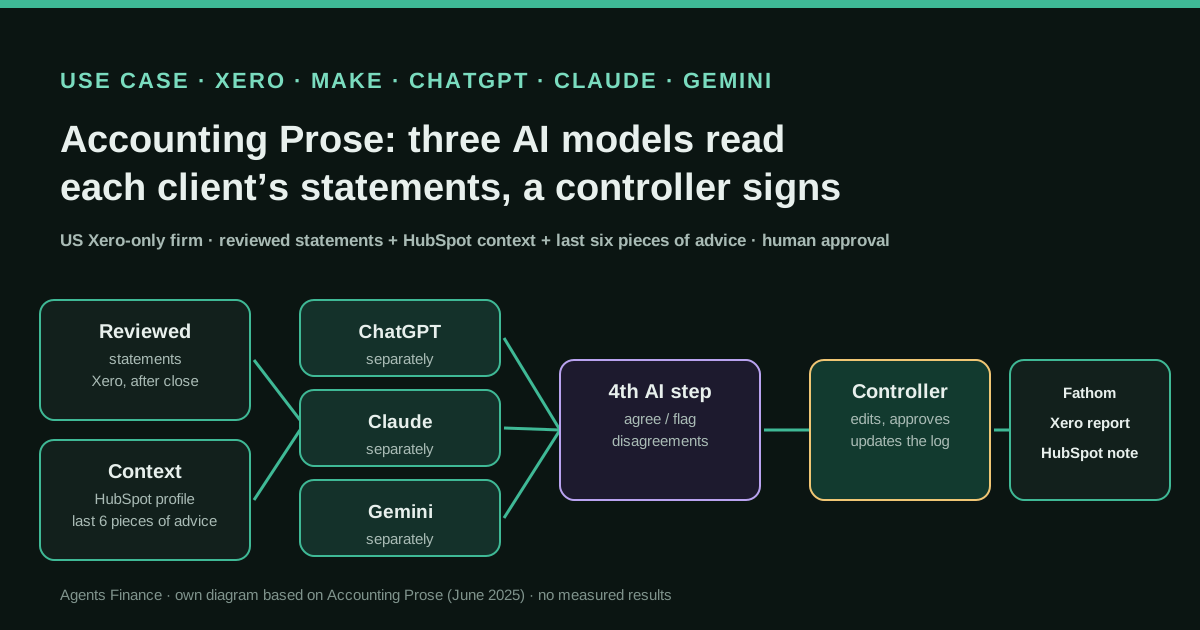
When a controller at Accounting Prose finishes a client's monthly financials, they fill in a short form (who submits, which client, which period, the statements as a PDF). A Make workflow then pulls the client's profile from HubSpot (industry detail, size, team, legal and ownership structure, location, growth stage) and the last six pieces of advice given to that client, and sends the same package to ChatGPT, Claude and Gemini, which analyse it independently. A fourth AI step compares the three answers and writes one set of insights, action items and next steps. The controller edits or rewrites it, and the final text appears at the top of the client's Fathom report or in a Xero management report, with a note logged in HubSpot. Around it, the firm uses Make to route Stripe data into Xero, update contacts, and turn PDF payroll reports into draft Xero bills via a custom GPT, and the founder has built a Claude skill on Xero's MCP server to review client files.
Reported result
No figures are given for the insights workflow: the firm says its purpose is to give every client, not only the largest, a readable analysis, and that a person approves everything before it reaches the client. For the payroll PDF workflow, Acuity reports it "handles hundreds of lines in seconds". The firm's automation page claims about 10 hours a month saved on batch invoicing into Xero, about 5 hours per client on onboarding, and project setup in Xero going "from a full day to just minutes", but those are mostly non-AI Make workflows. None of this is audited.
Mind the evidence. Someone explains how they do it or did it, without verifiable figures. It is documented practice, not proof that it will work in your case.
What has really been tested
On 22 October 2026 we read the firm's post on the insights workflow, the CA ANZ Acuity interview, the Xero blog post on builders, the firm's award post and its automation service page, and checked the embedded video's title and channel. YouTube blocked the video and its transcript from our server, so we have not watched the demo. The firm publishes no prompts, Make scenario or skill file, and gives no accuracy or time figures for the AI workflow. Every file under "Copy and adapt" is an Agents Finance template based on the firm's description; none has been run against a real Xero file.
How to replicate it
Start after close, not during it: only send statements a person has already reviewed. Collect the client's context once (industry, size, structure, goals) and keep a log of what you told them in previous months. Send the same statements, context and history to more than one model independently, then have one more step compare their answers and flag disagreements, and treat every figure the models quote as unverified until it is checked against the statements. A controller edits and approves before anything goes to the client, and their final text goes back into the history so next month's run does not repeat itself. Turn off training on client data in every AI account you use.
In two sentences
Accounting Prose, a small remote bookkeeping firm in the US that runs every client in Xero, built a monthly workflow in Make where three different AI models read the same reviewed financial statements, a fourth step reconciles what they say, and a controller edits the result before the client sees it. The idea worth copying is not “use three models”, it is the order of work: statements are closed and reviewed first, the AI writes a draft explanation with the client’s context and history, and a person signs it off.
Who does it and why it matters
Accounting Prose describes itself as a fully remote “FinOps as a Service” firm based in Denver, Colorado. Its founder and CEO, Enzo O’Hara Garza, has been active in the Xero partner community for more than a decade. In August 2026 the firm won Mid-Size Firm of the Year at Xero’s 2026 Partner Awards, a category Xero limits to US partners with 5 to 15 full-time equivalents, and was a finalist for Advisory Innovator of the Year.
The firm says it uses Xero exclusively, with a standard chart of accounts, close checklist and review workflow across clients, and that it closes clients’ books by the 10th of the following month at the latest. That standardisation is what makes the AI layer feasible: every client’s statements look alike, so the same workflow can run for all of them.
Keep the commercial context in mind. The firm sells automation projects built in Make and Claude (its service page quotes $2,500 per project, with a fixed scope), and the founder appears in Xero’s own marketing about “builders”. The firm’s account is first-hand and specific, but it is also how it sells its services, and it publishes no measurements of the AI workflow.
The insights workflow, step by step
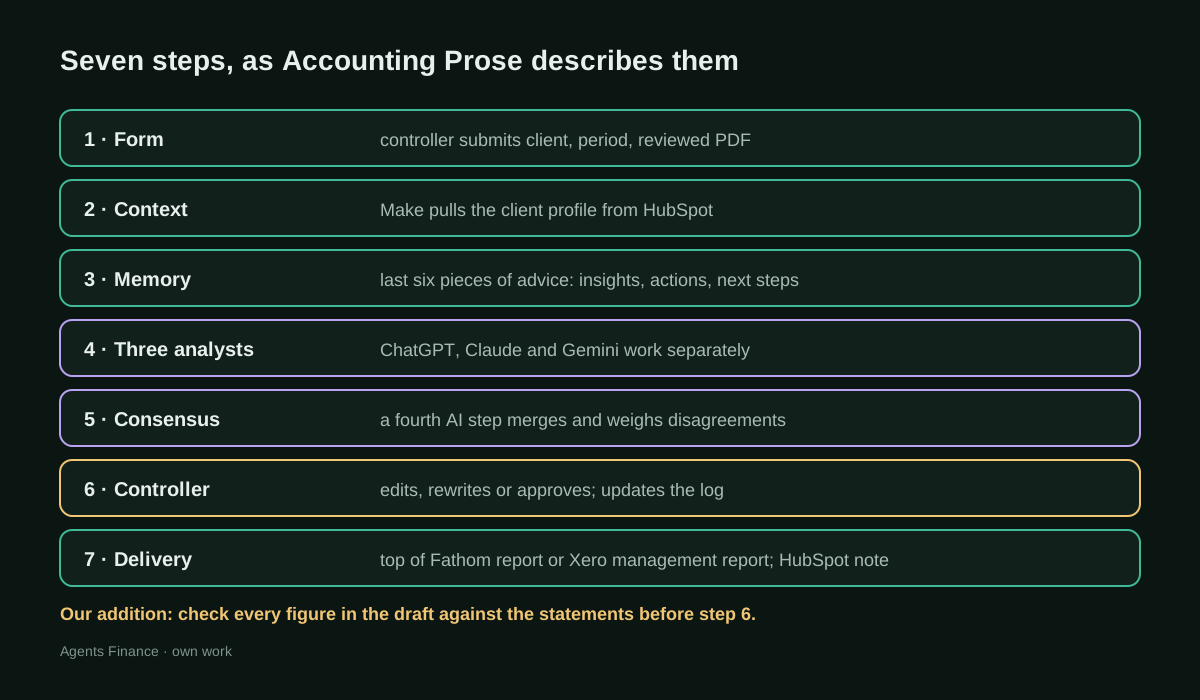
The firm’s post (June 2025), written around a video demo on its YouTube channel, describes seven steps:
- A short form at the end of close. When a controller finishes a client’s financials, they fill in a form with who is submitting, which client (a dropdown linked to the firm’s other systems), the period and the financial statements as a PDF. The founder first planned to require both current and prior-period statements, then dropped it: the workflow works with the current statements alone, and every extra field is more month-end work.
- The story behind the numbers. Make pulls what the firm knows about the client from HubSpot: not just “marketing agency” but what kind, how many people, revenue size, legal structure, owners, location and growth stage. The post’s examples are the point: advice for a $500K business is not advice for a $5M one.
- Do not repeat yourself. Before writing anything, the system reads the last six pieces of advice given to the client, tracked in three buckets: big-picture insights, action items and next steps. If it suggested improving cash flow last month, it should build on that, not say it again.
- Three analysts, separately. The same package (statements, profile, history) goes to ChatGPT, Claude and Gemini. They do not see each other’s answers, to avoid one model’s reading steering the others.
- A consensus step. A fourth AI step reads the three answers and writes one recommendation. Where two models agree and one differs, the outlier is treated as the likely error; where they disagree significantly, it weighs them against the client’s industry, stage and history. The post does not say which model runs this step.
- The controller decides. The output arrives as overview, action items and next steps. The controller can edit, add context only they know or rewrite sections, and update the history so future runs stay consistent. Repeated edits of the same kind are a sign the prompts need changing.
- Delivery where the client already looks. Fathom users see the insights at the top of their monthly report; Xero users get them inside a management report next to the statements. A note goes into the client’s HubSpot ticket so the team knows what was said and when.
On privacy, the post says that after team members raised concerns, the founder configured every AI service to exclude client data from training, kept everything inside the firm’s own accounts and checked the settings more than once.
The Xero plumbing around it
The insights workflow sits on top of other automations the founder described to Acuity, the magazine of Chartered Accountants Australia and New Zealand, in September 2025. Only some of them use AI, and the article is clear about which:
- Stripe into Xero. For a high-volume SaaS client, a Make workflow with several routes sorts Stripe charges, refunds and invoices and sends each to the right place in Xero, using Stripe metadata to support revenue recognition and deferred income.
- Contact clean-up. Stripe identifies customers by ID while Xero relies on contact names, which produced duplicates (“a John Smith with 100 invoices in Xero, and then there’ll be three John Smiths in Stripe”). A Make workflow matches contacts by email and appends the Stripe ID to the Xero contact.
- A Chrome extension that clicks “OK”. With no API to approve bank matches, the founder built an extension that clicks “OK” on the Xero reconciliation screen only where Xero shows a green match and at least three data points agree (vendor, date and amount), with start, stop and pause controls because the team was risk-averse. This is rule-based automation, not an AI model choosing transactions.
- Payroll PDFs to draft bills. One client’s payroll provider only sent PDFs with broken headers and merged columns. The founder first used a custom GPT to turn them into rows to paste into a spreadsheet, then automated it in Make: copy a Google Sheets template, have ChatGPT parse the PDF, and create a draft bill in Xero with tracking categories and the source PDF attached.
In August 2026, Xero’s blog added one more piece: faced with reviewing client files at scale, the founder built a Claude skill on Xero’s MCP server. Xero quotes them: “When I built this skill inside of Claude, it was something that was done out of necessity.” Neither Xero nor the firm describe what the skill checks.
Results, and how much to trust them
There are no figures for the insights workflow: no time saved per client, no error rate, no client feedback numbers. The benefit the firm claims is coverage: insights that used to be reserved for the highest-paying clients now go to all of them, with a human in the loop. The only figure for an AI workflow is Acuity’s description of the payroll parser handling “hundreds of lines in seconds”.
The time savings on the firm’s service page (about 10 hours a month on batch invoicing in Xero, about 5 hours per client on onboarding, Xero project setup from a full day to minutes) are the firm’s own claims, about workflows that are mostly not AI. We record them because they show the scale at which the firm automates, not as evidence for the AI layer.
What to copy, and what to change
Three design choices hold up well:
- AI after close, not instead of it. The models explain statements a controller has already reviewed. They do not post anything, and the only Xero write in the AI workflows described is a draft bill.
- Context and memory are explicit. The client profile and the last six recommendations are passed in every time. That is what stops monthly commentary from sounding generic and repetitive, and it is something any firm can build with a spreadsheet.
- A named human gate. The controller edits and approves, and their edits feed the history.
One choice needs care. Majority voting among models catches some invented figures and odd readings, but models can share the same blind spot, and two models agreeing on a wrong number does not make it right. If you copy the pattern, add a deterministic check that every amount and percentage quoted in the draft actually appears in, or can be computed from, the statements, and send anything that fails to the controller as a flag. The template below includes a small script for that.
And on the Chrome extension: Xero’s bank-match screen is a control point. Automating “OK” on three matching fields is the firm’s decision for its own clients, with a pause button; if you do anything similar, keep it to exact matches, log every click and sample-check the result. For AI agents that drive Xero’s screens, the safer rule is the opposite one: the agent fills fields and a person presses “OK”.
Step by step to replicate the pattern
- Standardise first. One chart of accounts template and one statement layout across clients make one workflow possible.
- Build the client profile as structured fields (industry detail, revenue band, headcount, structure, owners, location, stage, goals) in your CRM or a sheet.
- Create the advice log: one row per client and month, with insights, actions and next steps as finally sent.
- Trigger from a form at the end of close with the reviewed statements attached.
- Call two or three models with the same prompt, separately, asking for structured output that cites the figures it relies on.
- Merge and flag in one more step, and run the figure check.
- Route to the controller for edits and approval; only then publish to Fathom, Xero or email, and write the final text back to the log.
- Check privacy settings in every AI account and in Make, and tell clients which providers process their data.
Copy and adapt
Accounting Prose publishes no prompts, Make scenario or skill file, and we could not watch its video demo. Everything below is an Agents Finance template based on the firm’s description. It has not been run against a real Xero file or Make scenario. Use it with statements a person has already reviewed, and do not paste client names or tax identifiers into tools whose data settings you have not checked.
Prerequisites
- Xero with reviewed monthly statements you can export as PDF (or, better, as CSV/JSON through Xero’s API or MCP server, which makes the figure check easier).
- Make (or n8n, or a script) with connections to the AI providers you choose; Make’s AI modules or your own API keys.
- A place for the client profile and the advice log: HubSpot, Airtable, a database or a Google Sheet.
- Python 3.10+ if you use the figure check script (standard library only).
1. Intake form and client profile fields (Agents Finance template)
# Filled in by the controller at the end of close
intake:
  submitted_by: "{{CONTROLLER_NAME}}"
  client_id: "{{CLIENT_ID}}"          # from your CRM, not typed by hand
  period: "{{YYYY-MM}}"
  statements_file: "{{PATH_OR_URL}}"  # reviewed P&L, balance sheet, cash flow
  reviewed: true                      # the workflow stops if false

# Kept in the CRM and updated when something changes
client_profile:
  industry_detail: "SEO-focused digital agency"   # specific, not just "marketing"
  revenue_band: "1M-5M"
  headcount: 12
  legal_structure: "S corp"
  owners: 2
  location: "{{CITY_REGION}}"
  growth_stage: "scaling"            # startup | scaling | mature | declining
  goals: ["hire a second account manager in Q3", "keep 6 months of runway"]
2. Analyst prompt, sent unchanged to each model (Agents Finance template)
You are a senior accountant writing the monthly note for a small-business client.
The financial statements below have already been reviewed by a controller. Do not
correct them and do not invent figures.

Client profile:
{{CLIENT_PROFILE_YAML}}

What we told this client in the last six months (most recent first):
{{ADVICE_LOG_LAST_6}}

Statements for {{PERIOD}}:
{{STATEMENTS_TEXT_OR_TABLES}}

Write, in plain English for a business owner:
1. overview: 3 to 5 bullet points on what changed and why it matters for a business
   of this size, structure and stage.
2. action_items: up to 3 concrete actions, each tied to a figure in the statements.
3. next_steps: what to watch next month.

Rules:
- Every number you mention must appear in the statements or be a simple calculation
  from them; show the calculation in "evidence".
- Do not repeat a recommendation from the log unless you add something new
  (progress, a new figure, a next stage); say so if you do.
- If the statements do not support a conclusion, say what is missing instead.
- No tax, legal or investment advice.

Return JSON only:
{"overview": [{"text": "", "evidence": ""}],
 "action_items": [{"text": "", "evidence": ""}],
 "next_steps": [{"text": "", "evidence": ""}],
 "missing_information": [""]}
3. Consensus prompt (Agents Finance template)
You receive three independent analyses (A, B, C) of the same client's reviewed
statements for {{PERIOD}}, plus the client profile and advice log.

1. List the points where at least two analyses agree, with their evidence.
2. List the points where they disagree. Do not resolve a disagreement about a
   figure: mark it "CHECK FIGURE". Resolve a disagreement about priority only by
   reference to the client profile, and explain why in one sentence.
3. Draft the client note: overview (3-5 points), action items (max 3), next steps.
   Use only points from step 1, or from step 2 with your stated reason.
4. Add "for_controller": every CHECK FIGURE item and anything that repeats the log.

Return JSON with keys: agreed, disagreed, draft_note, for_controller.
Analyses:
A: {{ANALYSIS_A}}
B: {{ANALYSIS_B}}
C: {{ANALYSIS_C}}
4. Advice log record (Agents Finance template)
{
  "client_id": "{{CLIENT_ID}}",
  "period": "2026-09",
  "sent_at": "2026-10-08",
  "approved_by": "{{CONTROLLER_NAME}}",
  "overview": ["Gross margin fell from 61% to 55% as contractor costs rose"],
  "action_items": ["Review contractor rates on the two largest projects"],
  "next_steps": ["Watch October gross margin and contractor spend"],
  "controller_edits": "Removed a hiring suggestion: client already paused hiring",
  "models_used": ["model-a", "model-b", "model-c"]
}
5. Figure check before the controller sees the draft (Agents Finance template, Python)
"""Flag numbers in an AI draft that do not appear in the reviewed statements.

Usage: python check_figures.py statements.txt draft.json [allowed,numbers]
statements.txt: the statements as text (export from Xero or your reporting tool).
draft.json: the consensus output with a "draft_note" key.
It only flags; a person decides. Percentages and simple ratios computed by the
model will be flagged too unless you pass them as the third argument after checking.
"""
import json
import re
import sys

NUM = re.compile(r"-?\$?\(?\d[\d,]*(?:\.\d+)?\)?%?")

def numbers(text):
    out = set()
    for raw in NUM.findall(text):
        clean = raw.replace("$", "").replace(",", "").replace("(", "-").replace(")", "").rstrip("%")
        try:
            out.add(round(float(clean), 2))
        except ValueError:
            pass
    return out

def main(statements_path, draft_path, allow=()):
    statements = open(statements_path, encoding="utf-8").read()
    draft = json.load(open(draft_path, encoding="utf-8"))
    known = numbers(statements) | {round(float(a), 2) for a in allow}
    flagged = []
    for section, items in draft.get("draft_note", {}).items():
        for item in items:
            text = item if isinstance(item, str) else item.get("text", "")
            for n in numbers(text):
                if abs(n) >= 10 and n not in known and -n not in known:
                    flagged.append({"section": section, "number": n, "text": text})
    print(json.dumps({"flagged": flagged, "count": len(flagged)}, indent=2))
    return 1 if flagged else 0

if __name__ == "__main__":
    allowed = sys.argv[3].split(",") if len(sys.argv) > 3 else ()
    sys.exit(main(sys.argv[1], sys.argv[2], allowed))
Numbers below 10 are skipped to avoid flagging counts such as “3 actions”; adjust the threshold to your clients. A flagged figure is not necessarily wrong (it may be a correct ratio), but the controller should see it before the client does. We have run this script only on a made-up example.
Limits and open questions
- Single narrator. All sources trace back to the firm or its founder; Xero’s post and the Acuity interview repeat what the founder told them. No client describes the insights.
- No measurements of accuracy, time saved or client response for the AI workflow, and no word on how often the three models disagree.
- Model versions and the fourth step are not named, and the post dates from June 2025: the workflow may have changed since.
- What the Claude skill does on Xero’s MCP server is not described beyond “review client files”.
Common mistakes
- Sending unreviewed numbers. If the statements still have open reconciliations or missing accruals, three models will explain the wrong numbers fluently. Run the workflow only after the close checklist is signed.
- Treating agreement as proof. Two or three models agreeing does not verify a figure. Keep the deterministic figure check and let the controller see every flag.
- Skipping the history. Without the log of earlier advice, monthly notes repeat themselves and clients stop reading them. Write the controller’s final text back to the log, not the AI draft.
- Too much client context in the prompt. Pass the fields the analysis needs (industry, size, stage, goals), not tax identifiers, bank details or personal data, and check the data settings of every provider and of Make.
- Letting the draft go straight out. The value of the pattern is the named person who approves. Do not add an automatic “send if no edits” step.
Conclusion
Accounting Prose shows a pattern that a small firm can build without custom software: closed and reviewed Xero statements, a structured client profile, a log of past advice, several models working separately and a controller who signs off. The evidence is the firm’s own account, with no measured results and a commercial interest behind it, so copy the order of work rather than any promised savings, and add the figure check the firm does not describe.
Sources
- Accounting Prose blog — AI Powered Accounting Insights with Make (Enzo O'Hara Garza, 16 June 2025) (opens in a new tab) (primary)
- Accounting Prose (YouTube) — AI-Powered Financial Insights w Make (video embedded in the post) (opens in a new tab)
- Acuity (CA ANZ) — What one accounting firm built with AI (17 September 2025) (opens in a new tab)
- Xero Blog — Customizing their way: the rise of the builders (20 August 2026) (opens in a new tab)
- Accounting Prose blog — Accounting Prose Named Xero Mid-Size Firm of the Year 2026 (27 August 2026) (opens in a new tab)
- Accounting Prose — Business Process Automation for Startups (service page) (opens in a new tab)
We wrote this entry in our own words from the sources above and checked that the links worked on October 24, 2026. Is anything incorrect? Tell us.