What they do and how
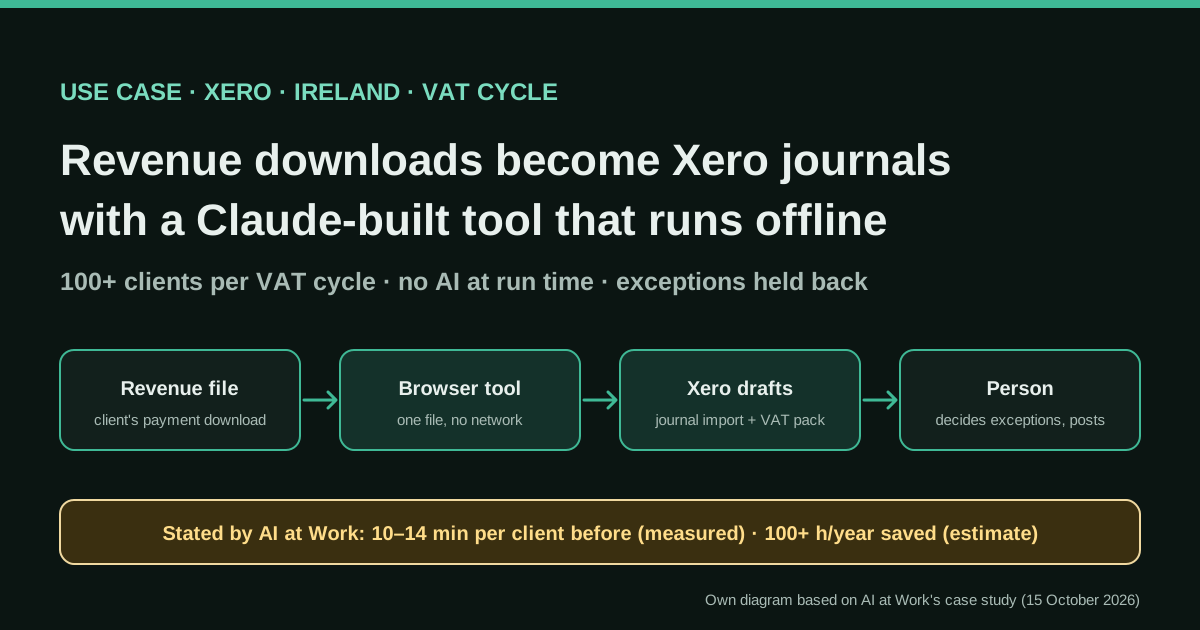
Many of the practice's clients are paid with tax deducted at source, and each payment recorded by Revenue needs a journal in the client's Xero books. The old routine was download, reformat in Excel, run a macro, import into Xero and then fix the dates Excel had flipped to US format. Claude wrote and tested a browser tool that reads the Revenue download and, optionally, an export of journals already in Xero, matches each payment by its own reference, writes a Xero journal file with day/month/year dates, builds the client's VAT pack and holds back anything unusual with a reason.
Reported result
Stated by AI at Work, which labels each figure: measured, 10 to 14 minutes per client under the old routine (timed from a recording) and 100+ clients processed through the tool every VAT cycle; estimated, not timed, more than 100 hours a year saved (old time per client, over six VAT cycles, minus a minute or two per client); observed, no AI model is involved at run time and client data does not leave the computer. The tool is in regular use. There is no error rate, no audit and the client is not named.
Stated figures. An identified person or organization states that they have used it. The results are stated by the source; we have not audited them.
What has really been tested
On 19 October 2026 we read the case study in full, its page metadata (published and reviewed on 15 October 2026), the consultancy's About page and a second case study it published the same day. We checked how Xero manual journal imports work in a Xero partner's help centre, read Xero's Claude connector page, a practitioner's test of that connector and a public GitHub issue on the Xero MCP server. We have not seen the tool, its code or its tests and have not run anything against Xero or Revenue. The worked example, the CSV, the checks list and the brief for Claude are ours.
How to replicate it
Pick one repetitive file-to-journal job, record someone doing it, and have your accountant sign off the journal treatment. Ask Claude to write a single offline HTML file that parses the source file, de-duplicates against an export of what is already in Xero using the source reference, writes the Xero manual-journal CSV in your region's date format and re-reads it, lists exceptions with reasons and refuses to export while any check fails. Generate thousands of test cases, keep a few hand-checked golden files, import as drafts and post only after review.
In two sentences
An Irish tax and accounting practice used to push every client’s Revenue payment download through Excel, a macro and a date fix before importing journals into Xero, for more than a hundred clients each VAT cycle. AI at Work, a Claude consultancy, used Claude to write and test a small browser tool that does the job offline, with no AI model involved when it runs: Revenue file in, Xero journal file and VAT pack out, exceptions held back for a person.
Who does it and why it is interesting
The case study was published on 15 October 2026 by AI at Work, the Claude implementation and training practice of Acuity AI Advisory in Ireland, and is signed by Ger Perdisatt, a former COO of Microsoft Enterprise Western Europe. The client is “a tax and accounting practice in Ireland”; its name is withheld for confidentiality. That matters for how much weight you give the case: the people telling the story sell Claude implementation, and we cannot ask the practice. The consultancy does, however, separate every figure into measured, estimate, target and observed, which is more discipline than most vendor case studies show.
Three things make it worth reading for anyone who works with Xero or any ERP that accepts imported journals:
- AI is used to build the tool, not to run it. Claude wrote the code and the tests. When the practice manager runs a client, no model sees the data, there is no login and no network call, and the consultancy says it works with the Wi-Fi switched off. For a firm holding tax data for a hundred clients, that answers most data-protection questions before they are asked.
- It is boring work done at scale. Ten to fourteen minutes per client, times more than a hundred clients and six VAT cycles a year.
- The design choices are transferable. Matching by source reference, de-duplicating against what is already in the ledger, re-reading the output before releasing it, holding exceptions back with a reason, importing as drafts. None of it is specific to Ireland or to Xero.
The problem in detail
According to the case study, many of the practice’s clients are paid with tax already deducted at source. Revenue, the Irish tax authority, records each of those payments, and each one needs a journal in the client’s books. The consultancy says Xero “has no built-in way to handle it”. The case study does not say which withholding scheme is involved, so we will not guess.
The routine before the tool, as described:
- Download each client’s payments from Revenue.
- Reformat them in Excel.
- Run them through a macro.
- Import the result into Xero.
- Correct the dates that Excel had switched to American (month/day) format.
- Assemble the client’s VAT pack by hand.
Step 5 is a failure every bookkeeper recognises: 03/09 silently becomes 9 March instead of 3 September, the import succeeds and the error shows only when somebody looks at the period. A tool can rule it out completely.
Tools and architecture
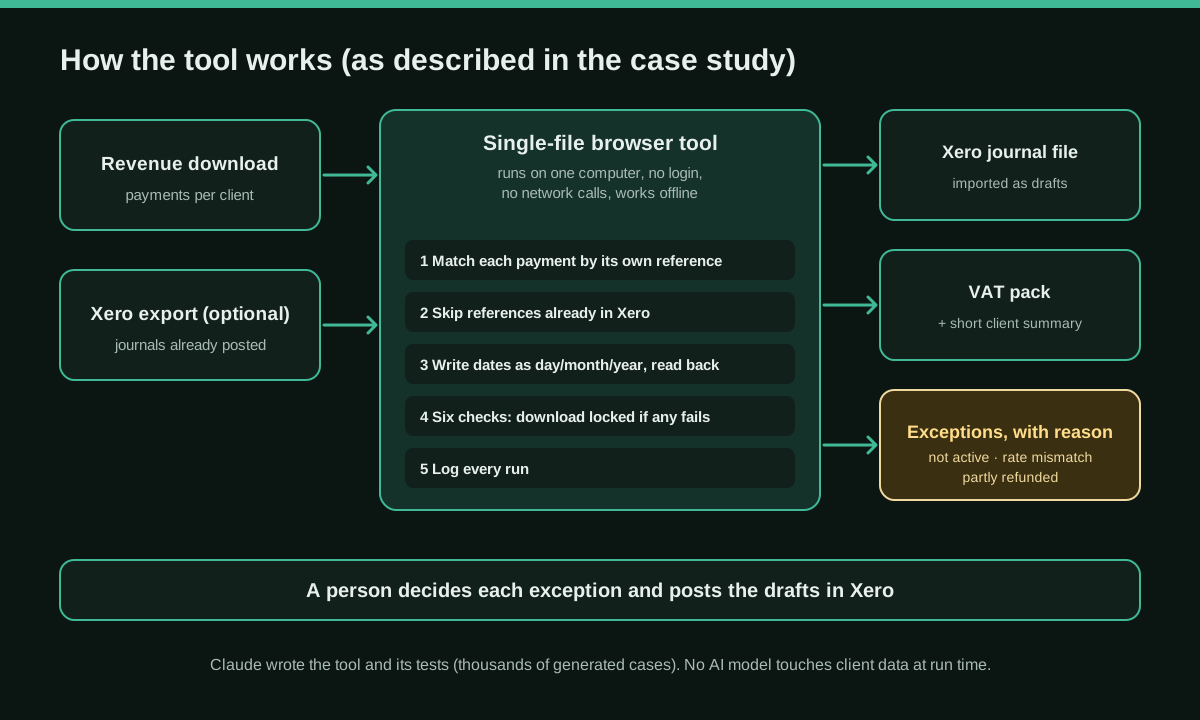
What the case study describes, piece by piece:
- Discovery by recording. The consultancy recorded the job being done, “so that the tool would follow the steps actually taken rather than a description of them”. The 10–14 minutes per client was timed from that recording.
- One file that opens in a browser. Claude wrote the tool as a single file. It runs on the practice manager’s own computer and makes no network calls.
- Two inputs. The client’s Revenue download and, if available, an export of the journals already posted in Xero, so nothing is posted twice.
- Matching by reference. Each payment is matched by its own reference, so a late payment that arrives out of order is still picked up.
- Date safety. The tool writes the Xero import file with day/month/year dates and reads them back before releasing the file.
- Exceptions with a reason. Payments that are not active, tax that does not match the expected rate and payments that were partly refunded are held back, never guessed.
- A gate. Six checks run on every file, and the download stays locked while any of them fails. Each run is logged. The case study does not list the six checks.
- A second output. A step that assembles the client’s VAT pack and a short summary to send to the client.
- Tests. Before handover, tests written with Claude checked the tool’s arithmetic against thousands of generated cases.
On the Xero side, manual journals can be imported from a CSV template: you download the template from the Manual Journals screen, fill it in without changing the column headers, upload it and complete the import, and the journals appear as drafts ready for review or posting, according to the help centre of CALTRiX, a Xero partner. The same guide notes that manual journals need the Advisor role. The case study confirms the practice’s journals go into Xero as drafts and that a person posts them.
Step by step to replicate it
This is our reading of the case, turned into steps. Adapt the accounting treatment to your country and have it approved by the accountant who signs the books.
- Choose one job, not a platform. A single source file, a single output and a high volume of repetitions. Here: one Revenue download per client, one journal file per client.
- Record it. Screen-record someone doing it end to end, including the corrections they make afterwards. The corrections are where the rules hide.
- Write down the journal treatment. Which accounts, which side, which tax rate name in Xero, and what makes a payment an exception. Get it signed off before any code is written.
- Prepare fictional sample files. Same layout as the real download, invented data. Keep real client files out of the chat with the model.
- Ask Claude for a single offline HTML file (brief below). No external libraries loaded from the internet, no storage of client data, no network calls.
- De-duplicate against the ledger. Put the source reference in the journal’s narration or description, export the journals already in Xero and skip any reference that is already there.
- Write and re-read dates. Generate dates in the format your Xero region expects, then parse the file you just wrote and compare it with the source before enabling the download.
- Hold back, do not guess. Every rule that cannot be decided from the file sends the line to an exception list with a reason.
- Gate the export. Balance per journal, totals that agree with the source file, references not already in Xero, account codes that exist, no exceptions mixed into the journal file, dates that round-trip. While any check fails, no download.
- Test with generated cases and golden files. Thousands of random cases for the arithmetic, plus three or four real-looking files whose correct output a person has worked out by hand.
- Import as drafts and post after review. Keep a log of each run (file, client, totals, exceptions).
- Plan for change. The consultancy notes that Revenue does not publish the layout of its download. Make the tool fail loudly when the columns change, instead of producing a plausible but wrong file.
A starting brief for Claude (ours, not the consultancy’s)
Build a single self-contained HTML file (inline JavaScript and CSS, no external
libraries, no network requests, no localStorage of client data) that runs offline.

Inputs: (1) a CSV payment download with columns {{SOURCE_COLUMNS}};
(2) optionally, a CSV export of manual journals already in Xero.

For each payment: if its reference already appears in the Xero export, skip it
and list it as "already posted". If status is not active, the tax does not equal
gross x {{EXPECTED_RATE}} to the cent, or a refund is present, do NOT create a
journal: list it as an exception with the reason.

Otherwise create one balanced manual journal using these accounts and signs:
{{JOURNAL_TREATMENT}} (debits positive, credits negative). Put the reference in
the narration. Write dates as DD/MM/YYYY.

Before enabling the download: re-parse the generated CSV and check that every
journal balances, every date and amount equals the source, the totals agree with
the input file and no reference is duplicated. Show each check as pass/fail and
keep the download button disabled while any check fails.

Also write a test file that generates 5,000 random payments (including edge
cases: rounding, zero tax, refunds, out-of-order dates, duplicate references)
and asserts the rules above. Do all arithmetic in whole cents.
Fill the {{…}} placeholders with your own layout and the treatment your accountant approved. Review the code, run the tests yourself, and try the tool on fictional files before a real one.
A concrete example (illustrative numbers)
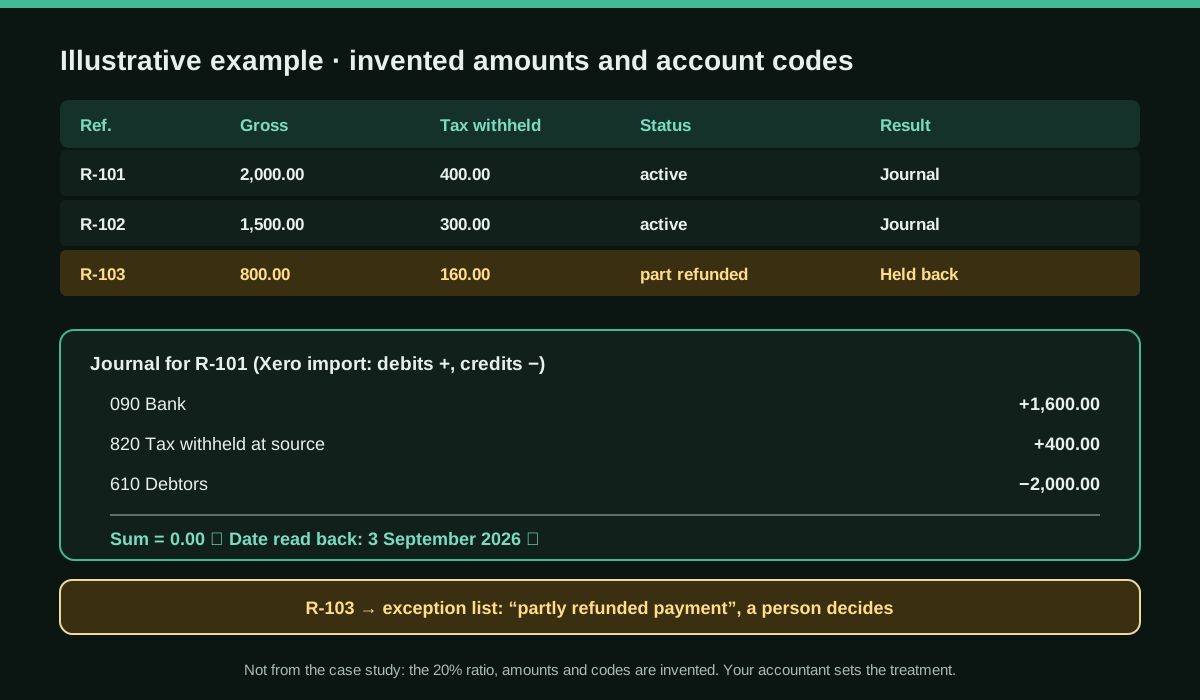
Imagine a client with three payments in the Revenue download. The amounts, the 20% ratio and the account codes are invented for the example; they are not from the case study and they are not a statement of Irish tax rules.
- R-101: gross €2,000.00, tax withheld €400.00, active. The tool creates a journal.
- R-102: gross €1,500.00, tax withheld €300.00, active. Another journal.
- R-103: gross €800.00, partly refunded. Held back: “partly refunded payment”.
The case study’s own illustration shows a journal that touches debtors, tax withheld and bank. A simplified import file for R-101 could look like this (always start from the template your Xero downloads, and use the exact tax-rate name from your Xero settings):
*Narration,*Date,Description,*AccountCode,*TaxRate,*Amount
Revenue payment R-101,03/09/2026,Net received,090,<your no-tax rate>,1600.00
,,Tax withheld at source,820,<your no-tax rate>,400.00
,,Customer balance cleared,610,<your no-tax rate>,-2000.00
Two lines of the gate would catch most real-world mistakes here: the journal sums to zero, and the date read back from the file is 3 September, not 9 March. Whether the cash leg belongs in this journal or is already recorded through the bank feed is a decision for your accountant; get it wrong and the bank account is counted twice.
Stated results
All figures come from AI at Work and keep its own labels:
- Measured: 10 to 14 minutes per client under the old routine, timed from the recording.
- Measured: more than 100 clients processed through the tool every VAT cycle.
- Estimate (not timed): more than 100 hours a year saved, worked out as the old time per client, for more than a hundred clients, over six VAT cycles, less a minute or two per client for the tool itself.
- Observed: no AI model is involved at run time and client data does not leave the computer.
A quick check of our own on that estimate: with exactly 100 clients and six cycles, an old time of 10 minutes less 2 for the tool gives 80 hours a year, and 14 minutes less 1 gives 130 hours. “More than 100 hours” therefore depends on the client count above 100 and on where the real time sits in that range, which is consistent with the consultancy calling it an estimate. The other results (fewer date errors, a VAT pack assembled automatically) are described, not quantified. There is no error rate and no independent review.
The same consultancy published, the same day, a case where Claude Code sends VAT record reminders for an Irish accountancy practice, each round waiting for approval. Different job, same pattern: the tool does the volume, a person approves.
How this compares with an AI working on Xero at run time
The obvious alternative is to connect an assistant to Xero and ask it to do the work live. Public experience in 2026 suggests why a firm might not, at least for this kind of job:
- Xero’s official Claude connector is presented by Xero as read-only at launch. Inbal Rodnay, who runs AI training for accounting firms, tested it in June 2026 and listed five tools: cash position, contacts and receivables, financial position, profit and loss and top customers by revenue, one organisation at a time and no invoice-level data. In a May 2026 r/xero thread a user reached the same conclusion; a reply in September said it was still as limited.
- The open-source Xero MCP server does more, but a user who extracted about 500 invoices and 17 credit notes for a small UK manufacturer with it, through Claude’s Cowork mode, reported a ten-record page cap, no date filter and credit notes without line items. The model had to infer account allocations, and two of the four credit notes in one month were misallocated; the error appeared only when the workbook was reconciled with the trial balance.
That is the core argument for the Irish approach. When the rules are fixed and the volume is high, an AI at run time adds cost, variability and a data-sharing question, while deterministic code written with AI gives the same answer every time and can be tested. Connectors remain useful for questions nobody has written a rule for. The two approaches are not exclusive, and nothing in the case study says the practice evaluated the connector; this comparison is ours.
Limitations and risks
- One-sided source. The narrator sells Claude services, the client is anonymous and nothing is audited.
- Unfinished parts. One kind of payment, where the Revenue file does not show how the amount is split, is still handled by hand; a version that lets staff enter the split has been built but is not in use. A planned check of posted journals against Revenue’s records is not finished.
- Undocumented input. Revenue does not publish the layout of its download, according to the case study. A silent change could break the parser.
- Tests written by the same model as the code. Thousands of generated cases prove that the arithmetic matches the rules; they cannot prove that the rules are the right accounting. Keep hand-checked examples and the accountant’s sign-off.
- Ownership. A single HTML file on one computer is easy to run and easy to lose. Version it, keep the tests next to it and name an owner.
- Data rules still apply. Building the tool with a model means deciding what you show the model. Use fictional or anonymised samples.
Common mistakes
- Matching by amount instead of reference. Two payments of the same amount, or a late payment, will be paired wrongly. The case study matches by each payment’s own reference.
- Trusting the spreadsheet’s dates. Regional formats flip day and month without warning. Write explicitly and read back.
- Re-importing what is already there. Without the export of posted journals, a re-run doubles the entries.
- Letting the tool post. Drafts plus human posting is the control. The tool “never guesses” on exceptions; neither should the person in a hurry.
- Changing the template headers. Xero’s import expects its own column names; renaming them breaks the import.
Conclusions
This is not an agent that does accounting. It is an AI that wrote a small, testable, offline program that removes a tedious step for more than a hundred clients, with exceptions held back and a person posting the drafts. The figures are the consultancy’s own, partly measured and partly estimated, and the practice is anonymous, so treat the case as a well-documented pattern rather than proof. The pattern is easy to copy for any recurring file that has to become journals in Xero, QuickBooks or another ERP: record the job, write the rules down, let Claude write the code and the tests, keep the AI out of the run, and keep a person on the post button.
Sources
- AI at Work (Ger Perdisatt) — Building a local VAT processing tool with Claude (15 October 2026) (opens in a new tab) (primary)
- AI at Work — About Ger Perdisatt and AI at Work (Acuity AI Advisory, Ireland) (opens in a new tab)
- AI at Work — Automating VAT client reminders with Claude Code (another Irish practice case, same labelling of results) (opens in a new tab)
- CALTRiX Xero Help Center — How to record Manual Journal in Xero? (import via CSV template; imported journals arrive as drafts) (opens in a new tab)
- Xero — Claude connector page (read-only at launch) (opens in a new tab)
- Inbal Rodnay — What the new Xero and Claude integration actually does (and doesn't do) (2 June 2026) (opens in a new tab)
- Reddit r/xero — “Xero & Claude - The MCP kinda sucks” (22 May 2026, with replies to September 2026) (opens in a new tab)
- GitHub, XeroAPI/xero-mcp-server issue #193 — Bulk-read limitations found while extracting a UK manufacturer's invoices with Claude (opens in a new tab)
We wrote this entry in our own words from the sources above and checked that the links worked on October 19, 2026. Is anything incorrect? Tell us.