What they do and how
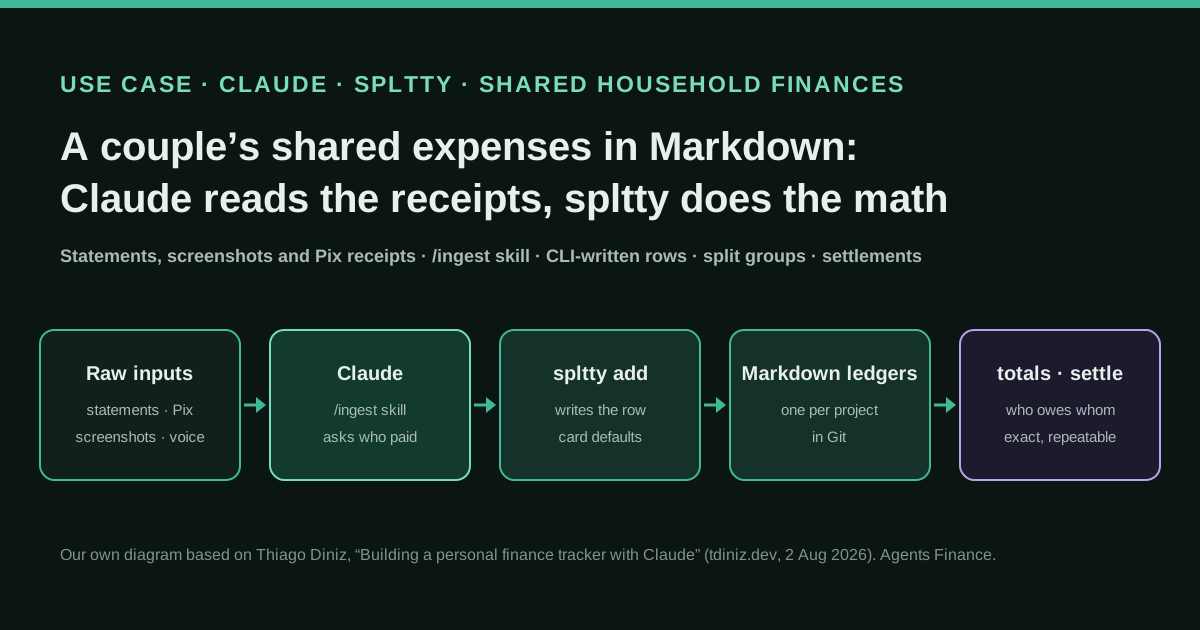
A Brazilian developer and his wife share costs that are neither all his, all hers nor always 50/50: a wedding, an apartment renovation, a rental unit and a six-week trip to Montreal paid in BRL, CAD and USD. He keeps them in a folder of Markdown tables, one ledger per project, under Git. Claude handles the ambiguous part: it reads card statements, screenshots, photos of Pix receipts and spoken notes, extracts each expense and asks who paid and who bears the cost. The arithmetic is done by spltty, a Ruby CLI he wrote with Claude, which appends rows, applies payment-card defaults and per-ledger split groups (for example 65/35 for the wedding), and computes per-person totals and settlements. A generated CLAUDE.md and an /ingest skill tell the agent never to edit the tables or add up figures by hand.
Reported result
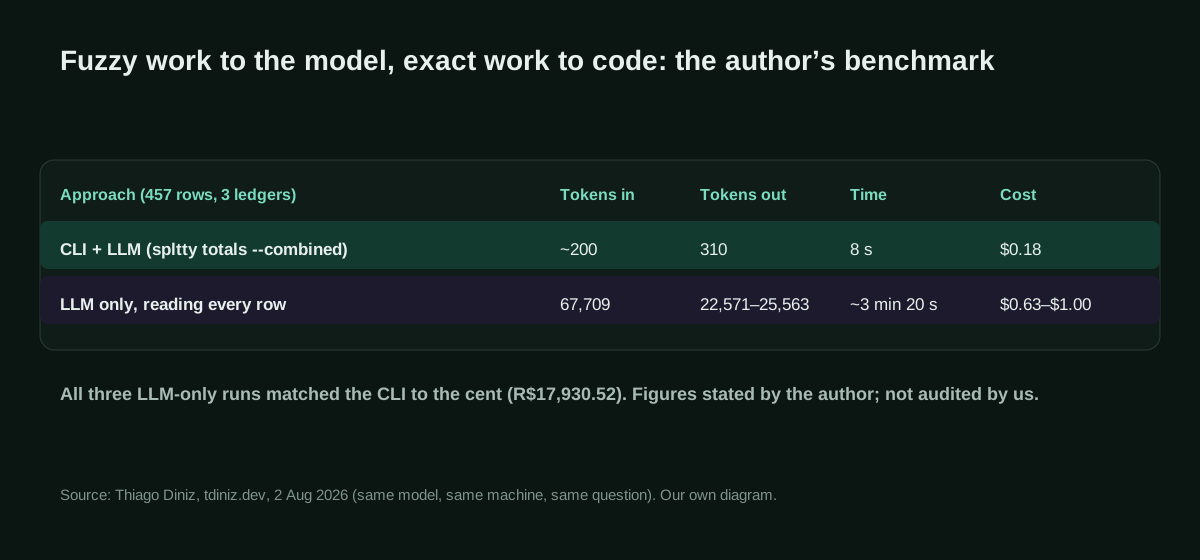
Stated by the author: after ten weeks the ledgers held 457 rows across three ledgers, resolved into one combined settlement. Asking the same model the same question, the CLI path used about 200 input and 310 output tokens, 8 seconds and $0.18, against 67,709 input and 22,571 to 25,563 output tokens, about 3 minutes 20 seconds and $0.63 to $1.00 when the model read every row. All three LLM-only runs matched the CLI to the cent (R$17,930.52); he still prefers the CLI because a number that must be re-verified every week cannot underpin settlements. He reports 86 tests.
Stated figures. An identified person or organization states that they have used it. The results are stated by the source; we have not audited them.
What has really been tested
On 22 October 2026 we read the post, the repository at commit 379fb8c, its templates and the Show HN thread. We installed spltty 0.1.1 from RubyGems with Ruby 3.4 and ran its own test suite: 115 tests in 15 files, all passing (the post, written earlier, mentions 86). In a workspace with fictional people we ran install, methods add, add with a card and with cash, a ledger-level 65/35 group, totals and settle: the split and the settlement came out to the cent, card rows took the bill day as their date, and a mistyped ledger name was refused. We did not use Claude Code with it or reproduce the author’s token benchmark, and we have not tested multi-currency ledgers.
How to replicate it
Install Ruby 3.1 or later and spltty (gem install spltty or Homebrew), create an empty folder and run spltty install with your participants, a shared split group and one ledger per account or project. Register each card with its payer, default responsible and bill day, open the folder in Claude Code and drop in a statement or a receipt: the generated CLAUDE.md and the /ingest skill make the agent transcribe, ask what it cannot infer and add rows only through spltty add. Get balances with spltty totals, record payments with spltty settle and commit the folder to Git after each batch.
In two sentences
Thiago Diniz, a Brazilian developer, tracks the money he shares with his wife in a folder of Markdown tables: Claude reads the messy inputs (card statements, screenshots, photos of Pix receipts, “I paid R$700 for the dress fitting”) and spltty, a small Ruby CLI he built with Claude, writes every row and works out who owes whom. It is a well-documented first-hand case with its own benchmark, and everything you need to copy it, including the agent instructions and the skill, is published under the MIT licence.
Who does it and why it matters
Most couples share money with what Diniz calls “very poor documentation”. Some costs are his, some are hers, and some are shared but not 50/50. In his case a wedding, an apartment renovation and a six-week trip to Montreal were all running at the same time, and the records came in every shape: PDF statements, screenshots of card bills, photos of Pix receipts (Pix is Brazil’s instant payment system) and spoken notes.
He had tried split-the-bill apps, usually a different one for each trip, and then spreadsheets. Both failed for the same reason, he writes: the hard part is not the arithmetic but transcribing forty rows from a statement and deciding whom each one belongs to. That is exactly the kind of fuzzy, repetitive work a language model handles well, and exactly the work that kills most household budgets.
The source is his own post of 2 August 2026, “Building a personal finance tracker with Claude”, which walks through four iterations over ten weeks. He published the code the same week as an MIT-licensed gem and posted it as a Show HN on 5 August (8 points and a single reader comment, “Very cool!”, when we checked, so there is little community discussion to weigh). He has no commercial product around spltty. We contrasted the post with the repository, its templates and the package on RubyGems, and we ran the tool ourselves.
How the system evolved
The interesting part is not the final tool but how each failure moved a responsibility from the model to code.
Iteration 1: one instruction file and one table. Inspired by ledger-cli, he made a folder of Markdown files and a CLAUDE.md describing how to fill them in. The first table had five columns: date, title, value in reais, responsible and source. He dropped in a screenshot of a card bill and Claude extracted 38 rows, confirming each with him before writing.
Iteration 2: real money broke the schema. “Responsible” was doing two jobs: did a row with his wife’s name mean she paid or that she owed? Settlements need both facts, so the column split into Paid By (who fronted the money) and Responsible (who bears the cost). One ledger was not enough either: the renovation, the wedding, the rental unit and the trip each got their own ledger with their own split rules. And the trip forced multi-currency rows: amounts in CAD and USD stored in BRL with the original amount kept, because the rate a Brazilian card applies can differ from the rate on the day of purchase.
Iteration 3: talking was not enough. With a few hundred rows, the obvious question was “who owes whom?”. Claude could add it up, but he would have to check the result every week. So, with Claude’s help, he wrote scripts/totals.py, which read any ledger from its header row, applied the splits and printed totals per person.
Iteration 4: the CLI. On 5 July he replaced the script with spltty in Ruby. The remaining problem was that rows were still written by Claude editing Markdown, and hand-written rows drift: inconsistent dates, misaligned columns, tokens burned on data entry. Now add writes the row, groups turns “Both” from a magic word into a named split (50/50 globally, 65/35 in the wedding ledger), totals and settle own the money maths, and the ingestion routine became an /ingest skill so he no longer re-explains it every session. The generated CLAUDE.md says plainly that the agent must never hand-edit a ledger table or tally by hand.
Tools and architecture
The workspace that spltty install creates has five parts:
accounts/: one ledger per account. Monthly ledgers are a folder with oneYYYY-MM.mdfile per month; single-file ledgers (NAME.ledger.md) suit projects with a beginning and an end, such as a trip.- A notes file per ledger whose YAML header holds that ledger’s default responsible party and split groups, kept in two-way sync with
.spltty/config.json. sources/INDEX.md: a tracker for every raw file dropped intosources/, with status pending, processed or superseded, and the titles extracted from it.CLAUDE.md: generated from your answers (participants, ledgers, groups, cards) and describing the table schema, the routing rules and the CLI..claude/skills/ingest/SKILL.md: the procedure the agent follows when you drop in a file or paste expense text.
The division of labour is strict. The model reads, OCRs, transcribes, interprets merchant names (“MOMENTOS BUFFET E RECE is probably the wedding caterer”) and asks about anything it cannot infer, batching the questions. It checkpoints its interpretation in a git-ignored INGEST-WIP.md so that work survives an interrupted session. The CLI writes rows, fills defaults from the card configuration, refuses unknown ledger names as typos, applies splits and records settlements as ordinary rows (Paid By = debtor, Responsible = creditor), so a payment offsets the debt in every later calculation. Git gives a diffable history of every change.
Step by step to replicate it
- Install Ruby and spltty. Ruby 3.1 or later; macOS ships an older Ruby, so use Homebrew there. On Linux the gem or the install script works.
- Decide your ledgers before you import anything. One monthly ledger for day-to-day household spending and one single-file ledger per project (renovation, wedding, trip) is the shape the author converged on.
- Scaffold the workspace with
spltty install, giving participants, the shared group and its split, and the ledgers. Say yes togit init. - Register each card with
spltty methods add: who normally pays it, who normally bears the cost and the day the bill is paid. Card rows are then dated on the bill day, so every row from one statement shares a date. - Override splits per ledger where they differ, with
spltty groups add NAME -s A:65,B:35 -l LEDGER. - Open the folder in Claude Code and drop in a statement or receipt. The agent writes
INGEST-WIP.md, asks once for what it cannot infer, then runsspltty add … -yfor each confirmed row and updatessources/INDEX.md. - Review and commit. Read the diff of the ledger file, run
spltty totals, and commit. - Settle when you pay each other with
spltty settle LEDGER, orspltty settleacross all non-reference ledgers.
Copy and adapt
Everything in blocks 1 to 3 comes from spltty by Thiago Diniz, © 2026, MIT licence, at commit 379fb8c. Block 4 is our own run; block 5 is an Agents Finance template.
Prerequisites: Ruby 3.1 or later (or Homebrew), Git, and Claude Code on a paid Claude plan (or another agent that reads CLAUDE.md). No bank connection or API key is needed: inputs are files you drop in.
1. Install and scaffold the workspace
From the README:
# Pick one installation method
brew tap thiagodiniz/spltty https://github.com/thiagodiniz/spltty
brew install spltty
# or (Ruby >= 3.1)
gem install spltty

# Interactive set-up in an empty folder
mkdir ~/finances && cd ~/finances
spltty install

# Or non-interactively
spltty install ~/finances -y -P Ana,Bruno -s Ana:60,Bruno:40 -l HOME,TRIP --no-git
2. The /ingest skill (literal)
Written to .claude/skills/ingest/SKILL.md by spltty install. Source: templates/skills/ingest/SKILL.md.
---
name: ingest
description: Ingest a raw source file (PDF, image/screenshot, txt, audio transcript) or pasted expense text into the ledger — read/OCR/interpret it, organize the expenses, and add them with the spltty CLI. Use whenever raw expense inputs are dropped into the prompt for this expense tracker.
---

# Ingest raw inputs into the ledger

Turn a raw input — a source file (PDF, image/screenshot, `.txt`, audio transcript) or expense text
pasted straight into the prompt — into ledger rows. This is the ingestion path of the workflow in
`CLAUDE.md`; that file is the source of truth for the table schema, payment-method defaults, split
groups and routing. Read it if you need those details.

## When to use

A source file or raw expense text was sent to the prompt. Treat its arrival as "ingest this" — do not
ask what to do with it. If instead the ask was for totals or a settlement, that's `spltty totals` /
`spltty settle`, not this skill.

## Do

1. **Read & interpret the input yourself.** OCR images/screenshots, read PDFs (some are
   password-protected — the password is usually given), transcribe audio. Extract each expense:
   title, value (two decimals), and date if present. Never invent a value from blurry or uncertain
   content — ask about that line.
2. **Checkpoint the inferred work.** As soon as you've interpreted the input, write the structured
   expenses to **`INGEST-WIP.md`** at the workspace root — one row per expense with the extracted
   fields plus the resolved (or still-open) ledger / paid-by / responsible and any open questions.
   This preserves work across interruptions and allows review before it lands. It's gitignored.
   Delete it once every row has been added with `spltty add`.
3. **Save file inputs.** If the input is a file (not chat text), make sure it lives under `sources/`
   and gets a `sources/INDEX.md` row (`pending` now, `processed` at the end).
4. **Resolve the three routing fields** for each expense — **ledger**, **paid-by**, **responsible**:
   - If the prompt states them, use them.
   - Else if the **payment method** matches a configured card, pre-fill paid-by / responsible / date
     from it (`spltty methods` lists them).
   - Else **ask** — one batched confirm for all pending expenses. Never guess these three.
5. **Read for context only when needed.** Reading a ledger's entries/notes is fine to match a prior
   categorization, dedup against an existing bill, or copy a split convention — but only when the
   task genuinely requires it. Don't read files speculatively.
6. **Add each expense with `spltty add`** — never hand-edit a ledger table:

   ```sh
   spltty add "<title>" -l <LEDGER> -v <value> -p <paid-by> -m "<method>" -r <responsible> -y
   ```

   - Card entries can omit `-p`/`-r`/`-d` (defaulted from the card).
   - Multi-currency ledgers take `-o <orig-value> -c <CUR>`.
   - Set `-s <source-filename>` when the row came from a file in `sources/`.
   - If it fails with *unknown ledger*, that is a typo guard, not a missing feature: use one of
     the ledgers it lists. Only pass `--create-ledger` after confirming a new account is wanted.
7. **Record per-batch methodology** (FX rates, exclusions, dedup, subtotals) in `sources/INDEX.md` —
   not in the `*.notes.md` files, which hold only forward-applicable rules. Update the source's row
   to `processed` with the extracted titles and the ledger(s) they landed in.

## Prefer the CLI

If the operation has a `spltty` command (`add`, `totals`, `settle`, `list`, `sync`, `groups`,
`methods`), use it rather than doing the work by hand — unless explicitly told otherwise.

## Never

- Never guess ledger, paid-by, or responsible — confirm when not inferable.
- Never conflate **Paid By** (who fronted the money) with **Responsible** (who bears the cost).
- Never hand-edit a ledger table to record spend, or tally totals by hand.
- Never invent values from uncertain source content.
- Never misspell a participant's name — they are matched literally.
3. The rules in the generated CLAUDE.md (extract)
spltty install renders CLAUDE.md from templates/CLAUDE.md.erb with your own participants, ledgers, groups and cards. These are its last two sections as generated in our test workspace (default ledger CASA):
### Steps

1. **Receive** an expense (text, audio, image, PDF).
2. **Parse** title + value (+ date). For files, save the raw input under `sources/` and add a row to
   `sources/INDEX.md`.
3. **Route** to a ledger — confirm which one when it isn't obvious. Default: `CASA`.
4. **Confirm** before writing: (a) who paid + payment method, (b) responsibility — a group name or a
   person. A configured card pre-fills both.
5. **Add** each confirmed expense with `spltty add … -y`. Do not hand-edit the table. Per-batch
   methodology (FX, exclusions, dedup) goes in `sources/INDEX.md`.
6. **Update** `sources/INDEX.md` to mark the source processed, listing the titles extracted and the
   ledger they landed in.
7. **Compile** on demand with `spltty totals` (`--combined` to merge ledgers).

## Things to never do

- Never hand-edit a ledger table to record spend — add every expense with `spltty add`. Never
  compute totals or a settlement by hand — use `spltty totals`. Never record a settlement payment
  with `spltty add` or a hand edit — use `spltty settle`.
- Never guess which ledger an expense belongs to — confirm when it isn't obvious.
- Never guess who is responsible — always confirm.
- Never conflate **Paid By** (who fronted the money) with **Responsible** (who bears the cost).
- Never invent expense values from blurry or uncertain source content — ask for clarification.
- Never misspell a participant's name — they are matched literally.
4. Our test run with fictional data
Commands from the README, run by us on 22 October 2026 with spltty 0.1.1 (fictional people Ana and Bruno). The output is trimmed to the lines that matter:
spltty install demo -y -P Ana,Bruno -s Ana:50,Bruno:50 -l CASA --no-git
cd demo
spltty methods add "Visa 1234" -s visa-1234 -p Ana -r Both -b last
spltty add "Supermercado" -l CASA -v 84.20 -p Bruno -m cash -r Both -d 2026-10-03 -y
spltty add "Farmacia" -l CASA -v 30.00 -p Ana -m Pix -r Bruno -d 2026-10-05 -y
spltty add "Restaurante" -l CASA -v 120.00 -m visa-1234 -y   # dated 2026-10-31, the bill day
spltty groups add Both -s Ana:65,Bruno:35 -l CASA            # this ledger splits 65/35
spltty totals
# == CASA ==
# Rows: 3   Grand total: R$ 234.20
# Person              Paid          Owes           Net
# Ana               150.00        132.73        +17.27
# Bruno              84.20        101.47        -17.27
# Settlement:
#   Ana is owed — Bruno owes Ana: R$ 17.27
spltty settle CASA -y        # writes "Settlement — Bruno → Ana | 17.27 | Bruno | Pix | Ana | settle"
spltty totals CASA           # Settlement: already even.
spltty add "Cafe" -l CAS -v 5 -p Ana -m cash -r Both -y
# spltty add: unknown ledger "CAS" (known ledgers: CASA) — pass --create-ledger to create it
The check by hand: shared spending of 204.20 split 65/35 gives Ana 132.73 and Bruno 71.47, plus the 30.00 pharmacy bill that falls entirely on Bruno, so Bruno owes 101.47 against 84.20 paid.
5. Agents Finance template: Claude Code permissions for the workspace
Agents Finance template based on the rules of spltty’s CLAUDE.md, not a file published by the author. Save it as .claude/settings.json in the workspace so that the agent can run spltty and read the workspace but cannot write ledger files directly. We have not tested it in Claude Code; check the rule syntax against the current Claude Code permissions documentation before relying on it.
{
  "permissions": {
    "allow": [
      "Bash(spltty add:*)",
      "Bash(spltty list)",
      "Bash(spltty totals:*)",
      "Bash(spltty methods)",
      "Bash(spltty groups)",
      "Bash(git diff:*)",
      "Bash(git status)"
    ],
    "ask": [
      "Bash(spltty settle:*)",
      "Bash(spltty groups add:*)",
      "Bash(spltty methods add:*)",
      "Bash(git commit:*)"
    ],
    "deny": [
      "Edit(./accounts/**)",
      "Write(./accounts/**)",
      "Edit(./.spltty/**)",
      "Write(./.spltty/**)",
      "Bash(curl:*)",
      "Bash(wget:*)"
    ]
  }
}
And a first prompt for a monthly statement (Agents Finance template):
/ingest sources/2026-10-visa-1234.pdf
This is the October bill of "Visa 1234". Put every row in CASA except anything
from the trip, which goes to VIAJE. Do not add a row until I confirm the batch
in INGEST-WIP.md. When done, run `spltty totals --combined` and show me the
git diff of the ledger files.
Results stated by the source
All figures are Diniz’s own and we have not audited them. After ten weeks his ledgers held 457 rows in three ledgers, resolved into one combined settlement. He ran the same question both ways with the same model on the same machine. The CLI path sent roughly 200 input tokens (a 738-character summary printed by spltty totals --combined) and produced 310 output tokens in 8 seconds for $0.18. The model-only path sent all 67,709 tokens of the ledger tables and produced 22,571 to 25,563 output tokens in about 3 minutes 20 seconds, for $0.63 to $1.00 across three runs. All three model-only runs gave the same answer as the CLI to the cent: R$17,930.52.
His conclusion is the useful part: this is not a story about a model failing at arithmetic, but about paying 25 times the wall-clock time for a number you must still verify every week. He also reports 86 tests in the CLI, which is what makes it safe to keep letting an AI change it; the repository we tested has 115, all passing.
Limitations and risks
- One household, one author. The benchmark is a single question on his own data, and the post does not say which Claude model he used.
- The currency label is fixed. In version 0.1.1 the value column and reports say
R$. Amounts are plain numbers, so it works for euros or dollars, but every table and report will still read “R$”. - Statements are sensitive. The agent reads full card statements and receipts. Keep the workspace in a private repository or none, and remember those files are sent to the model provider.
- A young project. Nine commits, one release (0.1.1 on 5 August 2026) and no activity since then at the time of checking. It is small and readable, but you would be adopting it, not buying support.
- Rules depend on the agent obeying them.
CLAUDE.mdsays never to edit the tables; only permissions (our block 5) or code review make that a guarantee. - Card bill dates hide transaction dates. Card rows take the bill day as their date by design, which is right for settlements and wrong if you later want monthly spending by transaction date; keep the date in the title when it matters.
Common mistakes
- Using one “Responsible” column for both who paid and who owes. Diniz’s second iteration exists because of it.
- Mixing a project ledger that duplicates household rows into the combined total. Mark it as a reference ledger so
totals --combinedandsettleexclude it. - Letting the model “just add it up this once”. The point of the design is that totals only ever come from the CLI.
- Recording a repayment with
spltty addinstead ofspltty settle, which gets Paid By and Responsible backwards. - Creating a new ledger by accident with a typo; spltty refuses it under
-y, so do not pass--create-ledgerreflexively.
Conclusions
Diniz’s ten weeks are a compact lesson in where to put an AI in household finance. The model is very good at the part people abandon budgets over: reading a blurry receipt, recognising a cryptic merchant, turning forty statement lines into rows and asking the right question once. It is the wrong place for the part that must be exact, repeatable and cheap, and his own benchmark shows that even when it gets the sum right, you pay more for an answer you cannot trust without checking. Plain Markdown in Git, a tiny CLI that owns the maths, and a CLAUDE.md plus skill that say so explicitly: all of it is MIT-licensed and can be running on a laptop in an evening.
Sources
- Thiago Diniz (tdiniz.dev) — Building a personal finance tracker with Claude (opens in a new tab) (primary)
- GitHub — thiagodiniz/spltty (MIT), commit 379fb8c (opens in a new tab)
- spltty — /ingest skill template (SKILL.md) (opens in a new tab)
- spltty — generated CLAUDE.md template (CLAUDE.md.erb) (opens in a new tab)
- RubyGems — spltty 0.1.1 (MIT, 5 Aug 2026) (opens in a new tab)
- Hacker News — Show HN: Spltty, a Markdown-based personal finance CLI built with Claude (opens in a new tab)
We wrote this entry in our own words from the sources above and checked that the links worked on October 22, 2026. Is anything incorrect? Tell us.