What they do and how
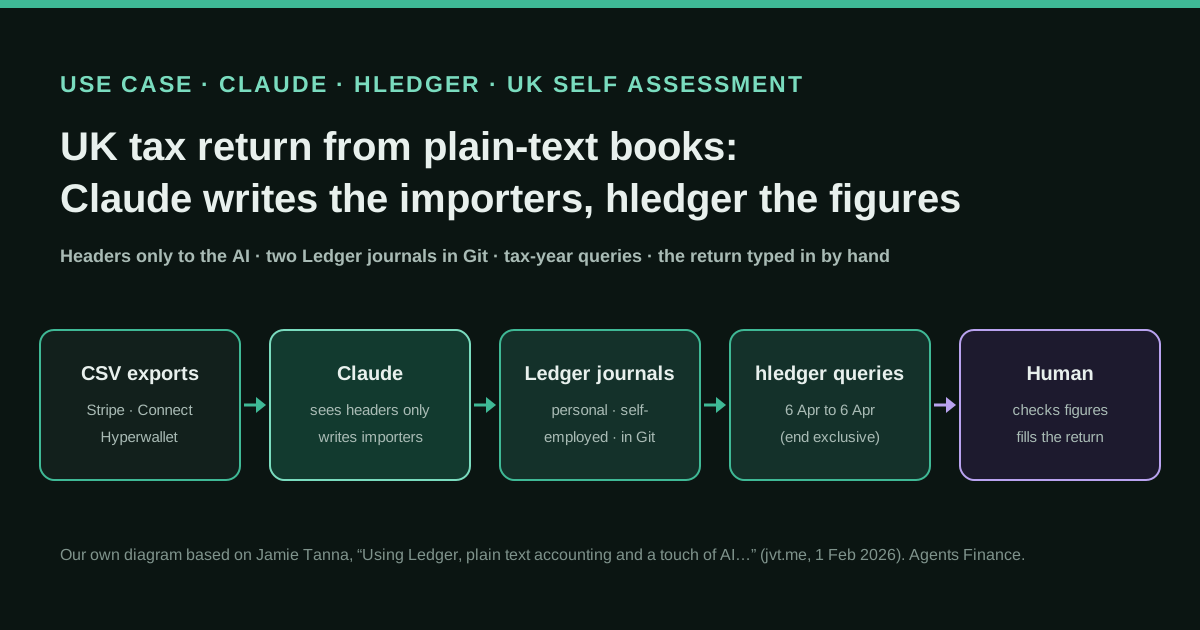
A UK employee who also earns self-employed income from open source (sponsorships, donations and consulting paid through Stripe, Stripe Connect and Hyperwallet) keeps two plain-text journals in Ledger format: one for employment and savings interest, one for self-employment. Instead of writing the importers by hand, he gave Claude Sonnet 4.5 only the CSV column headers, never the data, and had it write scripts that turn each export into journal entries; he iterated until the entries were right. He then queries the journals with hledger for the tax year (6 April to 5 April) to get each figure the Self Assessment return asks for: salary, PAYE, taxable benefits, student loan, savings interest and self-employed income and fees.
Reported result
No figures. The author says the approach saved him writing the importers himself and let him spend his time reading the tax return guidance, and that the format is simple enough to share with an accountant. He built it only after a first draft of the return, published fictional sample data, and planned to test it again on the 2025-26 return and to extract P45, P60 and bank statement figures with a local model (gpt-oss:20b), not a remote one.
Mind the evidence. Someone explains how they do it or did it, without verifiable figures. It is documented practice, not proof that it will work in your case.
What has really been tested
On 21 October 2026 we read the post, the author’s open-source and local-AI pages, the hledger manual and the GOV.UK deadlines page. With hledger 1.52.4 we loaded the author’s two sample journals (Apache-2.0) and ran his commands: the employer and self-employment figures match his post, but his savings-interest query returns 0 in our run, because hledger end dates are exclusive and the sample entry is dated 5 April; ending the period on 6 April fixes it. We tested our own CSV rules file and report script on fictional data. The author’s import scripts are not published, and we have not filed any return with this method. This is not tax advice.
How to replicate it
Install hledger (or Ledger), create one journal for employment and savings and one for self-employment, and agree a small account taxonomy before importing anything. Export each income source as CSV, give an AI assistant only the header row and invented sample rows, and ask for an hledger CSV rules file or a small importer; run it, check the output with hledger check and compare totals with the payout reports. Then query each journal for the tax year with an end date of 6 April (exclusive), copy the figures into the HMRC return yourself and keep the journals in Git for next year.
In two sentences
Jamie Tanna, a UK software engineer who maintains the open-source project oapi-codegen, filled in his first Self Assessment tax return from two plain-text Ledger journals: Claude Sonnet 4.5 wrote the scripts that convert his Stripe, Stripe Connect and Hyperwallet exports into entries, after seeing only the CSV headers, and a handful of hledger commands give the number for each part of the return. It is a short, honest first-hand account with fictional sample data and no results to measure, but the method is small enough to copy in an afternoon and the code in the post is Apache-2.0.
Who does it and why it matters
Tanna’s situation is common among people with a salary and a side income. His employer handles PAYE, but sponsorships, donations and consulting for his open-source work arrive through several payment platforms, each with its own export, its own fees and its own idea of what a transaction is. In the UK that means a Self Assessment return covering the tax year from 6 April to 5 April. GOV.UK gives 31 January 2027 as the online deadline for the 2025-26 year, so the question of how to gather the figures is live right now for many people.
He says he was not a natural candidate for bookkeeping. He had read Siddhant Goel’s post about ten years of personal finances in plain text and decided that level of tracking was not for him. Only while filling in the return did he wonder whether it would make the process easier. He stresses that he did not start building tooling until he had a first draft of the return, so that he would not spend precious time perfecting a system he might not need.
The source is his own blog post of 1 February 2026, which states that it is entirely human-written. He sells no tax or accounting product and has no stake in Ledger, hledger or Anthropic. We contrasted the post with his other pages (the projects he maintains, and a later post on how he uses local models) and with the hledger manual. The post was submitted to Hacker News and drew no comments, so there is no community discussion to weigh.
Tools and architecture
The design has three layers, and only one of them uses AI.
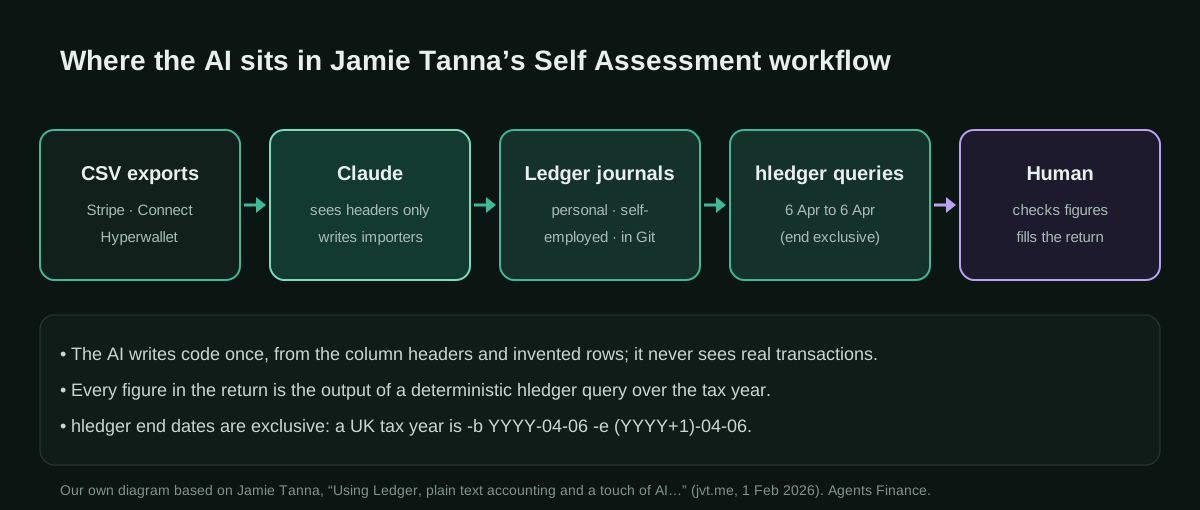
The books are plain text. He chose the Ledger format after considering Beancount, which he passed over mainly because he would rather not maintain Python importers. He also considered a small SQLite database and dropped it, for a reason worth quoting in spirit: the Ledger format is light, the ledger and hledger tools have query interfaces that language models already know well, and a text file is easier to hand to an accountant than a custom database. Files in Git also give him diffs.
The importers were written by an AI. Each payment platform exports a CSV. Rather than write the converters himself, he gave Claude Sonnet 4.5 the column headers, deliberately without the raw data, and asked for scripts that build the journal. It took a few attempts to get the entries right. He jokes that, since he ended up vibe-coding the scripts entirely, he might as well have used Python after all.
The figures come from queries. Once the journals were complete, every number on the return is the output of an hledger command over the tax-year period: a balance filtered by employer, an income statement for the self-employment journal, a balance for savings interest and one for student loan deductions. No model does arithmetic on the figures that go into the return.
He also used GPT-4.1 and Claude Sonnet 4.5 as sounding boards for the account taxonomy, and says he is still not fully happy with it.
The journals and the queries
He keeps two journals: personal income (employment and savings interest) and self-employment from open source. The samples below are the author’s, with fictional figures, reproduced from his post under the Apache License 2.0, which the post applies to its code. The prose of his post is CC BY-NC-SA 4.0 and is not copied here.
# personal.journal
# Source: Jamie Tanna, https://www.jvt.me/posts/2026/02/01/ledger/ (Apache-2.0, fictional sample data)
2024-04-04 Deliveroo P60
  income:salary:deliveroo            -£ 76543.21
  expenses:tax:income:PAYE:deliveroo  £ 10203.54
  expenses:loan:student               £  2030.40
  assets:bank:current                 £ 64309.27

2024-04-04 Deliveroo P11D
  income:salary:benefits:private-medical:deliveroo     -£  123.45
  equity:HMRC:taxable-benefits:deliveroo                £  123.45

2024-04-05 Bank-account-1 savings statement
  income:savings-interest  123.45
  income:bank-account-1   -123.45
# self-employment.journal
# Source: Jamie Tanna, https://www.jvt.me/posts/2026/02/01/ledger/ (Apache-2.0, fictional sample data)
; Statement Descriptor: buymeacoffee
2023-06-16 One time support for Jamie Tanna
assets:bank:sponsorship 4.39 gbp
income:sponsorship:buymeacoffee -5.00 gbp
expenses:fees:stripe 0.61 gbp
; Statement Descriptor: JAMIE TANNA
2023-12-10 Invoice ABC123DE-0001
assets:bank:consulting:oapi-codegen 184.80 gbp
income:consulting:oapi-codegen:company-x -200.00 gbp
expenses:fees:stripe 15.20 gbp
; Statement Descriptor: Kofi Donation
2024-03-17 Ko-fi Donation
assets:bank:sponsorship 11.20 gbp
income:sponsorship:kofi -11.54 gbp
expenses:fees:stripe 0.34 gbp
2024-01-01 Stripe Connect py_abcdef
assets:bank:sponsorship 115.11 gbp
income:sponsorship:github-sponsors -115.11 gbp
expenses:fees:stripe 0.00 gbpNote the design choices. Every posting for an employer carries the employer’s name, so one query collects salary, PAYE and benefits together; the post warns that this only works if the name is present on every related line. Each sponsorship records gross income, the platform fee and the net amount that reached the bank, so fees can be reported separately. The P11D benefit is booked against an equity:HMRC account, because no cash moved.
These are his queries (Apache-2.0), with the period of the 2023-24 tax year:
# Employer figures: salary, PAYE and taxable benefits
hledger balance deliveroo --period "2023-04-06 to 2024-04-05" -f personal.journal

# Self-employment: income statement for the tax year
hledger income --period "2023-04-06 to 2024-04-05" -f self-employed.journal

# Savings interest
hledger balance income:savings-interest --period "2023-04-06 to 2024-04-05" -f personal.journal

# Student loan deducted through payroll
hledger balance expenses:loan:student --period "2023-04-06 to 2024-04-05" -f personal.journal
What we found when we ran them
We loaded both journals into hledger 1.52.4 (save the second one as self-employed.journal, the name his commands use, not the name in its first comment). The employer query returns exactly the four lines in the post, and the income statement shows £331.65 of income, £16.15 of Stripe fees and £315.50 net, as he reports.
The savings query, however, returned 0 for us, not the £123.45 shown in the post. The hledger manual explains why: “End dates are exclusive; specify the day after the last day you want to see in the report.” With --period "2023-04-06 to 2024-04-05" anything dated 5 April, the last day of the UK tax year, is left out, and the sample savings entry is dated 5 April. The income statement header gives it away: it reads 2023-04-06..2024-04-04. Ending the period on 6 April returns £123.45. His published output may come from different data or a different version; either way, end UK tax-year queries on 6 April. It is exactly the kind of quiet error that a plain-text, reproducible setup lets you catch.
Step by step to replicate it
- Draft the return first. Like the author, find out which boxes you actually need before you build anything: employment, savings interest, self-employment, student loan.
- Install hledger from hledger.org (or Ledger from ledger-cli.org) and create a Git repository with two journals, one for personal income and one for self-employment.
- Agree on a taxonomy of a dozen accounts before importing anything. Put the payer’s name in every account that you will need to total by payer.
- Export the CSVs from each platform for the whole tax year, plus a little either side to catch transactions that settle later.
- Ask the AI for the importer, not the books. Give it the header row and two or three invented rows, and ask for an hledger CSV rules file (no code to maintain) or a small script. Never paste real rows, names or account numbers.
- Run it and check it.
hledger checkmust pass, and the net amounts must match what each platform says it paid out. Expect a few iterations, as the author did. - Query each figure for the tax year with an end date of 6 April, and type the numbers into the HMRC return yourself.
- Commit everything and keep the importer for next year, when only the dates change.
Copy and adapt
The author did not publish his import scripts, so everything in this section, except the journals and commands above, is an Agents Finance template based on Jamie Tanna’s workflow, not his code. We tested the rules file and the script with hledger 1.52.4 on invented data; check them against your own exports. Requirements: hledger 1.30 or later, a CSV export from each income source and access to an AI assistant (the author used Claude Sonnet 4.5; any capable model will do).
1. Prompt for the importer (headers only)
I keep my books in plain-text Ledger format and query them with hledger.
Write an hledger CSV rules file (FILE.csv.rules) that converts this export
into journal entries. I am giving you ONLY the header row and invented rows;
never ask me for real data.

Header row:
{{HEADER_ROW}}

Invented sample rows:
{{TWO_OR_THREE_FAKE_ROWS}}

Rules:
- Account taxonomy to use: {{ACCOUNT_LIST}}
- Each charge: net amount to assets:stripe:balance, gross amount to an
  income account, platform fee to expenses:fees:<platform>.
- Payouts and transfers between my own accounts are not income.
- Anything you cannot classify goes to income:self-employed:UNCATEGORISED.
- Keep the platform's transaction id as the transaction code.
- Do not compute totals or tax; only map columns to postings.
Then tell me which hledger commands to run to check the result.
2. hledger CSV rules for a Stripe balance export
The column names below are an example of a Stripe balance export; Stripe lets you choose columns, so edit the fields line to match your header row, in the same order.
# stripe-balance.csv.rules
# Agents Finance template based on Jamie Tanna's taxonomy (jvt.me, 2026-02-01).
# Stripe "Balance" export -> hledger journal. Check the header row of YOUR export
# and edit the `fields` line so the names match the columns, in the same order.
skip 1
fields id, type, source, amount_gross, fee, net, currency_code, created, available_on, description

date-format %Y-%m-%d %H:%M:%S
date %created
description %description
code %id
comment stripe_type:%type, source:%source

currency %currency_code
account1 assets:stripe:balance
amount1 %net

# Default: a charge is self-employed income, with the Stripe fee as an expense
account2 income:self-employed:UNCATEGORISED
amount2 -%amount_gross
account3 expenses:fees:stripe
amount3 %fee

# Payouts move money from the Stripe balance to the bank: no income, no fee
if %type payout
  account2 assets:bank:current
  amount2
  account3
  amount3

# Classify by description (edit to your own sources of income)
if %description Invoice
  account2 income:self-employed:consulting

if %description support|sponsor|donation
  account2 income:self-employed:sponsorship
Preview with hledger print -f stripe-balance.csv, and when it looks right append it with hledger import stripe-balance.csv -f self-employed.journal, which skips transactions it has already imported.
3. Tax-year report
#!/usr/bin/env bash
# tax-year-report.sh — Agents Finance template based on Jamie Tanna's hledger queries.
# Usage: ./tax-year-report.sh 2025   -> tax year 6 April 2025 to 5 April 2026
set -euo pipefail
Y="${1:?start year, e.g. 2025}"
B="$Y-04-06"            # first day of the tax year (inclusive)
E="$((Y + 1))-04-06"    # hledger end dates are EXCLUSIVE: 6 April includes 5 April
P="${PERSONAL:-personal.journal}"
S="${SELF:-self-employed.journal}"

echo "== Tax year $B to $((Y + 1))-04-05 =="
echo "-- Employment (salary, PAYE, benefits)"
hledger balance income:salary expenses:tax:income:PAYE equity:HMRC -b "$B" -e "$E" -f "$P"
echo "-- Savings interest"
hledger balance income:savings-interest -b "$B" -e "$E" -f "$P"
echo "-- Student loan deducted"
hledger balance expenses:loan:student -b "$B" -e "$E" -f "$P"
echo "-- Self-employment: income and expenses (check which expenses are allowable)"
hledger income -b "$B" -e "$E" -f "$S"
echo "-- Checks"
hledger check -f "$P" && hledger check -f "$S" && echo "journals OK"
4. AGENTS.md for the books repository
If you let a coding agent work in the repository, give it written limits.
# AGENTS.md — personal books (Agents Finance template)

## What this repository is
Plain-text double-entry journals in Ledger format, queried with hledger.
- personal.journal: employment, benefits, savings interest
- self-employed.journal: self-employed income and fees
- rules/*.csv.rules: importers, one per platform

## You may
- Edit or create CSV rules files and test them with `hledger print -f FILE.csv`.
- Run `hledger check` and read-only reports (balance, income, register).
- Propose new accounts in a pull request, with a one-line reason.

## You must not
- Read CSV files in imports/ or any PDF unless I ask you to, for one file.
- Edit existing transactions by hand; fix the rules and re-import instead.
- Compute tax, allowances or what is deductible. Report hledger output only.
- Commit real names, account numbers, NI numbers or UTRs into rules or docs.

## Tax year
UK tax year runs 6 April to 5 April. hledger end dates are exclusive:
always use `-b YYYY-04-06 -e (YYYY+1)-04-06`.
Results stated by the source
There are none in numbers, and the author does not pretend otherwise. What he reports is qualitative: the AI saved him writing the importers, which freed his time for reading the tax return guidance; the format needs no special database, and he can share it with an accountant. He planned to see how well it holds up on his 2025-26 return, to extend the import scripts and to try extracting P45, P60 and bank-statement figures with gpt-oss:20b, which he found coped fairly well with simple PDFs in preliminary tests. We found no follow-up post as of 21 October 2026.
Limitations and risks
- One person, one first year, sample data. It shows a workable method, not a proven one, and nothing here has been checked by HMRC or an accountant.
- The AI-written importers are not published. We cannot judge their quality; our templates are replacements, not copies.
- Mapping errors are silent. A payout booked as income, or a refund missed, produces a tidy but wrong total. Reconcile against platform payout reports.
- Taxonomy drift. The author himself is not settled on his accounts; changing them mid-year makes queries harder.
- Tax judgement stays with you. hledger can total Stripe fees; whether they and other costs are allowable expenses, and which boxes they go in, is a tax question.
- Data exposure. He sent headers only to a remote model and says he would only let a local model see documents such as P60s. Follow the same line.
Common mistakes
- Ending a UK tax-year query on 5 April and losing everything dated that day.
- Leaving the payer’s name off some postings, so a per-employer balance misses lines.
- Recording net instead of gross income, so platform fees disappear.
- Counting payouts or transfers between your own accounts as income.
- Pasting full CSVs into a chat to “just categorise them”.
Conclusions
The lesson of Tanna’s post is in its proportions. The AI did the tedious, one-off job of writing importers from a header row; everything that ends up in the return comes from deterministic queries over text files he controls, versions and can show an accountant. For anyone with a salary plus a side income, that division of labour is easy to copy, cheap to run every year, and, as our run of his own commands showed, transparent enough that you can catch an off-by-one-day error before HMRC does.
Sources
- Jamie Tanna (jvt.me) — Using Ledger, plain text accounting and a touch of AI to fill in my UK tax return (opens in a new tab) (primary)
- Jamie Tanna — Open Source Projects I Maintain (oapi-codegen, Renovate at Mend) (opens in a new tab)
- Jamie Tanna — How I'm using Local Large Language Models (gpt-oss:20b, 28 Feb 2026) (opens in a new tab)
- hledger manual — CSV rules and report dates (“End dates are exclusive”) (opens in a new tab)
- Ledger — official site (opens in a new tab)
- GOV.UK — Self Assessment tax returns: deadlines (opens in a new tab)
- Siddhant Goel — 10 years of personal finances in plain text files (the post that inspired him) (opens in a new tab)
- Hacker News — submission of the post (no comments) (opens in a new tab)
We wrote this entry in our own words from the sources above and checked that the links worked on October 21, 2026. Is anything incorrect? Tell us.