What they do and how
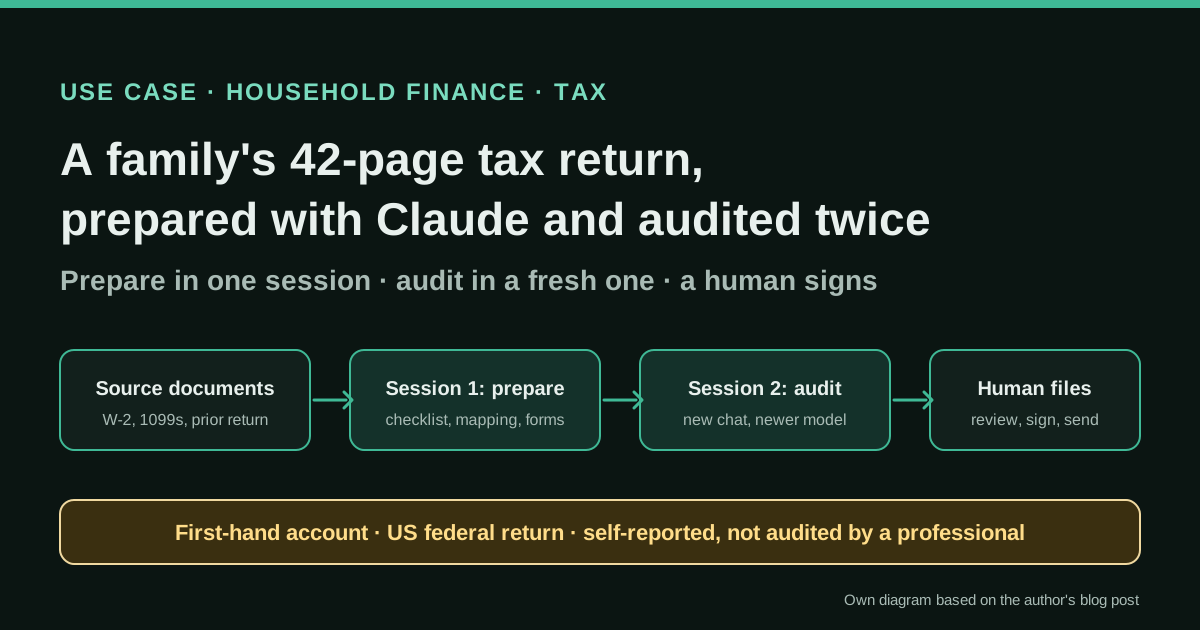
A married couple with two children and a non-trivial tax position (inherited IRA distributions across two brokerages, a Roth conversion, HSA, capital-loss carryforwards, foreign tax credit and Section 199A REIT dividends) prepares its 2025 US federal return with Claude instead of commercial tax software. Claude builds a document checklist from the prior-year return, extracts and maps values from W-2s and 1099s to form lines and walks through the worksheets; the author types the numbers into IRS Free File Fillable Forms. He then exports the return as a PDF and asks a fresh Claude conversation, on a newer model, to audit it against the source documents. For two trust returns (Form 1041), Claude filled the blank PDFs directly and he reviewed, signed and mailed them.
Reported result
Stated by the author: the 2025 federal return (Form 1040 plus Schedules 1, 3, B and D and Forms 8949, 8889, 8995 and 1116; 42 pages) “filed successfully”, using about 150,000 tokens and no paid tax software; time spent was comparable to past TurboTax years. The fresh-session audit found four categories of errors (a misread withholding box that would have misstated the refund, worksheets left blank, rounding mismatches and outdated form-line references). No figures on the refund, the number of individual errors or any IRS review are published; whether the return is fully correct is not independently known.
Stated figures. An identified person or organization states that they have used it. The results are stated by the source; we have not audited them.
What has really been tested
On 18 October 2026 we read Alef's post, his skill repository (README, SKILL.md and licence), Vladimir Klimontovich's essay and the Hacker News thread. We have not prepared a tax return with these tools, have not seen the author's documents or prompts beyond the published skill, and cannot verify that the return was accepted without later adjustments. The workflow is US-specific; the audit pattern is what we consider transferable. This is not tax advice.
How to replicate it
Use a dedicated, private workspace. Start from last year's return to build a checklist of expected documents, upload current-year blank forms (do not trust the model's memory of forms), work form by form, have the model fill or map values while you check each total against the source, then open a new conversation (ideally on a newer model), give it only the finished return and the source documents, and ask for an audit by error category. Fix, re-export and re-audit. Keep filing and signature in human hands, redact identifiers you do not need to share, and pay a professional when the stakes or complexity justify it.
In two sentences
Christopher Alef, who had used TurboTax for more than a decade, writes that he prepared his family’s 2025 US federal return — married filing jointly, two children, 42 pages across nine forms — with Claude, and that the most valuable step was auditing the finished return in a new conversation on a newer model, which caught four kinds of errors. It is a first-hand, self-reported account: the method is concrete and reusable, but nobody outside the household has checked the return, and the tax rules involved are American.
Who does it and why it is interesting
Most of the cases in this directory are companies closing their books. This one is a household, and that is exactly why it is useful: family finance has the same raw materials as corporate accounting — source documents, mappings to a reporting format, reconciliations of totals and a deadline — but usually without a finance team to review the work.
Alef describes a situation that is not a simple return:
- married filing jointly, with two children;
- distributions from inherited IRAs held at two brokerages, a Roth conversion and a rollover — six 1099-R forms with different distribution codes;
- HSA contributions and distributions;
- capital-loss carryforwards, foreign tax credits and Section 199A REIT dividends.
The result was Form 1040 plus Schedules 1, 3, B and D and Forms 8949, 8889, 8995 and 1116. He also needed Form 1041 for two irrevocable trusts.
His motivation is stated openly and is partly political: he did not want to keep paying Intuit, whose lobbying against free government filing he criticises at length. He does not sell a tax product. After the season he packaged his approach as a free Claude Code skill on GitHub under GPL-3.0. That combination — a named individual, a detailed list of forms, a public artefact and no commercial interest in the tool — is why we treat this as a real case, while remembering that every result is his own account.
To avoid relying on a single voice, we contrasted it with a second household: Vladimir Klimontovich, founder of the data company Jitsu, who used Claude Code for a joint Federal, New York State and New York City return with two Schedule Cs, an LLC, SEP IRA planning, HSA, child-care credit and foreign accounts. And we read the Hacker News discussion of Alef’s post, where readers pushed back hard.
Tools and architecture
Alef’s setup is deliberately simple:
- A dedicated Claude project holding all source documents: W-2s, 1099-Rs, 1099-DIV and 1099-INT statements, HSA documents and the prior-year return.
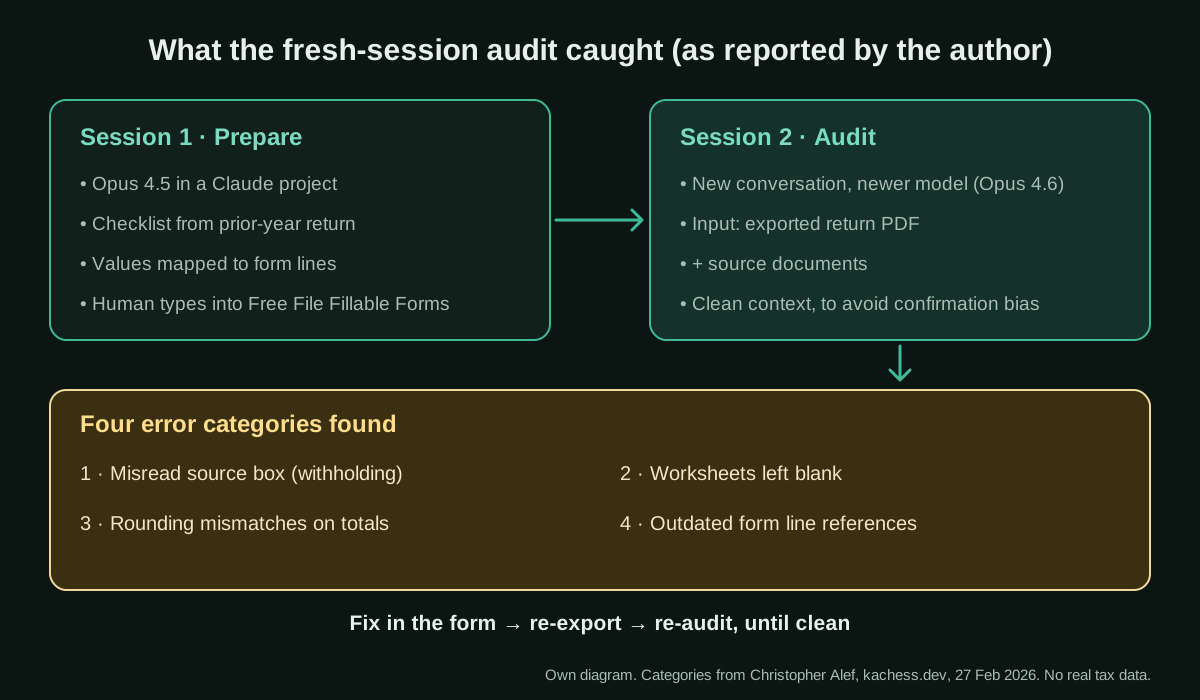
- Claude Opus 4.5 for preparation. It extracted values, organised them by form and institution, mapped them to form lines (for Schedule B, every payer with its EIN and amount) and walked through worksheets such as the Qualified Dividends and Capital Gain Tax Worksheet and the Child Tax Credit limit.
- IRS Free File Fillable Forms (FFFF) for the 1040. FFFF has no import, so the author typed every value himself, using Claude as reference and checker.
- Current blank forms uploaded by hand. He found Claude’s knowledge of IRS forms out of date (line numbers and worksheets change every year) and says the IRS blocked Claude from downloading forms directly, so he uploaded current PDFs.
- A fresh audit session on Claude Opus 4.6, given only the exported return PDF and the documents.
- Direct PDF filling for the trusts. For Form 1041, which FFFF does not support, Opus 4.6 filled the blank PDFs from the trust documents and 1099-DIVs; he reviewed, signed and mailed them.
Klimontovich’s architecture is more engineered, and it complements Alef’s. He put all documents in one folder and wrote a task.md brief for Claude Code. His first three attempts failed because the context window filled up too fast. What worked:
- one sub-agent per document, which parses it and saves a short
*-summary.mdwith only the numbers that matter; - for large PDFs, a Python script to extract data instead of reading the file directly;
- an
answers.mdfile where every answer he gives is saved, so later runs do not ask again; - a two-step output: first a
result.jsonwith the figures for each return, then PDF generation.
He reports about two hours and five clean-slate runs in total.
Step by step to replicate the pattern
The steps below are our synthesis of what both authors describe. They are written for the US federal return they used, but the logic — checklist, extraction, mapping, independent audit, human filing — applies to any household tax or finance task.
- Create a private, dedicated workspace. One Claude project (or one folder for Claude Code) per tax year. Decide before you start what you are willing to upload; see the risks section.
- Start from last year. Upload the prior-year return and ask for a checklist of every document you should expect this year, grouped by institution. Alef updated it as documents arrived.
- Upload current-year blank forms and instructions. Both authors’ experience points the same way: do not let the model rely on memory of forms or line numbers.
- Extract once, reuse many times. Have each document summarised into a small file with the key boxes (Klimontovich’s sub-agent pattern), and keep a running file of your answers to the model’s questions.
- Work form by form. Alef’s advice is to finish and verify one schedule before moving to the next instead of preparing everything at once.
- Ask for the map, then check the totals yourself. Every withholding total, interest total and dividend total should tie to the sum of the source boxes. His skill lists these checks explicitly.
- Audit in a fresh conversation. Export the finished return as a PDF, open a new conversation — he used a newer model — and give it the return plus the source documents. Ask it to look for specific error categories, and to compare against document images, not only extracted text.
- Fix, re-export, re-audit. Each of Alef’s audit passes found real errors; budget time for several rounds.
- Keep filing and signing human. In both cases the person decided, signed and filed (or, in Klimontovich’s case, had not yet filed at the time of writing).
A prompt for step 7 (ours, not the authors’)
Alef published a skill rather than his prompts, and we do not reproduce third-party prompt text. This audit prompt is written by this directory and has not been tested with real tax data (evidence level: proposal). Free to use and adapt.
You are reviewing a household tax return that someone else prepared. You did not prepare it,
so do not assume any figure is right.

Inputs in this conversation:
- {{RETURN_PDF}}: the completed return, exported from the filing software
- {{SOURCE_DOCUMENTS}}: every source document (wage statements, bank and broker slips,
  pension and health-account forms, last year's return)
- {{CURRENT_FORMS}}: the blank forms and official instructions for {{TAX_YEAR}}

Do not file, submit or send anything. Do not give tax-planning advice.

1. Build a table: source document, box, amount, and the form and line where it should appear.
   Read the document images, not only extracted text.
2. Check every figure on the return against that table. Flag misread boxes, especially
   withholding versus other taxes.
3. List every worksheet the instructions require and whether it is complete.
4. Recompute each total that is a sum of several entries and flag rounding differences.
5. Compare line numbers and labels with {{CURRENT_FORMS}} and flag anything that looks like
   a previous year's layout.
6. Output: a list of findings ordered by money at stake, each with document, box, line,
   expected value, value found and how sure you are. Finish with what you could not check.
A concrete example from the source
The most telling detail is the first audit finding. During preparation, Opus 4.5 had confused which box on a 1099 contained federal income tax withheld and which held a different tax category — an error that, Alef writes, would have misstated his refund. The preparation session did not notice it; the fresh audit session did. The other findings were mechanical: supporting worksheets that FFFF does not calculate had been left blank; FFFF rounds each withholding entry before summing, so the totals did not match what Form 1040 expected; and some preparation work used outdated line references.
Alef draws a clear conclusion from the contrast with the trust returns. For the 1041s, where Claude filled the PDFs directly, Opus 4.6 caught its own errors and flagged uncertainties within the same session; for the 1040, manual transcription into FFFF created a whole class of errors that a separate audit then had to catch. His recommended workflow for next year is to skip FFFF, have Claude fill the current PDFs and then audit.
Stated results
All of the following is stated by the authors, not verified by us:
- Alef: the 42-page 2025 federal return “filed successfully”; total cost about 150,000 tokens and no tax-software fee; time spent comparable to past TurboTax years, with FFFF — not Claude — as the bottleneck; four categories of errors found by the fresh-session audit; two Form 1041 trust returns prepared by Claude, reviewed, signed and mailed.
- Klimontovich: about two hours and five clean-slate runs to prepare three returns; on a $200-a-month Claude Max subscription, he estimates the token cost of the task at “a few dozen dollars at most”, against CPA fees he puts at $1,300–2,000+ for a return like his. He had not filed when he wrote, because investment slips were still missing and moving data from
result.jsoninto PDF forms kept missing fields.
Neither author reports the refund, the number of individual errors or the outcome of any IRS review. “Filed successfully” means submitted, not confirmed correct.
Limitations and risks
- Tax rules are local. Everything here is US federal (and, for Klimontovich, New York). The forms, deadlines and liability are different elsewhere. In Spain, for example, the Agencia Tributaria already offers a draft return built from the data it holds; there, the transferable part is checking that draft against your own documents, not building a return from scratch.
- Privacy. Several Hacker News readers objected to uploading Social Security numbers and full financial records to an AI provider; one suggested a local model. Check your plan’s data terms, and redact identifiers the model does not need.
- “Free” is relative. Readers pointed out that tokens and subscriptions cost money; Alef reports tokens, not a bill.
- The model’s tax knowledge goes stale. Both authors hit outdated form knowledge; Alef had to explain changed line numbers several times.
- Strategic advice is the weak spot. Klimontovich asked for optimisation ideas; Claude proposed converting the LLC to an S-Corp with “pretty significant” savings but ignored his goal of maximising retirement contributions, and revised the estimate down only when pressed. He would not follow strategic advice blindly.
- An LLM auditing an LLM is not independence. A fresh session reduces confirmation bias, but it is the same family of models. Commenters suggested cross-checking against established tax software or a professional; one wrote that he prepares his return twice for exactly this reason.
- A “fresh” session may not be fully fresh. One commenter warned that Claude can reference other conversations and suggested explicitly telling it not to; check your memory and project settings before the audit.
- Complexity is in the eye of the beholder. A commenter argued that inherited-IRA 1099-Rs are routine for any tax software. The case shows what Claude can help with, not that it beats a professional.
Common mistakes
- Asking for the whole return in one go instead of one form at a time.
- Trusting the model’s memory of this year’s forms instead of uploading them.
- Auditing in the same conversation that prepared the numbers.
- Letting extracted text replace the document images when checking boxes.
- Filling the context window with raw PDFs (Klimontovich’s first three runs).
- Treating a confident tax-planning suggestion as advice.
- Uploading more personal data than the task needs.
Conclusions
The value of this case is not “AI did my taxes”. It is a pattern that any household — or a small business doing its own books — can borrow: prepare with the model, then audit with a fresh one that never saw the preparation, and keep the human as the person who checks totals, decides and signs. Alef’s account shows that the audit step found an error with money attached that the preparation step had missed; Klimontovich’s shows how to keep a long document set manageable with summaries, saved answers and a structured result file. Both are honest about the gaps: stale form knowledge, the last mile of filling and filing, and weak strategic advice. Use the pattern, not the conclusion that you no longer need anyone else to look at your return.
Sources
- Kachess (Christopher Alef) — Breaking Up with TurboTax: How I Used Claude to File My Taxes for Free (27 Feb 2026) (opens in a new tab) (primary)
- GitHub — calef/us-federal-tax-assistant-skill (Claude Code skill published by the author, GPL-3.0) (opens in a new tab)
- Vladimir Klimontovich — Claude Code Did My Taxes (a second household's workflow) (opens in a new tab)
- Hacker News — discussion of “I Used Claude to File My Taxes for Free” (3 Mar 2026) (opens in a new tab)
We wrote this entry in our own words from the sources above and checked that the links worked on October 18, 2026. Is anything incorrect? Tell us.