What they do and how
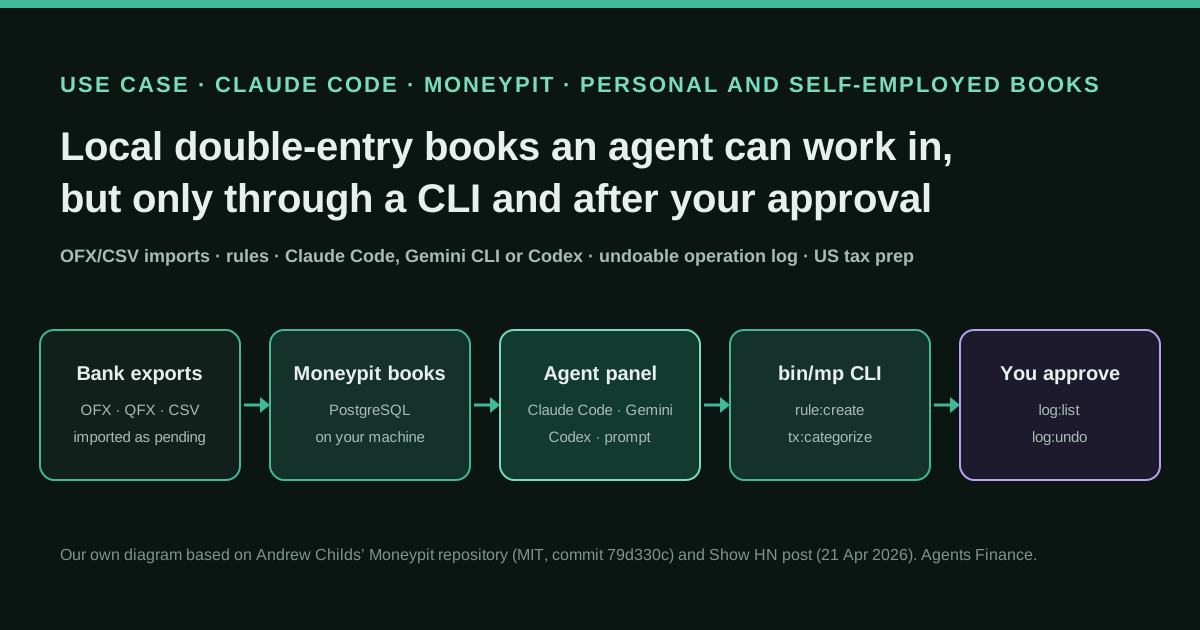
Andrew Childs wanted his books in order and his US personal and small-business tax returns filed, and had been using accounting software he wrote himself about ten years ago. Realising that agents can help a lot with accounting tasks, he rebuilt it as Moneypit: a local web app (SvelteKit, Bun and PostgreSQL) with double-entry transactions, hierarchical accounts, OFX/QFX and CSV bank imports, pattern rules, an undoable operation log, separate books, IRS tax categories and, in recent versions, a draft Form 1040 with its schedules. Every database operation is exposed through a CLI, bin/mp, and that is the only interface the AI uses: from the app's side panel, a button opens Claude Code (or Gemini CLI or Codex CLI) in a terminal with a prompt that lists the pending transactions, existing rules and accounts, and tells the agent to propose rules and commands and stop until the user approves them.
Reported result
No figures. The author states that he built it to keep his books in order and file his personal and small-business returns for the year, that it handles imports from many different sources well, and that, apart from what you choose to send to an agent, there is no telemetry. The project has one maintainer and two stars on GitHub; the Show HN post had one point and no comments when we checked.
Mind the evidence. Someone explains how they do it or did it, without verifiable figures. It is documented practice, not proof that it will work in your case.
What has really been tested
On 22 October 2026 we read the Show HN post, the README, CLAUDE.md, the agent configuration and the three built-in prompts at commit 79d330c. We installed it with Bun and PostgreSQL 17 on Linux: after generating the Prisma client, its 192 unit tests passed. With a fictional book we created accounts, imported a seven-line CSV, tested and created three rules, applied them (5 of 7 transactions categorised), categorised the other two by hand and undid the rule run with log:undo. We found that dates shift one day earlier when you import from a time zone east of UTC (fixed by running the CLI with TZ=UTC) and that amounts with a decimal comma are misread. We did not run the e2e tests, open the agent panel with Claude Code or test the draft tax return.
How to replicate it
Install Bun and PostgreSQL, clone the repository, create the database with scripts/create-local-db.sh, run bun run db:push and start the app with bun run dev on localhost:5180. Create a book, your accounts and import an OFX or CSV export. In the Categorize page, launch the agent: it receives up to 200 pending transactions with your rules and accounts, proposes bin/mp rule:create and tx:categorize commands, and waits for your approval. Check each run in the activity log and undo it if needed. Keep it on your own machine, since there is no authentication.
In two sentences
Andrew Childs, a New York software founder, rebuilt the personal accounting app he had used for a decade as Moneypit, a local double-entry bookkeeping and tax-prep tool designed so that a coding agent such as Claude Code can do the tedious part, categorising transactions and writing rules, through a command-line interface and only after he approves each change. It is a first-hand account without figures, but the whole system, including the agent instructions and the prompts the app sends to the agent, is published under the MIT licence and runs on your own machine.
Who does it and why it matters
Childs, whose GitHub profile says he is building Pennant Sports and previously co-founded Shortcut (formerly Clubhouse), presented the project on Hacker News on 21 April 2026. His explanation is short and specific: he built it “to help me keep my books in order and get my personal + small business tax returns for this year filed”. He had been using “an older piece of accounting software I wrote maybe 10 years ago that I never open-sourced”, and he “realized that agents can actually help quite a bit with accounting tasks, so I built this new version”.
That makes it a useful case for anyone who keeps their own books, freelancers and sole traders above all. It is not a chatbot bolted onto a spreadsheet or an AI that posts entries on its own. It is a proper double-entry ledger (every transaction has a debit and a credit account) with a deliberately narrow door for the agent: a CLI with explicit commands, prompts that end with “STOP and wait for the user to approve”, and an operation log that can undo whatever the agent did.
He sells nothing around it. The repository has a single maintainer, two stars and no forks, and the Show HN post had one point and no comments when we checked, so there is no community feedback to weigh. Since April it has grown considerably: the September 2026 commits add businesses with their own Schedule C, worksheets such as the home office deduction, and a draft federal return printed onto IRS forms. We contrasted the post with the repository at commit 79d330c (18 September 2026) and ran it ourselves with fictional data.
Tools and architecture
Moneypit is a SvelteKit web app that runs locally with Bun and stores everything in PostgreSQL through Prisma. The data model is small: accounts with a type (asset, liability, equity, income, expense) and a colon-separated path such as Business:Hosting; transactions with a debit and a credit account, where a pending import has one side empty until it is categorised; rules that match a pattern (optionally a regex, a field or an amount range) to an account; tax categories with IRS schedule references; and books, which keep personal, business or demo records completely separate.
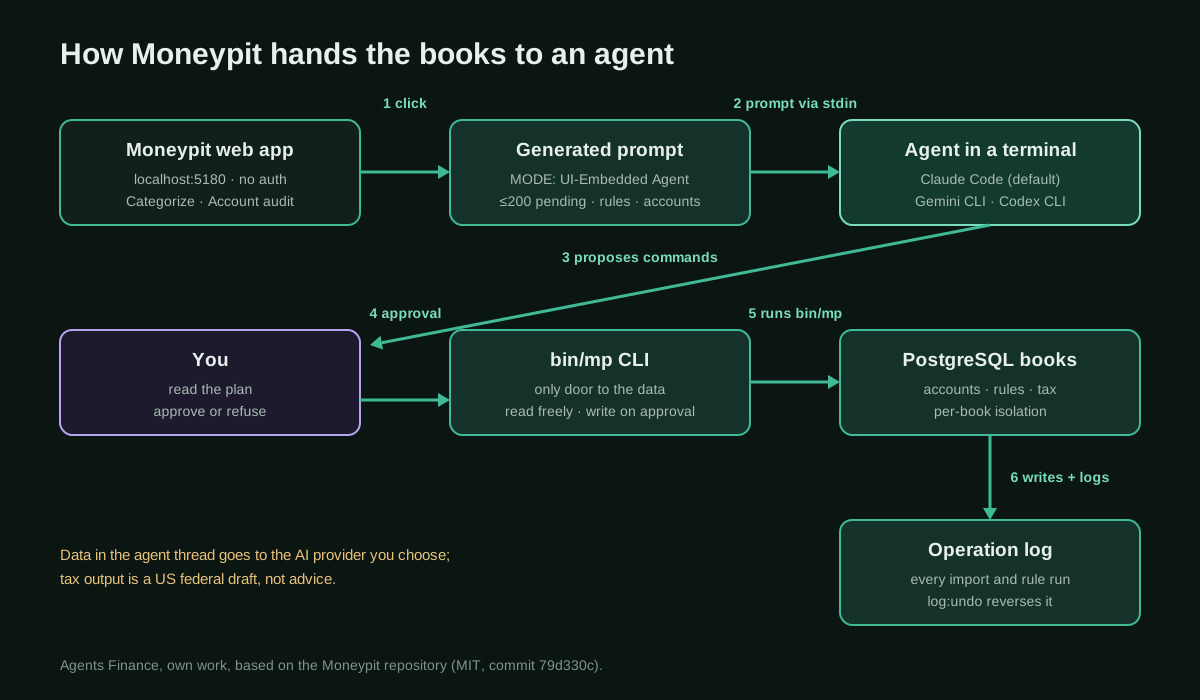
The AI part has three pieces:
- The CLI,
bin/mp. A Bash wrapper that runsscripts/mp.tswith Bun. It covers every database operation: books, accounts, transactions, imports, rules, tax categories and documents, balance checks and the operation log. The README states it plainly: “This is also how AI agents interact with Moneypit.” - The side panel. The app opens a real terminal (node-pty and xterm.js) inside the page and launches the chosen agent there: Claude Code by default, Gemini CLI, Codex CLI or a custom command. The prompt is written to a temporary file and piped to the agent’s standard input (Codex gets it as an argument). The agent starts in the project folder, so it can read
CLAUDE.md. - Task prompts generated from live data. Buttons on the Categorize page and on each account page build a prompt with the context already filled in: up to 200 pending transactions, the existing rules and the chart of accounts for categorisation; a summary of the account’s transactions grouped by description for an audit; sample transactions and the list of tax categories for a tax-category suggestion. A generic system prompt is prepended with the account conventions, the full CLI reference and four guidelines, the first being “Always present your plan and WAIT for user approval before executing mutations”.
CLAUDE.md serves two audiences. In “Coding Agent (terminal)” mode the agent develops Moneypit itself; in “UI-Embedded Agent (sidebar)” mode it may only use bin/mp and must not touch code. The prompts start with MODE: UI-Embedded Agent so the agent knows which hat it is wearing.
Step by step to replicate it
- Install the prerequisites: Bun 1.0 or later and PostgreSQL 14 or later (we used 17). Keep the app on your own computer: the README warns there is no authentication.
- Create the database and the schema with
scripts/create-local-db.shandbun run db:push, put the connection string in.envand start the app withbun run dev(http://localhost:5180). - Create a book and a minimal chart of accounts: checking and credit cards as assets and liabilities, your income sources, and expense accounts with paths you will want in reports (
Business:Hosting,Housing:Rent). - Import a month of statements as OFX/QFX or CSV. Use
import:previewfirst to see the headers, thenimport:csvwith a JSON column mapping. Imported lines arrive as pending. - Ask the agent to categorise. On the Categorize page, start the agent session. Read its proposal: rules to apply, new rules with exact
rule:createcommands, new accounts and one-off transactions to categorise by hand. Approve only what you agree with; the agent may run read-only commands without asking. - Audit account by account. From an account page, the audit prompt asks the agent to flag lines that look out of place, rules that are too broad and pending transactions that belong there.
- Check and undo. Every import, rule creation and categorisation is an operation in the log (
log:list);log:undo <id>reverses it. - Link accounts to tax categories (the tax-category prompt suggests one per account) and, if you file in the US, review the tax year page, the documents and the draft return as a working paper for yourself or your preparer.
Copy and adapt
Everything in subsections 1 to 4 is reproduced from the Moneypit repository, Copyright (c) 2026 Andrew Childs, under the MIT licence; keep that notice if you copy it. Subsections 5 and 6 are Agents Finance templates based on Moneypit, not files published by the author.
1. Install and start the app (README, literal)
From the README:
# Install dependencies
bun install

# Create database
./scripts/create-local-db.sh moneypit moneypit

# Push schema to database
bun run db:push

# Start dev server
bun run dev
The .env file needs two variables (.env.example):
DATABASE_URL="postgresql://user:password@localhost:5432/moneypit"
BACKUP_PATH="/path/to/backups/moneypit"
2. The two agent modes in CLAUDE.md (extract)
From CLAUDE.md, which also documents the schema, the book resolution order, the full CLI and the tax-prep model:
## Agent Modes

This file is used in two contexts. The prompt will tell you which mode you're in.

### Coding Agent (terminal)

You're helping develop Moneypit itself. Focus on:

- Code changes, bug fixes, new features
- Schema modifications
- Component development
- Use standard development workflow (edit files, run checks, etc.)

### UI-Embedded Agent (sidebar)

You're helping the user manage their finances through the embedded Claude panel. Focus on:

- Categorizing transactions via `bin/mp` commands
- Creating/updating rules
- Auditing accounts for miscategorization
- Answering questions about their financial data

**Important**: In UI-embedded mode, you should ONLY use the `bin/mp` CLI for database operations. Do not modify code files or run development commands.
3. Which agents the panel can launch (extract)
From src/lib/agents/config.ts. promptMethod: 'stdin' means the generated prompt is written to a temporary file and redirected to the command; add another CLI agent by adding an entry here.
export const AGENTS: AgentConfig[] = [
	{
		id: 'claude',
		name: 'Claude Code',
		command: 'claude',
		readsClaudeMd: false,
		promptMethod: 'stdin',
		description: 'Anthropic Claude Code CLI'
	},
	{
		id: 'gemini',
		name: 'Gemini CLI',
		command: 'gemini',
		readsClaudeMd: false,
		promptMethod: 'stdin',
		description: 'Google Gemini CLI'
	},
	{
		id: 'codex',
		name: 'Codex CLI',
		command: 'codex',
		readsClaudeMd: false,
		promptMethod: 'arg',
		description: 'OpenAI Codex CLI'
	},
	{
		id: 'custom',
		name: 'Custom',
		command: '',
		readsClaudeMd: false,
		promptMethod: 'none',
		description: 'Run a custom command'
	}
];
4. The categorisation prompt (extract)
This is the instruction part of the template in src/lib/prompts/categorize.ts. Above it, the app inserts the book ID, the pending transactions as a tab-separated table, the rules and the accounts grouped by type; ${mp} becomes bin/mp --book <id> and the full CLI reference is appended at the end. It works as a standalone prompt for any ledger with rules if you swap the commands.
YOUR TASKS:

1. **Analyze the uncategorized transactions**
   Look for patterns in the descriptions that could be captured by rules.
   Group similar transactions mentally and identify:
   - Recurring merchants/payees (e.g., "AMAZON", "SPOTIFY", "SHELL OIL")
   - Common patterns that appear across multiple transactions
   - Transactions that might need amount constraints (same merchant, different categories based on amount)

2. **Check existing rules for coverage**
   - Do any existing rules already match these transactions? If so, running `${mp} rule:apply` may categorize them.
   - Are there patterns in uncategorized transactions that SHOULD be matched by existing rules but aren't? (possible rule refinement)

3. **Recommend new rules**
   For transaction patterns not covered by existing rules:
   - Identify the target account from EXISTING ACCOUNTS above
   - If no suitable account exists, suggest creating one first
   - Prefer substring patterns over regex when possible (simpler, more reliable)
   - Consider amount constraints for merchants that span categories (e.g., "TARGET" could be groceries OR household goods)

4. **Present your recommendations and WAIT for approval**
   Summarize your findings:
   - Rules that should be applied immediately: `${mp} rule:apply` (if existing rules would match)
   - New rules to create (with specific `${mp} rule:create` commands)
   - New accounts needed (with specific `${mp} account:create` commands)
   - Any transactions that need manual categorization (unusual one-offs)

   Then STOP and wait for the user to approve before executing any commands that modify data.
   You may run read-only commands (tx:list, rule:list, account:list, etc.) without approval.

IMPORTANT: Do NOT execute any database mutations (rule:create, account:create, tx:categorize, etc.) until the user explicitly approves your plan. Always present your recommendations first and wait for confirmation.

TIPS:
- Pick the top 6-8 transaction/account categories to resolve first - you don't have to evaluate the entire list, especially if it's very long.
- Use `${mp} rule:test "PATTERN"` to preview which transactions a rule would match before creating it
- Prioritize rules that would categorize the most transactions
- For transfers between accounts, the credit account is the source, debit account is the destination
5. Agents Finance template: Claude Code permissions for the panel
The “wait for approval” rule above is an instruction to the model. Claude Code’s documentation is explicit that permission rules are enforced by Claude Code, not by the model, so it is worth adding a .claude/settings.json in the Moneypit folder that lets read-only commands run, makes every write ask, and blocks the destructive ones and code edits. This is our template based on the Moneypit CLI, checked against the permission rule syntax; the prompts call bin/mp --book <id> …, which is why each write rule appears twice. Commands with --book that are read-only will still ask, which is the safe side.
{
  "permissions": {
    "allow": [
      "Bash(bin/mp help)",
      "Bash(bin/mp tx:list *)",
      "Bash(bin/mp tx:get *)",
      "Bash(bin/mp tx:uncategorized *)",
      "Bash(bin/mp account:list *)",
      "Bash(bin/mp account:tree *)",
      "Bash(bin/mp rule:list)",
      "Bash(bin/mp rule:test *)",
      "Bash(bin/mp log:list *)"
    ],
    "ask": [
      "Bash(bin/mp rule:create *)", "Bash(bin/mp * rule:create *)",
      "Bash(bin/mp rule:update *)", "Bash(bin/mp * rule:update *)",
      "Bash(bin/mp rule:apply *)", "Bash(bin/mp * rule:apply *)",
      "Bash(bin/mp tx:categorize *)", "Bash(bin/mp * tx:categorize *)",
      "Bash(bin/mp tx:update *)", "Bash(bin/mp * tx:update *)",
      "Bash(bin/mp account:create *)", "Bash(bin/mp * account:create *)",
      "Bash(bin/mp account:update *)", "Bash(bin/mp * account:update *)",
      "Bash(bin/mp log:undo *)", "Bash(bin/mp * log:undo *)"
    ],
    "deny": [
      "Bash(bin/mp book:delete *)", "Bash(bin/mp * book:delete *)",
      "Bash(bin/mp tx:delete-imported *)", "Bash(bin/mp * tx:delete-imported *)",
      "Bash(bin/mp account:delete *)", "Bash(bin/mp * account:delete *)",
      "Bash(psql *)",
      "Read(./.env)",
      "Edit(/src/**)",
      "Edit(/prisma/**)",
      "Edit(/scripts/**)"
    ]
  }
}
If you also use Moneypit’s coding mode to change the app, keep this file out of that working copy or relax the Edit rules there.
6. Agents Finance template: convert a European bank CSV before importing
In our test, import:csv reads -86,41 as -8641 (its amount parser strips commas) and expects commas between columns, while most Spanish and European bank exports use semicolons, DD/MM/YYYY and decimal commas. This script, ours, rewrites such a file into the format Moneypit reads; we ran it on a fictional statement and imported the result.
#!/usr/bin/env python3
"""Agents Finance template: convert a European bank CSV export into a CSV
that Moneypit's import:csv reads correctly.

Moneypit's CSV parser expects comma-separated files and amounts with a dot as
decimal separator (it strips commas, so "-86,41" would become -8641).
This script rewrites: delimiter ; -> ,  ·  DD/MM/YYYY -> YYYY-MM-DD  ·
1.234,56 -> 1234.56. Usage:
  python3 eu_csv_to_moneypit.py input.csv output.csv \
      --date "Fecha" --desc "Concepto" --amount "Importe"
"""
import argparse
import csv
import sys
from datetime import datetime
from decimal import Decimal, InvalidOperation


def eu_amount(value: str) -> str:
    v = value.strip().replace("€", "").replace("\u00a0", "").replace(" ", "")
    v = v.replace(".", "").replace(",", ".")  # 1.234,56 -> 1234.56
    try:
        return str(Decimal(v).quantize(Decimal("0.01")))
    except InvalidOperation:
        sys.exit(f"Unreadable amount: {value!r}")


def main() -> None:
    p = argparse.ArgumentParser()
    p.add_argument("input")
    p.add_argument("output")
    p.add_argument("--date", required=True, help="date column (DD/MM/YYYY)")
    p.add_argument("--desc", required=True, help="description column")
    p.add_argument("--amount", required=True, help="signed amount column")
    p.add_argument("--delimiter", default=";")
    p.add_argument("--encoding", default="utf-8-sig")
    a = p.parse_args()

    with open(a.input, newline="", encoding=a.encoding) as f_in, \
         open(a.output, "w", newline="", encoding="utf-8") as f_out:
        reader = csv.DictReader(f_in, delimiter=a.delimiter)
        writer = csv.writer(f_out)
        writer.writerow(["Date", "Description", "Amount"])
        rows = 0
        for row in reader:
            if not (row.get(a.date) or "").strip():
                continue  # skip blank or footer lines
            day = datetime.strptime(row[a.date].strip(), "%d/%m/%Y")
            writer.writerow([day.strftime("%Y-%m-%d"),
                             " ".join(row[a.desc].split()),
                             eu_amount(row[a.amount])])
            rows += 1
    print(f"{rows} rows written to {a.output}")


if __name__ == "__main__":
    main()
Then import the converted file with a mapping and, if you are east of UTC, the time zone fix described below:
python3 eu_csv_to_moneypit.py extracto.csv extracto-moneypit.csv \
  --date Fecha --desc Concepto --amount Importe
TZ=UTC bin/mp import:csv extracto-moneypit.csv --account <checking-id> \
  --mapping '{"dateColumn":"Date","descriptionColumn":"Description","amountColumn":"Amount","dateFormat":"YYYY-MM-DD"}'
Prerequisites
- A computer where you can install Bun and PostgreSQL, and basic comfort with a terminal. It is a developer’s tool: there is no installer and no hosted version.
- Bank exports in OFX/QFX or CSV. There are no bank connections.
- For the agent panel, a working Claude Code, Gemini CLI or Codex CLI installation and subscription or API access. Claude Code is not part of Claude’s free plan; prices are on the tool page linked from this entry.
- Some double-entry literacy: you decide the chart of accounts and must be able to tell a transfer from an expense when the agent asks.
- For the tax features, a US filing situation. The modules, categories and forms are federal US (IRS); elsewhere you can still use the bookkeeping, rules and reports.
A concrete example: one month of a freelancer’s checking account
We reproduced the core loop on a fictional book. After creating a checking account and five income, expense and equity accounts, we imported a seven-line CSV for September 2026 (hosting, groceries, a client payment, software subscriptions). All seven lines arrived as pending. We then did, by hand, what the agent would propose: preview a pattern, create rules, apply them, categorise the leftovers and check the log.
# Output abridged; IDs replaced with placeholders
$ bin/mp rule:test "DIGITALOCEAN"          # preview matches before creating the rule
$ bin/mp rule:create "DIGITALOCEAN" --account <Business:Hosting-id>
$ bin/mp rule:create "TRADER JOE" --account <Groceries-id>
$ bin/mp rule:create "ACME CORP" --account <Consulting-id>
$ bin/mp rule:apply
Applied 3 rule(s) to 5 transaction(s)
$ bin/mp tx:uncategorized --condensed
…	2026-09-20	FIGMA MONTHLY	$15.00	Checking	(pending)
…	2026-09-08	GITHUB INC	$4.00	Checking	(pending)
$ bin/mp tx:categorize <id1> <id2> --debit <Business:Software-id>
Categorized 2 transactions
$ bin/mp log:list --limit 5
…  CATEGORIZE  5 change(s)   Applied 3 rules to 5 transactions
…  CREATE      1 change(s)   Created rule: ACME CORP
…  IMPORT      7 change(s)   Imported 7 transactions from checking-2026-09.csv
$ bin/mp log:undo <categorize-operation-id>
Undone: 5 change(s), skipped: 0
Undoing the rule run put the five transactions back to pending, and running rule:apply again recategorised them. That is the safety net that makes it reasonable to let an agent propose bulk changes: the unit of work is an operation you can inspect and reverse. Two details showed up on the way. Running the import from a machine set to Canary Islands time (UTC+1), every date landed one day early (09/20/2026 became 19 September); the same file imported with TZ=America/New_York or TZ=UTC kept the right dates. And the demo:create command that CLAUDE.md and the README mention is not recognised by the current CLI; we created our own book instead.
Results stated by the source
There are no figures: no hours saved, no transaction counts, no accuracy rate. What the author states is qualitative and first-hand: he built it to keep his books and file his personal and small-business returns for the year, “agents can actually help quite a bit with accounting tasks”, it “handles imports from a lot of different sources quite well”, and there is “no telemetry aside from what you choose to send to an agent”. The commit history supports the tax-season motivation, with most of the work on the draft return landing in September 2026. Our own checks are limited to the unit tests and the CLI loop above.
Limitations and risks
- Data sent to the AI provider. The README warns that whatever appears in the agent thread goes to the provider you choose. The categorisation prompt includes up to 200 pending transactions with descriptions and amounts, plus your chart of accounts. If that is not acceptable, the author’s advice is not to use the panel or to configure a local model.
- Approval is an instruction, not a lock. The prompts tell the agent to stop and wait, and the agent runs inside the project folder with your user’s permissions. Claude Code’s own permission prompts and a settings file like the template above are what actually enforce it.
- No authentication. The app must not be exposed to a network; it is for one person on one machine.
- Locale assumptions. US dates and amounts, USD formatting in the prompts, the decimal-comma problem and the one-day shift east of UTC that we observed. Non-US users should convert files first and run imports with
TZ=UTC. - Tax output is a draft. The disclaimer is clear that it is not a substitute for professional advice. The draft return covers a long list of federal forms but warns when forms it does not produce (such as 5329 or 6198) would be needed; state returns are outside what we reviewed.
- Single-maintainer project. No releases, no outside contributors, no community discussion yet. Pin a commit, back up the database (
bun run db:backup) and export books to JSON.
Common mistakes
- Approving bulk rules without
rule:test. A substring such asAMAZONcan swallow purchases that belong to several accounts; the prompt itself suggests amount ranges for merchants that span categories. - Treating transfers as income or expense. Moving money between your own accounts should debit and credit two asset or liability accounts; the duplicate detection and
tx:mergeexist because the same transfer often appears in both statements. - Mixing books. The CLI resolves the book from
--book, then~/.moneypit, then the only non-demo book; with several books, checkbook:currentbefore letting the agent write. - Importing European files as they come. Decimal commas and semicolons produce wrong amounts silently; convert first.
- Running the agent in a working copy you also develop in. The coding mode can edit code; keep a separate folder for your real books.
Conclusions
Moneypit is a clear example of the pattern that keeps showing up in the best personal finance cases with agents: let the model do the fuzzy work of reading descriptions and proposing rules, and keep the books, the arithmetic and the audit trail in deterministic software with a narrow interface. What makes it worth copying is less the app than its design choices: a CLI as the agent’s only door, prompts generated from live data that end in an explicit stop, and an undoable operation log. If you file in the US and are comfortable with a terminal, you can run it as is. Elsewhere, the CLAUDE.md, the prompts and the permission template are a solid starting point for putting an agent in front of whatever ledger you already keep.
Sources
- GitHub — andrewchilds/moneypit (MIT), commit 79d330c (opens in a new tab) (primary)
- Hacker News — Show HN: Local, agent-friendly double-entry bookkeeping and tax prep (Andrew Childs) (opens in a new tab)
- moneypit — CLAUDE.md (agent modes, schema, CLI reference, tax prep) (opens in a new tab)
- moneypit — categorisation prompt (src/lib/prompts/categorize.ts) (opens in a new tab)
- moneypit — agent panel configuration (src/lib/agents/config.ts) (opens in a new tab)
- Claude Code docs — Configure permissions (opens in a new tab)
We wrote this entry in our own words from the sources above and checked that the links worked on October 22, 2026. Is anything incorrect? Tell us.