What they do and how
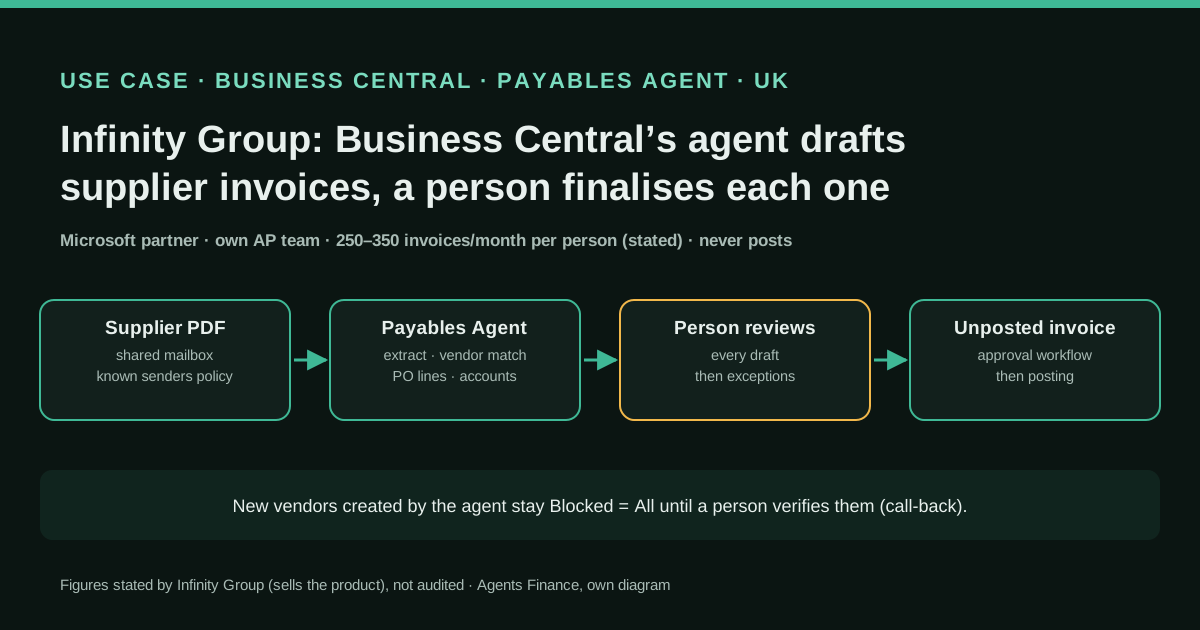
Infinity Group, a UK Microsoft partner that sells and implements Business Central, uses Business Central as its own finance system and has switched on Microsoft's built-in Payables Agent for its own supplier invoices before recommending it to clients (it calls this "Customer Zero"). Invoices arrive as PDFs in a Microsoft 365 mailbox; the agent imports each one as an inbound e-document, extracts the data with Azure Document Intelligence, identifies the vendor, suggests accounts, items and purchase order lines from the company's setup and posting history, and prepares a purchase invoice draft. A person reviews the draft and only then does the agent finalise it into an unposted purchase invoice, which then follows the normal approval workflow. Senders are governed by a known senders list (Ask, Approve or Reject), and vendors the agent creates stay blocked until someone checks them. The team started by reviewing every draft line by line and, within a few weeks, moved to reviewing exceptions.
Reported result
Stated by Infinity Group about its own finance team, without a baseline or method: 50% faster month-end, 90% less invoice processing time and twice the throughput (blog post, 16 October 2026). A LinkedIn post by Jenna Tween of Infinity Group adds review time of around 2 minutes per invoice, around 5 days saved at month-end and one person processing 250 to 350 invoices a month (2 October 2026). The firm sells Business Central and this agent, so the figures are marketing as well as experience. Other users on Microsoft's forums report the opposite early on (more interactions than manual entry, inconsistent lines) and later improvement once known senders were set up.
Stated figures. An identified person or organization states that they have used it. The results are stated by the source; we have not audited them.
What has really been tested
On 25 October 2026 we read Infinity Group's blog post and the LinkedIn post by Jenna Tween (we could not watch the video with Sam, its procurement administrator), Microsoft Learn's overview, set-up, known senders, FAQ, availability and billing pages, the Copilot Studio pricing page, and the agent's source code in microsoft/BCApps (MIT licence), including both versions of its natural-language instructions and the code that loads them. We also read user threads on the Dynamics Community forum and Microsoft Ideas, and a Reddit thread through a search index (Reddit blocks our server). We have not run the agent in a Business Central tenant. The two Python scripts under "Copy and adapt" were run on the fictitious sample data shown; the other files are Agents Finance templates or literal MIT excerpts.
How to replicate it
You need Business Central online in a supported country, billing for Copilot Credits set up in the admin center (or trial mode for the first 50 invoices), and a Microsoft 365 shared mailbox kept internal, with Full Access delegated to whoever activates the agent. Clean the vendor list and purchase order habits first, set Text-to-Account mappings and item references for recurring lines, and make sure a purchase invoice approval workflow exists, because the agent does not provide one. Start with "Manage per sender", put a handful of high-volume suppliers with stable formats on Approve and leave the rest on Ask, review every draft line by line for the first weeks, keep a review log, and only widen Approve when a sender's drafts stop needing corrections. Model credit consumption from your invoice and line counts before go-live.
In two sentences
Infinity Group, a UK Microsoft partner, has put Business Central’s built-in Payables Agent to work on its own supplier invoices and says the agent now prepares drafts that a person checks in about two minutes, with one person handling 250 to 350 invoices a month. The figures come from a firm that sells the product, but the agent’s own instructions are public under the MIT licence, so any finance team can see exactly what it is told to do, and where people still have to step in.
Who does it and why it matters
Infinity Group is an IT services company with offices in London and Tunbridge Wells that implements Microsoft Dynamics 365, including Business Central. It runs Business Central as its own finance system and has a programme it calls “Customer Zero”: it uses a Microsoft technology on its own processes before recommending it to clients. On 16 October 2026 Paul Cameron published a guide on the company blog about the Payables Agent, Microsoft’s accounts payable agent inside Business Central, with a section on what the firm learned running it on its own invoices. Two weeks earlier, Jenna Tween, who works at the firm, posted on LinkedIn about “our Customer Zero story”, with a video in which Sam, its procurement administrator, shows the agent at work.
The case matters because Business Central is one of the most widely used mid-market ERPs, the agent is part of the product, and the use is narrow in the right way: emailed PDFs become purchase invoice drafts, and every draft is reviewed. Keep the commercial angle in mind: Infinity Group sells Business Central and this agent, so its numbers are both experience and marketing.
How the agent works
A supplier, or an employee forwarding a supplier email, sends a PDF to a Microsoft 365 mailbox that the agent monitors. The agent imports each PDF attachment as an entry in Inbound E-Documents, sends it to Azure Document Intelligence for extraction, and tries to identify the vendor: first by exact identifiers such as the VAT number, then by name and address, then by searching the vendor assignment history and the vendor list. If it cannot find a vendor with confidence, it stops and asks a supervisor. If told to, it creates the vendor from the extracted data, but the card stays Blocked = All until someone verifies it: vendor and bank account approval is meant to involve a human call-back.
Then it works on the lines. It proposes purchase order lines when an order exists, and Business Central itself checks compatibility of vendor, unit of measure, currency, quantity, receipt and price. Lines without an order get an account or item from Business Central’s draft logic: posting history, Text-to-Account mappings, item references and the chart of accounts. The result is a purchase document draft in which each field the agent set carries a tip explaining why.
Then the key control: the agent asks for a review, and only after a person confirms does it finalise the draft into an unposted purchase invoice. It never posts. The invoice then goes through the company’s approval workflow; as Infinity Group stresses, if you have none today, the agent will not create one.
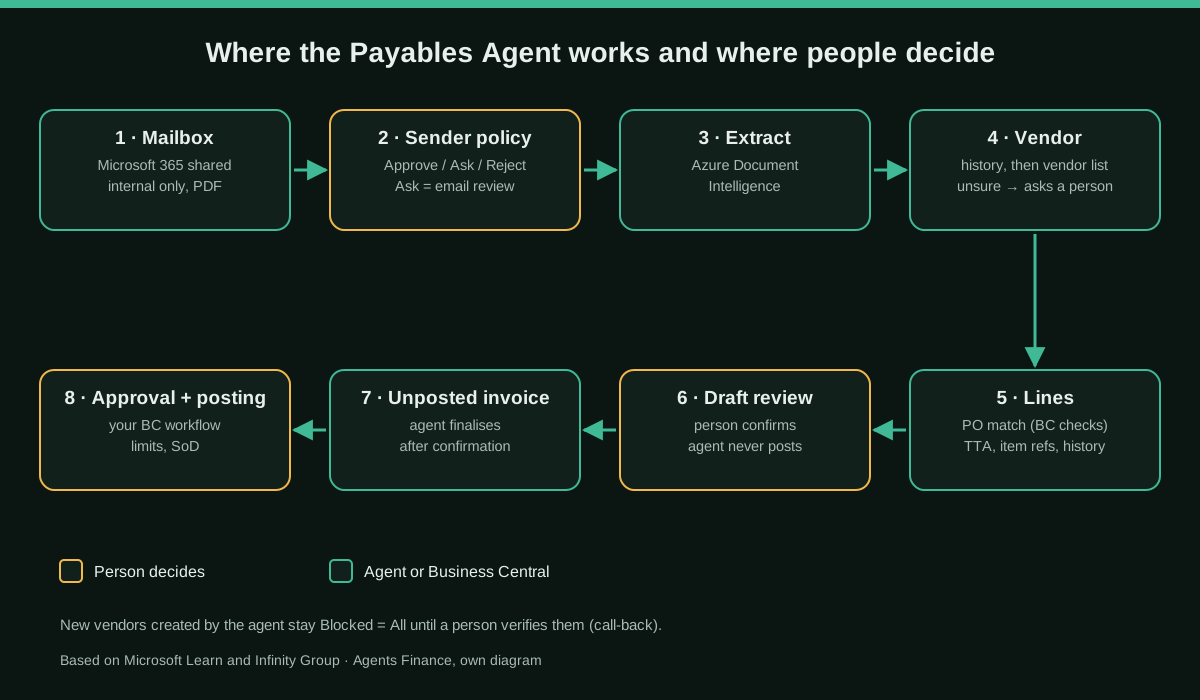
What Microsoft actually tells the agent
The Payables Agent is not a black box in one respect: its source code is in Microsoft’s public BCApps repository under the MIT licence, including the natural-language instructions the agent receives. Reading them is the fastest way to understand its limits.
The instructions open with a placeholder that the setup code fills with a separate “security prompt” retrieved from Azure Key Vault, which is not published. The rest is visible. The agent works from a fixed to-do list (validate the e-document status, memorise the vendor details, ensure a vendor is assigned, add a purchase order matching task for every line, request a review, finalise). It is told not to message users at all and to interact only through two tools, one to request assistance and one to request review. The vendor rule is strict: a candidate is a valid match only if the name is recognisably the same, at least one address element matches and the country is the same, and “when in doubt, do NOT memorize”. It may create a vendor only if a user explicitly tells it to, and it must not unblock it.
There is a second version of the instructions behind a feature flag described in the code as an experiment, “agent-driven line matching”. In it the agent itself resolves units of measure and, for every unmatched line, collects candidates from six sources (item references, Text-to-Account mappings, historical purchase lines, chart of accounts, items and deferral templates) before choosing, with written weights, a “product identifier rule” so that one laptop model is not matched to another, a recency rule that flags a “new pattern detected” when coding changes, and a confidence level attached to each field. On 22 October 2026 the repository also added credit memo handling. These are changes in the source code; check what your tenant actually runs.
The rollout, step by step
Combining Infinity Group’s lessons with Microsoft’s set-up guide, the sequence looks like this:
- Fix the master data first. Infinity Group says most of the preparation was supplier master data and purchase order discipline, and that configuring the agent was the quicker part. Duplicate vendors confuse the agent exactly as they confuse a new starter.
- Prepare the mailbox. Use a dedicated Microsoft 365 shared mailbox, ideally internal only: Microsoft suggests not exposing it to vendors, so your staff see invoices first and can spot fraud. Whoever activates the agent needs Full Access to that mailbox, because the agent runs as a background task in that user’s context. Nobody should read the mailbox in Outlook.
- Turn on the capability and try it. In trial mode the first 50 invoices are processed without consuming billable credits, which is the cheapest way to measure real consumption.
- Choose the email review policy. “Manage per sender” is the recommended option: senders on Approve skip the email review step, senders on Reject are ignored, authenticated internal senders skip review and everyone else waits for a person. Infinity Group suggests starting with a small group of high-volume suppliers with consistent formats on Approve and everything else on Ask.
- Set the matching tolerances. The E-Document Matching Difference % in Purchases & Payables Setup decides when a price difference is flagged. Infinity Group warns that price and quantity tolerance rules may need an extension.
- Review everything at first, then exceptions. Its team reviewed every draft line by line and moved to reviewing exceptions within a few weeks. It recommends letting that happen “at its own pace” and telling the AP team early that the gain is time, not headcount.
- Watch the cost. The configuration page shows the Copilot Credits consumed; when the organisation’s credits run out, the agent stops processing new invoices.
Copy and adapt
Prerequisites: Business Central online with the Payables Agent available in your country, Copilot Credit billing or trial mode, a Microsoft 365 shared mailbox, and Python 3.10 or later for the two scripts. Nothing here needs credentials; the scripts read CSV files that you export or keep yourself.
1. The agent’s to-do list and vendor rule (literal MIT excerpt)
This is what Microsoft tells the agent about vendors. Useful as a control description for your auditors, and as a pattern if you build your own AP agent on another ERP.
<!-- Excerpt from microsoft/BCApps, src/Apps/W1/PayablesAgent/app/.resources/Prompts/PayablesAgent-AgentInstructions.md
     commit 8e97a483e5c7be6c20b0ceb023336e7876cf534a. Copyright (c) Microsoft Corporation. MIT License. -->
**Main todo-template**:
1. [ ] Validate e-document status
2. [ ] Memorize vendor details
3. [ ] Ensure vendor is assigned to the draft
4. [ ] Add PO matching tasks for all lines (invoices only)
5. [ ] Confirm corrected invoice (credit memos only)
6. [ ] Request pre-finalization review
7. [ ] Finalize draft

  **VENDOR MATCHING CRITERIA**
  A vendor is a **valid match** ONLY if **ALL** of the following are true:

  | Criterion | Requirement |
  |-----------|-------------|
  | **Name** | Recognizably the same (allow for abbreviations, minor typos, legal suffixes like Inc/Ltd/GmbH) |
  | **Address** | At least ONE address element matches (postal code, city, OR street) |
  | **Country** | Same country |

  **NEVER** memorize or select a vendor if:
  - You are not **certain** it matches
  - You want to "compare later" - this is not allowed

  > Assigning the wrong vendor has serious negative consequences. When in doubt, do NOT memorize.
2. How the experimental variant weighs coding sources (literal MIT excerpt)
<!-- Excerpt from microsoft/BCApps, .../Prompts/PayablesAgent-AgentInstructions-AgentDriven.md
     commit 8e97a483e5c7be6c20b0ceb023336e7876cf534a. Copyright (c) Microsoft Corporation. MIT License. -->
  | Source | Weight | Notes |
  |--------|--------|-------|
  | Item Reference | High | A configured vendor-to-item mapping is a strong signal; prefer this when the product code or description matches well |
  | Text-to-Account (TTA) | High | A configured text rule is explicit intent by the user; prefer this when the mapping text closely matches the line description |
  | Historical (exact match) | High | Product code or exact description match are strong signals |
  | Historical (fuzzy match, no product identifier) | Medium | Similar-description match where neither side has a product identifier is acceptable; can be overridden by TTA or Item Reference |
  | Items (exact or strong description match) | Medium | The item exists in the master catalog but no vendor-specific Item Reference is configured. Loses to Item Reference when both match. When Items and Historical agree on the same Item No., that is a strong combined signal |
  | Historical (fuzzy match, product identifier present) | Low | One or both sides has a product identifier and they differ — do not treat as a valid match; flag as low confidence |
  | Chart of Accounts | Low (fallback) | Use only when no other source provides a good match |
  | Deferral | Independent | Evaluate separately — a deferral can apply regardless of which account source won |
The practical lesson: the sources with the highest weight are the ones you configure (item references and Text-to-Account mappings). Set them up for your recurring lines before go-live.
3. Known senders rollout plan
Agents Finance template based on Infinity Group’s advice and Microsoft’s known senders documentation. Keep it next to the agent configuration and review it monthly.
sender_email,vendor_no,policy,reason,owner,review_on
invoices@utility-example.co.uk,V00010,Approve,"High volume, one-line invoices, stable PDF format",AP lead,2026-11-30
billing@saas-example.com,V00042,Approve,"Monthly subscription, amount checked against contract",AP lead,2026-11-30
billing@parts-example.co.uk,V00107,Ask,"Stock purchases with purchase orders; lines need checking",AP lead,2026-11-30
ar@newsupplier-example.com,,Ask,"New sender: vendor not verified by call-back yet",Controller,2026-11-15
noreply@marketing-example.com,,Reject,"Newsletters, not invoices",AP lead,2027-01-31
4. Script: which senders can move from Ask to Approve
Agents Finance template. It reads a review log the AP team keeps (one row per draft reviewed) and suggests senders that have earned Approve. Remember that Approve only skips the email review step; the draft is still reviewed before it becomes an invoice.
"""Which senders could move from Ask to Approve in the Payables Agent known senders list?
Agents Finance template. Input: a review log kept by the AP team (one row per draft reviewed).
'Approve' only skips the email review step; the draft is still reviewed before it is finalised."""
import csv, sys
from collections import defaultdict

MIN_INVOICES = 10        # enough history to judge the sender
MAX_LINE_FIX_RATE = 0.05 # at most 5% of lines corrected
MAX_HEADER_FIXES = 0     # vendor, invoice no., date, totals: no corrections allowed

stats = defaultdict(lambda: {"inv": 0, "lines": 0, "fixed": 0, "hdr": 0, "mins": 0.0})
with open(sys.argv[1], newline="", encoding="utf-8") as f:
    for r in csv.DictReader(f):
        s = stats[r["sender"].strip().lower()]
        s["inv"] += 1
        s["lines"] += int(r["lines"])
        s["fixed"] += int(r["lines_corrected"])
        s["hdr"] += r["header_corrected"].strip().lower() in ("y", "yes", "1")
        s["mins"] += float(r["review_minutes"])

print("sender,invoices,line_fix_rate,header_fixes,avg_review_min,suggestion")
for sender, s in sorted(stats.items()):
    rate = s["fixed"] / s["lines"] if s["lines"] else 0
    ok = s["inv"] >= MIN_INVOICES and rate <= MAX_LINE_FIX_RATE and s["hdr"] <= MAX_HEADER_FIXES
    suggestion = "candidate for Approve" if ok else "keep on Ask"
    print(f"{sender},{s['inv']},{rate:.1%},{s['hdr']},{s['mins'] / s['inv']:.1f},{suggestion}")
The log it expects, and the output on our fictitious sample of 26 drafts:
date,sender,invoice_no,lines,lines_corrected,header_corrected,review_minutes
2026-10-01,invoices@utility-example.co.uk,U-1000,1,0,n,1.5
2026-10-01,billing@parts-example.co.uk,P-500,8,2,n,6
sender,invoices,line_fix_rate,header_fixes,avg_review_min,suggestion
ar@newsupplier-example.com,3,0.0%,0,3.0,keep on Ask
billing@parts-example.co.uk,11,17.0%,1,6.0,keep on Ask
invoices@utility-example.co.uk,12,0.0%,0,1.5,candidate for Approve5. Script: monthly Copilot Credit estimate
Agents Finance template based on Microsoft’s billing table (50 credits to process an invoice, 5 per invoice line) and the capacity pack on the Copilot Studio pricing page ($200 per 25,000 credits per month at list price on 25 October 2026). It reproduces Microsoft’s own example: 100 invoices of 3 lines are 6,500 credits.
"""Payables Agent: monthly Copilot Credit estimate.
Agents Finance template based on Microsoft's published billing table
(50 credits per processed invoice + 5 credits per invoice line).
Check the current rates in Microsoft Learn before relying on it."""
import csv, math, sys

CREDITS_PER_INVOICE = 50   # "Process invoice" (10 agent actions)
CREDITS_PER_LINE = 5       # "Process invoice line" (1 agent action)
PACK_CREDITS = 25_000      # Copilot Credit capacity pack (Copilot Studio pricing page)
PACK_PRICE_USD = 200.00    # per pack per month (list price, check your contract)

def estimate(rows):
    invoices = lines = 0
    for r in rows:
        n = int(r["invoices_per_month"])
        invoices += n
        lines += n * float(r["avg_lines_per_invoice"])
    credits = invoices * CREDITS_PER_INVOICE + lines * CREDITS_PER_LINE
    packs = math.ceil(credits / PACK_CREDITS) if credits else 0
    return invoices, lines, credits, packs

if __name__ == "__main__":
    with open(sys.argv[1], newline="", encoding="utf-8") as f:
        inv, ln, cr, packs = estimate(csv.DictReader(f))
    print(f"Invoices/month: {inv}")
    print(f"Invoice lines/month: {ln:.0f}")
    print(f"Copilot Credits/month: {cr:,.0f}")
    print(f"Credits per invoice (average): {cr / inv:.1f}" if inv else "No invoices")
    print(f"Capacity packs needed: {packs} (list price {packs * PACK_PRICE_USD:,.2f} USD/month)")
print(f"Pay-as-you-go alternative: check the meter rate in your Azure subscription")vendor_group,invoices_per_month,avg_lines_per_invoice
utilities_rent_services,120,1.5
software_subscriptions,60,2
stock_purchases_with_po,90,8Invoices/month: 270
Invoice lines/month: 1020
Copilot Credits/month: 18,600
Credits per invoice (average): 68.9
Capacity packs needed: 1 (list price 200.00 USD/month)
Pay-as-you-go alternative: check the meter rate in your Azure subscription6. Instructions for an AP agent on another ERP
If you are not on Business Central but want the same discipline from a general agent (Claude, ChatGPT, Copilot Studio or similar) connected to your ERP, this is an Agents Finance template based on Microsoft’s MIT-licensed Payables Agent instructions, rewritten for a generic setting. It assumes the agent can only create drafts.
<!-- Agents Finance template based on the Payables Agent instructions in microsoft/BCApps
     (Copyright (c) Microsoft Corporation, MIT License). Adapt names to your ERP. -->
# AP DRAFT AGENT
You prepare purchase invoice DRAFTS in {{ERP_NAME}} from one supplier PDF at a time.
You never post, approve or pay. You never create or unblock a supplier unless a person
explicitly tells you to, and any supplier you create stays blocked.

## Todo list (follow in order, do not skip)
1. Read the PDF and note supplier name, tax ID, address, country, invoice number, dates, currency, totals.
2. Find the supplier: search previous invoices first, then the supplier list, by name, tax ID,
   postal code, street and city. A match needs ALL of: same name (allowing abbreviations and legal
   suffixes), at least one address element, same country. If in doubt, stop and ask.
3. Check for duplicates: same supplier + same invoice number, or same supplier + same amount + date
   within {{DUPLICATE_WINDOW_DAYS}} days. If found, stop and ask.
4. For each line: look for an open purchase order line first; otherwise use, in this order of
   weight, item references, text-to-account rules, the supplier's recent invoices, then the chart
   of accounts. If two sources disagree, say so. Never match two different product codes.
5. Write the draft. For every field you set, add one sentence with the evidence used.
6. Check that line totals + tax = invoice total. If not, stop and ask.
7. Ask for review with a 2-5 word title and a list of anything uncertain. Stop there.
7. Reviewer checklist
Agents Finance template for the person who confirms each draft.
# Payables Agent draft review (2 minutes)
- [ ] Vendor is right and NOT newly created by the agent (if new: blocked, call-back done?)
- [ ] Invoice number, invoice date and due date match the PDF
- [ ] Posting date: changed from today's work date if your policy uses the invoice date
- [ ] Line count and line amounts match the PDF; totals and tax match
- [ ] Order line matches checked; every warning on the line read (they are BC validations, not AI confidence)
- [ ] Unmatched lines: account or item makes sense; deferral applied if it is a subscription or prepayment
- [ ] PDF attached where your auditors expect it
- [ ] Log corrections in the review log (sender, lines corrected, header corrected, minutes)
A concrete example
A fictitious example to show the flow, not a result. A utility’s one-line monthly invoice arrives from a sender on Approve, so no email review is needed. The agent finds the vendor in the assignment history, a Text-to-Account mapping codes the line, and the reviewer only checks amount, tax and dates, fixes the posting date and confirms; the approval workflow sends the invoice to the budget holder. The same morning a parts supplier sends an eight-line invoice against a purchase order, and Business Central flags a price difference above the tolerance on one line: someone has to decide whether to accept it or query the supplier. That second kind of invoice is where review time goes.
Results stated by the sources
Infinity Group states, about its own finance team: 50% faster month-end, a 90% reduction in invoice processing time and twice the processing throughput. Jenna Tween’s post adds an invoice review time of around 2 minutes, around 5 days saved at month-end and one person processing 250 to 350 invoices a month. Neither source gives a baseline, the period measured, how many invoices or suppliers were involved, or how “processing time” was measured, and the two month-end figures (50% faster, about 5 days saved) are not reconciled. They are stated, not audited, by a company that sells the product.
The independent voices are mixed. A user on Microsoft’s forum (giovanni79) first wrote that the agent needed so many interactions that checking the result took longer than manual entry, with vendors always right, G/L accounts almost always right and lines “inconsistent at best, sometimes the totals too”. In a later update he wrote that, after adding known senders and with product improvements, it felt “a true time gain” with a light review. Teagen Boll, a CPA who works at a Business Central partner, replied in the same thread that the partner now recommends the agent only for basic invoices without inventory, such as utilities, rent, legal and accounting services, and points other clients to third-party AP automation tools.
Limitations and risks
- Hard limits. PDF only; emails with more than 10 attachments are skipped; PDFs over 10 pages or 5 MB are not processed; at most 100 emails and 500 invoices a day. No approval flows and no anomaly detection, according to Microsoft.
- Content filter errors. In August and September 2026 users reported every invoice being stopped with an Azure OpenAI content filtering message; one commenter quoted Microsoft support confirming a product bug due to be fixed in a model update. Have a manual fallback.
- No learning by repetition. A forum user posted ten identical invoices, coded them consistently, and the agent still left the account blank; the answer was to use Text-to-Account, vendor defaults or item references. Configure them.
- Posting date. Users report the invoice date is read correctly but the purchase invoice takes the current work date.
- Folder and policy interactions. If you configure a monitored subfolder, emails in it are processed without review and sender policies are ignored. Authenticated internal senders also skip email review.
- Language. The availability page lists all countries and languages including Spanish, but the overview still says it is validated and supported in English only.
- Cost. Billed per invoice and per line in Copilot Credits; long invoices cost more, and the agent stops when credits run out.
- Commercial bias. The main case is told by a reseller.
Common mistakes
- Switching it on with duplicate vendors and expecting the agent to sort them out.
- Treating the review confirmation as an approval; set up an approval workflow with limits and segregation of duties.
- Putting every supplier on Approve on day one, or giving suppliers the monitored mailbox address.
- Reading the monitored mailbox in Outlook, so emails are moved or marked read first.
- Measuring headcount instead of review time and correction rate per supplier.
- Not modelling credits for long stock invoices before presenting a saving.
Conclusions
The Payables Agent is a sober piece of automation: it types, a person decides. Infinity Group’s experience, even discounted for its commercial interest, matches what the design suggests: the gain comes from simple, recurring invoices from known suppliers once master data, Text-to-Account mappings and sender policies are in place, and confidence is built by moving gradually from line-by-line review to exceptions. Users on Microsoft’s forums confirm both the early friction and the improvement. The most useful thing for any finance team, on Business Central or not, is that Microsoft has published the agent’s instructions: a clear, auditable specification of what an AP agent should and should not do, which you can reuse.
Sources
- Infinity Group — Business Central Payables Agent: what it automates and what finance still controls (Paul Cameron, 16 October 2026) (opens in a new tab) (primary)
- Jenna Tween (Infinity Group) on LinkedIn — our Customer Zero story with the Business Central Payables Agent (2 October 2026) (opens in a new tab)
- GitHub — microsoft/BCApps, Payables Agent instructions (MIT), commit 8e97a48 (opens in a new tab)
- GitHub — microsoft/BCApps, agent-driven line matching variant of the instructions (MIT), commit 8e97a48 (opens in a new tab)
- GitHub — microsoft/BCApps, PayablesAgentSetup.Codeunit.al (how the instructions are loaded) (opens in a new tab)
- Microsoft Learn — Payables Agent overview in Business Central (opens in a new tab)
- Microsoft Learn — Set up Payables Agent (opens in a new tab)
- Microsoft Learn — Manage known senders for Payables Agent (opens in a new tab)
- Microsoft Learn — FAQ for Payables Agent (opens in a new tab)
- Microsoft Learn — Manage consumption-based billing (Payables Agent billing) (opens in a new tab)
- Microsoft — Copilot Studio plans and pricing (Copilot Credit packs) (opens in a new tab)
- Dynamics Community Forum — Payables Agent feedback (giovanni79, with replies from Teagen Boll, CPA) (opens in a new tab)
- Dynamics Community Forum — Payables Agent not learning repetitive GL or Item coding after multiple identical posted invoices (opens in a new tab)
- r/Dynamics365 — Business Central AP Agent flagging invoice (27 August 2026) (opens in a new tab)
We wrote this entry in our own words from the sources above and checked that the links worked on October 25, 2026. Is anything incorrect? Tell us.
Share this entry
This entry is part of the guide: AI agents for accounting