What it is about
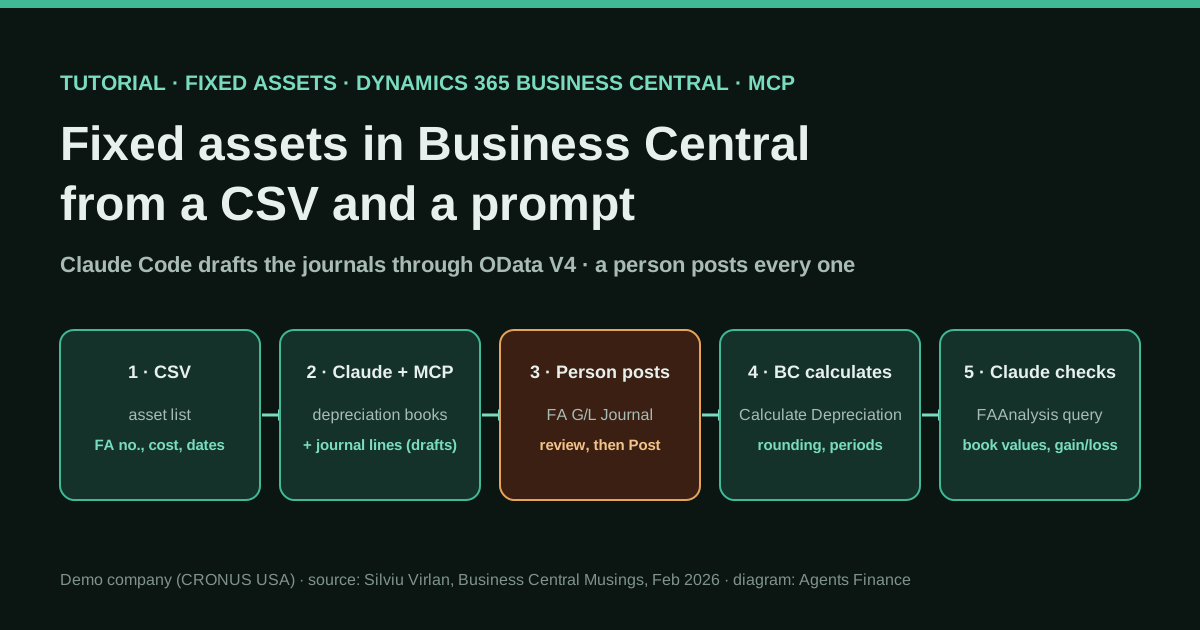
A Business Central consultant connected Claude Code to a Business Central environment through MCP and documented, step by step, how to run the fixed asset cycle from a CSV file. Claude reads the file, assigns depreciation books, drafts acquisition and disposal lines in the Fixed Asset G/L Journal through OData V4 web services and reads the results back. Business Central calculates depreciation and gain or loss, and a person reviews and posts every journal in the user interface.
What it offers, according to the source
Stated by the author for a demo company: nine assets with a total cost of 363,500 were given depreciation books and acquisition entries from one CSV, depreciation was calculated up to 5 February 2026 (152,468, 41.9% of cost) and two disposals were drafted, with zero lines of new AL code and about four to five hours of prompting and troubleshooting. He estimates that about 70% of the workflow can be automated. There is no real company, no time measurement against the manual process and no audit. The disposal example in the post computes gain and loss against cost rather than net book value, so check that part yourself.
Mind the evidence. Someone explains how they do it or did it, without verifiable figures. It is documented practice, not proof that it will work in your case.
What has really been tested
On 19 October 2026 we read the tutorial, the author's earlier setup post and his About page, Microsoft's documentation on configuring the Business Central MCP server and on fixed asset disposals, and the source code of Business Central's disposal calculation in Microsoft's BCApps repository. We recomputed the post's figures. We have not connected Claude to a Business Central environment, have not run the calls and have not seen the author's MCP server code, which he has not published. The starting prompt and the checklist below are ours.
How to follow it
Use a sandbox or a copy of a company, never production, and an app registration with the narrowest permission set that works. Start with three or four assets you already know, compare every journal line with what you would have keyed in by hand, keep posting in the Business Central interface and leave depreciation to the Calculate Depreciation batch job. Before posting a disposal, recompute the expected gain or loss from net book value.
- Connect Claude Code to a Business Central sandbox through MCP: register a Microsoft Entra app with application permissions, register it in Business Central with a permission set and use an MCP server that can call both the standard API and OData V4 web services.
- Publish three OData V4 web services in Business Central: page 5619 (FA Depreciation Books) as FADepBooks, query 123 (Analyse Fixed Assets) as FAAnalysis and page 5611 (Depreciation Book Card) as DepBooks. The workflowGenJournalLines endpoint is already available.
- Prepare a CSV with one row per asset: number, description, class or posting group, transaction, amount, posting date, depreciation method, years and the date to depreciate up to.
- Ask Claude to assign each asset its depreciation book in three calls (create the record with the keys, set the depreciation starting date, then the posting group and number of years), because Business Central validates the fields in that order.
- Ask Claude to create one acquisition line per asset in the Fixed Asset G/L Journal through workflowGenJournalLines, with FA posting type, depreciation book, document type and balancing account; then a person reviews the batch and posts it in Business Central.
- Run Calculate Depreciation in Business Central yourself and post the resulting journal; do not let the AI compute depreciation amounts.
- For sales, ask Claude for disposal lines (posting type Disposal, proceeds as a negative amount), check the expected gain or loss against net book value, post them yourself and have Claude read FAAnalysis to report book values and results.
In two sentences
Silviu Virlan, a Business Central developer and consultant, connected Claude Code to Dynamics 365 Business Central through MCP and published the full path from a CSV of fixed assets to posted acquisitions, depreciation and disposals, including every API call that failed along the way. Claude prepares the data and drafts the journals; Business Central does the depreciation and gain-or-loss arithmetic; and a person posts every entry.
Who does it and what kind of evidence this is
The tutorial appeared on 10 February 2026 on Business Central Musings, the blog Virlan has kept since 2016. On his About page he says he has worked only on Dynamics NAV and Business Central for more than twelve years, mostly as a developer and consultant, that Microsoft gave him the MVP award a few times, and that he writes Business Central books. His company, SVirlan.com LLC, trading as SureHoofERP, is a registered Microsoft partner. A week earlier he had published a shorter post on how he connected Claude to Business Central over a weekend.
Three points set the level of evidence:
- It was done in Microsoft’s demo company. The calls go to CRONUS USA, Inc., the sample company that ships with Business Central, and the nine assets (three vehicles and six pieces of conveyor and warehouse equipment) look like demo data. Nothing here comes from a real company’s fixed asset register.
- The figures describe the demo, not a saving. He reports the amounts posted, the effort it took to work the method out (about four to five hours of prompting, reading API responses and fixing failures) and his own estimate that about 70% of the workflow can be automated. Nobody timed it against keying the same assets in by hand.
- He sells Business Central consulting. The post ends with an offer of consulting and AL development. That does not make the method wrong, but it is worth knowing.
Why it deserves a long read anyway: it is one of the few public write-ups that goes beyond “ask your ERP a question” to writing accounting data into an ERP through MCP, and it is honest about what the standard API cannot do and why posting stays with a person. We found it while looking for Dynamics 365 examples; a reply on Reddit’s r/Accounting in June 2026, from someone whose firm moved from QuickBooks Online to Business Central and used Claude Code to build custom extensions, suggests practitioners are trying the same pairing.
The problem it tackles
Fixed assets are a classic close chore. Each new asset needs a card, a depreciation book (method, start date, useful life, posting group) and an acquisition entry; each month or year, depreciation; each sale, a disposal that must leave the asset at zero and post a gain or loss. In Business Central that means several pages per asset. A list of thirty new assets after a capex project, or twenty disposals at year end, is mostly typing, and typing is where errors creep in. The tutorial asks whether that typing can come from a spreadsheet and a few sentences, without writing any custom code.
Tools and architecture
- Claude Code, Anthropic’s command-line agent, connected to Business Central through an MCP server.
- A Python MCP server written by the author. In his setup post he describes it as a lightweight server that translates the AI’s tool calls into Business Central API requests, caches OAuth tokens, looks up company IDs and builds OData queries. It exposes tools such as
bc_list_fixed_assets,bc_list_companiesandbc_query. He has not published the code. - Business Central online, with an app registered in Microsoft Entra ID using application permissions (he notes that delegated permissions did not work for him),
API.ReadWrite.AllandAutomation.ReadWrite.All, admin consent, and the app registered in Business Central with a permission set. He used a full-access set for testing. - Four OData V4 endpoints. This is the key discovery. The standard API v2.0 exposes fixed asset master data, but its
journalLinesendpoint has no field for the FA posting type or the depreciation book, so an acquisition posted through it fails with “FA Posting Type must not be blank”. The built-inworkflowGenJournalLinesOData V4 endpoint exposes the whole general journal line, including those fields. He also published three pages and queries as web services: page 5619 FA Depreciation Books (asFADepBooks, read and write), query 123 Analyse Fixed Assets (asFAAnalysis, read-only, ledger entries with depreciation data) and page 5611 Depreciation Book Card (asDepBooks, read-only).
How this relates to Microsoft’s own MCP server: Microsoft’s documentation, checked on 19 October 2026, describes a Business Central MCP server for online environments that exposes API pages, API queries and API codeunits as tools, with a configuration page where an administrator sets, object by object, whether agents can read, create, modify, delete or run actions, plus an Unblock Edit Tools switch and a read-only Data Query Tools preview. The OData V4 web services this tutorial relies on are not API pages, which is why the author’s own server matters. We have not tested whether Microsoft’s server can reach them.
Step by step
The steps are summarised in our own words. Use a sandbox.
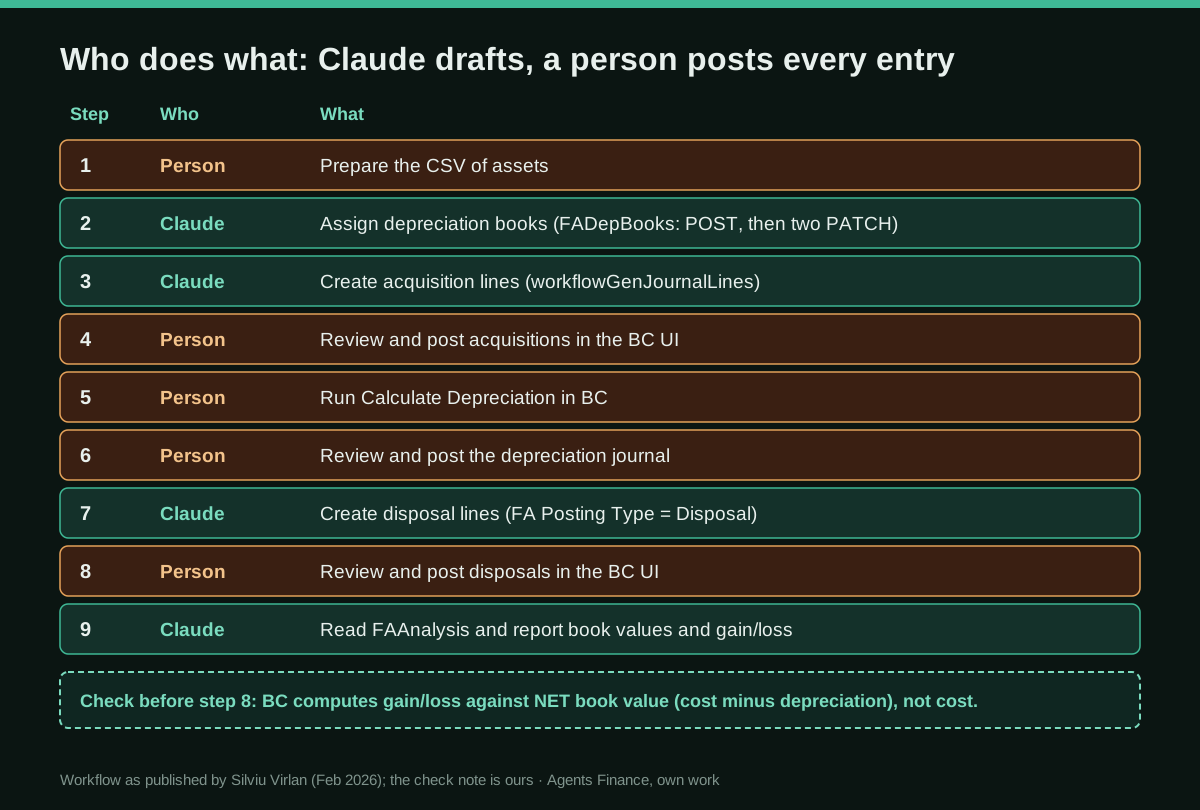
1. Connect and publish the web services
Register the Entra app, give it the API permissions and admin consent, add it on the Microsoft Entra Applications page in Business Central with a permission set, and connect your MCP server. Then open Web Services and publish page 5619 as FADepBooks, query 123 as FAAnalysis and page 5611 as DepBooks. The OData V4 address follows the pattern /v2.0/{tenant}/{environment}/ODataV4/Company('{company}')/{service}. Query 123 is a relatively recent addition to the base application, according to the author; check that your version has it.
2. Prepare the CSV
One row per asset with: asset number, description, class or posting group (VEHICLES, EQUIPMENT), transaction type, amount, posting date, depreciation method, number of years and the date to depreciate up to. In the demo all nine assets were acquired on 1 January 2024, straight-line over five years, for 363,500 in total. The post does not create asset cards: the numbers and names match assets that appear to exist already in the demo company. In your company, create the cards first or add that step.
3. Let Claude assign the depreciation books
For each asset Claude made three calls to FADepBooks: create the record with only the keys (asset number and book COMPANY), set the depreciation starting date, then set the posting group and the number of years. A single call with all the fields fails, because Business Central validates the fields in order and refuses the number of years while the start date is still blank. Business Central filled in the ending date (31 December 2028) itself.
4. Let Claude draft the acquisition lines
One line per asset in the Fixed Asset G/L Journal (template ASSETS, batch DEFAULT) through workflowGenJournalLines, with account type Fixed Asset, FA posting type Acquisition Cost, depreciation book COMPANY, a document number, posting and FA posting dates, the amount and a balancing G/L account. The author found that lines without a document type (he used Invoice) or without a balancing account would not post, and that Claude worked out the balancing account by reading earlier G/L entries for fixed asset postings.
5. Post the acquisitions yourself
The OData endpoint does not expose a Post action for this journal, so you open Fixed Asset G/L Journal, check the nine lines and post. The author calls this a safety net rather than a limitation, and we agree.
6. Let Business Central calculate depreciation
Run Calculate Depreciation for the book, with the posting date and document number you want and the balancing account per posting group, then post the journal. The author first had Claude compute depreciation with a day-count formula and the amounts did not match Business Central’s, which applies its own rounding and accounting-period logic. His conclusion, and ours: never let the AI compute depreciation the ERP already computes.
7. Draft disposals, check, post and verify
For a sale, Claude drafts a line with FA posting type Disposal (the API value; the error message lists the valid options, and Proceeds on Disposal, the label he expected, is not one of them), the proceeds as a negative amount and the bank account as the balancing account. You post it; Business Central computes the gain or loss and closes the asset. Finally Claude reads FAAnalysis and reports cost, accumulated depreciation and book value per asset.
A starting prompt (ours, not the author’s)
You are working in the Business Central SANDBOX company {{COMPANY}} through MCP.
Read {{CSV_FILE}}. Do not post anything and do not call any posting action.

1. List every asset in the file and confirm that its card exists. Stop and ask
   if any card is missing or any row has a blank date, amount or posting group.
2. For each asset, create the {{DEPRECIATION_BOOK}} depreciation book in three
   calls (keys, then starting date, then posting group and years). Show me a
   table of what you created.
3. Create one acquisition line per asset in template {{TEMPLATE}}, batch
   {{BATCH}}, with balancing account {{BALANCING_ACCOUNT}}. Use document numbers
   {{DOC_PREFIX}}-001 onwards.
4. Give me a control total: number of lines and total amount, compared with the
   CSV. Then stop. I will post the journal myself.
Never compute depreciation. Never change master data that is not in the CSV.
A concrete example and a figure to check
In the demo, after depreciation up to 5 February 2026, the nine assets carried 152,468 of accumulated depreciation and a book value of 211,032, 41.9% of cost, which fits about two years and one month of a five-year straight line. The author then sold the switchboard (cost 8,500) for 5,000 and the conveyor computer (cost 15,000) for 18,000.
His table of expected results shows a loss of 3,500 and a gain of 3,000: sale price against cost. But his own report a few lines earlier gives net book values of 4,935 and 8,708. Business Central’s disposal code, published by Microsoft, computes the result as book value plus proceeds on disposal. Both the depreciation run and the disposals are dated 5 February 2026, so on our arithmetic the expected results would be gains of about 65 and 9,292, not a loss of 3,500 and a gain of 3,000. The post does not show the depreciation entries in the disposal listing, so we cannot tell what was actually posted. The lesson matters more than the discrepancy: recompute every expected gain or loss from net book value before you post, and treat the AI’s own explanation as a claim to check. Microsoft also reminds you that a disposal must be the last entry posted for an asset, and a partial disposal requires splitting the asset first.
Results, as stated
- Nine assets, 363,500 of cost: depreciation books and acquisition lines created from one CSV and a short instruction.
- Depreciation calculated and posted by Business Central: 152,468 to 5 February 2026.
- Two disposals drafted by Claude and posted by a person.
- Zero lines of new AL code; four API endpoints used; about four to five hours to work it all out; and his estimate of roughly 70% of the steps automatable, with four human review points (all postings).
All of it in a demo company. There is no figure for time saved on a real register.
Limitations and risks
- Sandbox only, at first. A full-access permission set and an app with write permissions are fine for a demo, not for production. Give the app the narrowest set that works and keep the posting rights with people.
- Microsoft’s server can post documents if you let it. Its documentation lists running OData actions “like posting documents” among the things agents can do when actions are allowed. If you use the official server, decide deliberately which objects get Allow Actions; in this tutorial posting is manual by design.
- Undocumented server code. The author’s MCP server is not public. Whatever you use, log every call and keep the journal batch as your review point.
- Country rules. The demo is a US company with straight-line depreciation. Useful lives, methods, tax versus book depreciation and what goes into the annual accounts depend on your country and your policy; the AI does not decide them.
- The demo’s own figures need checking, as the disposal example shows.
Common mistakes
- Using the standard
journalLinesAPI for fixed assets: no FA posting type, so posting fails. - Sending all depreciation book fields in one call: Business Central validates in order and rejects it.
- Leaving out the document type or balancing account: the lines will not post.
- Using UI labels as API values: the posting type is Disposal, not Proceeds on Disposal.
- Letting the AI compute depreciation: rounding and periods will not match.
- Judging a disposal against cost instead of net book value.
Conclusions
This is a modest, useful pattern: the AI does the typing between a spreadsheet and the ERP, the ERP does the accounting arithmetic, and a person posts. Its real value is the list of traps an experienced Business Central consultant hit and solved. Its weak spot, the gain-or-loss example, is a reminder of why the review gate stays. If you run Business Central, try it in a sandbox with a few assets you already know, and compare every line before posting anything.
Sources
- Business Central Musings (Silviu Virlan) — Fixed Asset Accounting from a Prompt: Claude MCP Meets Business Central (10 February 2026) (opens in a new tab) (primary)
- Business Central Musings (Silviu Virlan) — Weekend Project: Teaching AI to Talk to Business Central (3 February 2026; the connection setup) (opens in a new tab)
- Business Central Musings — About (author's background and consulting business) (opens in a new tab)
- Microsoft Learn — Configure Business Central MCP Server (opens in a new tab)
- Microsoft Learn — Dispose or retire fixed assets in Business Central (opens in a new tab)
- Microsoft BCApps on GitHub — CalculateDisposal codeunit (how Business Central computes gain or loss on disposal) (opens in a new tab)
- Reddit r/Accounting — “Claude” (a reply from someone who moved from QuickBooks Online to Business Central and built extensions with Claude Code, June 2026) (opens in a new tab)
We wrote this entry in our own words from the sources above and checked that the links worked on October 19, 2026. Is anything incorrect? Tell us.