What they do and how
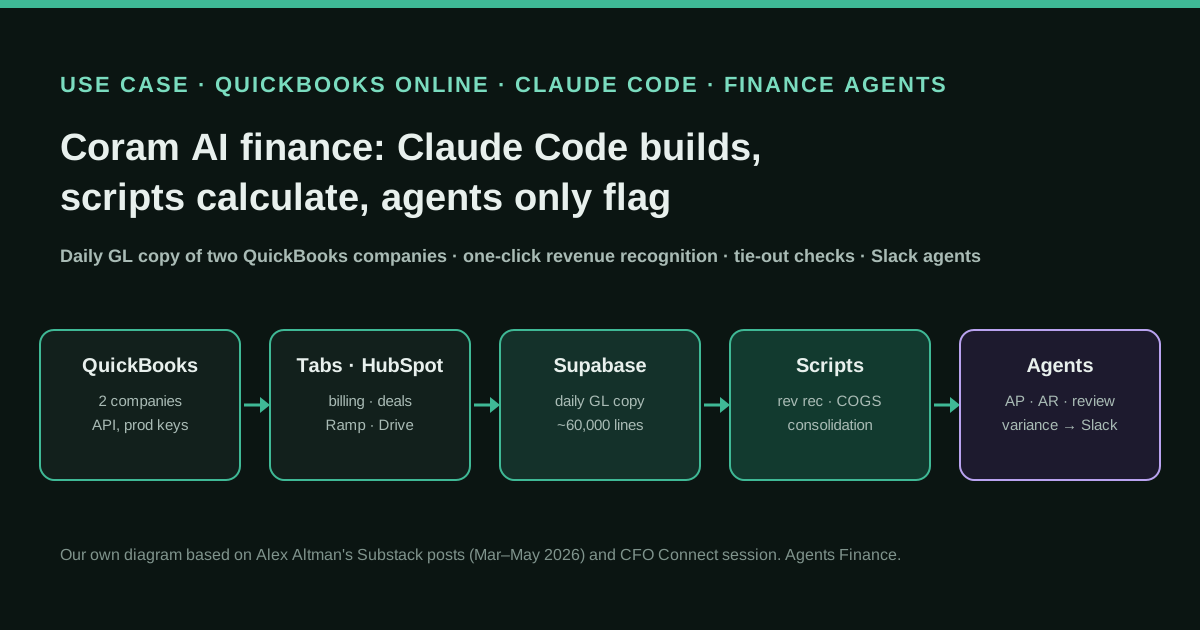
Coram AI's finance function is two people. Its head of finance, who says he had never written code, used Claude Code to write Python scripts that pull billing data from Tabs, deals from HubSpot and the ledger from QuickBooks Online, then post the monthly revenue recognition, COGS, prepaid and depreciation entries to QuickBooks after his review, with an Excel audit file. A daily sync copies the full general ledger of both QuickBooks companies (about 60,000 lines) into Supabase, where mapping tables drive a consolidated P&L, balance sheet and cash flow with tie-out checks. On top of that database, agents that live in Slack review every bill, every closed deal and every QuickBooks posting, and compare results with plan, flagging only what changed.
Reported result
Stated by Alex Altman: revenue recognition went from four hours a month (four to six in the CFO Connect session) to "one click and a few confirmations", after a few months of running both methods in parallel; when checked against twelve months of history, the model found a June discrepancy that was an error in the books, and a correction was posted. The consolidation rebuild took about three hours once QuickBooks was connected. In their first runs the AP agent found a long-standing vendor with no contract on file and the AR agent found four closed deals whose line items had not flowed through correctly. He used about seven million tokens in the month he built most of it. No audit, error rate or close-length figure is given.
Stated figures. An identified person or organization states that they have used it. The results are stated by the source; we have not audited them.
What has really been tested
On 22 October 2026 we read Alex Altman's four posts on the stack (March to May 2026), the full transcript of his CFO Connect live session, his LinkedIn post on Coram AI's funding, Intuit's pages on production keys and the app assessment questionnaire, and the README and LICENSE of Intuit's QuickBooks Online MCP server. We have not seen his code, his Supabase schema, his CLAUDE.md files or his QuickBooks data, and he publishes no repository. Every file under "Copy and adapt" is an Agents Finance template based on what he describes; none has been run against a live QuickBooks company.
How to replicate it
Get your QuickBooks Online data out first: API access with production keys (or full GL exports if you cannot), copied daily into a database you control. Build the mapping tables in Excel before you open Claude Code, then ask Claude Code, in plan mode, to write deterministic scripts that turn that data into your entries and statements, and make every output tie to QuickBooks (net income by entity and month, cash). Run new scripts in parallel with the old process before trusting them, and keep posting behind an explicit approval. Only then add agents, one job each with its own CLAUDE.md and thresholds in a policy file, that read the database and flag changes instead of fixing them.
In two sentences
Alex Altman, who runs finance at the video-security company Coram AI with one accountant, used Claude Code to turn QuickBooks Online into something closer to a small ERP: scripts that post reviewed month-end entries, a daily copy of the whole general ledger in a database, consolidated statements with checks, and a set of agents that watch the books and only speak up when something changed. His rule is the part worth copying: Claude writes the system, but the numbers are produced by deterministic code, and the agents only flag.
Who does it and why it matters
Coram AI sells AI video security and access control, with a lot of its work in schools. Altman says the company raised a $35M round in 2026 and that finance is two people: him and an accountant, alongside a business operations lead, a part-time admin and a warehouse associate. Between them they cover finance, accounting, legal, HR, operations, inventory and shipping. The company runs on QuickBooks Online, with more than one QuickBooks company and at least one entity outside the US dollar.
He has told the story in public twice: in a series of posts on his Substack between March and May 2026, and in a 40-minute live session for CFO Connect, a community for finance leaders, where he demoed the tools with dummy data. That gives us two independent formats from the same first-hand source. He is not selling software; the posts promote his own profile, and the figures are his.
Three reasons make this case useful for a finance team on QuickBooks:
- It is ordinary SMB tooling. No NetSuite, no consultants, no data team. QuickBooks Online, a billing tool, a CRM, Slack and a hosted Postgres database.
- It separates building from running. Altman is explicit: “I do not trust Claude to manipulate my financials. I trust Claude to build a system that does.” In the live session he adds that, once built, the data flows from QuickBooks to Supabase to the portal and Claude is not in that loop.
- It shows the order of work. Data access first, then deterministic schedules, then consolidation and checks, then agents. Each layer stands on the one before.
Tools and architecture
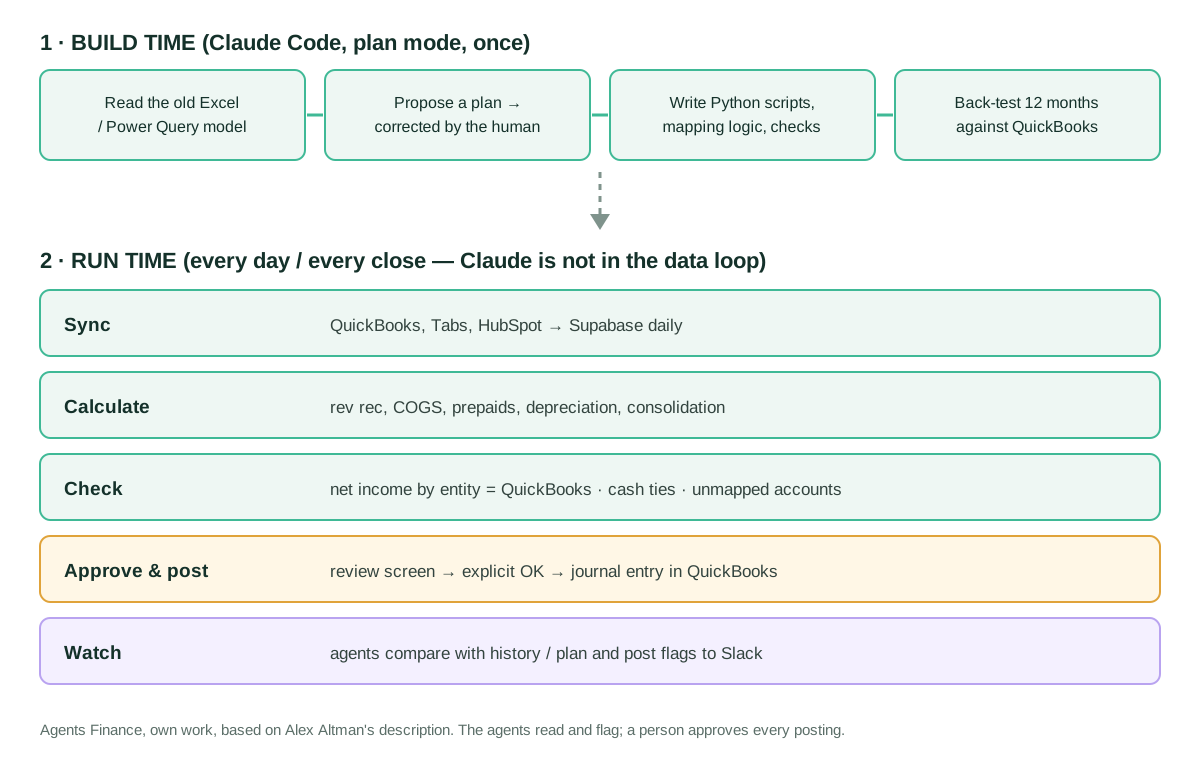
The stack, as described in the posts and the session:
- QuickBooks Online through the API. Altman tried a third-party automation tool’s QuickBooks connector first and found it unsuited to pulling a full general ledger of 50,000+ transactions. He then applied for production keys on the Intuit Developer portal, which requires an app assessment questionnaire even for a private, internal app. He had Claude Cowork fill it in as a browser agent; he says approval was instant. The keys went into Claude Code.
- Supabase as the finance database. Claude Code proposed it while building the consolidation. A scheduled job downloads every general ledger line of both QuickBooks companies (about 60,000 rows) every day and re-checks prior periods, not just new activity.
- Deterministic scripts. Revenue recognition reads the billing export from Tabs (through its API) and closed-won deals from HubSpot, computes revenue per customer and product line, builds the journal entry, and posts it to QuickBooks after a review screen. The same pattern now covers COGS, prepaid schedules and fixed-asset depreciation. Each run produces an Excel file with the revenue summary, the entry and a deferred revenue waterfall, saved to the month-end folder for the auditors.
- Consolidation. Mapping tables (chart-of-accounts bridge, summary groups, statement tags, departments and an FX table with monthly average and month-end rates) drive a consolidated P&L, balance sheet and indirect cash flow, with toggles for entity, fiscal or calendar year and period.
- A portal. An engineer spent a day putting it on Vercel behind Google single sign-on, with modules gated at the database, so marketing sees acquisition cost reports and not the financials.
- Agents in Slack. Each one watches one area, runs on its own schedule and has its own CLAUDE.md with its responsibilities, sources and flag rules; the variance engine reads its thresholds from a
policy.yaml.
The agent team
Altman describes a small org chart:
- AP agent. For every bill and card expense: is there a contract for this vendor in Google Drive, is the GL account different from how the vendor was coded before, and is the amount out of line with past bills. A morning alert lists what passed, what was flagged and a recommendation. His key design prompt turned it from guessing the right account into change detection: the check should just say “this is a different account than it was last bill”.
- AR and sales-ops agent. Every three hours it checks that closed-won deals in HubSpot carry the right figures from the signed quote, that every closed deal has an invoice, and that overdue invoices have a documented collections plan. It does not fix data; it routes issues. One correction from him made it stricter on currency: pass only if the foreign-currency amount matches, because a matching USD amount means the conversion never happened.
- QuickBooks review agent. Every posting is tagged normal, different or unexpected compared with the previous period. He reviews the last two groups.
- Two analyst agents. A variance engine compares actuals with plan every Monday (net new ARR, gross margin, runway, burn multiple, cash burn, headcount, revenue, bookings) against thresholds in
policy.yaml; a financial analyst runs after close and writes five to ten numbered observations, each with the change, a hypothesis and a follow-up. - Investigation agent. It emerged when he asked whether “why?” should be a second agent on top of the analyst. It routes each flag to a specialist with its own playbook (hardware margin looks at SKU cost, discount and average selling price). On its sixth run the working-capital specialist reported that inventory data was missing and stopped instead of guessing.
- Controller agent (planned in May 2026). It would route escalations to the right person in Slack and follow up.
Step by step to replicate the pattern
- Get the ledger out. Production API access to QuickBooks Online, or, if you cannot, full general ledger exports. Altman’s advice to beginners in the session: there is always a way to get data onto your desktop, even CSV.
- Copy it to a database you own, daily, all periods, so the agents and reports work from one source of truth instead of calling five APIs.
- Build the mapping tables in Excel first. Chart-of-accounts bridge, summary groups, statement tags, department parents, FX rates. The cleaner they are, the less Claude has to guess.
- Use plan mode. Ask Claude Code for a plan, read it, correct it, then let it build. Altman calls skipping this step the way to get garbage.
- Make every output tie. Each entity’s net income must equal QuickBooks; translated entities must add to the consolidated total; cash in the cash flow must equal cash on the balance sheet. Do not let Claude plug the cumulative translation adjustment.
- Back-test before trusting. Run the new script over the last twelve months against what is booked, explain every difference, then run both methods in parallel for a few closes.
- Keep a human gate on posting. Review screen, explicit confirmation, closed periods locked in QuickBooks.
- Add agents last, one job each, reading the database, flagging changes against history or plan, and reporting gaps instead of filling them.
Copy and adapt
Altman publishes no code, prompts file or repository; the short prompts quoted above are from his posts. Everything below is an Agents Finance template based on his description, written for a QuickBooks Online company and a Postgres database such as Supabase. Nothing here has been run against a live QuickBooks company: test it in a sandbox company first. No secrets go in these files; keep keys in environment variables.
Prerequisites
- QuickBooks Online with admin access, and an Intuit Developer account. Production keys require the app assessment questionnaire, also for private apps. If an AI agent helps you fill it in, read every answer before you submit: you are the one attesting to how the app handles data.
- Claude Code on a paid Claude plan (it is not in the free plan).
- A Postgres database (Supabase or any other) and somewhere to run a daily job.
- Python 3.11+ with
requestsandpsycopgfor the sync template. - Optional: Slack incoming webhooks for the agents’ alerts.
1. Kick-off prompt for the first schedule (Agents Finance template)
We are in plan mode. Do not write code until I approve the plan.

Goal: a script that produces our monthly revenue recognition journal entry for {{MONTH}}.

Inputs
- Billing export: {{BILLING_FILE_OR_API}} (one row per invoice line: customer, product line, amount, service period, discount %).
- Closed-won deals: {{CRM_EXPORT_OR_API}} (deal id, customer, line items, ship date).
- Last month's workbook, which shows the method I use today: {{LAST_MONTH_XLSX}}.

Method (deterministic, no estimates by the model)
- Software revenue is recognised ratably over the service period.
- Hardware revenue is recognised on {{INVOICE_DATE_OR_SHIP_DATE}}.
- Discounts reduce revenue on the same basis as the line they belong to.

Outputs
1. An Excel file with: revenue summary by customer and product line, the journal entry (account, debit, credit, memo), and a deferred revenue waterfall for the next 12 months.
2. A JSON file with the journal entry, ready to post. The script must NOT post anything.

Checks
- Total revenue in the entry = total in the summary = movement in deferred revenue + billings.
- List every billing line that could not be matched to a deal.

Then propose how to back-test this method against the last 12 months already booked in QuickBooks, month by month, and how you will show me differences down to the customer and line.
2. Database schema for the daily ledger copy (Agents Finance template, Postgres)
-- One row per general ledger line, per QuickBooks company
create table if not exists gl_line (
  entity        text        not null,   -- e.g. 'US', 'UK'
  txn_date      date        not null,
  txn_type      text,
  doc_num       text,
  account_name  text        not null,
  name          text,                   -- vendor / customer
  memo          text,
  debit         numeric(18,2) default 0,
  credit        numeric(18,2) default 0,
  currency      text        not null,
  synced_at     timestamptz not null default now()
);
create index if not exists gl_line_entity_date on gl_line (entity, txn_date);

-- Mapping tables, built in Excel first and loaded as CSV
create table if not exists coa_bridge (
  entity        text not null,
  account_name  text not null,
  group_name    text not null,           -- consolidated account / summary group
  statement     text not null check (statement in ('IS','BS')),
  primary key (entity, account_name)
);

create table if not exists fx_rate (
  month         date not null,           -- first day of month
  currency      text not null,
  avg_rate      numeric(18,8) not null,  -- for the P&L
  month_end_rate numeric(18,8) not null, -- for the balance sheet
  primary key (month, currency)
);

-- Net income per entity and month as reported by QuickBooks (loaded by the sync)
create table if not exists qbo_net_income (
  entity        text not null,
  month         date not null,
  net_income    numeric(18,2) not null,
  primary key (entity, month)
);

-- New accounts that nobody has mapped yet: show this on the dashboard
create or replace view unmapped_accounts as
select distinct g.entity, g.account_name
from gl_line g
left join coa_bridge b on b.entity = g.entity and b.account_name = g.account_name
where b.account_name is null;
3. Tie-out check: our P&L against QuickBooks (Agents Finance template)
-- Any row returned is a break to investigate before anyone uses the numbers
with ours as (
  select g.entity,
         date_trunc('month', g.txn_date)::date as month,
         sum(g.credit - g.debit) as net_income
  from gl_line g
  join coa_bridge b on b.entity = g.entity and b.account_name = g.account_name
  where b.statement = 'IS'
  group by 1, 2
)
select coalesce(o.entity, q.entity) as entity,
       coalesce(o.month, q.month)   as month,
       o.net_income                 as ours,
       q.net_income                 as quickbooks,
       coalesce(o.net_income,0) - coalesce(q.net_income,0) as difference
from ours o
full join qbo_net_income q on q.entity = o.entity and q.month = o.month
where abs(coalesce(o.net_income,0) - coalesce(q.net_income,0)) > 0.01
order by 1, 2;
4. Daily sync from the QuickBooks General Ledger report (Agents Finance template, untested)
It reads the GeneralLedger report of the QuickBooks Online Reports API one month at a time and replaces that month in gl_line. Column titles vary with your report settings, so print one response and adjust COLS before loading anything.
"""Daily copy of the QuickBooks Online general ledger into Postgres.
Agents Finance template based on Alex Altman's description. Untested: run it
against a sandbox company first. Credentials come from environment variables."""
import os, datetime as dt, requests, psycopg

BASE = "https://quickbooks.api.intuit.com"          # sandbox: https://sandbox-quickbooks.api.intuit.com
REALM = os.environ["QBO_REALM_ID"]
TOKEN = os.environ["QBO_ACCESS_TOKEN"]               # refresh it with your OAuth flow before running
ENTITY = os.environ.get("ENTITY", "US")
CURRENCY = os.environ.get("CURRENCY", "USD")
COLS = "tx_date,txn_type,doc_num,name,memo,debt_amt,credit_amt"

def fetch(start, end):
    r = requests.get(f"{BASE}/v3/company/{REALM}/reports/GeneralLedger",
                     params={"start_date": start, "end_date": end, "columns": COLS},
                     headers={"Authorization": f"Bearer {TOKEN}", "Accept": "application/json"},
                     timeout=120)
    r.raise_for_status()
    return r.json()

def walk(rows, account=None):
    """The report nests one section per account; data rows sit inside."""
    for row in rows.get("Row", []):
        if "Header" in row:  # section header carries the account name
            acc = row["Header"]["ColData"][0].get("value") or account
            yield from walk(row.get("Rows", {}), acc)
        elif row.get("type") == "Data":
            yield account, [c.get("value", "") for c in row["ColData"]]

def num(x):
    try: return float(x)
    except ValueError: return 0.0

def sync_month(conn, first):
    last = (first.replace(day=28) + dt.timedelta(days=4)).replace(day=1) - dt.timedelta(days=1)
    rep = fetch(first.isoformat(), last.isoformat())
    lines = [(acc, v) for acc, v in walk(rep.get("Rows", {})) if v and v[0] and v[0][0].isdigit()]
    with conn.cursor() as cur:
        cur.execute("delete from gl_line where entity=%s and txn_date between %s and %s", (ENTITY, first, last))
        for acc, v in lines:
            cur.execute("""insert into gl_line (entity, txn_date, txn_type, doc_num, name, memo,
                           account_name, debit, credit, currency)
                           values (%s,%s,%s,%s,%s,%s,%s,%s,%s,%s)""",
                        (ENTITY, v[0], v[1], v[2], v[3], v[4], acc, num(v[5]), num(v[6]), CURRENCY))
    conn.commit()
    return len(lines)

if __name__ == "__main__":
    months_back = int(os.environ.get("MONTHS_BACK", "24"))   # re-check prior periods every day
    today = dt.date.today()
    with psycopg.connect(os.environ["DATABASE_URL"]) as conn:
        for i in range(months_back):
            y, mth = divmod(today.year * 12 + today.month - 1 - i, 12)
            first = dt.date(y, mth + 1, 1)
            print(first, sync_month(conn, first))
5. CLAUDE.md for the AP agent (Agents Finance template)
# AP review agent

## Job
Review every new bill and card expense since the last run and tell the head of finance
what passed and what needs attention. You never edit, approve, pay or post anything.

## Sources (read-only)
- Database tables: gl_line, bills, card_expenses, vendors.
- Contracts folder: {{DRIVE_CONTRACTS_FOLDER}} (one subfolder per vendor).

## Checks, in this order
1. Contract on file: if the vendor has no contract in the folder, flag "no contract".
2. Account change: compare the GL account with the account used on this vendor's previous bill.
   If it differs, flag "different account than last bill" and say whether the change looks
   reasonable. Do NOT guess what the right account should be.
3. Amount outlier: flag if the amount is more than {{OUTLIER_PCT}}% above the vendor's
   average of the last {{N_BILLS}} bills, or if it is the first bill above {{NEW_VENDOR_LIMIT}}.

## Output (one Slack message per run)
- Line 1: counts (reviewed / passed / flagged).
- Then one bullet per flag: vendor, date, amount, account, check that failed, your recommendation.
- If a source is missing or a query fails, say which one and stop. Never fill gaps with assumptions.
6. Thresholds for the variance engine (Agents Finance template)
# policy.yaml — read by the variance agent every Monday; change thresholds here, not in prompts
compare_to: plan            # plan | prior_month | prior_year
metrics:
  net_new_arr:      { flag_if_variance_pct_over: 10 }
  gross_margin_pct: { flag_if_points_below_plan: 2 }
  runway_months:    { flag_if_drop_week_over_week: 1 }
  burn_multiple:    { flag_if_above: 2.0 }
  cash_burn:        { flag_if_variance_pct_over: 15 }
  headcount:        { flag_if_behind_plan_by: 2 }
  revenue:          { flag_if_variance_pct_over: 5 }
  bookings:         { flag_if_variance_pct_over: 15 }
opex_lines:
  flag_if_variance_abs_over: 10000   # in reporting currency
collections:
  flag_if_qtd_behind_plan_pct: 10
output:
  channel: "#finance-flags"
  max_items: 10
  each_item_needs: [metric, actual, plan, variance, drill_through_query]
7. Read-only exploration with Intuit’s MCP server (literal extract, Apache-2.0)
If you want Claude Code to answer questions about the books before you build any script, Intuit publishes a local MCP server whose configuration lets you switch off the categories of tools that write. Extract from the README of intuit/quickbooks-online-mcp-server (Apache License 2.0 in its LICENSE file, although the README badge says MIT). We changed only the three DISABLE_* values to "true"; this is not the route Altman used, he called the API directly.
{
  "mcpServers": {
    "quickbooks": {
      "command": "node",
      "args": ["path/to/mcp-quickbooks-online/dist/index.js"],
      "env": {
        "QUICKBOOKS_CLIENT_ID": "your_client_id",
        "QUICKBOOKS_CLIENT_SECRET": "your_client_secret",
        "QUICKBOOKS_REFRESH_TOKEN": "your_refresh_token",
        "QUICKBOOKS_REALM_ID": "your_realm_id",
        "QUICKBOOKS_ENVIRONMENT": "sandbox",
        "QUICKBOOKS_DISABLE_WRITE": "true",
        "QUICKBOOKS_DISABLE_UPDATE": "true",
        "QUICKBOOKS_DISABLE_DELETE": "true"
      }
    }
  }
}
A concrete example (fictional)
A company has a US and a UK QuickBooks company. In week one the sync loads 24 months of both ledgers. The tie-out query returns one row: the UK company’s March net income differs from QuickBooks by £1,200. The unmapped_accounts view explains it: an account “Software subscriptions – EMEA” was created in March and is not in coa_bridge. The controller maps it, the break disappears, and the consolidated P&L for March now ties. On Tuesday the AP agent posts: 14 bills reviewed, 12 passed, 2 flagged: a cloud provider coded to “Professional fees” instead of last month’s “Hosting”, and a new contractor with no contract in the folder. Nothing is posted until a person decides.
Results stated by the source
All figures come from Alex Altman, about his own work, and are not audited:
- Revenue recognition took four hours a month in the March post and four to six in the live session; now it is “a button click or three button clicks”, after a few months running both methods in parallel.
- In the back-test over twelve months, Claude Code worked for about 45 minutes and found a June difference that was an error in the books (a line from a deal that closed late but shipped that month). A correcting entry was posted, with his approval, to the current open month. A second check on deferred revenue found another booking error traced to a specific journal entry.
- The consolidation rebuild took about three hours, once the QuickBooks connection existed; the daily copy holds about 60,000 ledger lines.
- In their first runs, the AP agent found a long-standing vendor with no contract on file, and the AR agent found four closed deals whose line items had not flowed through, before quarter-end close.
- He used about seven million tokens in the month he built most of the portal.
Limitations and risks
- One narrator. Posts and session come from the same person; there is no statement from Coram AI’s auditors or accountant, and no measured close length or error rate.
- Write access is real. Altman warns that once connected, Claude Code can post, edit and reclassify at scale; QuickBooks closed periods are the only hard stop. His advice to non-engineers to “just say yes” to questions they do not understand applies to building, not to postings: read every write request.
- Questionnaire answers are yours. Letting an agent fill in Intuit’s app assessment is fast, but the answers describe your security and data handling and must be true.
- A database copy is a new place for financial data. Access control, backups and who can read what (he gates modules at the database) become finance’s problem.
- Key-person risk. The system was built by one person through prompting; document the scripts and checks so the accountant or an auditor can follow them.
- Inventory is not solved. He said in the session that his inventory module kept failing; the agents are presented as in progress, with the controller agent still planned in May 2026.
Common mistakes
- Asking Claude for the numbers instead of for the script that produces them.
- Skipping plan mode and accepting the first build.
- Building a consolidation without an unmapped-accounts view, so new accounts silently drop out.
- Plugging the translation adjustment so the balance sheet always balances, which hides errors.
- One agent for everything. Altman found that one job per agent, with its own CLAUDE.md, gave clearer prompts and better results.
- Too many flags. Thresholds need tuning; too many alerts are noise, too few miss things.
Conclusions
The Coram AI case is less about a clever agent than about order: get the ledger out, make the numbers deterministic and tied to QuickBooks, keep posting behind a person, and only then let agents watch for change. For a QuickBooks Online company that has outgrown spreadsheets but not into NetSuite, it is a credible path that a finance lead can start alone, as long as the controls grow with the tooling.
Sources
- Alex Altman (Substack) — A Team of Finance Agents, Running 24/7 (21 May 2026) (opens in a new tab) (primary)
- Alex Altman (Substack) — I've never written a line of code. I'm going to have a one-click close in six months (18 March 2026) (opens in a new tab)
- Alex Altman (Substack) — How I Connected Claude Code to QuickBooks (24 March 2026) (opens in a new tab)
- Alex Altman (Substack) — How to Consolidate Your Financials with Claude Code (11 May 2026) (opens in a new tab)
- CFO Connect (YouTube) — Live-Build Session #4: Finance Workflows with Claude, Cowork & Code, with Alex Altman, Head of Finance, Coram AI (6 May 2026) (opens in a new tab)
- Intuit Developer Blog — Updated process to get production keys (app assessment questionnaire) (opens in a new tab)
- GitHub — intuit/quickbooks-online-mcp-server (Apache-2.0 LICENSE file) (opens in a new tab)
We wrote this entry in our own words from the sources above and checked that the links worked on October 22, 2026. Is anything incorrect? Tell us.