What they do and how
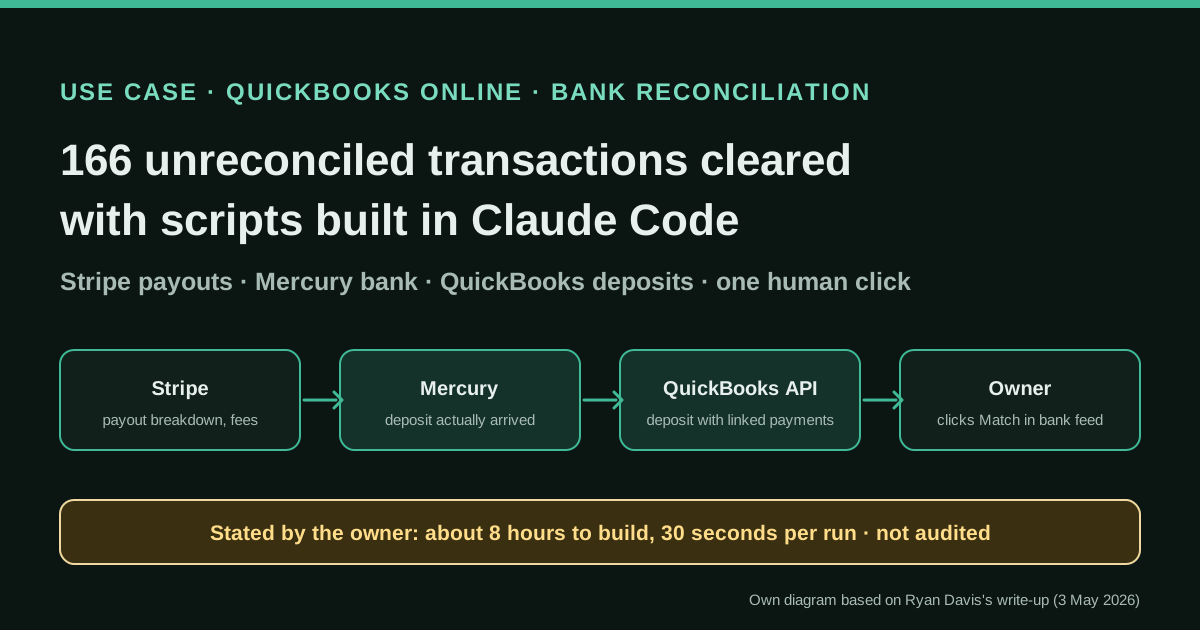
Stripe pays out card receipts in batches, net of its fees and, in this case, net of Stripe Capital loan repayments, so the deposits in the bank feed never equal the invoices recorded in QuickBooks. Ryan Davis had 166 unreconciled bank transactions piling up before tax season. With Claude Code he built three Python command-line tools: one breaks down a Stripe payout into charges, fees and Capital deductions; one confirms the deposit landed in his Mercury account; and one creates a QuickBooks Online deposit that links the existing invoice payments, posts the fees to an expense account and stores the Stripe payout ID. He then clicks "Match" once per line in the QuickBooks bank feed.
Reported result
Stated by Ryan Davis: building the tools took "maybe 8 hours of focused work" over a weekend; the reconcile command processed all outstanding payouts "in about 30 seconds"; 166 transactions were cleared and his P&L was ready for tax prep; producing the P&L for his tax preparer took 20 minutes instead of a task he had dreaded for weeks; and he compares the one-off 8 hours with "4+ hours every month" of manual reconciliation. The tools now run weekly (reconcile) and monthly (P&L). There is no error rate, no count of payouts or amounts, and no review by an accountant; the figures are his own and unaudited.
Stated figures. An identified person or organization states that they have used it. The results are stated by the source; we have not audited them.
What has really been tested
On 18 October 2026 we read Ryan Davis's post in full and his home page, which lists the same "bookkeeping pipeline" among his tools; we checked Stripe's documentation on payout reconciliation and Stripe Capital, Intuit's reference page for the Deposit entity and a public Intuit developer question about a gated bank-feed endpoint. We have not seen his code, have not run it and have not tested the QuickBooks or Stripe calls ourselves. The worked example, the accounting treatment of the Capital withholding and the starting brief for Claude Code in this article are ours.
How to replicate it
Record invoices and customer payments in your books first (here, WHMCS feeds QuickBooks). Then, in a QuickBooks sandbox, have a coding agent write a script that, for each automatic Stripe payout, lists its balance transactions, maps every charge to an existing payment, totals fees and any loan withholdings, checks the net amount against the bank, and creates one deposit with the linked payments plus negative lines for fees and withholdings, storing the payout ID. Skip payouts already deposited, review a handful by hand, then match them in the bank feed yourself.
In two sentences
Ryan Davis, a small-business owner who runs a managed WordPress hosting company, used Claude Code to write three small Python tools that turn each Stripe payout into a properly structured QuickBooks Online deposit, so the bank feed can be matched with one click per line. By his own account it took about eight hours to build, cleared a backlog of 166 unreconciled transactions before tax season and now runs every week.
Who does it and why it is interesting
Davis lives in Binghamton, New York, and owns three web companies: Lucky Tyke (WordPress builds), WebOps Hosting (managed hosting, 125 sites according to his home page) and Osita (search marketing). Like many owner-managers, he keeps his own books in QuickBooks Online. His customers pay invoices issued from WHMCS, a billing system common among hosting providers, and most pay by card through Stripe.
The case deserves a place in this directory for three reasons:
- It is a problem almost every online business has. Card processors do not pay invoice by invoice. Stripe groups several charges into one payout, deducts its fees and sends the net amount. The bank shows $1,443.19; the books show a handful of invoices for round amounts. Matching one to the other by hand is slow, and it is the reason many small companies’ bank feeds fill up with “For Review” items.
- It is first-hand and specific. The post names the tools, the commands, the order of the calls, what did not work and how long it took. Nobody is selling anything: Davis’s businesses are web services, not accounting software.
- The AI is used to build, not to decide. Claude Code wrote and debugged the integration; the scripts themselves are deterministic. No model reads the bank statement and guesses a category. That is a pattern worth copying in accounting, where the same input should always give the same entry.
The problem in detail
Davis lists what made the deposits impossible to match directly:
- Fees. A $100 invoice paid by card arrives as $96.80, because Stripe keeps 2.9% plus $0.30 (his figures, which correspond to Stripe’s standard US card pricing).
- Batching. Several invoices land in a single payout.
- Loan repayments. He has a Stripe Capital loan, and Stripe withholds part of his sales to repay it. Stripe’s documentation confirms the mechanism: repayment is a percentage of Stripe sales, “the repayment rate”, plus minimum payments on loans.
Doing this manually meant, for each deposit: find it in the bank feed, look up the payout in the Stripe Dashboard, open the invoices it contained, work out the fees, then build a split transaction in QuickBooks. He had more than 50 payouts to do.
Tools and architecture
His first idea was to let a script work directly on the QuickBooks bank feed. Claude Code researched the API and concluded that transactions in the “For Review” queue are not available through the QuickBooks Online API, because Intuit receives bank data through aggregators. Our check nuances this: a public question on Intuit’s developer forum describes a bankfeedtransaction endpoint that returns “Operation bankfeedtransaction is not supported” unless Intuit enables a beta for the app. In practice, for a small business, Davis’s conclusion holds: the review queue is not something you can count on automating.
So he changed the target. Instead of categorising bank lines, he created the transactions that QuickBooks needs in order to suggest a match. Over a weekend, working with Claude Code, he built three command-line tools that call each other:
stripe.pyreturns the full breakdown of a payout: which charges it included, the fees by type and any Capital deductions. Stripe documents exactly this: for automatic payouts, you can list the balance transactions belonging to a payout ID (po_…) and expand each one to its charge or refund.mercury.pylooks for the matching deposit in his Mercury business bank account by amount and date, to confirm the money actually arrived.qbo.pycreates a QuickBooks Online deposit that links the payments already recorded for those invoices, posts the fees to a “Payment Processing Fees” expense account and writes the Stripe payout ID in a private note.
The reconcile command chains them in five steps: get the payout from Stripe; read the WHMCS invoice numbers from the charge descriptions; connect over SSH to his WHMCS server to look up the QuickBooks payment IDs for those invoices; skip any payment that is already deposited; create the deposit through the QuickBooks API.
A shared lib/credentials.py module unlocks a Bitwarden vault once per session and serves the API keys to every script, so no secret is written into the code.
Step by step to replicate it
Davis gives the design, not the code. The steps below follow his design; where we add something, we say so.
- Make sure the invoices and payments already exist in the books. His pipeline assumes each paid invoice is already a QuickBooks payment waiting to be deposited (in his case it comes from WHMCS). If your payments are not recorded, solve that first.
- Use a sandbox and narrow credentials (our addition). Create a QuickBooks sandbox company and restricted Stripe keys before letting a coding agent call anything. Keep keys in a vault, as Davis does, not in files.
- Write the Stripe breakdown. For each automatic payout, list its balance transactions, expand the source objects and classify each line: charge, refund, fee, loan withholding, other. Note that Stripe cannot do this for manual payouts.
- Find the link to your invoices. Davis parses invoice numbers from the charge descriptions. If your descriptions or metadata do not carry the invoice number, fix that in your billing system first: it is the key to everything else.
- Confirm the bank deposit. Look up the net amount and date in the bank (Mercury’s API in his case; an export works too) and stop if they do not match.
- Create one deposit per payout. Lines linked to the existing payments, plus negative lines for fees and for anything else withheld, so that the deposit total equals the bank amount. Put the payout ID in the memo or private note.
- Make it idempotent. Check whether each payment is already in a deposit before creating a new one; Davis does this to avoid duplicates.
- Leave the final match to a person. In QuickBooks, the bank feed suggests the deposit you just created; you confirm with one click. That click is the review step.
- Run it on a schedule. Davis now runs
reconcileweekly and generates a P&L each month withqbo.py pnl.
A starting brief for Claude Code (ours, not Davis’s)
Davis did not publish his prompts. This brief is our own and is meant to be adapted; the bracketed values are yours.
Goal: a Python command-line tool that turns each automatic Stripe payout into
one QuickBooks Online deposit. Work only against the QuickBooks SANDBOX
company [SANDBOX REALM ID] until I say otherwise.

Inputs
- Stripe restricted key (read-only) from [VAULT ITEM].
- QuickBooks OAuth credentials from [VAULT ITEM].
- Bank export or bank API for account [ACCOUNT NAME].

For each payout between [START DATE] and [END DATE]:
1. List its balance transactions and expand the source of each one.
2. Classify every line: charge, refund, Stripe fee, loan withholding, other.
   Stop and report any type you have not seen before.
3. Map each charge to an existing QuickBooks payment using [FIELD THAT
   HOLDS THE INVOICE NUMBER]. Stop if a charge has no payment.
4. Skip payments that are already in a deposit.
5. Check that gross charges − refunds − fees − withholdings = payout amount,
   and that the bank shows that amount within [N] days. Stop if not.
6. Build the deposit: linked payment lines; negative lines for fees to
   [FEES ACCOUNT] and for loan withholdings to [LOAN ACCOUNT]; private note
   "Stripe payout [PAYOUT ID]".
7. Default to --dry-run: print the deposit as a table and do not create it.
   Create only when called with --apply.

Write tests with recorded API responses for: a payout with one charge, a
payout with a refund, a payout with a loan withholding, a payout that does
not tie. Log every request and response ID to a file.
A concrete example (illustrative numbers)
The post gives only one real amount, a $1,443.19 deposit, without its breakdown. The figures below are invented to show how a single deposit should look.
Three invoices of $100, $250 and $150 are paid by card and land in one payout. Stripe fees at 2.9% + $0.30 are $3.20, $7.55 and $4.65: $15.40 in total. Assume the Capital repayment rate is 8%, so $40.00 is withheld from the $500 of sales. The payout, and the deposit in Mercury, is $444.60.
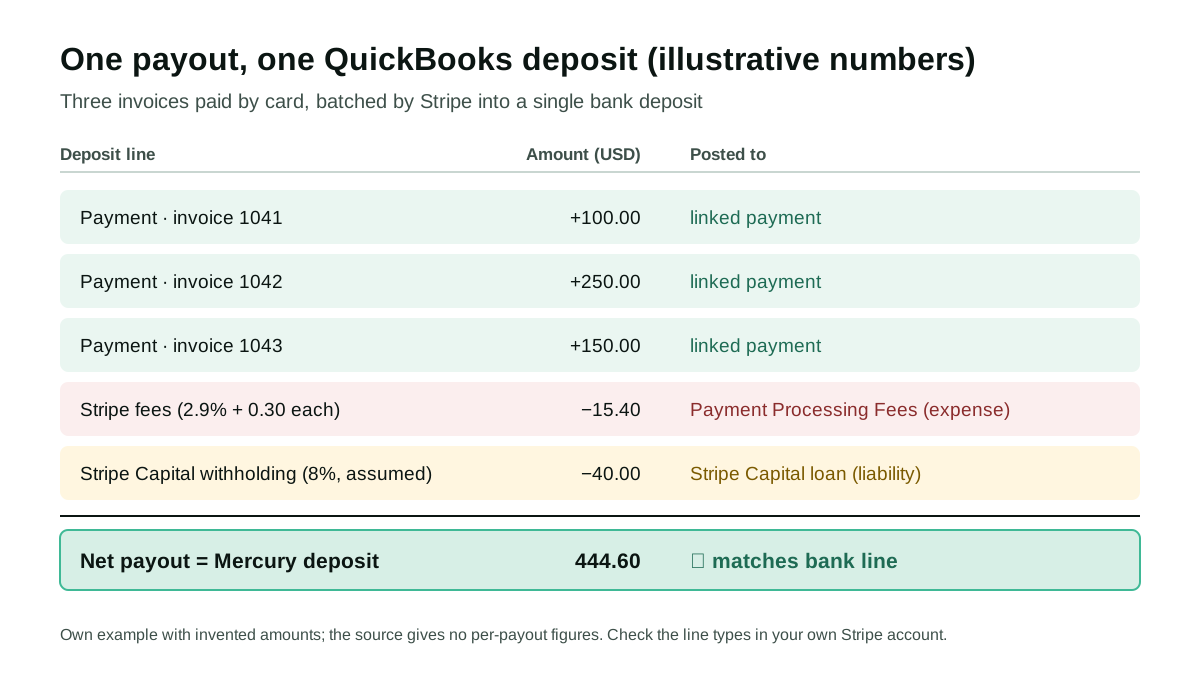
The deposit carries the three payments at their full amount, so revenue and receivables stay at gross; the fees go to an expense account; and the withholding goes to the loan, not to fees. The post mentions where fees are posted but not where Capital deductions go; whichever way he does it, separating the two is what an accountant will expect.
Stated results
Everything here is stated by Ryan Davis in his post; nothing has been measured by us or by a third party.
- About 8 hours of focused work to build the three tools, over a weekend.
- About 30 seconds for
reconcileto process all outstanding Stripe payouts. - 166 transactions cleared, with the P&L ready for his tax preparer.
- 20 minutes to produce and format the annual P&L for the tax preparer, a task he says he had dreaded for weeks.
- 4+ hours a month of manual reconciliation avoided, by his own estimate.
- What is missing: the number of payouts and their value, any errors found afterwards, whether an accountant reviewed the books, and the model or plan used in Claude Code.
Limitations and risks
- One person, one business, one write-up. It is a credible first-hand account, but it describes a single US company with one payment processor, one bank and one currency.
- Write access to the books. Davis’s scripts create deposits in his live QuickBooks company. A bug creates wrong entries at the speed of a script. Sandbox, dry runs and the one-click human match are the controls.
- The link to invoices is fragile. Everything depends on the invoice number appearing in the Stripe charge description. If a customer pays outside the normal flow, or a description changes, the mapping breaks.
- Not every payout line is a fee. Refunds, disputes, loan withholdings and adjustments appear in payouts too. Posting all of them to “fees” would misstate expenses; check the line types in your own account.
- Manual payouts cannot be broken down. Stripe states that it cannot tell which transactions are in a manual payout.
- Country specifics. The fee rate, Stripe Capital, Mercury and QuickBooks are US-centred. In other countries, check your fee invoices and their tax treatment with your adviser.
Common mistakes
- Booking the net payout as revenue. It hides fees and makes revenue and receivables wrong.
- Letting a model categorise bank lines freely. For this job, rules and IDs are better than guesses; use the AI to write and test the code.
- No duplicate check. Re-running a script without one creates a second deposit for the same payout.
- Skipping the bank confirmation. A deposit created in the books for money that never arrived is worse than an unmatched line.
- Hard-coded keys. Davis’s vault-backed credentials module is the right default.
Conclusions
The value of this case is not that an AI did the bookkeeping: it is that a non-accountant owner used a coding agent to build a small, auditable bridge between his payment processor, his bank and his ledger, and kept the final confirmation for himself. Every deposit carries the payout ID, so any number can be traced back months later. For any business that collects through Stripe or a similar processor, the recipe is reusable: get the payout breakdown, tie it to existing payments and to the bank, create one deposit per payout and let a person confirm the match.
Sources
- Ryan Davis — How I used Claude Code to clear my accounting backlog (3 May 2026) (opens in a new tab) (primary)
- Ryan Davis — home page (owner of Lucky Tyke, WebOps Hosting and Osita; Binghamton, New York) (opens in a new tab)
- Stripe Docs — Payout reconciliation (list the balance transactions of an automatic payout) (opens in a new tab)
- Stripe API Reference — List all balance transactions (opens in a new tab)
- Stripe Docs — How Stripe Capital works (repayment withheld as a percentage of sales) (opens in a new tab)
- Intuit Developer — QuickBooks Online Accounting API, Deposit entity (opens in a new tab)
- Intuit Developer Support — question on enabling the gated BankFeedTransaction beta endpoint (opens in a new tab)
- Mercury — API reference (opens in a new tab)
We wrote this entry in our own words from the sources above and checked that the links worked on October 18, 2026. Is anything incorrect? Tell us.