What it is about
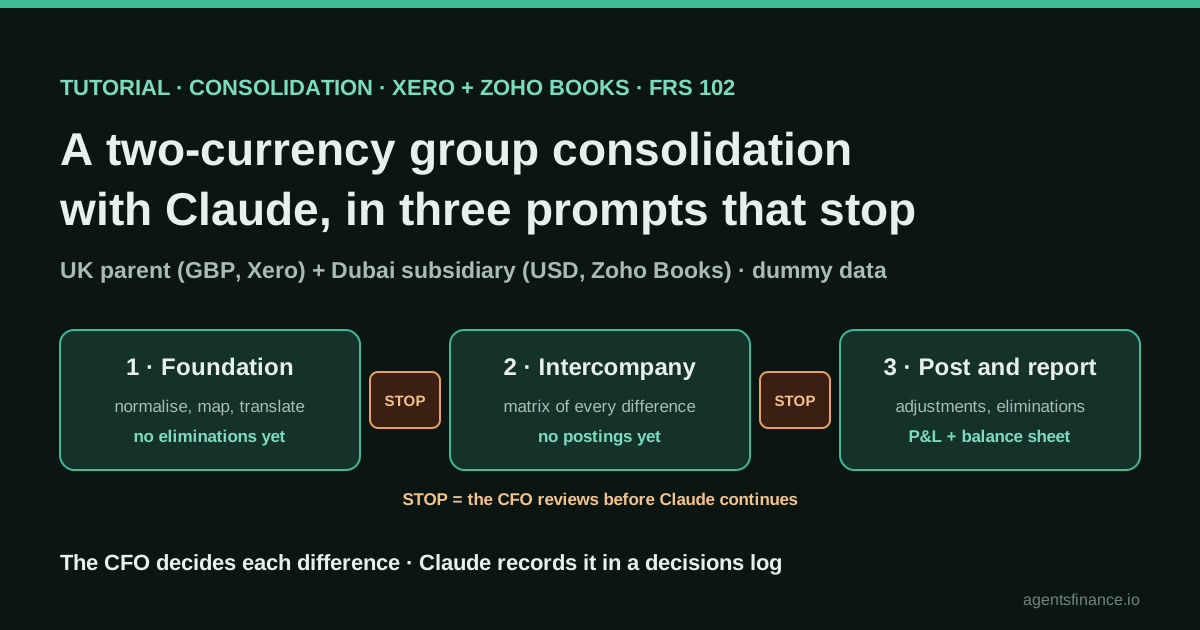
It is a method for preparing a small group's consolidation with Claude from raw accounting exports. The author gives Claude nineteen files for a fictional UK parent (Xero, GBP) and its Dubai subsidiary (Zoho Books, USD) and splits the job into three milestones: build a traceable workbook without eliminating anything, reconcile intercompany without posting anything, then post his decisions and produce the group statements. Claude does the mapping, translation and matching; the accountant makes the calls that change the group's numbers.
What it offers, according to the source
Stated by the author: he used to spend two, sometimes three working days on a consolidation like this and now produces one in under an hour, to a standard he says he would sign as a CFO. In the demonstration Claude returned a 27-sheet workbook with forty checks and twenty-two logged decisions, and flagged a GBP 7,583.69 loan difference, a GBP 6,600 cut-off error and a GBP 140 rate residual, all planted in dummy data. There is no measurement on a real group, no error rate and no audit.
Mind the evidence. Someone explains how they do it or did it, without verifiable figures. It is documented practice, not proof that it will work in your case.
What has really been tested
On 19 October 2026 we read the written walkthrough and the About page, read the video's public description, chapters and metadata, and read the author's LinkedIn post. We checked the FRS 102 treatment of exchange differences on intercompany loans in the ICAEW helpsheet, and how to run date-range trial balances in Xero Central and the Zoho Books FAQ. We have not seen the author's three prompts (they are in his community), his workbook or his data, and we have not run the method ourselves. The briefs and the checklist below are ours.
How to follow it
Start with a consolidation you have already closed and signed, so you can compare Claude's result line by line. Remove personal data, check your Claude plan's data terms with your firm, and give Claude only the folder for that group. Write the workbook rules into the first prompt, make every prompt end with an explicit stop, answer its questions in writing and keep every decision about the group's numbers for yourself. Treat checks that read zero as consistency, not correctness.
- Put the real exports in a folder exactly as you receive them: each entity's monthly trial balance, general ledger extract, chart of accounts, opening balances and intercompany schedule, plus the intercompany agreements, the group accounting and consolidation policy, the exchange rates and the CFO's reporting format.
- Prompt 1 (foundation): ask Claude to read everything, obey workbook rules (inputs, workings and outputs on separate sheets; raw data never overtyped; every figure a formula back to the inputs; one sign convention; rates in one place; a check on every sheet and a control sheet; a decisions log) and to build only the normalised, mapped and translated master trial balance. No eliminations yet.
- Review stop: open the control sheet, then the decisions log, then the mapping gaps, and write down your answers to Claude's questions.
- Prompt 2 (intercompany): give your answers in writing and ask for a matrix of every intercompany balance and transaction at every month end (each side, the difference, what Claude thinks it is and what it would do). No postings; it must stop and wait.
- Review stop: decide each difference yourself (cut-off, rate residuals, how to classify an intercompany loan) and record why.
- Prompt 3 (post and report): start with your decisions, have Claude post corrections as labelled consolidation adjustments, post the eliminations at every month end (including investment against equity, goodwill and its amortisation) and produce the consolidated P&L, a five-column consolidation view and the balance sheet with a balance check in every column.
- Final review: check that every check reads zero, trace a sample of group figures back to each trial balance and have the entity accountants correct their own ledgers before the next period.
In two sentences
Zain ul Abideen, an FCCA who works as a CFO for small and mid-sized businesses, published a step-by-step method for consolidating a two-entity, two-currency group with Claude: a UK parent on Xero and a Dubai subsidiary on Zoho Books, taken from raw trial balances to a consolidated P&L and balance sheet. The key is not the arithmetic but where he makes Claude stop: three prompts, each ending in a review, and every decision that changes the group’s numbers left to the accountant.
Who does it and what kind of evidence this is
The walkthrough was published on 27 September 2026 on the site of AI for Finance Circle, the training company Zain ul Abideen founded in August 2026, and it is written up from a 13-minute video on his Claude for Finance YouTube channel published on 21 September. On his About page he says he spent more than a decade in commercial finance and FP&A for multinational groups in the UAE, moved to the UK in 2025 and serves as CFO to SMEs through CompassPoint Consulting.
Three things set the level of evidence:
- It is a demonstration on fictional data. The video description says so explicitly: dummy data for a fictional business, nothing from a real company or a live consolidation. The differences Claude “finds” were built into the data.
- The time saving is his own statement. In a LinkedIn post he says a consolidation of this kind used to take him “two, sometimes three, working days”, almost none of it judgement, and that his method now produces one in under an hour. Nobody has measured that on a real group.
- He sells training. His company sells Claude courses and workshops for finance teams, and the three exact prompts are in his free online community rather than in the public article. We therefore do not reproduce them; the briefs further down are ours.
Why it is still worth a long read: consolidation is the close task where AI demos are rarest, and this one is unusually specific about inputs, control rules and the judgement points. It is also honest about what the checks prove.
The problem it tackles
Small groups rarely have a consolidation tool. The group accountant receives exports that “export nothing the same way” (his words), a subsidiary in another currency, staff recharged between entities and an intercompany loan that agrees in one ledger and not in the other. In the demo:
- Parent: UK company reporting in GBP on Xero.
- Subsidiary: 100% owned Dubai company reporting in USD on Zoho Books, acquired on 2 January 2026.
- Four intercompany flows that must disappear every month: a monthly management fee, a staff recharge at cost plus 10%, a USD 250,000 loan with rolled-up interest and two interim dividends.
- Framework: FRS 102, GBP as the consolidation currency, and a short group accounting and consolidation policy issued by the CFO. Period: January to August 2026.
A reader on Reddit’s r/FPandA describes the same pain from the other end: an analyst in a large company whose team consolidates sensitive month-end data in Excel because it may not go to the company’s data platforms. He had Claude write a Python script, run locally, that replaced 30-plus minutes of copying tens of thousands of rows with about two minutes, and he still spends about five minutes verifying the result. Different scale, same pattern: AI writes or does the mechanical part, the person checks.
Tools and architecture
There is no integration and no connector. Everything goes through files:
- Nineteen files in five folders, “the way a group accountant actually receives them”: business context for each entity; the agreements (management services, staff secondment and recharge, the loan, transfer pricing policy); each entity’s monthly trial balance, general ledger extract, chart of accounts, opening balances and intercompany schedule; and a group folder with the CFO’s reporting format, the consolidation policy and daily exchange rates.
- Claude, which reads the folder and builds an Excel workbook. The walkthrough does not say which model or Claude product he used.
- Three prompts, each one closing a milestone and ending in a stop.
- The CFO, who reads the control sheet and the decisions log between prompts and answers in writing.
He insists on one rule that runs against most people’s instinct: do not tidy the data first. Normalising the exports is part of the work and part of the evidence trail.
Getting the exports out of Xero and Zoho Books
The walkthrough does not explain how he pulled the files, so here is what the vendors’ own help pages say, and the traps we would watch for:
- Xero. The Trial Balance by Date Range report (Reporting → All reports) shows account balances for a period, and can compare against past periods. Xero Central warns that with multicurrency the report shows balances in your base currency, and that this report calculates retained earnings for the period shown, unlike the standard Trial Balance report, which calculates it from the start of the financial year. In our reading, if you mix the two reports across months, your retained earnings line will not roll forward and the mapping will look broken when it is not.
- Zoho Books. Reports → Accountant → Trial Balance; switch As of Date to Date Range and add the Opening Balance and Closing Balance columns with Customize Report Columns to get movements and balances in one export.
Export the same report type, with the same column layout, for every month of every entity. Claude can normalise inconsistent layouts, but you will review faster if the inconsistency is not of your own making.
Step by step
Milestone 1: the foundation, with no eliminations
The first prompt makes Claude read the context, sets the rules the workbook must obey and asks for the first milestone only. The rules, as he lists them, are what make the output reviewable:
- inputs, workings and outputs on separate sheets;
- raw data loaded as received and never overtyped;
- every figure a formula that traces back to the inputs;
- one sign convention and all exchange rates in one place;
- a check on every sheet and a single control sheet;
- a decisions log recording every judgement Claude makes and why.
The milestone is to normalise both trial balances into one layout, map both charts of accounts to the group’s reporting lines (flagging anything it cannot map with confidence), and produce a master trial balance with the subsidiary translated under the group policy. Nothing is eliminated yet.
In the demo Claude returned a 27-sheet workbook, forty checks and twenty-two logged decisions, plus its questions. It had already noticed that the loan did not agree after translation, by GBP 7,583.69 at August, and left it alone because the policy says differences are investigated before elimination.
Review stop. He opens the control sheet first, then the decisions log, then the mapping gaps.
Milestone 2: the intercompany matrix, with no postings
The second prompt starts by answering Claude’s questions in writing (those answers become part of the record), then asks it to read the agreements and reconcile every intercompany balance and transaction at every month end in a matrix: each side, the difference, what Claude thinks the difference is and what it would do. It must not post anything and must wait for decisions.
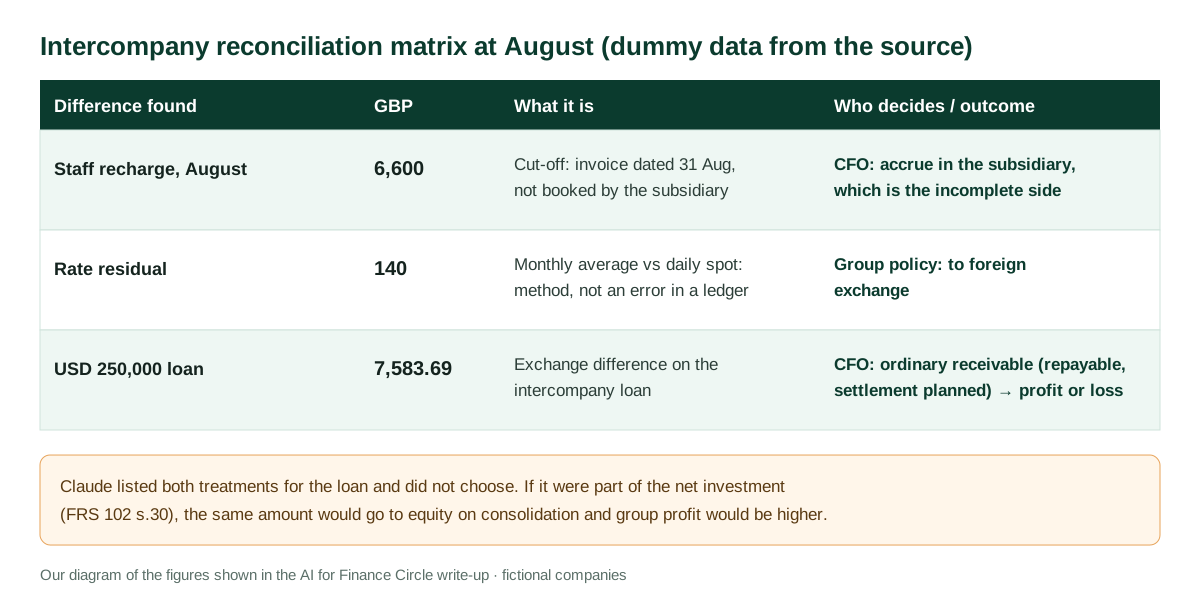
Review stop. This is where the accountant earns the fee. The three decisions in the demo:
- The cut-off. The recharge invoice is dated 31 August and the agreement makes it an August cost, so the subsidiary’s books are the incomplete ones and the accrual goes there.
- The rate residual. Both entities followed their agreements; the GBP 140 comes from translating at monthly averages what the subsidiary booked at daily spot. Nothing is wrong in either ledger, and the group policy sends it to foreign exchange.
- The loan. Claude set out both possible treatments and did not pick one. Under FRS 102 section 30, as the ICAEW helpsheet summarises it, exchange differences on a monetary item that forms part of the net investment in a foreign operation (settlement neither planned nor likely in the foreseeable future) go to other comprehensive income and equity in the consolidated accounts, and are never recycled; otherwise they go to profit or loss. The agreement makes the loan repayable on demand with repayment expected in 2027, so he treats it as an ordinary receivable. Had the agreement said otherwise, he notes, group profit would have been GBP 7,584 higher. “That is a judgement, not a calculation.”
A small inconsistency worth knowing about: the article speaks of three problems built into the data, while the video description says Claude found four intercompany differences. We report the three the article details.
Milestone 3: post, eliminate and report
The third prompt opens with his decisions on each difference, then asks Claude to:
- post the corrections as labelled consolidation adjustments, so the input sheets stay exactly as received;
- post the eliminations at every month end, including the investment against the subsidiary’s equity, with goodwill and its amortisation;
- produce three outputs in the CFO’s format: the consolidated P&L, a five-column consolidation view (each entity, adjustments, eliminations, group) and the consolidated balance sheet with a balance check in every column.
He is explicit that in real life the entity accountants would correct their own ledgers and send fresh trial balances; the adjustments are how the demo keeps moving while leaving an honest record.
A starting brief (ours, not the author’s)
These are our own skeleton briefs following the structure he describes. Replace the bracketed parts and keep the stop sentence at the end of each one.
Brief 1. “Read every file in [GROUP FOLDER]. Build an Excel workbook that obeys these rules: [the six rules above]. Milestone 1 only: normalise the trial balances of [ENTITY A] and [ENTITY B] into one layout, map both charts of accounts to the lines in [REPORTING FORMAT], list anything you cannot map with confidence, and translate [ENTITY B] under [POLICY FILE]. Do not eliminate anything. Record every judgement in the decisions log. End by listing your questions and stop.”
Brief 2. “My answers to your questions: [ANSWERS]. Read the agreements and reconcile every intercompany balance and transaction at every month end in a matrix with both sides, the difference, your explanation and your proposed treatment, citing the clause or policy you rely on. Do not post any adjustment. Stop and wait for my decisions.”
Brief 3. “My decisions: [DECISION AND REASON FOR EACH DIFFERENCE]. Post them as labelled consolidation adjustments without changing the input sheets. Post all eliminations at every month end, including investment against equity and goodwill under [POLICY]. Produce the consolidated P&L, the five-column view and the balance sheet with a balance check in every column. Update the control sheet and the decisions log, then stop.”
Results, as stated
- Time: from “two, sometimes three working days” to “under an hour”, according to the author. Not measured by a third party and not shown on a real group.
- Output in the demo: 27 sheets, 40 checks, 22 logged decisions; all checks reading zero at the end; every group figure traceable to a trial balance.
- What Claude found: the three planted differences above. It did not decide any of them.
Limitations and risks
- Fictional, clean-ish data. Two entities, one currency pair and four known flows. Real groups bring minority interests, mid-year acquisitions with fair-value adjustments, hyperinflation, more entities and messier agreements.
- Checks prove consistency, not correctness. He says it himself: checks that read zero tell you the model agrees with itself, not that it is right.
- Judgement can be smuggled in. Mapping a chart of accounts is a series of small judgements. The decisions log only helps if someone reads it.
- Confidential data. Agreements, trial balances and payroll recharges are sensitive. Check what your Claude plan does with uploaded files, and whether your firm allows it, before you start.
- Accounting framework. The loan decision is specific to FRS 102. Under IFRS (IAS 21) the logic is similar, although those differences are reclassified to profit or loss when the foreign operation is disposed of; under other local GAAPs, including the Spanish chart of accounts, check the rule before copying the treatment.
Common mistakes
- Asking for the consolidated statements in one prompt, so there is nowhere to stop and look.
- Cleaning the exports by hand before giving them to Claude, which destroys the trail back to the source.
- Letting Claude “fix” an entity’s books instead of posting a labelled adjustment.
- Reviewing the numbers before the control sheet and the decisions log.
- Mixing Xero’s standard and date-range trial balance reports across months, which breaks retained earnings.
Conclusions
The interesting part of this tutorial is not that an AI can add up two trial balances; it is the discipline around it: rules written into the first prompt, milestones that end in a stop, written answers that become audit trail, and a clear line between what Claude prepares and what the accountant decides. The evidence is a single practitioner’s demonstration on dummy data, so try it first on a group you have already closed and compare every line before you rely on it.
Sources
- AI for Finance Circle (Zain ul Abideen, FCCA) — How to do a group consolidation with Claude (27 September 2026) (opens in a new tab) (primary)
- YouTube, Claude for Finance channel — How to Do Group Consolidation with Claude AI (Correctly) (21 September 2026, 12 min 47 s) (opens in a new tab)
- LinkedIn — Zain ul Abideen (FCCA): “If you own group reporting, you already know. Consolidation is a pain in the neck.” (September 2026) (opens in a new tab)
- AI for Finance Circle — About (founder's background and what the company sells) (opens in a new tab)
- ICAEW Technical Advisory Service — Foreign currency translation under FRS 102 (reviewed 19 February 2026) (opens in a new tab)
- Xero Central — Trial Balance by Date Range report (opens in a new tab)
- Zoho Books FAQ — Can I view the trial balance report with opening and closing balances? (opens in a new tab)
- Reddit r/FPandA — “AI uses in corpfin” (an analyst who consolidates month-end workbooks with a Claude-written Python script, July 2026) (opens in a new tab)
We wrote this entry in our own words from the sources above and checked that the links worked on October 19, 2026. Is anything incorrect? Tell us.