What it is for
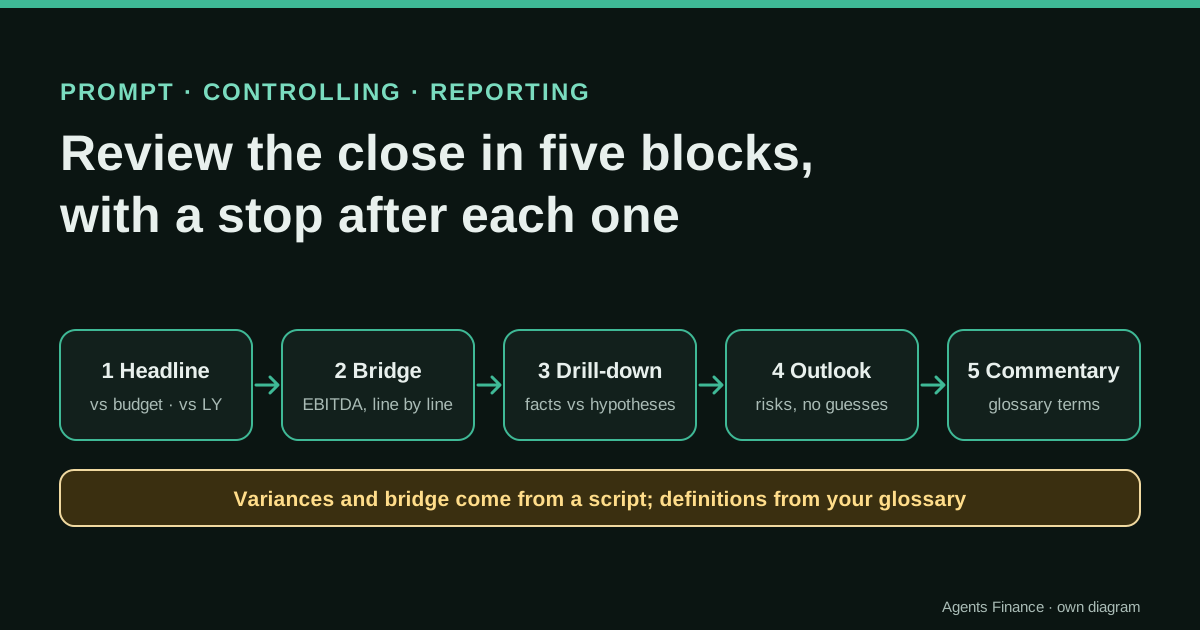
It turns the review of the monthly close into a conversation with fixed stops. A script computes every variance against budget and prior year, decides what is material and builds the EBITDA bridge; the assistant receives that table, your glossary and your context, and goes through five blocks, waiting for you after each one. The aim is that you lead the conversation and the assistant writes, without it inventing figures or definitions.
Expected result and limits
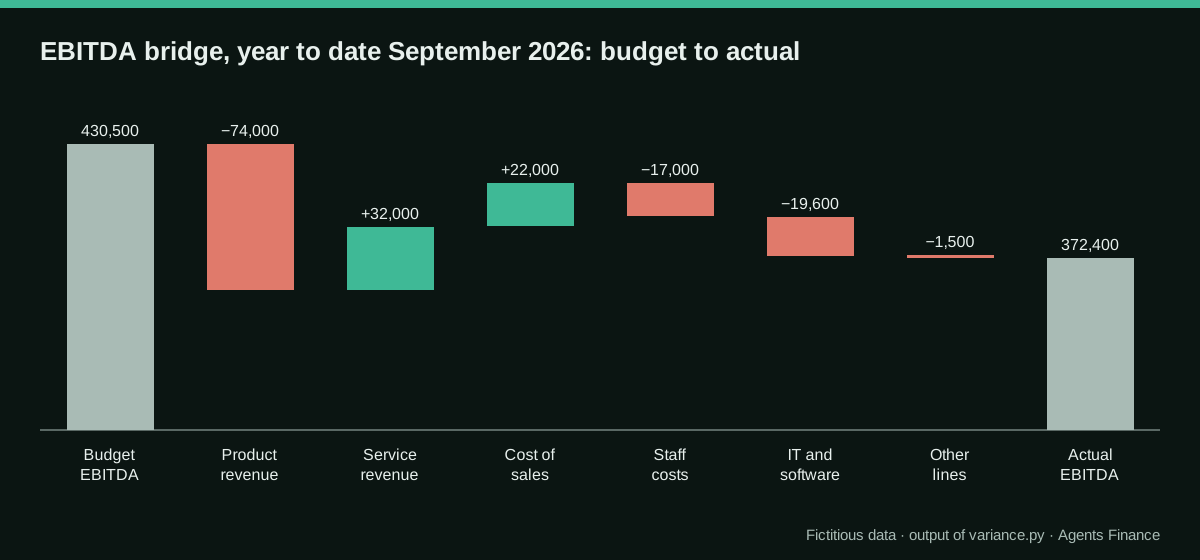
There are no results from real companies: it is a proposal. On the fictitious nine-month P&L published with this entry, the script produces the variance table and an EBITDA bridge that ties exactly from budget (430,500) to actual (372,400).
Mind the evidence. Material written by this directory based on published practices. We have not tested it with real data: try it with sample data first.
What has really been tested
On 19 October 2026 we ran the variance script on the fictitious data published here and checked that the bridge ties to the totals; the tables below are its real output. We checked the guidance on chaining prompts and on letting the model say it does not know in Anthropic's documentation. We have not run the five blocks with an AI assistant on a real close, and the example exchange is written by us.
The prompt
You are my finance partner for the review of the {{MONTH}} close of {{COMPANY}}. We will go through it in five blocks. After each block, stop and wait for me to say "next" or to ask a question. Never run ahead.

Inputs:
- VARIANCES: a table already computed by a script, with each P&L line for the month and year to date, against budget and prior year, in amount and %, marked F (favourable) or U (unfavourable) and "material" or not. It also contains the EBITDA bridge from budget to actual. These figures are final: do not recalculate, round differently or create new totals.
- GLOSSARY: {{GLOSSARY}}. Use these definitions and names exactly. If you need a metric that is not defined, ask me.
- CONTEXT: {{CONTEXT}}
- AUDIENCE: {{AUDIENCE}}

Block 1, headline: five bullets at most on revenue, gross margin, EBITDA and profit before tax, month and year to date, against budget and prior year. Then list the material lines and ask me which one to open first.
Block 2, bridge: explain the EBITDA bridge line by line in words, using only the amounts in VARIANCES. Say which items look like timing or one-offs according to CONTEXT and which look recurring. Point out where the comparison with prior year tells a different story from the comparison with budget.
Block 3, drill-down (repeat for each line I choose): separate "what the figures show" from "possible explanations". For each explanation say which data or person would confirm it. Mark anything that is not supported by VARIANCES or CONTEXT as HYPOTHESIS.
Block 4, outlook: list the risks and opportunities for the rest of the year that follow from what we discussed. Do not project figures; if a projection would help, tell me what calculation to run and with which inputs.
Block 5, commentary: draft the commentary for {{AUDIENCE}} in at most {{WORDS}} words, in the glossary's terms, followed by the list of open questions with an owner for each.

Style: plain business language, short bullets, no jargon that is not in the glossary. If something in VARIANCES looks inconsistent, say so instead of explaining around it.
Without JavaScript you will not see the button: select the text in the block and copy it. License: Original text of this directory. You may use and adapt it freely.
Variables you need to fill in
Replace each placeholder in double curly braces with your data before sending it.
{{MONTH}}- Month being closed, for example September 2026.
{{COMPANY}}- Company or business unit.
{{GLOSSARY}}- Your definitions of revenue, gross margin, EBITDA, the cost groups and the sign rules, pasted or attached (see the template in this entry).
{{CONTEXT}}- Known events of the period: hires, price changes, contract wins or losses, one-off costs, budget assumptions that already proved wrong.
{{AUDIENCE}}- Who reads the commentary: board, management committee, investors, budget holders.
{{WORDS}}- Word limit for the commentary, for example 150.
How to use it
Export the P&L with actual, budget and prior year for the month and year to date, run the script, fill in the glossary once and keep it with your close files. Use the prompt on a close you have already presented, compare the draft commentary with the one you actually wrote, and only then use it on a live close.
In two sentences
A close review goes well when someone asks the right questions in the right order: what changed, why, what it means for the year and how to say it to the board. This prompt makes an AI assistant follow that order in five blocks and stop after each one, while a short script does every calculation and your glossary fixes what each KPI means.
What problem it solves
Ask a chat assistant “analyse this P&L” and you get the whole analysis at once: a long answer that mixes the headline with secondary lines, explains variances it has not been asked about and sometimes recalculates a subtotal slightly differently from your management pack. It is hard to review and easy to over-trust.
Three design choices fix most of that:
- Fixed blocks with a stop. Anthropic’s documentation recommends splitting complex tasks into a chain of smaller prompts, because each step gets the model’s full attention and errors are easier to spot. In a chat you can get the same effect with one prompt that forces a pause after each block.
- The numbers come from a script. The assistant receives the variances, the materiality flags and the bridge already computed, with the instruction not to recalculate anything.
- A glossary. If you do not say what EBITDA includes, the assistant will use a textbook definition, and next month someone will use another. A one-page glossary keeps the commentary aligned with the management pack.
The fictitious data
The sample is a software and services company, nine months to September 2026, with ten P&L lines. Each row has the month and year-to-date figures for actual, prior year and budget, and a group column (income, cogs, opex, below_ebitda) that the script uses to build subtotals. Costs are positive numbers.
- P&L month and YTD, actual, prior year and budget (CSV)
- Variance and bridge script (Python, standard library only)
Run python3 variance.py pl-month-ytd.en.csv. The materiality rule is ours and deliberately simple: a variance matters if it is at least 15,000, or at least 10% and at least 5,000. Change it in the first lines of the script.
def var(r, a, b):
    d = float(r[a]) - float(r[b])
    fav = d if r["group"] == "income" else -d       # > 0 favourable
    return d, (d / float(r[b]) if float(r[b]) else None), "F" if fav > 0 else "U" if fav < 0 else "="

mat = abs(d) >= MAT_ABS or (p is not None and abs(p) >= MAT_PCT and abs(d) >= PCT_FLOOR)
...
assert abs(e_bud + sum(i for _, i in bridge) + rest - e_act) < 0.01   # the bridge must tie
If you work in a spreadsheet, the same logic is one column per comparison: =E2-G2 for the difference, =IF(G2=0,"",(E2-G2)/G2) for the percentage, and =IF(B2="income",SIGN(E2-G2),-SIGN(E2-G2)) to mark favourable (1) or unfavourable (−1).
What the script returns
Year to date, revenue is 4,298,000 against a budget of 4,340,000 and 3,855,000 last year; EBITDA is 372,400 (8.7% of revenue) against 430,500 budgeted (9.9%) and 303,600 last year (7.9%).
| Line | YTD vs budget | % | F/U | YTD vs prior year | % | Material vs budget |
|---|---|---|---|---|---|---|
| Product revenue | −74,000 | −2.1% | U | +271,000 | +8.4% | yes |
| Service revenue | +32,000 | +4.1% | F | +172,000 | +26.9% | yes |
| Cost of sales | −22,000 | −1.0% | F | +179,000 | +9.2% | yes |
| Staff costs | +17,000 | +1.4% | U | +139,000 | +13.0% | yes |
| IT and software | +19,600 | +19.8% | U | +32,200 | +37.3% | yes |
| Marketing, rent and other opex (combined) | +1,500 | U | no |
The glossary: one page, written once
Paste it as GLOSSARY or attach it. A template you can copy:
Revenue: invoiced sales net of discounts and returns; excludes other operating income.
Gross margin: revenue minus cost of sales (materials, subcontractors, hosting of client projects).
EBITDA: gross margin minus staff, marketing, rent and facilities, IT and other operating expenses.
        Excludes depreciation, finance costs and taxes.
Cost groups: staff = salaries + social security + benefits; IT = licences + cloud for internal use.
Signs: costs are positive numbers; a favourable variance is higher income or lower cost.
Materiality: >= 15,000 or (>= 10% and >= 5,000).
Comparisons: "budget" = approved budget version B1; "prior year" = same period last year, restated.
How the conversation goes
Fill in the variables and paste the script’s output as VARIANCES. In the example we added this CONTEXT: “two senior engineers hired in May, not budgeted; product price list unchanged since January while the budget assumed +3% in April; new monitoring tool contracted in March”. AUDIENCE: management committee; WORDS: 150.
What we expect from each block (written by us as a reference, not model output):
- Block 1 should say that EBITDA is below budget but above last year, and list the five material lines. It should then stop and ask which line to open. If it starts explaining causes here, remind it of the rule.
- Block 2 should read the bridge in order and notice the key contrast: product revenue is 74,000 below budget but 271,000 above last year, which, with the CONTEXT, points to a budget assumption (the April price increase) rather than a fall in sales.
- Block 3 on IT and software should keep the facts (+19,600, +19.8% against budget) separate from the explanation (the new monitoring tool), and ask for the contract to confirm the annual cost.
- Block 4 should mention the staff run-rate after the two hires and the missing price increase as risks for the full year, and propose a calculation (for example, monthly cost of the hires multiplied by the remaining months) instead of giving a number.
- Block 5 should produce a short paragraph in the glossary’s terms and the open questions, each with an owner.
Variants by ERP: getting actual, budget and prior year
The script needs the three versions side by side. Where they live depends on the system:
- Microsoft Dynamics 365 Business Central: budgets are stored as G/L budgets; financial reports can show actual, budget and prior-year columns, and the result can be opened in Excel.
- NetSuite: budgets are loaded per account and period; the Budget vs. Actual report, customised with a prior-year column, gives the three columns.
- Odoo: the profit and loss report with comparison to previous periods gives actual and prior year; budgets are managed in the Budget feature where it is enabled, or kept in a spreadsheet and joined by account.
- QuickBooks Online and Xero: both have budget-versus-actual reports in their supported plans; export them with a prior-year comparison.
- Sage and A3: export the P&L by period and join the budget from the spreadsheet where it usually lives, using the account or the management line as the key.
If your budget lives in a spreadsheet, the join is the real work: use the same line names as the glossary and check that the total of the budget column matches the approved budget before running anything.
Human review steps
- Check that the YTD actual in the CSV matches the closed P&L in the ERP, line by line.
- Read the script output before opening the assistant and note what you expect to discuss.
- In each block, challenge any sentence that has no figure from VARIANCES or fact from CONTEXT behind it.
- Rewrite the commentary in your own words where needed. The person who presents it signs it.
- File the variance table, the final commentary and the open questions with the close.
Common mistakes
- Pasting the raw P&L and asking for variances. The assistant will calculate; sooner or later it will get one wrong.
- No glossary. Each month’s commentary defines margin slightly differently.
- Letting the assistant run all five blocks at once. You lose the chance to steer it to the lines that matter.
- Only comparing with budget. A line can look bad against an optimistic budget and good against last year; the story needs both.
- Treating hypotheses as findings. Anything marked HYPOTHESIS needs an owner and a document before it goes in the pack.
- Confidential data in a consumer account. Use a business plan your company approves, or anonymise the entity and round the figures.
Limits
The prompt does not replace the controller’s knowledge of the business: it organises the conversation and drafts the text. The quality of blocks 2 and 3 depends on the CONTEXT you give; without it, the assistant can only describe the numbers, and it should say so.
Sources
- Claude Docs (Anthropic) — Prompting best practices: chain complex prompts (opens in a new tab) (primary)
- Claude Docs (Anthropic) — Reduce hallucinations (opens in a new tab)
We wrote this entry in our own words from the sources above and checked that the links worked on October 19, 2026. Is anything incorrect? Tell us.