What it is for
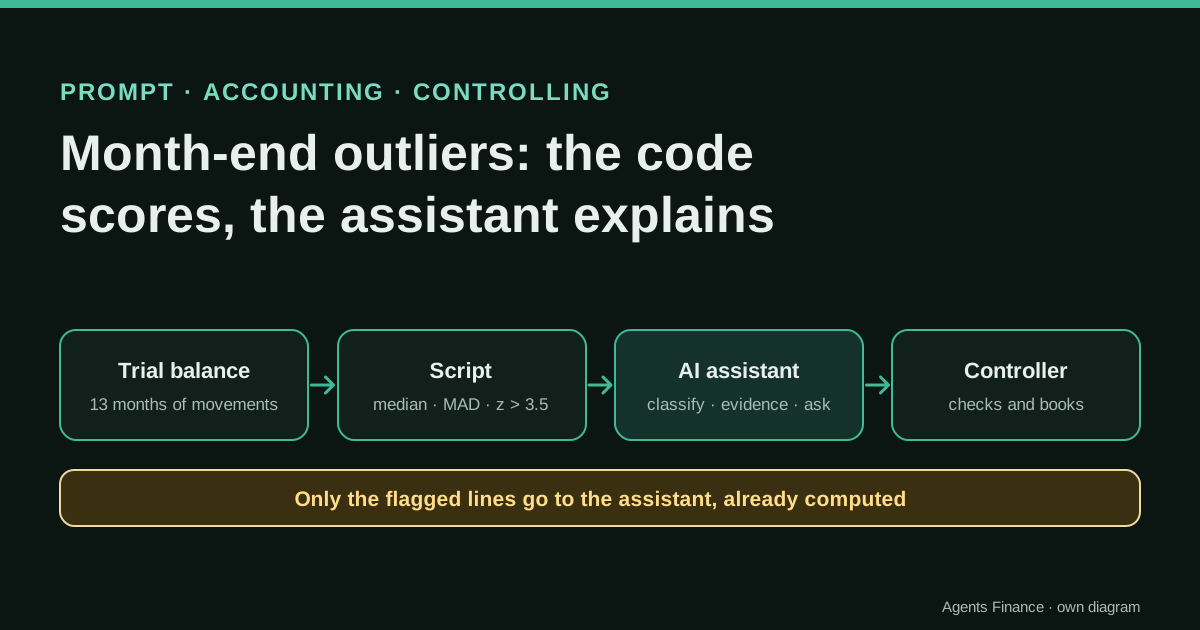
It splits the review of month-end outliers into two jobs. A script or a few spreadsheet formulas compare each account's movement this month with its own previous 12 months using the median and a robust score (the modified z-score), a materiality filter and a same-month-last-year check, and they flag missing amounts and sign flips. The AI assistant receives only those flags and the context you add, and its job is to classify each one, say what evidence would confirm it and draft the questions for the account owners.
Expected result and limits
There are no results from real companies: it is a proposal. On the fictitious close published with this entry, the script flags the five problems we planted (a missing rent accrual, a duplicated utilities invoice, a one-off payroll increase, a bank-fee sign flip and an annual fee) and marks two large movements as matching last year's pattern.
Mind the evidence. Material written by this directory based on published practices. We have not tested it with real data: try it with sample data first.
What has really been tested
On 19 October 2026 we ran the scoring script published here on the fictitious dataset that comes with this entry, and the results table below is its real output. We checked the modified z-score formula and the 3.5 cut-off in the NIST handbook. We have not run the prompt with an AI assistant or on a real company's close: the example answer is written by us to show what a good answer should contain.
The prompt
You are helping a controller review the month-end close of {{COMPANY}} for {{MONTH}} before it goes to management. You do not change any figure and you do not post anything.

You receive:
1. FLAGS: the output of a script that has already compared each account's movement this month with its previous 12 months (median, modified z-score, change against the same month last year, and flags such as "outlier", "sign flip", "missing" and "matches last year"). Treat these numbers as correct and do not recalculate them.
2. CONTEXT: {{CONTEXT}}
3. Optional: the ledger lines of the flagged accounts in {{LEDGER_FILE}}.

For each flagged account, in order of the absolute gap:
a) Classify it as one of: probable posting error, timing (accrual or cut-off), one-off event, seasonal pattern, real business change, cannot tell yet.
b) Give the reason in one sentence, using only figures from FLAGS or rows from the ledger file (cite the row number).
c) Name the document or person that would confirm it (invoice, contract, payroll summary, bank statement, or the account owner in {{OWNERS}}).
d) If it looks like an error or a timing difference, describe the correcting entry in words (accounts and direction). Give no amount you cannot trace.
e) Check the usual partner account: if a cost moved, say whether its partner moved too (salaries and social security, purchases and inventory, revenue and receivables), using only FLAGS.

Rules:
- If the information is not enough, use "cannot tell yet" and write the exact question to ask.
- Do not call a line "seasonal" unless FLAGS says it matches last year.
- Do not add accounts that are not in FLAGS.
- Keep the sign convention as given: {{SIGN_CONVENTION}}.

Output:
1. A table: account | classification | reason | evidence to request | proposed action | owner.
2. Up to five questions, each addressed to a named person or team.
3. Three sentences for the close summary in plain language, with no figure that is not in FLAGS.
Without JavaScript you will not see the button: select the text in the block and copy it. License: Original text of this directory. You may use and adapt it freely.
Variables you need to fill in
Replace each placeholder in double curly braces with your data before sending it.
{{COMPANY}}- Company or entity name (an internal code is enough).
{{MONTH}}- Month under review, for example September 2026.
{{CONTEXT}}- What you already know happened this month: price changes, new contracts, hires, bonuses, one-off invoices, changes in accounting criteria.
{{LEDGER_FILE}}- Optional: name of the attached file with the ledger lines of the flagged accounts.
{{OWNERS}}- Who owns each area or account group (for example: payroll, HR; utilities and rent, office manager).
{{SIGN_CONVENTION}}- How amounts are signed in your export, for example: debits positive, credits negative, so revenue is negative.
How to use it
Export 13 months of account movements from your ERP, run the script or paste the formulas, and give the assistant only the flagged rows plus a few lines of context. Start with a month that is already closed and reviewed, compare the assistant's classification with what really happened, and adjust the materiality and the cut-off to your company before using it on a live close.
In two sentences
Most month-end surprises are visible in the trial balance before anyone asks about them: a rent accrual nobody booked, a utilities invoice entered twice, a credit where there should be a debit. This entry gives you a small script that finds those lines with a statistic that is hard to fool, and a prompt that asks an AI assistant to do only what it is good at: explain, classify and write the questions.
Why the code scores and the assistant explains
Asking a chat assistant to “find the anomalies” in a pasted trial balance has two problems. The first is arithmetic: language models can misread a column, drop a sign or compute a percentage on the wrong base, and the error comes back in a confident sentence. The second is consistency: run the same request twice and the list of “anomalies” changes, because there is no rule behind it.
So we separate the jobs. The flagging is a deterministic rule that you can rerun and audit. The assistant receives the result of that rule and is told to treat those numbers as correct. That way, if a figure is wrong, it is wrong in a script you can read, and the assistant’s added value is the part that takes a controller time: deciding whether a movement is an error, a timing difference, a one-off or a real change, and who to ask.
The rule: median, MAD and a materiality floor
For each account the script takes the movements of the previous 12 months and computes their median and their median absolute deviation (MAD). The current month is then scored with the modified z-score:
M = 0.6745 × (current − median) / MAD
The NIST/SEMATECH statistics handbook describes this score and the recommendation to label values with an absolute modified z-score above 3.5 as potential outliers. We use it instead of the usual mean and standard deviation because a single odd month in the history (a year-end adjustment, a bonus) inflates the standard deviation and hides the next anomaly; the median and the MAD barely move.
A score alone is not enough in accounting, so the script adds three rules of our own:
- Materiality: a line is only an outlier if the gap against the median is at least €2,000 and at least 10% of the median. Change both thresholds to your scale.
- Missing and sign flip: an account that is usually material and is zero this month, or that changes sign, is always flagged, whatever its score.
- Same month last year: if a flagged line is within ±15% of the same month last year, the script adds “matches last year”. It does not remove the flag: it tells the reviewer and the assistant that the explanation may be seasonal.
An account with exactly the same amount every month (rent, depreciation) has a MAD of zero. The script does not divide by zero: any change from a fixed amount is treated as infinitely unusual, and the materiality floor decides whether it matters.
The fictitious close you can download
The sample is a small trading company with 15 profit-and-loss accounts and 13 months of movements, September 2025 to September 2026, signed the way most ERPs export them: debits positive, credits negative, so revenue is negative. We planted five problems in September 2026 and kept two genuine seasonal peaks.
- Trial balance movements, 13 months (CSV, English account names)
- The scoring script (Python, standard library only)
Run it with python3 outlier_score.py trial-balance-movements.en.csv. The core of the script is this:
hist = [float(r[m]) for m in history]          # previous 12 months
x = float(r[cur])                              # current month
med = st.median(hist)
mad = st.median(abs(h - med) for h in hist)
z = 0.6745 * (x - med) / mad if mad else (0.0 if x == med else float("inf"))
gap = x - med
material = abs(gap) >= MAT_ABS and abs(gap) >= MAT_PCT * abs(med)
yoy = (x - ly) / ly if ly else None            # same month last year
flags = []
if material and abs(z) > Z_LIMIT: flags.append("outlier")
if med and x * med < 0: flags.append("sign flip")
if med and x == 0 and abs(med) >= MAT_ABS: flags.append("missing")
if flags and yoy is not None and abs(yoy) <= YOY_BAND: flags.append("matches last year")
The same rule in Excel
If your team prefers a spreadsheet, put the 13 months in columns C to O (C is the same month last year, O is the current month) and add five helper columns per row. In Excel 365 these work as normal formulas; in older versions confirm the MAD formula as an array formula.
P  Median of the history     =MEDIAN(C2:N2)
Q  MAD                       =MEDIAN(ABS(C2:N2-P2))
R  Modified z-score          =IF(Q2=0,IF(O2=P2,0,"fixed amount changed"),0.6745*(O2-P2)/Q2)
S  Gap against the median    =O2-P2
T  Change vs last year       =IF(C2=0,"",(O2-C2)/C2)
The history in C2:N2 is the 12 months before the current one, so the current month never takes part in its own score. Add a column with the materiality test, for example =AND(ABS(S2)>=2000,ABS(S2)>=0.1*ABS(P2)), and filter on it.
What the script finds in the sample
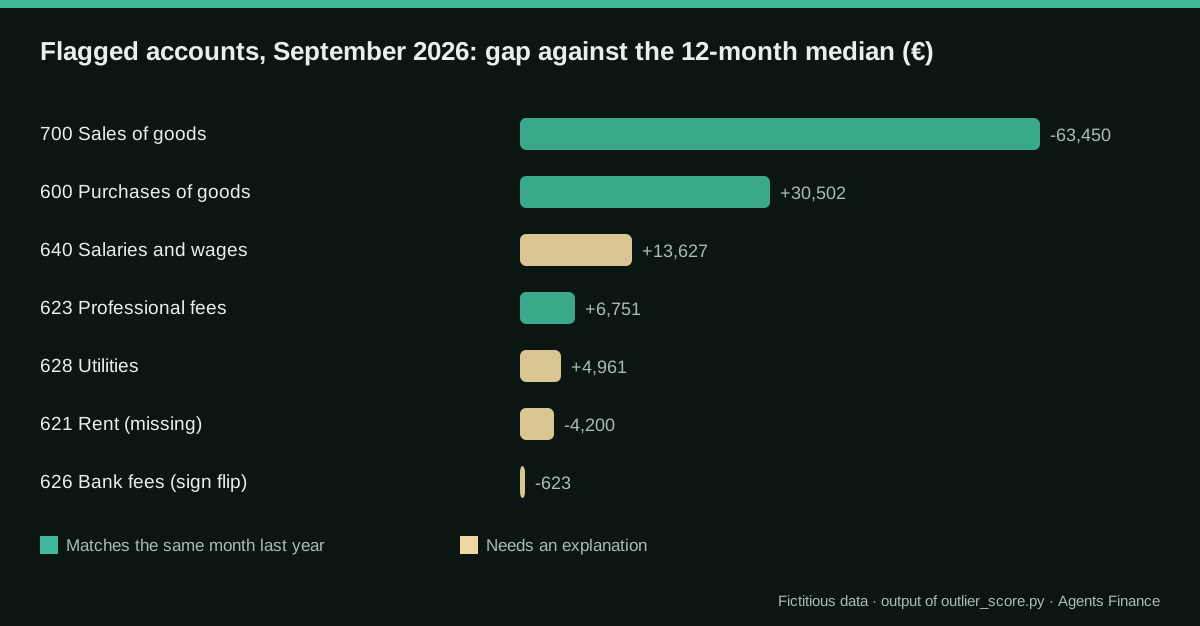
| Account | Current | Median 12 m | Gap | Modified z | vs last year | Flags |
|---|---|---|---|---|---|---|
| 700 Sales of goods | −181,940 | −118,490 | −63,450 | −10.6 | +8% | outlier, matches last year |
| 600 Purchases of goods | 101,987 | 71,485 | +30,502 | 13.9 | +1% | outlier, matches last year |
| 640 Salaries and wages | 61,250 | 47,623 | +13,627 | 21.3 | +30% | outlier |
| 623 Professional fees | 9,800 | 3,049 | +6,751 | 18.8 | +3% | outlier, matches last year |
| 628 Utilities | 7,230 | 2,269 | +4,961 | 39.1 | +240% | outlier |
| 621 Rent | 0 | 4,200 | −4,200 | n/a | −100% | outlier, missing |
| 626 Bank fees | −310 | 313 | −623 | −41.0 | −207% | sign flip |
Two things are worth noticing. September is a peak month for this company, so sales and purchases are flagged but carry “matches last year”: a reviewer can confirm them quickly. And the bank-fee line is below the materiality floor, yet it is flagged because it changed sign, which usually means a refund booked to the wrong side or a reversed entry.
How to use the prompt
Copy the prompt from the block on this page, replace the variables and paste the flagged rows as FLAGS (the table above, or the script’s output). Add two or three lines of CONTEXT: in our example, “one-off retention bonus paid in September; no new contracts; the annual audit fee is invoiced every September”. Attach the ledger lines of the flagged accounts only if you want the assistant to point at specific postings.
What a good answer should contain
This is not model output: it is the answer we would expect from a careful junior, written by us so you can judge what the assistant returns.
- 621 Rent, timing: the monthly accrual is missing; confirm with the lease and the September ledger; proposed action: accrue one month of rent against accrued expenses; owner: office manager.
- 628 Utilities, probable posting error: more than three times the usual amount; ask for the supplier invoices of September and check for the same invoice number twice.
- 640 Salaries, one-off event: matches the bonus in CONTEXT; check the partner account: social security (642) did not move, so ask payroll whether the employer contribution on the bonus is missing.
- 626 Bank fees, cannot tell yet: credit balance this month; ask treasury whether a refund was booked to the fee account.
- 700, 600 and 623, seasonal pattern: in line with September 2025; confirm and move on.
The salaries line is where the assistant earns its place: the script cannot know that a bonus normally carries employer contributions, but a well-briefed assistant can notice that one account moved and its partner did not.
Getting the input out of your ERP
The script needs one row per account and one column per month, with movements (not cumulative balances). Most ERPs give you a trial balance by period; if yours only gives balances, subtract the previous month in a column before scoring.
- Odoo: Accounting › Reporting › Trial Balance, with the comparison set to the previous periods, exported to XLSX.
- Microsoft Dynamics 365 Business Central: the Trial Balance by Period report, or the G/L Entries page opened in Excel and pivoted by account and month.
- NetSuite: Reports › Financial › Trial Balance per period, or a saved search on transactions summarised by account and period.
- QuickBooks Online and Xero: the Trial Balance report run per month, or a profit and loss report by month, which already gives movements.
- Sage, A3 and Holded: the trial balance (sumas y saldos) report per month exported to Excel; in Holded you can also read it through its MCP server if you have connected an assistant.
Keep the export’s sign convention and tell the assistant what it is. Mixing a report where revenue is negative with another where it is positive is the most common way to get a sign-flip flag that is not real.
Human review: who signs what
- Before the run: confirm the close version. Scoring a provisional trial balance that will still change produces flags that disappear the next day.
- After the script: the controller reads the flag table first, without the assistant, and marks anything obvious.
- After the assistant: every “probable error” and “timing” line is checked against the document the assistant named before any entry is proposed in the ERP. Entries are booked by a person, not by the assistant.
- At the end: save the flag table, the assistant’s answer and the decisions in the close folder, so next month’s reviewer can see which flags were accepted and why.
Common mistakes
- Letting the assistant compute the scores. Paste the result, not the raw table with an instruction to find outliers.
- Using the mean and standard deviation. One unusual month in the history makes every later anomaly look normal.
- Mixing balances and movements. Balance-sheet accounts drift upwards over time; score their movements, or compare balances with a separate rule.
- No materiality floor. A €40 account that doubles scores higher than a €40,000 one that grows 15%; without a floor, the table fills with noise.
- Treating “matches last year” as an explanation. It means “probably seasonal”; someone still has to confirm it.
- Skipping the partner accounts. Bonuses without social security, sales without receivables and purchases without inventory movements are the anomalies a single-account rule misses.
Limits
- The rule looks at one month against twelve. New accounts, restructured charts of accounts or a business that changed recently need a person’s judgement.
- Pasting account names and amounts into an AI service sends that data outside your company; use a business plan your company has approved or anonymise the entity.
- The assistant can still invent a reason that sounds plausible. The rule “cite only figures from FLAGS or row numbers” makes that easier to catch, not impossible.
Sources
- NIST/SEMATECH e-Handbook of Statistical Methods — 1.3.5.17 Detection of Outliers (opens in a new tab) (primary)
- Claude Docs (Anthropic) — Reduce hallucinations (opens in a new tab)
- Odoo 19 documentation — Accounting: Reporting (opens in a new tab)
We wrote this entry in our own words from the sources above and checked that the links worked on October 19, 2026. Is anything incorrect? Tell us.