What it is about
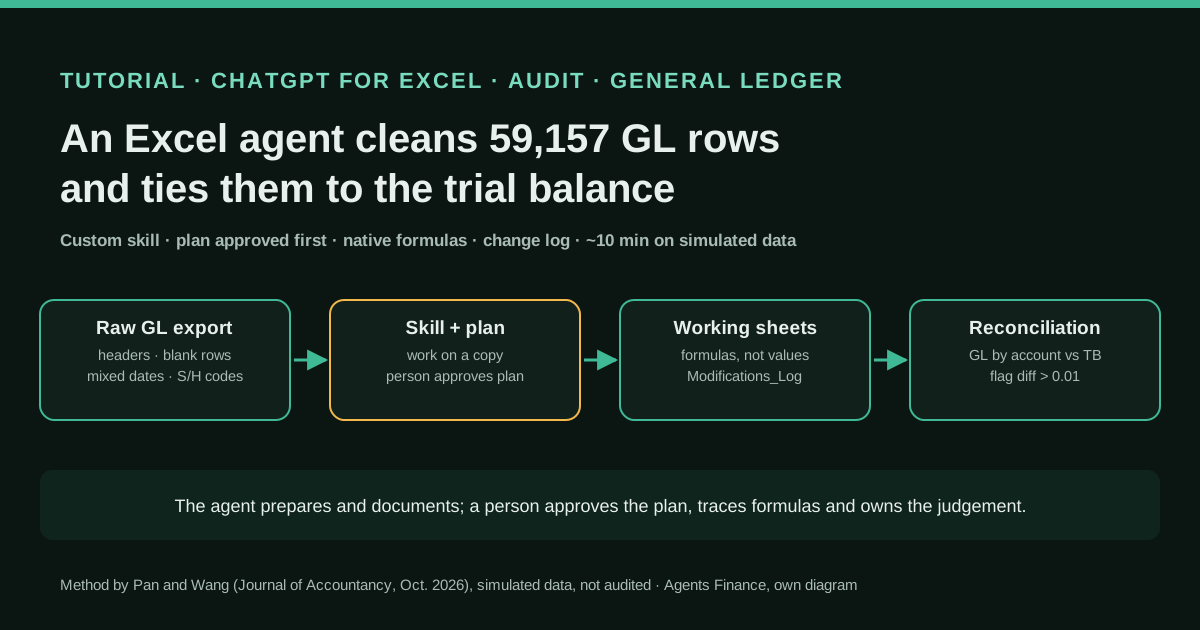
Gang (Ernest) Pan and Li Wang, accounting professors at the University of Akron, built an agent in ChatGPT for Excel to prepare a general ledger export for audit use. They first wrote a custom "skill", a text file of instructions that tells the agent to work on a copy, inspect the data, present a cleaning plan for approval, use only native Excel formulas, log every change and reconcile the cleaned ledger to control totals without claiming audit compliance. With the skill in place, the agent proposed a plan in a worksheet, removed blank rows and headers, built reconciliation keys, standardised dates and debit/credit signs, summed the ledger by account and compared it with the trial balance, flagging any difference. A person reviewed the plan, traced formulas and approved the result.
What it offers, according to the source
Stated by the authors: on a simulated dataset of 59,157 transaction-level general ledger rows, adapted from a published teaching case, the whole process of cleaning, validating and reconciling to the trial balance took about 10 minutes on average, a task they say would take many hours by hand. Their screenshots show the 2019, 2020 and all-period reconciliations tying within a $0.01 tolerance. There is no real client, no measured manual baseline and no error rate; the custom skill itself is not published.
Mind the evidence. Someone explains how they do it or did it, without verifiable figures. It is documented practice, not proof that it will work in your case.
What has really been tested
On 25 October 2026 we read the Journal of Accountancy article, both figure PDFs (including the visible worksheet tabs, formulas and quality gates), OpenAI's launch post and help pages for ChatGPT for Excel and for skills, and Microsoft's page on skills in Copilot in Excel. We did not have the authors' dataset, skill file or video, and we did not run ChatGPT for Excel. Every file under "Copy and adapt" is an Agents Finance template based on the article: we ran the Python script on the fictitious control file shown, and checked the formulas in LibreOffice Calc 25.2 (not in Microsoft Excel).
How to follow it
You need Excel with the ChatGPT for Excel add-in signed in to an approved work account (the authors stress enterprise licences for audit work), permission to create or upload skills, and a general ledger export plus the trial balance it should tie to. Write or upload a skill like the one below, test it on a small control file whose clean answer you already know until it gets it right every time, then run it on a copy of the real export: approve the plan, let it build the working sheets and the change log, and re-check the totals yourself, for example with the Python script in this entry.
- Install ChatGPT for Excel from Excel's Add-ins, sign in with the approved work account and check with your administrator that skills and the add-in are enabled for you.
- Write a data-cleaning skill (or ask ChatGPT's skill creator to draft one from your firm's procedures), then review every line yourself: work on a copy, inspect first, plan and ask for approval, native Excel only, log every change, reconcile to control totals, no compliance conclusions.
- Test the skill on a small control dataset with known flaws and a pre-calculated clean answer; check the formulas it writes and refine the instructions until the result matches every time.
- Open a copy of the real export, name the source sheet and the trial balance sheets in the prompt and ask for the cleaning plan only; read the plan worksheet and approve it or ask for changes.
- Let the agent build the working data, the modifications log and the reconciliation by account and year, with differences above your tolerance flagged.
- Review: confirm every trial balance account appears in the reconciliation, trace the formulas of the largest accounts to source, re-run the totals independently and resolve rounding or other judgement calls yourself before using the data.
In two sentences
Two accounting professors used ChatGPT for Excel, guided by a custom “skill” they wrote, to turn a messy 59,157-row general ledger export into clean, documented data and tie it to the trial balance in about 10 minutes, with a plan the auditor approves before anything changes and a log of every modification. It was done on simulated data and the skill is not public, so we explain the method and add a skill, formulas, a control file and an independent re-check script you can use the same day.
Who did it and why it matters
The article appeared in the October 2026 issue of the Journal of Accountancy, the AICPA’s magazine. Its authors are Gang (Ernest) Pan, an assistant professor of accounting, and Li Wang, CPA/ABV and professor of accounting, both at the University of Akron’s George W. Daverio School of Accountancy. They did not sell anything in the piece: they picked ChatGPT for Excel as a “representative example” and say the skills carry over to similar tools such as Claude for Excel or audit products like DataSnipper.
The problem they chose is one every auditor, controller and outsourced accountant knows. Before you can test journal entries, run analytics or reconcile anything, the client’s ledger has to be usable: text mixed with numbers, inconsistent date formats, report headers and blank rows in the middle of the data. That preparation is repetitive and error-prone, and the harder part is not the cleaning itself but showing afterwards that the cleaned population still represents the original. That is why the article is useful: it is less about the AI than about the controls wrapped around it.
Tools and architecture
ChatGPT for Excel is OpenAI’s add-in for Excel. OpenAI launched it in beta on 5 March 2026 and made it generally available across ChatGPT plans on 5 May 2026; skills and app support arrived on 22 April. According to OpenAI’s help centre it works on large multi-tab workbooks, asks permission before changing a workbook and links its answers to the cells it uses. Free and Go plans get limited usage, Plus and Pro use their agentic limits, and business plans consume credits.
The piece that makes the difference is the skill. A skill is a folder with a SKILL.md file: a short header with a name and a description of when to use it, followed by plain instructions. In ChatGPT you can create one with the chat, write it in an editor or upload it, and ChatGPT scans uploaded skills before they can be used. The same open format is read by Copilot in Excel from a OneDrive folder, which means a firm can keep one procedure and use it in more than one tool.
The authors built their skill by giving the agent data analytics teaching material and audit standards, asking it to draft the file, and then reviewing and refining it. Its seven principles are simple: preserve the original data and work on a copy; inspect before acting; produce a cleaning plan and ask the user to approve it; use only native Excel tools (formulas, filters, tables, PivotTables); document every change in a modifications log; validate completeness and accuracy against control totals such as the trial balance; and never overstate compliance, because the audit judgement stays with the user.
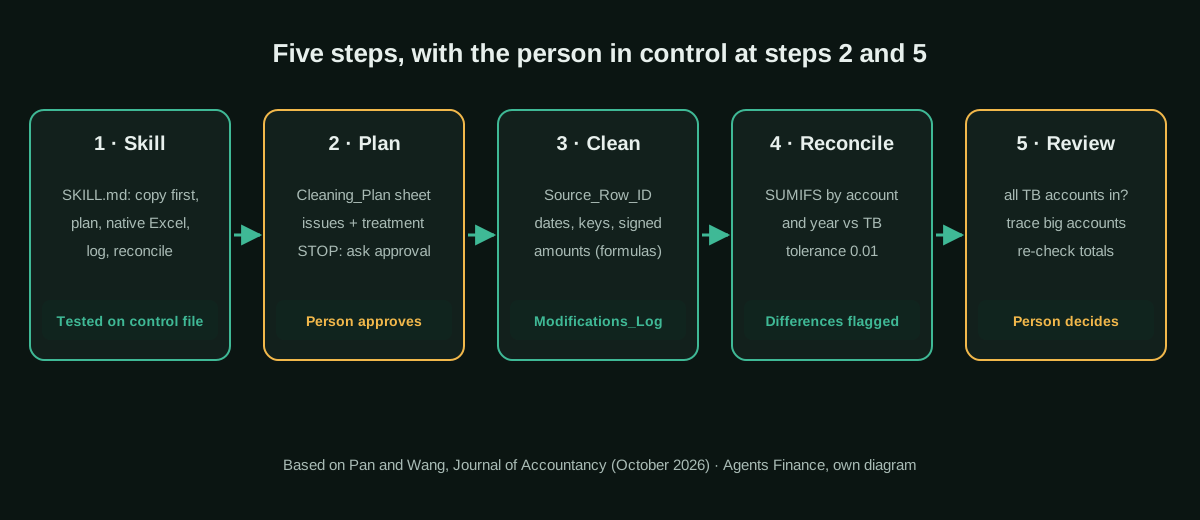
The screenshots in the two figures show the resulting workbook: a Cleaning_Plan sheet, Working_Data, Modifications_Log, Reconciliation, FY_Variance_Bridge and Final_Summary, alongside the original tabs. The diagram below sums up the flow.
Step by step
1. Train the agent with a skill. ChatGPT for Excel ships with a few default skills for financial modelling and corporate finance, but none for audit data cleaning, so the authors wrote one. Before sharing a skill with an engagement team they recommend a structured test: a technical lead runs it on a small control dataset with known flaws and a pre-calculated clean output, checks that the formulas it writes are correct and trace to the source cells, and keeps refining the instructions until the result is 100% right on that control file. Staff then report odd behaviour on real files so managers can improve the skill over time.
2. Plan before execution. The skill forces the agent to analyse the active dataset and write its proposed method in a separate worksheet before touching anything, and then to ask for approval. In the screenshot, the user’s request is short: clean the general ledger in the original sheet, use the “Report Contents” sheet as the workbook guide and reconcile the result to the 2019 and 2020 account balance sheets. The plan lists the issues it found, such as debit and credit codes (“S” for debit and “H” for credit) that must be turned into signed amounts, control account keys whose format differs from the ledger, and blank debit or credit cells where the balance is zero, together with the proposed treatment of each one.
3. Clean and standardise. Once the plan is approved the agent does the work with ordinary, reviewable formulas. It removes blank rows and repeated headers, builds a reconciliation key by combining the relevant fields so the ledger matches the structure of the balance tables, and standardises dates, including a “00/00/0000” placeholder. The log in the second figure shows the detail an auditor wants: a source row identifier added as the leftmost column for traceability, helper columns for debit, credit and signed amounts across all 59,157 rows, and a note for each change.
4. Validate through reconciliation. The agent sums the cleaned ledger by account and compares the totals with the ending balances in the client’s trial balance, highlighting any non-zero difference. In the screenshots it uses an account-plus-cost-centre key only where that key exists in the balance tables and falls back to the plain account otherwise, and reports that the 2019, 2020 and all-period reconciliations tie within $0.01.
5. Document for the reviewer. A final tab explains in plain English what was done and why, and the quality gates read “Pass” for preservation and approval, documentation, data quality, reconciliation and communication, the last one noting that no audit compliance conclusion is asserted. The authors’ human review has three parts: check that every account in the trial balance reconciles to the aggregated ledger; trace the formulas of high-volume accounts back to their source; and settle matters of professional judgement, such as rounding, by instructing the agent explicitly.
Copy and adapt
Prerequisites: Excel with ChatGPT for Excel signed in to an approved work account, permission to create or upload skills (or Copilot in Excel with a OneDrive skills folder, which reads the same format), and Python 3.10 or later with pandas for the re-check. The authors have not published their skill, dataset or prompts, so everything below is an Agents Finance template based on the Journal of Accountancy article. Use fictitious data first and never upload client data to a personal account.
1. The skill (Agents Finance template)
Save it as gl-clean-reconcile-tb/SKILL.md and upload the folder, or paste it into ChatGPT’s skill editor.
---
name: gl-clean-reconcile-tb
description: Use when I ask to clean a general ledger or journal export and reconcile it to a trial balance or other control totals for audit or month-end use.
---

# Clean a general ledger export and reconcile it to the trial balance

## Principles (never skip)
1. Never edit the source sheet. Copy it to `Working_Data` and add `Source_Row_ID` as the first column, pointing to the original row.
2. Inspect before acting: list every data-quality issue you find (blank rows, report headers or footers, text in number columns, mixed date formats, placeholder dates, debit/credit codes, key formats that differ from the control totals, currency fields).
3. Write the plan in a `Cleaning_Plan` sheet (issue, evidence with a cell reference, proposed treatment) and STOP. Ask me to approve or change it. Do nothing else until I approve.
4. Use only native Excel: formulas, filters, tables and PivotTables. No macros, no VBA, no hard-coded values pasted over formulas.
5. Log every change in `Modifications_Log` with: Step, Timestamp, Sheet, Column or range, Issue found, Approved action, Excel method or formula, Rows affected, Validation performed, Notes.
6. Reconcile: sum the cleaned amounts by account (and by the extra dimension only where the control totals carry it) and by period, compare with the control totals in a `Reconciliation` sheet, compute the difference and flag anything above the tolerance I give you (default 0.01).
7. Completeness: show rows in the source = rows kept + rows excluded, with the reason for each exclusion.
8. Finish with a `Final_Summary` sheet: what you did, what you could not resolve and the open questions. Do not state or imply that the data complies with any auditing standard: that judgement is mine.

## Never
- Delete or overwrite the source data.
- Change signs, round, or drop rows to force a reconciliation to tie.
- Guess the meaning of a code: ask me.
2. The prompt to start a run (Agents Finance template)
@gl-clean-reconcile-tb
Source sheet: "{{SOURCE_SHEET}}". Workbook guide: "{{GUIDE_SHEET}}" (column meanings, currency, debit/credit codes).
Control totals: "{{TB_SHEET_1}}" and "{{TB_SHEET_2}}" (one per fiscal year).
Tolerance: {{TOLERANCE}}. Reconciliation grain: account, plus {{EXTRA_DIMENSION}} only where the control totals have it.
First step only: build Cleaning_Plan and ask me to approve. Do not change any data yet.
3. Formulas for the working sheets (Agents Finance template)
Column letters follow the layout of our control file: A account, B cost centre, C posting date, D fiscal year, E debit/credit code, F amount, and a TB sheet with the key in column E. Adjust them to your file.
Clean_Date (G2):      =IF(OR(TRIM(C2)="",TRIM(C2)="00/00/0000"),"",C2)
dd.mm.yyyy to date:   =DATE(RIGHT(C2,4),MID(C2,4,2),LEFT(C2,2))
Signed_Amount (H2):   =IF(E2="S",F2,IF(E2="H",-F2,NA()))
Acct_Key (I2):        =UPPER(SUBSTITUTE(TRIM(A2),"-",""))
Recon_Key (J2):       =IF(COUNTIFS(TB!$E:$E,I2&"|"&UPPER(TRIM(B2)))>0,I2&"|"&UPPER(TRIM(B2)),I2)
TB_Key (TB!E2):       =UPPER(SUBSTITUTE(TRIM(B2),"-",""))&IF(TRIM(C2)="","","|"&UPPER(TRIM(C2)))
GL total (Rec!C2):    =SUMIFS(Working_Data!$H:$H,Working_Data!$J:$J,B2,Working_Data!$D:$D,A2)
Difference (Rec!E2):  =ROUND(C2-D2,2)
Status (Rec!F2):      =IF(ABS(E2)<=0.01,"OK","INVESTIGATE")
NA() in the signed amount is deliberate: an unknown debit/credit code should break the total, not disappear.
4. Control file with known flaws (Agents Finance template)
Two small CSV files with fictitious data: a ledger with a report header, a blank row, a page footer, comma and period decimals, a parenthesised negative, a placeholder date and trailing hyphens on account codes, and the trial balance it must tie to. The correct answer is: 11 rows read, 8 kept, 3 excluded, 7 keys reconciled, no differences.
account,cost_center,posting_date,fiscal_year,debit_credit,amount,text
Report: GL line items,,,,,,
,,,,,,
INT-1000-,,2020-01-31,2020,S,"18,584.00",Cash receipt
INT-1000-,,02/03/2020,2020,H,"1.200,50",Bank fee reversal
INT-2111-,CC10,00/00/0000,2020,H,950.00,Accrual
INT-2111-,CC20,15.06.2020,2020,H,"(50.00)",Accrual correction
INT-4000-,,2020-12-31,2020,H,"25,000.00",Revenue
INT-6100-,,2020-11-30,2020,S,7266.50,Expenses
Page 2 of 2,,,,,,
INT-1000-,,2019-12-31,2019,S,"5,000.00",Opening
INT-4000-,,2019-12-31,2019,H,5000,Revenue 2019fiscal_year,account,cost_center,balance
2020,INT-1000,,17383.50
2020,INT-2111,CC10,-950.00
2020,INT-2111,CC20,50.00
2020,INT-4000,,-25000.00
2020,INT-6100,,7266.50
2019,INT-1000,,5000.00
2019,INT-4000,,-5000.005. Independent re-check in Python (Agents Finance template)
It rebuilds the result from the raw export without reading the agent’s formulas, so the reviewer has a second, independent total. On the control file above it prints Rows read: 11 | kept: 8 | dropped: 3 and differences above 0.01: 0; if you change one trial balance figure by 0.50 it flags that key and exits with code 1.
#!/usr/bin/env python3
"""Independent re-check of an Excel agent's GL clean-up and GL-to-TB reconciliation.

Agents Finance template based on the procedure described by Pan and Wang
(Journal of Accountancy, October 2026). It does not read the agent's workbook
formulas: it rebuilds the result from the raw export so you can compare totals.

Usage:
  python gl_tb_recheck.py raw_gl.csv trial_balance.csv --year-col fiscal_year
Outputs: recheck_reconciliation.csv and recheck_rows.csv in the current folder.
"""
import argparse
import re
import sys
from datetime import datetime
from decimal import Decimal, InvalidOperation

import pandas as pd

TOLERANCE = Decimal("0.01")
DATE_FORMATS = ("%Y-%m-%d", "%d/%m/%Y", "%m/%d/%Y", "%d.%m.%Y", "%Y%m%d")
PLACEHOLDER_DATES = {"", "00/00/0000", "00.00.0000", "0000-00-00", "00000000"}


def parse_amount(text):
    """'1.234,50' / '1,234.50' / '(500.00)' / '500-' -> Decimal, or None."""
    s = str(text).strip().replace(" ", "").replace("\u00a0", "")
    if not s or s.lower() == "nan":
        return None
    negative = s.startswith("(") and s.endswith(")") or s.endswith("-")
    s = s.strip("()").rstrip("-").lstrip("+")
    if s.startswith("-"):
        negative, s = True, s[1:]
    if "," in s and "." in s:
        # the right-most separator is the decimal one
        if s.rfind(",") > s.rfind("."):
            s = s.replace(".", "").replace(",", ".")
        else:
            s = s.replace(",", "")
    elif "," in s:
        s = s.replace(",", ".") if len(s.split(",")[-1]) == 2 else s.replace(",", "")
    try:
        value = Decimal(s)
    except InvalidOperation:
        return None
    return -value if negative else value


def parse_date(text):
    s = str(text).strip()
    if s in PLACEHOLDER_DATES or s.lower() == "nan":
        return None
    for fmt in DATE_FORMATS:
        try:
            return datetime.strptime(s, fmt).date()
        except ValueError:
            continue
    return "UNPARSED"


def norm_key(text):
    """Same idea as =UPPER(TRIM(SUBSTITUTE(x,"-",""))) in the workbook."""
    return str(text).strip().upper().replace("-", "").replace(" ", "")


def main():
    ap = argparse.ArgumentParser()
    ap.add_argument("raw_gl")
    ap.add_argument("trial_balance")
    ap.add_argument("--account-col", default="account")
    ap.add_argument("--costcenter-col", default="cost_center")
    ap.add_argument("--amount-col", default="amount")
    ap.add_argument("--dc-col", default="debit_credit")
    ap.add_argument("--debit-code", default="S")   # S/H = Soll/Haben in many SAP exports
    ap.add_argument("--credit-code", default="H")
    ap.add_argument("--date-col", default="posting_date")
    ap.add_argument("--year-col", default="fiscal_year")
    ap.add_argument("--account-regex", default=r"^[A-Z]{0,4}-?\d",
                    help="what a real account looks like; other rows are treated as headers/text")
    args = ap.parse_args()

    raw = pd.read_csv(args.raw_gl, dtype=str, keep_default_na=False)
    tb = pd.read_csv(args.trial_balance, dtype=str, keep_default_na=False)

    rows, kept = [], []
    for i, r in raw.iterrows():
        source_row = i + 2  # header is row 1 in the CSV
        account = r.get(args.account_col, "").strip()
        amount = parse_amount(r.get(args.amount_col, ""))
        dc = r.get(args.dc_col, "").strip().upper()
        reason = None
        if not account and amount is None:
            reason = "blank row"
        elif not re.match(args.account_regex, account.upper()):
            reason = "header or text row"
        elif amount is None:
            reason = "amount not numeric"
        elif dc not in (args.debit_code, args.credit_code):
            reason = f"unknown debit/credit code '{dc}'"
        date = parse_date(r.get(args.date_col, ""))
        if reason is None and date == "UNPARSED":
            reason = "date not parseable"
        rows.append({"source_row": source_row, "account": account, "reason_dropped": reason or ""})
        if reason:
            continue
        signed = amount if dc == args.debit_code else -amount
        kept.append({
            "source_row": source_row,
            "year": r.get(args.year_col, "").strip(),
            "acct_key": norm_key(account),
            "acct_cc_key": norm_key(account) + "|" + norm_key(r.get(args.costcenter_col, "")),
            "signed_amount": signed,
            "date_blank": date is None,
        })

    gl = pd.DataFrame(kept)
    tb["acct_key"] = tb["account"].map(norm_key)
    tb["acct_cc_key"] = tb["acct_key"] + "|" + tb.get("cost_center", "").map(norm_key)
    tb["balance_dec"] = tb["balance"].map(parse_amount)
    tb_cc_keys = set(tb.loc[tb["cost_center"].str.strip() != "", "acct_cc_key"]) if "cost_center" in tb else set()

    # Use the account+cost-centre key only when the TB carries that grain (as in the JofA plan).
    gl["recon_key"] = [cc if cc in tb_cc_keys else a for cc, a in zip(gl["acct_cc_key"], gl["acct_key"])]
    tb["recon_key"] = [cc if cc in tb_cc_keys else a for cc, a in zip(tb["acct_cc_key"], tb["acct_key"])]

    gl_sum = gl.groupby(["year", "recon_key"])["signed_amount"].apply(lambda s: sum(s, Decimal("0")))
    tb_sum = tb.groupby(["fiscal_year", "recon_key"])["balance_dec"].apply(lambda s: sum(s, Decimal("0")))
    tb_sum.index = tb_sum.index.set_names(["year", "recon_key"])

    rec = pd.concat([gl_sum.rename("gl"), tb_sum.rename("tb")], axis=1).fillna(Decimal("0")).reset_index()
    rec["difference"] = rec["gl"] - rec["tb"]
    rec["status"] = ["OK" if abs(d) <= TOLERANCE else "INVESTIGATE" for d in rec["difference"]]
    rec.to_csv("recheck_reconciliation.csv", index=False)
    pd.DataFrame(rows).to_csv("recheck_rows.csv", index=False)

    dropped = sum(1 for r in rows if r["reason_dropped"])
    print(f"Rows read: {len(rows)} | kept: {len(kept)} | dropped: {dropped} | blank dates kept: {int(gl['date_blank'].sum())}")
    print(f"Completeness check: {len(rows)} = {len(kept)} + {dropped} -> {'OK' if len(rows) == len(kept) + dropped else 'FAIL'}")
    bad = rec[rec["status"] != "OK"]
    print(f"Keys reconciled: {len(rec)} | differences above {TOLERANCE}: {len(bad)}")
    if len(bad):
        print(bad.to_string(index=False))
    return 1 if len(bad) else 0


if __name__ == "__main__":
    sys.exit(main())
Run it with pip install pandas and python gl_tb_recheck.py raw_gl.csv trial_balance.csv. The default account pattern and the S/H codes match the control file; change --account-regex, --debit-code and --credit-code for your export.
6. Reviewer checklist (Agents Finance template)
- [ ] The source sheet is untouched and every Working_Data row has a Source_Row_ID.
- [ ] I approved Cleaning_Plan before any change, and the log matches the plan.
- [ ] Rows read = rows kept + rows excluded, and each exclusion has a reason.
- [ ] Every trial balance account and period appears in Reconciliation.
- [ ] I traced the formulas of the five largest accounts back to the source rows.
- [ ] The independent re-check gives the same totals and no difference above tolerance.
- [ ] Rounding and any other judgement call was decided by me, not by the agent.
- [ ] Final_Summary makes no claim of compliance with auditing standards.
A concrete example
Take the control file above. The agent’s plan should list five issues: two non-data rows (the report title and the page footer) and one blank row; amounts in two formats (“18,584.00” and “1.200,50”) plus a negative in brackets; one placeholder date and three date formats; debit and credit codes “S” and “H”; and account codes with a trailing hyphen (“INT-1000-”) that do not match the trial balance (“INT-1000”). After approval, Working_Data keeps eight rows, Modifications_Log records each helper column with its formula, and Reconciliation shows seven keys: account 2111 is reconciled by cost centre (CC10 and CC20) because the trial balance has that split, and the rest by account. Account 1000 for 2020 ties at 17,383.50: 18,584.00 debit less 1,200.50 credit. Change the trial balance for account 6100 from 7,266.50 to 7,266.00 and both the workbook and the script must flag a 0.50 difference instead of rounding it away.
Results stated by the source
The authors report that cleaning, validating and reconciling 59,157 rows to the trial balance took about 10 minutes on average in their simulation, against “many hours” by traditional methods, and their screenshots show the 2019, 2020 and all-period reconciliations tying within $0.01. Those are the only figures. The data were simulated from a teaching case, there was no client and no timed manual comparison, and they do not report how often the agent got something wrong before the skill was refined. Treat the 10 minutes as what is possible once a tested skill exists, not as what your first run will take.
Limitations and risks
- Data protection. OpenAI notes that, under Microsoft’s add-in marketplace terms, Microsoft may be able to read workbook content and prompts, and that some logs may be kept for 30 days. The authors insist on enterprise licences for audit work. Check your firm’s policy and the client’s engagement terms before uploading a ledger.
- The tool changes. The article’s screenshots are from July 2026; menus, default skills and usage limits have changed since and will keep changing.
- A plan is not a control. Approving a plan reduces the risk of unwanted changes but does not remove it, as the authors themselves say. The reconciliation and your own tracing are the controls.
- Formulas, not values. The method depends on the agent writing visible formulas. If it pastes values, the trail is gone: tell the skill to forbid it, as ours does.
- Macros and very large files. OpenAI lists VBA and macros as not fully supported, and larger workbooks use more of your usage limit.
Common mistakes
- Letting the agent work on the only copy of the export. Duplicate the file first, as OpenAI also recommends.
- Approving the plan without reading it, especially the treatment of debit/credit codes and of rows it proposes to exclude.
- Accepting “reconciled” without checking that every trial balance account is in the reconciliation: a missing account cannot show a difference.
- Asking the agent to “fix” a difference. Differences are evidence to investigate, not something to make disappear.
- Sharing a skill with the team before it has passed a control file whose answer you already know.
Conclusions
The most valuable part of this tutorial is not the 10 minutes but the shape of the work: a written procedure the agent must follow, a plan a person approves, formulas instead of pasted values, a log of every change and a reconciliation to an external control total. Those are the same controls an audit manager would demand from a junior, and they fit in one short SKILL.md that works in ChatGPT for Excel and, with the same format, in Copilot in Excel. Start with a control file, add an independent re-check like the script above, and only then point the agent at a real client ledger.
Sources
- Journal of Accountancy — Using an Excel agent to clean, validate, and reconcile data (Gang (Ernest) Pan and Li Wang, 1 October 2026) (opens in a new tab) (primary)
- Journal of Accountancy — Figure 1: Data cleaning and reconciliation planning (PDF, screenshots from ChatGPT for Excel, 6 July 2026) (opens in a new tab)
- Journal of Accountancy — Figure 2: Completed cleaning checks and modification log (PDF) (opens in a new tab)
- OpenAI Help Center — ChatGPT for Excel and Google Sheets (availability, skills, limitations, data handling) (opens in a new tab)
- OpenAI Help Center — Skills in ChatGPT (create, upload, share and admin controls) (opens in a new tab)
- OpenAI — Introducing ChatGPT for Excel and new financial data integrations (5 March 2026, updated 5 May 2026) (opens in a new tab)
- Microsoft Support — Use skills with Copilot in Excel (same SKILL.md format, OneDrive skills folder) (opens in a new tab)
- Agent Skills — Specification (SKILL.md format) (opens in a new tab)
We wrote this entry in our own words from the sources above and checked that the links worked on October 25, 2026. Is anything incorrect? Tell us.
Share this entry
This entry is part of the guide: AI agents for accounting