What it is for
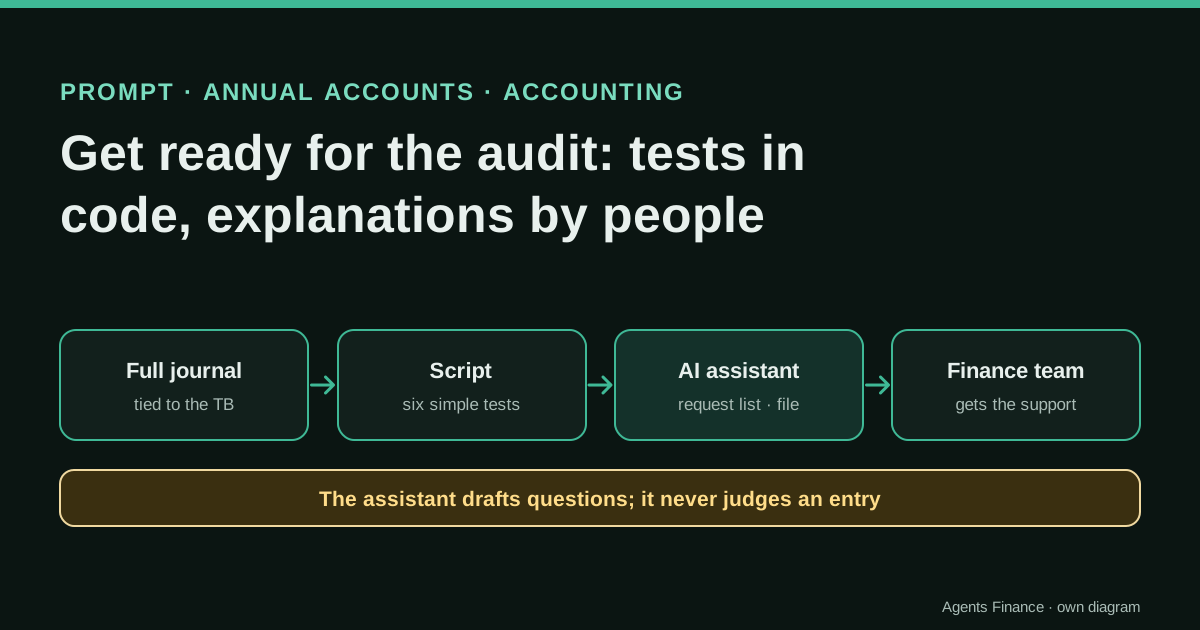
It helps the finance team arrive at the audit with the documents organised and with the unusual journal entries already explained. A script runs simple tests over the full year's journal; the assistant turns its output, the auditor's list (if any) and the extraction log into three working tables: requests, explanations to obtain and extraction gaps.
Expected result and limits
There are no results from real companies: it is a proposal. On the fictitious journal published here (1,017 entries, 2,034 lines), the script flags 17 entries across six tests, including the 16 we planted and one ordinary entry that falls in the "just below the approval limit" band by chance.
Mind the evidence. Material written by this directory based on published practices. We have not tested it with real data: try it with sample data first.
What has really been tested
On 19 October 2026 we generated the fictitious journal, ran the test script on it and checked that its output (the tables below) catches the cases we planted. We checked that the ICAC page lists NIA-ES 240 among the standards in force and read the IAASB page on ISA 240 (Revised) and its effective date. We have not run the prompt on a real audit, and the example rows are written by us.
The prompt
You are helping the finance team of {{COMPANY}} prepare for the statutory audit of the year ending {{YEAR_END}} ({{FRAMEWORK}}). You work for the company, not for the auditor. You draft; people decide.

Inputs:
- AUDITOR_REQUEST: {{AUDITOR_REQUEST}} (the auditor's own list, if we have received it; otherwise "none").
- SYSTEMS: {{SYSTEMS}}
- TEST_RESULTS: the output of our journal-entry tests, already computed by a script, with the entry numbers and the details of each flagged entry. Do not recalculate, re-count or add flags.
- EXTRACTION_LOG: the log of every file we extracted from the ERP, with parameters, row counts and control totals.

Task 1, request list. If AUDITOR_REQUEST is not "none", map every item to the document we will provide and only add items we probably need to prepare earlier. If it is "none", propose a list by area (revenue and receivables, purchases and payables, payroll, cash and banks, fixed assets, inventory, tax, equity and debt, year-end entries) and mark every item as SUGGESTED. Columns: area, document, period or cut-off date, source (system and report, or folder), owner, due date, status. Do not invent requirements and do not cite paragraphs of standards.

Task 2, explanation file. For each flagged entry in TEST_RESULTS, one row: entry, tests that flagged it, amount, user, accounting date and entry date, the evidence that would explain it (invoice, contract, approval, email, calculation), who should answer, and a neutral draft explanation with blanks such as [reason] and [approved by]. Never state that an entry is correct, wrong or suspicious, and never fill in a reason that is not in the inputs.

Task 3, extraction log. List the rows of EXTRACTION_LOG with missing parameters, missing row count or control total, or a difference that is not zero.

Task 4: open questions, each with an owner.

Format: three tables and a list. If an input is missing or inconsistent, say so at the start instead of working around it.
Without JavaScript you will not see the button: select the text in the block and copy it. License: Original text of this directory. You may use and adapt it freely.
Variables you need to fill in
Replace each placeholder in double curly braces with your data before sending it.
{{COMPANY}}- Legal entity being audited.
{{YEAR_END}}- Year-end date, for example 31 December 2025.
{{FRAMEWORK}}- Accounting framework, for example Spanish PGC or IFRS as adopted by the EU.
{{AUDITOR_REQUEST}}- The auditor's request list pasted as text, or the word none.
{{SYSTEMS}}- ERP and other sources: payroll provider, bank portals, expense tool, sales platform.
How to use it
Export the full journal for the year with user, accounting date, entry date and source, write the extraction log as you go, set the approval limit and close date in the script, and run it. Give the output and the log to the assistant, review every row, and get each explanation from the person who made the entry before the fieldwork starts.
In two sentences
Auditors test journal entries every year, and the questions arrive at the worst moment: in the middle of fieldwork, about an entry nobody remembers. This prompt and a short script let the finance team run the obvious tests first, collect the explanations in advance and hand over a tidy request list with a log of how every file was extracted.
Why do this on the company side
Under the auditing standards in force in Spain (NIA-ES 240, listed on the ICAC page we cite) and internationally (ISA 240), the auditor has to respond to the risk that management overrides controls, and testing the appropriateness of journal entries is one of the procedures. In practice that means the auditor will select entries with unusual features and ask for support. The IAASB has issued a revised ISA 240 that applies to audits of periods beginning on or after 15 December 2026; how and when it is adopted in Spain is for the ICAC to decide, so check the page before your next audit.
None of this tells the company what to do, but the logic is simple: if you know which entries will look unusual, you can gather the support while the people involved still remember them. The tests in this entry are deliberately basic and are not the auditor’s tests. Your auditor may use other criteria, and that is their decision.
The fictitious data
A distribution company, calendar year 2025. The journal has 1,017 entries and 2,034 lines, all balanced. Four users post most of them: an automatic system user for sales imports, two accounts payable clerks and the controller; a temp_user appears twice. Each line has the entry number, the accounting date, the entry date (when it was keyed in), user, source (sales_import, ap_import or manual), account, description, debit and credit. We planted 16 cases of the kind auditors usually ask about.
Run python3 je_tests.py journal-2025.csv. The approval limit (10,000) and the close date (20 January 2026) are at the top of the script, together with the 2025 national holidays in Spain. Change them to yours, and add your regional and local holidays.
The six tests
| Test | Our rule | Why it is worth asking | Typical innocent reason |
|---|---|---|---|
| Just below the approval limit | Manual entry between 95% and 100% of the limit | Splitting or sizing amounts to avoid an approval | Normal invoices that happen to fall there |
| Weekend or holiday | Manual entry keyed in on a Saturday, Sunday or national holiday | Work outside normal controls | Year-end overtime |
| After the close, into the year | Accounting date in the year, entry date after the close date | Changes after the figures were reported | Late auditor adjustments, agreed and documented |
| Round amount | Manual entry of at least 5,000 and a multiple of 1,000 | Estimates or plugs | Agreed fees, provisions with a documented basis |
| Rare user | User with three entries or fewer in the year | Generic or temporary access | A one-off project user |
| Possible duplicate | Same supplier account and amount within five days | Paying twice | Two genuine identical deliveries |
The core of the script is a few lines per test:
if manual and 0.95 * THRESHOLD <= a < THRESHOLD: flags["just below approval limit"].append(k)
if manual and (entered.weekday() >= 5 or entered in HOLIDAYS): flags["posted on weekend/holiday"].append(k)
if acc_date <= YEAR_END and entered > CLOSE_DATE: flags["posted after close into the year"].append(k)
if manual and a >= 5000 and a % 1000 == 0: flags["round amount"].append(k)
if by_user[h["user"]] <= 3: flags["user with <= 3 entries"].append(k)
In a spreadsheet with one row per entry, the same tests are columns: =AND(E2="manual",H2>=0.95*$L$1,H2<$L$1), =WEEKDAY(C2,2)>5 (plus a lookup in a holiday list), =AND(B2<=DATE(2025,12,31),C2>DATE(2026,1,20)) and =AND(E2="manual",H2>=5000,MOD(H2,1000)=0), where B is the accounting date, C the entry date, E the source, H the amount and L1 the approval limit.
What the script returns
| Test | Entries | Entry numbers |
|---|---|---|
| Just below the approval limit | 7 | JE01001–JE01006, JE00498 |
| Weekend or holiday | 3 | JE01013, JE01014, JE01015 |
| Round amount | 2 | JE01016, JE01017 |
| Rare user | 1 | JE01017 (temp_user) |
| After the close, into the year | 1 | JE01016 |
| Possible duplicate | 3 pairs | JE01007/08, JE01009/10, JE01011/12 |
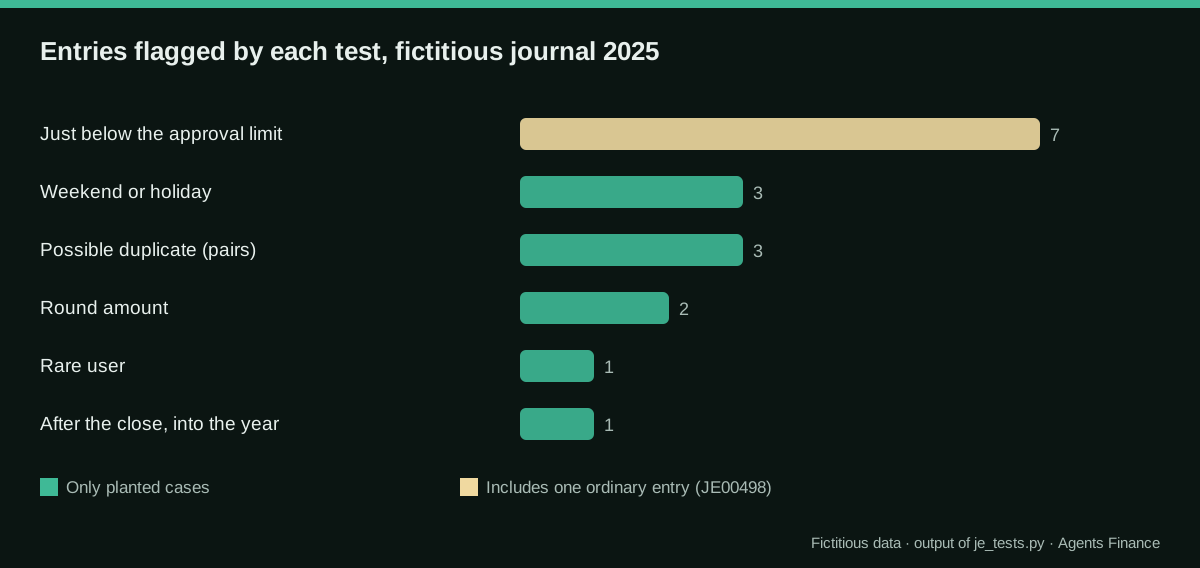
Six of the seven entries below the limit are consulting invoices from the same supplier, between 9,802.83 and 9,967.69, all keyed in manually by the same clerk. The seventh, JE00498, is an ordinary entry that falls in the band by chance: a reminder that a flag is a question, not a finding. JE01016 is an 18,000 debit to revenue dated 31 December 2025 and keyed in on 12 February 2026. JE01017 is a 25,000 “Adjustment” by temp_user, flagged twice. The duplicate pairs share supplier, amount and invoice number, with a “-1” suffix on the manually entered copy.
The script also prints a first-digit (Benford) comparison for supplier invoices: 632 amounts, mean absolute deviation 0.0069. Use it only as a screening view and compare it with previous years; on a few hundred amounts and with a population of mixed invoice types, it says little on its own.
The extraction log
Auditors and reviewers need to know that a file is complete. Keep one row per file, filled in at the moment of extraction (the first row matches the sample journal; the second is illustrative):
File            | System and report          | Parameters                       | By / when           | Rows  | Control total      | Ties to                      | Difference
journal-2025    | ERP > G/L entries export   | Company 01, 01/01/25-31/12/25    | M. López 15/01/26   | 2,034 | Debits 3,137,503.97| Sum of TB movements 2025     | 0.00
                |                            | all sources, incl. closing       | 10:42               |       |                    |                              |
ap-open-items   | ERP > Vendor ledger        | Open at 31/12/25                 | M. López 15/01/26   | 214   | 318,544.20         | TB account 400 at 31/12/25   | 0.00
The “ties to” column is the important one: a file without a tie-out to the trial balance can be incomplete without anyone noticing, and every test run on it inherits the gap.
How to use the prompt
- Run the script and keep the full output, with the details of each flagged entry (date, user, account, description, amount).
- Paste the output as TEST_RESULTS and the log as EXTRACTION_LOG. If the auditor has already sent a request list, paste it as AUDITOR_REQUEST.
- Read task 1 against the auditor’s list; delete SUGGESTED items you do not need.
- Send each row of task 2 to the person who made the entry, and replace the blanks with what they answer and the document they provide.
A row of the explanation file should look like this (our own example, not model output):
| Entry | Tests | Amount | User | Dates | Evidence to obtain | Who answers | Draft |
|---|---|---|---|---|---|---|---|
| JE01016 | After the close | 18,000.00 | controller | 31/12/25 · 12/02/26 | Calculation of the provision, approval, communication with the auditor | Controller | “Entry recorded on [date] to [reason], approved by [name]; support: [document].” |
Variants by ERP: the fields you need
The tests need the user and both dates. Check that your export has them before relying on any result:
- Microsoft Dynamics 365 Business Central: general ledger entries include posting date, document date, user ID and source code; the entry date can be checked through the G/L register.
- Odoo: journal items can be exported with the accounting date, the journal and the “created by” and “created on” fields, which give the user and the entry date.
- SAP: document headers hold the posting date, the entry date, the user and the document type; ask whoever administers the system for a report over them.
- Sage, A3 and Holded: check whether the journal export includes user and entry date. If not, ask your provider how to obtain the audit trail, and record in the log that the user test could not be run.
Spanish companies on a full PGC usually also need the closing and opening entries in the file; decide whether to include them in the tests and write that decision in the parameters column.
Human review steps
- Tie the journal to the trial balance before running anything, and record the result in the log.
- Review the parameters of the script (limit, close date, holidays) with whoever owns the approval policy.
- Read every flagged entry yourself; the assistant only drafts the questions.
- Get explanations and documents from the people who made the entries, not from the assistant.
- Agree with the auditor what you will hand over and in what format; their list prevails over the suggested one.
Common mistakes
- Running the tests on an incomplete file. Without the tie-out, no flag (or lack of flags) means anything.
- Using the wrong date. The accounting date tells you which period an entry belongs to; the entry date tells you when it was keyed in. The “after the close” and weekend tests need the second one.
- Treating a flag as a finding. JE00498 is a normal invoice. Write the explanation and move on.
- Letting the assistant write the explanation. It does not know why an entry was made. The prompt forbids it from filling in reasons; check that it obeyed.
- Sharing the full journal with a consumer AI account. Use the business plan your company has approved, or give the assistant only the script’s output.
- Copying test thresholds from the internet. Benford thresholds, round amounts and bands depend on the population; set yours and document why.
Limits
This is preparation, not an audit. The tests are basic, the thresholds are ours and the auditor decides their own procedures and samples. The prompt helps you be organised and answer quickly; it does not reduce the auditor’s work or change their responsibility.
Sources
- ICAC — Normas Técnicas de Auditoría y de Control de Calidad (includes NIA-ES 240) (opens in a new tab) (primary)
- IAASB — ISA 240 (Revised), The Auditor's Responsibilities Relating to Fraud in an Audit of Financial Statements (opens in a new tab)
- Claude Docs (Anthropic) — Reduce hallucinations (opens in a new tab)
We wrote this entry in our own words from the sources above and checked that the links worked on October 19, 2026. Is anything incorrect? Tell us.