What it is about
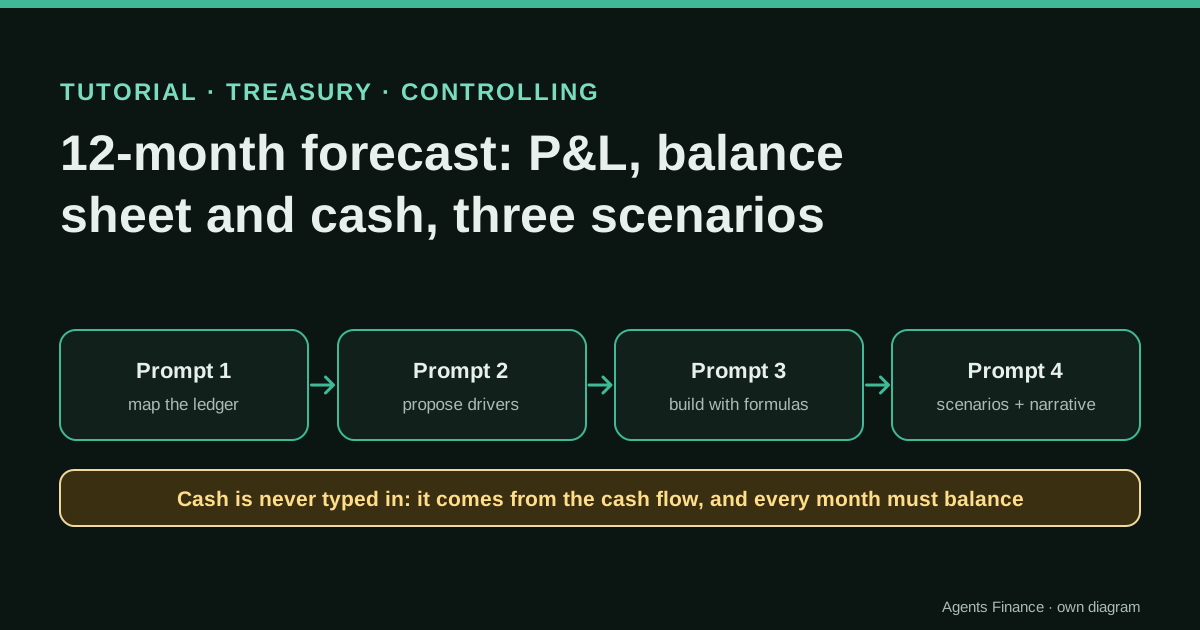
It is a method in four prompts, each followed by a review stop, to go from a general ledger export to a monthly forecast of the profit and loss account, balance sheet and cash flow for the next 12 months, in three scenarios. The assistant writes code or formulas and drafts text; the controller agrees the mapping and decides the drivers. The model is built so that cash is the result of the cash flow and the balance sheet must balance every month, which makes most errors visible.
What it offers, according to the source
There are no results from real companies: it is a tutorial. On the fictitious distributor published with this entry (24 months of ledger, 694 lines), our reference script builds the three scenarios and all 36 monthly balance checks read zero; closing cash at September 2027 is 464,568 in the base case, 562,716 in the optimistic case and 218,582 in the pessimistic case.
Mind the evidence. Material written by this directory based on published practices. We have not tested it with real data: try it with sample data first.
What has really been tested
On 19 October 2026 we generated the fictitious ledger, ran our reference model on it and checked that the ledger balances, that every account is mapped and that the balance sheet balances in every month of the three scenarios; the figures in this entry are its output. We checked the Forecast Sheet and FORECAST.ETS behaviour in Microsoft's documentation and the indirect method in IAS 7. We have not run the four prompts end to end with a specific AI assistant, and we have not used the method on a real company.
How to follow it
Use a company whose last year you know well, so you can judge whether the drivers make sense. Run the four prompts in order and do not move on until the stop of the previous one is reviewed. Keep the drivers on one sheet, labelled as assumptions, and compare the first forecast month with the actual close when it arrives.
- Export at least 12 months (ideally 24) of journal lines with date, account, debit and credit, plus the chart of accounts, and prepare a mapping file that assigns each account to a statement line.
- Prompt 1: ask the assistant to write and run code that checks the ledger balances, applies the mapping, lists unmapped accounts and produces monthly P&L movements and closing balance-sheet balances. Stop and review.
- Prompt 2: ask it to compute the reference ratios from the actuals (gross margin, cost run-rates, implied days of receivables, inventory and payables) and to propose drivers for a base, an optimistic and a pessimistic scenario as a table. You decide the final values.
- Prompt 3: ask it to build the model with formulas, not typed values: monthly P&L, balance sheet and indirect cash flow, with cash taken only from the cash flow and a checks sheet that must read zero every month.
- Prompt 4: run the three scenarios, get a summary table and the cash low point, and only then ask for a short narrative that uses only figures from the summary.
- Review: trace the opening balances to the closed trial balance, test one month by hand, challenge every driver and file the model with its assumptions.
In two sentences
A three-statement forecast is mostly bookkeeping discipline: every euro of profit has to end up somewhere on the balance sheet, and cash is what is left after working capital, investment and debt have taken their share. This tutorial uses an AI assistant to write the code and the formulas, keeps the decisions about drivers with you, and forces the model to prove every month that it balances.
Why split it into four prompts
If you ask an assistant to “build a 12-month forecast with three scenarios” in one go, it will usually produce something that looks right and contains at least one of these errors: cash typed in as a balancing figure, receivables that do not move with sales, interest that ignores debt repayments, or a balance sheet that only balances in the first month. You will not see which one until you dig.
Four smaller prompts with a stop after each one let you check the foundation before anything is built on it. The order matters: first the actuals, then the drivers, then the mechanics, and only at the end the narrative.
The fictitious company and the files
The sample is a small wholesale distributor with seasonal sales (a strong September to November and a weak August), 37% to 38% gross margin, stock worth almost two months of cost of sales, customers who pay in about 60 days and a bank loan repaid at 5,000 a month. It has 24 months of ledger, from October 2024 to September 2026, with 694 journal lines.
- General ledger, 24 months (CSV)
- Account mapping (CSV)
- Reference model (Python, standard library only)
- Output: 12 months × 3 scenarios (CSV)
The reference model is ours: it is what a correct answer to prompts 1 to 4 should be equivalent to. Use it to check what the assistant builds for you, not as a finished planning tool.
Getting the ledger out of your ERP
You need one row per journal line with date, account, debit and credit; description and document number help. Export at least 12 months and ideally 24, so that each forecast month has a same-month-last-year reference.
- Odoo: the Journal Items list (or the General Ledger report) filtered by date and exported to XLSX.
- Microsoft Dynamics 365 Business Central: the General Ledger Entries page, filtered by posting date and opened in Excel.
- NetSuite: a saved search on transactions showing the GL impact lines (account, period, debit, credit), exported to CSV.
- QuickBooks Online and Xero: the general ledger or journal report for the period, exported to Excel or CSV.
- Sage, A3 and Holded: the journal (libro diario) export for the period in Excel or CSV.
Also export the chart of accounts. The mapping file is short and you write it once: account, statement line (Revenue, COGS, Opex, Payroll, Depreciation, Interest, Tax, Cash, Receivables, Inventory, PPE, Payables, Tax payable, Debt, Equity) and statement (PL or BS).
Prompt 1: actuals by month
Attached: general-ledger.csv (journal lines) and account-mapping.csv.
Write and run code (not mental arithmetic) that:
1. Checks that total debits equal total credits, overall and for each entry. Stop and report if not.
2. Applies the mapping and lists every account that is not mapped, with its total. Do not guess a mapping.
3. Produces, for each month, the P&L movements by line and the closing balance-sheet balances by line.
4. Shows a control table: for each month, assets minus liabilities minus equity minus cumulative profit must be zero.
Show me the code, the unmapped accounts and the control table. Then stop.
Review stop. Check that the last month’s balances match your closed trial balance, line by line. If the control table is not zero, the problem is the mapping or the export, not the forecast.
Prompt 2: reference ratios and proposed drivers
Using only the monthly actuals from the previous step, compute with code:
- revenue for the last 12 months and the same months of the year before (growth rate);
- gross margin % for the last 12 months;
- average monthly operating expenses and payroll for the last 3 months;
- implied days for receivables (balance / monthly revenue × 30), inventory (balance / monthly cost of sales × 30)
  and payables (balance / monthly purchases × 30) at each of the last 3 month-ends.
Then propose drivers for three scenarios (base, optimistic, pessimistic) in a table with one column per scenario
and a "why" column that cites the ratio it starts from. Label the table PROPOSAL. Do not build anything yet. Stop.
In the sample, the ratios are 2.70 million of revenue in the last 12 months, a 37.5% gross margin and implied days of about 59 for receivables, 54 for inventory and 43 for payables. You then decide the final values. The ones in our reference model are:
| Driver | Base | Optimistic | Pessimistic |
|---|---|---|---|
| Revenue vs same month last year | +5% | +10% | −5% |
| Gross margin vs last 12 months | ±0 pts | +1 pt | −2 pts |
| Days of receivables (DSO) | 60 | 55 | 70 |
| Days of inventory (DIO) | 55 | 52 | 62 |
| Days of payables (DPO) | 45 | 45 | 38 |
Common to all three: operating costs at the last-three-month average plus 3% inflation, a 3% payroll increase from January, 30,000 of capex in March 2027 depreciated over 60 months, the loan repaid at 5,000 a month at 4.5% interest, and corporate tax at 25% of positive monthly profit, paid in July. That tax timing is a simplification: replace it with your real payment calendar.
Prompt 3: the model, with formulas
Build the forecast for the next 12 months with the drivers in the attached table (final values).
Rules:
- Use formulas or code that recalculate; never type a result. Keep all drivers on one Inputs sheet.
- P&L: revenue = same month last year × (1 + growth); cost of sales from the gross margin; operating costs,
  payroll, depreciation (existing + new capex / 60), interest = opening debt × rate / 12, tax on positive profit.
- Balance sheet: receivables, inventory and payables from the days; fixed assets = opening + capex − depreciation;
  debt with its repayment schedule; equity = opening + profit.
- Cash flow, indirect method: profit + depreciation − increase in receivables − increase in inventory
  + increase in payables + tax accrued − tax paid; investing = − capex; financing = − repayments.
- Cash = opening cash + total cash flow. Cash is never a balancing figure.
- A Checks sheet with, for each month: assets − liabilities − equity; opening cash + cash flow − closing cash;
  opening equity + profit − closing equity. All must be zero.
Return the file and the Checks table. Stop.
If your assistant works inside Excel, ask for named ranges on the Inputs sheet and plain formulas you can audit. If it works with code, ask for the script as well as the output. In both cases, open the Checks sheet first.
The heart of our reference model, for comparison:
ar1, inv1 = rev * g["dso"] / 30, cogs * g["dio"] / 30
purch = cogs + inv1 - inv; ap1 = purch * g["dpo"] / 30
taxpaid = taxp if m.endswith("-07") else 0
cfo = ni + dep - (ar1 - ar) - (inv1 - inv) + (ap1 - ap) + (tax - taxpaid)
cfi = -capex; cff = -min(INSTAL, debt)
cash += cfo + cfi + cff
...
check = round(cash + ar + inv + ppe - ap - taxp - debt - eq, 2)   # must be 0 every month
Prompt 4: scenarios and narrative
Run the three scenarios and give me one summary table: revenue, EBITDA, net profit, closing cash, debt,
the lowest month-end cash and the month it happens, and whether all checks are zero.
Then write a narrative of at most 200 words for the management committee that:
- uses only figures from the summary table;
- explains what drives the difference between scenarios (name the drivers);
- says which month is the cash low point and why;
- lists the three assumptions that matter most and one sensitivity worth running next.
The reference output for the sample:
| Next 12 months | Base | Optimistic | Pessimistic |
|---|---|---|---|
| Revenue | 2,835,635 | 2,970,665 | 2,565,575 |
| EBITDA | 264,845 | 345,169 | 112,300 |
| Net profit | 164,020 | 225,480 | 45,223 |
| Closing cash, Sep 2027 | 464,568 | 562,716 | 218,582 |
| Lowest month-end cash | 242,999 (Oct 2026) | 273,175 (Oct 2026) | 120,066 (Jul 2027) |
| Monthly checks | 12/12 zero | 12/12 zero | 12/12 zero |
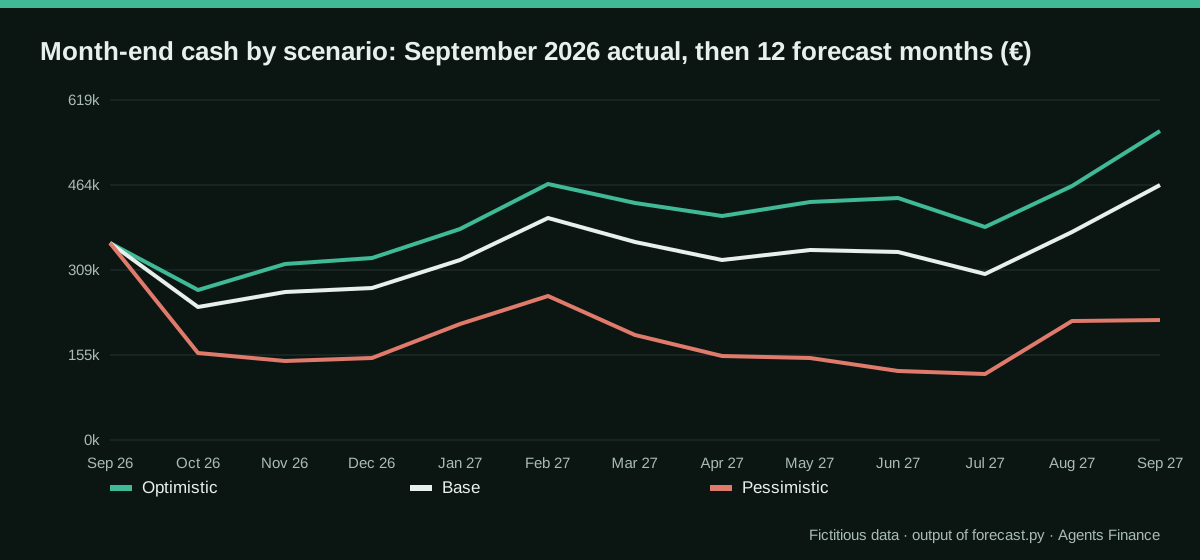
A good narrative should notice that cash falls in October in every scenario. That is not a drop in sales: September is the peak purchasing month, and its supplier invoices are paid in October. In the pessimistic case the low point moves to July, when the accrued tax is paid on top of a weaker margin and slower collections.
Where Excel’s own forecasting fits
Our revenue rule (same month last year plus growth) is deliberately simple and easy to explain. If you prefer a statistical baseline, Excel’s Forecast Sheet and the FORECAST.ETS function, documented by Microsoft, fit an exponential smoothing model that detects seasonality and can add a confidence interval. Use it to produce the base revenue line, keep it on the Inputs sheet and let the rest of the model work the same way. Python in Excel is another option if your team already uses it.
Human review steps
- Opening balances: the first forecast month starts from the closed trial balance, line by line.
- One month by hand: recompute October’s receivables, payables, cash flow and closing cash with a calculator.
- Drivers: each one has an owner and a reason; days of receivables and payables are compared with the last three month-ends.
- Checks: all three check rows are zero in every month and scenario. A check of 0.01 is a formula that does not reference the right cell, not a rounding detail.
- Narrative: every figure in the text can be found in the summary table.
Common mistakes
- Cash as a plug. If cash is typed in or calculated as “whatever balances”, the model will always balance and tell you nothing.
- Interest without the repayment schedule. Interest must fall as the loan is repaid; a fixed amount overstates cost and hides the link.
- Days applied to the wrong base. Receivables go with revenue, inventory with cost of sales, payables with purchases (cost of sales plus the change in inventory).
- A step change in the first month. If your drivers differ a lot from the implied days at the last close, the first forecast month jumps. Start from the actual days and move gradually.
- Twenty scenarios. Three well-explained scenarios are easier to defend than many unexplained ones; a sensitivity on one driver is often more useful than another scenario.
- Tax timing ignored. Accruing tax without a payment calendar overstates cash for most of the year.
- Uploading the full ledger to a consumer account. It contains customers, suppliers and salaries. Use an approved business plan, or aggregate and anonymise before uploading.
Limits
The model is monthly and driver-based, not a transaction-level cash forecast; for the next few weeks of cash, a receipts and payments forecast from open items is more accurate. It does not handle VAT, multiple currencies or intercompany balances, and the tax treatment is simplified. The assistant writes the mechanics; the drivers, and the decision to present them, are yours.
Sources
- Microsoft Support — Create a forecast in Excel for Windows (Forecast Sheet and FORECAST.ETS) (opens in a new tab) (primary)
- IFRS Foundation — IAS 7 Statement of Cash Flows (opens in a new tab)
- Microsoft Support — Get started with Python in Excel (opens in a new tab)
We wrote this entry in our own words from the sources above and checked that the links worked on October 19, 2026. Is anything incorrect? Tell us.