What it is about
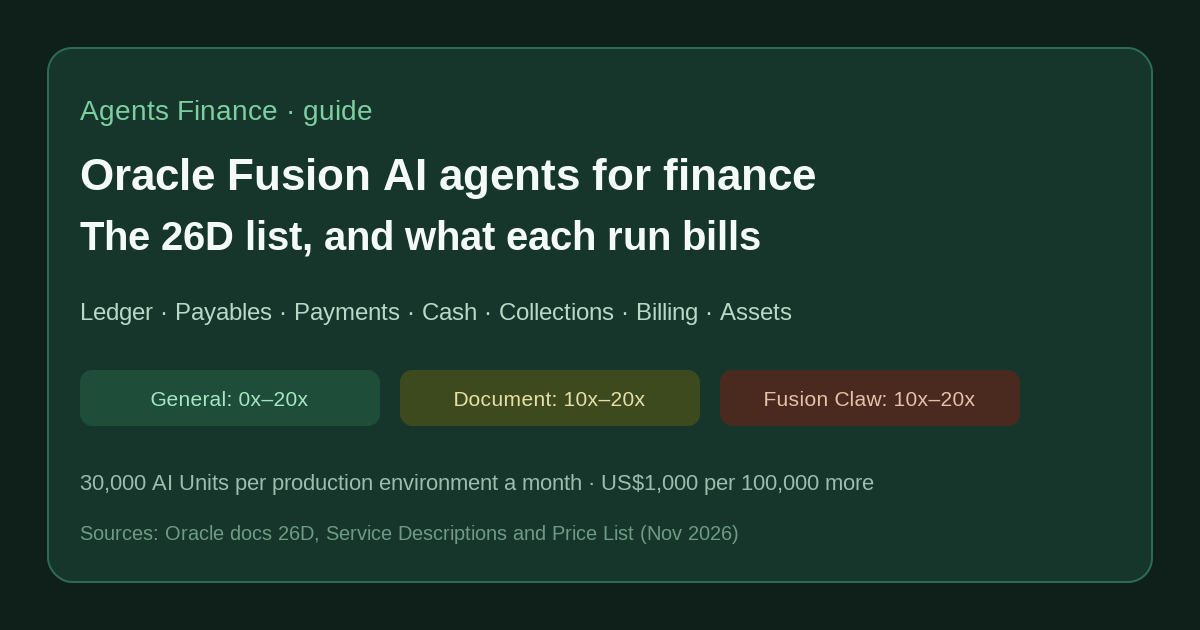
Oracle Fusion Cloud ERP now ships dozens of AI agents and agentic applications for finance, listed by Oracle under "Financials: ERP Agents": Ledger, Payables, Payments, Expenses, Cash Processing (bank reconciliation, cash positioning, cash application), Collector Workspace, Billing, Budgetary Control, Assets and Joint Venture assistants. This guide turns Oracle's list into a table finance teams can act on: what each agent does in update 26D, whether it only reads, recommends or changes data, what it takes to switch on and which role grants access. It then explains the cost model that came with it: every agent action draws down Fusion AI Units according to the action type and the model tier chosen in AI Agent Studio, and 26D added budgets, warnings and auto-stop to control that.
What it offers, according to the source
No customer results: Oracle's documentation describes capabilities and expected benefits, not measured outcomes, and we found no customer with published figures for these finance agents. What is documented: Oracle's ERP list has 39 finance agent rows across updates 26A to 26D; the 26D Financials summary tags 21 features as AI agents, agentic apps or Fusion Claw, all with no impact on existing processes until set up; each production environment gets 30,000 AI Units a month; one action costs ceil(tokens ÷ 10,000) times a factor from 0x (general action on the Basic model) to 20x (Frontier model or Fusion Claw); and extra AI Units list at US$1,000 per 100,000. CFO Dive reported in June 2026 that 33 customers, including Aon and Liberty Energy, had pre-purchased AI token bundles. Evidence level: vendor documentation.
Mind the evidence. Described by the project’s own documentation or README. It says what the project claims to do and how it is used, not that it works in your case: we have not tested it.
What has really been tested
On 20 November 2026 we read Oracle's ERP AI features list, the Financials 26D feature summary and the 26D What's New pages for the Ledger Agentic Application, Payables Agent, Payables Period Close Workspace, Payments Agent, Cash Processing Agent (three pages), Collector Workspace, Billing Operations Workspace, Budget Adjustment Assistant, Expenses Agent and the Assets assistants; the AI Agent Studio pages on AI Unit budgets and on user access; the Fusion Cloud Service Descriptions v110526 and the Global Price List of 5 November 2026; Oracle's press releases of 24 March and 26 October 2026; and CFO Dive's report of 11 June 2026. We have no Oracle Fusion environment and have not run any of these agents. The kit is an Agents Finance template: oracle_ai_units_estimator.py passed its self-test and, on the fictitious workloads shipped with it, estimated 42,680 AI Units a month against a 30,000 allocation (12,680 over, US$126.80 a month at list price) and flagged one invalid model choice. The workbook formulas, recalculated in LibreOffice, gave the same totals.
How to apply it
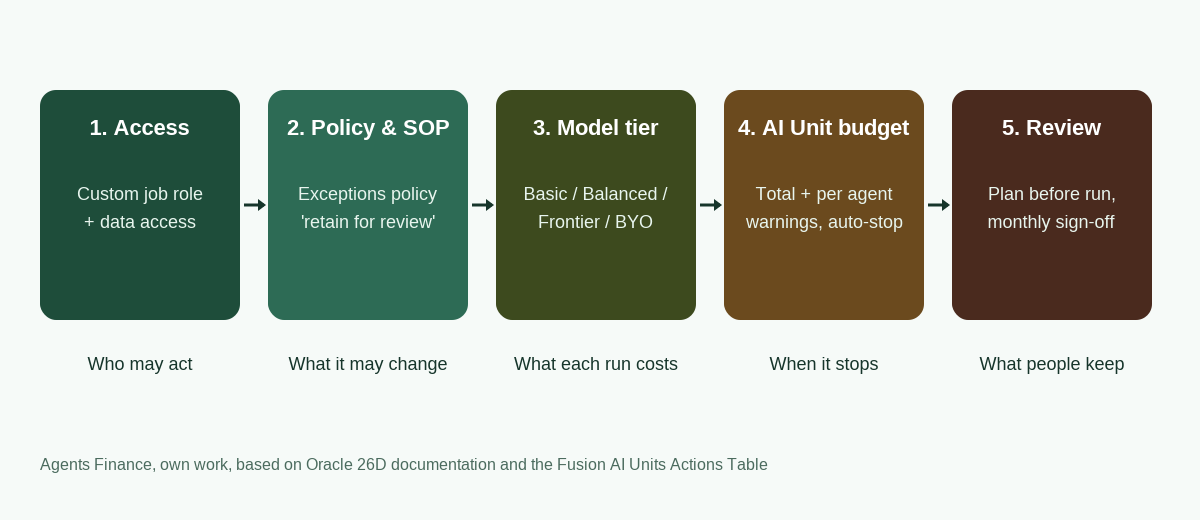
Start from your own environment, not Oracle's list: check which finance agents your update and modules include and what each needs (setup, opt-in, security adjustment or a service request). Create custom job roles for agent access, scope Business Unit and ledger data access to the pilot, and upload policies in "retain for review" mode. Choose a model tier per agent in AI Agent Studio, estimate AI Units with the workbook or the script, set a total budget with per-agent allocations, warnings and auto-stop where it is safe, and review consumption and agent actions every month before widening the scope.
- List the finance agents in your update and the 'action to enable' each needs.
- Create custom job roles and scope data access to the pilot business units and ledgers.
- Write the SOP and exceptions policy; upload policies with automatic correction off.
- Choose the model tier per agent and estimate AI Units with the workbook or script.
- Configure the AI Unit budget: total, per-agent allocations, 50/80/95% warnings, auto-stop where safe.
- Run one full period in parallel with the team and compare results.
- Review consumption, corrections and new matching rules monthly; sign off before widening scope.
In two sentences
Oracle Fusion Cloud ERP now ships a long list of finance AI agents, from a Ledger app that investigates variances and fixes accounting exceptions to a Cash Processing Agent that can submit bank transfers once a user accepts its recommendation. They come with the subscription, but each action draws down AI Units at a rate set by the model you pick, so the list, the permissions and the budget have to be planned together.
Why this guide
People search for “Oracle Fusion AI agents” and land on press releases that count agents by the hundred, or on Oracle’s own list, which repeats the same agent once per quarterly update. Neither tells a controller what to switch on first, what each agent is allowed to change, or what it will cost. Since release 26C, that last question has a real answer: Oracle meters agent work in Fusion AI Units, and since 26D AI Agent Studio has budgets, warnings and an auto-stop switch.
This guide is the practical version, checked against Oracle’s documentation on 20 November 2026. It sits next to our March news piece on Oracle’s agentic applications, which covered the announcement; this one is the reference for the list, the access model and the cost. Everything here comes from Oracle’s documents. We have not run these agents, and Oracle publishes no customer results for them.
The finance agents in Oracle Fusion up to 26D
Oracle’s page “Enterprise Resource Planning features with AI” has a section called “Financials: ERP Agents” with 39 rows across updates 26A to 26D. Many rows are the same agent enhanced in successive updates (the Payables Agent appears four times), so the list is shorter than it looks. Here it is by process, with our reading of what each one can change. “Acts on policy” means it can correct or resolve items without a click when a policy you uploaded allows it; “acts after approval” means a user confirms each action.
| Agent or app (Oracle name) | Process | Updates | What it does in 26D | Can it change data? |
|---|---|---|---|---|
| Ledger Agentic Application | Record to report | Agent 26A–26B, app 26C, Fusion Claw 26D | Delegated “outcomes”: balance and journal analysis, accounting health review, period flux root cause with evidence, correction of exceptions such as missing currency rates or inactive segment values | Acts on policy |
| Payables Agent | Accounts payable | 26A–26D | Invoice intake, matching controls by business unit, category, legal entity and currency, automated fixes for three import-exception patterns, chat-driven Invoice List | Acts on policy |
| Payables Period Close Workspace | AP close | 26D | Close posture by ledger and period, grouped exceptions, Priority Actions, Ask Oracle | Recommends |
| Payments Agent | Payments | 26A–26D | Virtual card offers, dynamic discounting enrolment and standing offers, supply chain finance evaluation, diagnosis of failed payment files | Acts after review |
| Cash Processing Agent, bank statement reconciliation | Treasury | 26D | Unreconciled lines, exception reasons, suggested matching rules; approve automatic or one-time reconciliation | Acts after approval, creates rules |
| Cash Processing Agent, cash positioning | Treasury | 26C–26D | Cash positions and shortfalls; recommends a bank transfer and, once accepted, generates and submits it | Moves money after acceptance |
| Cash Processing Agent, receipt processing and cash application | Receivables | 26C–26D | Investigates unidentified and unapplied receipts and applies them when the user confirms | Acts after confirmation |
| Collector Workspace | Collections | 26C, Fusion Claw 26D | Prioritised queue, reasons behind each action, incoming customer emails, driven by a collections policy you upload | Acts on policy |
| Billing Operations Workspace, Customer Billing Agent | Billing | 26C–26D | Billing exceptions from feeder systems to invoice sending and disputes; out-of-policy items go to people | Acts on policy |
| Expenses Agent | Expenses | 26A–26D | Completes and submits expense reports when employees reply by email; itemisation, attendees, cash advances, policy questions | Acts with employee input |
| Budget Adjustment Assistant | Budgetary control | 26C–26D | Control budget adjustments with policy validation and approval routing | Acts with approval routing |
| Asset Additions Assistant | Fixed assets | 26D | Adds assets, saves drafts, submits them for posting | Drafts and submits |
| Asset Acquisition Cost Analyst, Capital Expenditure Planning Analyst, Depreciation Expense Projection Assistant | Fixed assets | 26D | Analysis and projections | Reads |
| Fixed Asset Inquiry, Retirement and Retirement Request assistants | Fixed assets | 26C | Inquiry and retirement requests | Varies |
Outside “ERP Agents”, Oracle’s page also lists Joint Venture assistants and a U.S. Federal Treasury Confirmation Assistant (26D), Predictive Cash Forecasting (predictive AI, 25C) and Intelligent Account Combination Defaulting for invoices (22D). Planning, profitability and close in EPM sit on a separate EPM list.
Two points from the 26D feature summary matter for planning. First, every AI feature in it is marked “None” for impact on existing processes: nothing changes until you set it up. Second, the “action to enable” varies. Most say “Setup Required”; the Budget Adjustment Assistant with policy and approvals needs a service request (Oracle calls it a controlled release); the Payables Period Close Workspace needs a “Security Adjustment”; and one Expenses enhancement is “Opt In”. New users of the Ledger Agentic Application also have to raise a service request so Oracle can put its managed prerequisites in place.
What “acts on policy” means in practice
The Ledger and Payables documentation shows how far these agents go, and where the switches are.
Ledger Agentic Application. In 26D the accountant writes an “outcome”, which Oracle describes as delegating a task to a colleague, attaches a standard operating procedure (SOP) document, reviews the plan the agent proposes, then confirms it. Outcomes can be scheduled hourly, daily or on weekdays. For accounting exceptions, you upload an Accounting Exceptions Policy (Oracle provides a template) that defines correction options for missing currency rates and inactive segment values. Oracle says customers “can allow policy-approved automatic corrections or retain exceptions for team review”. That choice is the control: start with retention.
Payables Agent. The 26D release brings matching controls into the agent’s Compliance and Control setup. Tolerances can be set by business unit, purchasing category, legal entity and currency, and, where applicable, the system “automatically release[s] holds that fall within the more specific policy tolerance”. Automated Exception Resolution covers three import-exception patterns (amount precision, invalid attribute values, attribute name and ID conflicts) with predefined paths. Oracle says these cover more than 60 import rejection codes. For each pattern you pick a path, for example “Round Amount”, “Skip Validation”, “Prioritize Attribute Name” or “Reject Invoice”. Oracle’s own tips: check the paths against your historical rejections, route anything outside the three patterns to a named queue, and remember that “every upload of Policy Details file to application will replace the existing data.”
Cash Processing Agent. For bank reconciliation, the user can approve automatic reconciliation, “allowing the agent to reconcile identified groups and create matching rules for the next reconciliation run”. For cash positioning, “after reviewing and accepting a recommendation, the agent automatically generates and submits the bank account transfer,” defaulting the payment method, payment process profile and business unit from earlier transfers from the same account. These are the two places where an agent’s suggestion turns into a standing rule or a movement of money, so they need the tightest roles.
Access: who can use each agent
There is no single “AI agents on” switch. Oracle’s 26D documentation lists, for each finance agent, the duty roles that grant it. A few examples from the 26D pages:
- Bank reconciliation agent: the predefined Cash Manager job role (
ORA_CE_CASH_MANAGER) with the Bank Statement Reconciliation Assistant Duty. - Payables Agent: separate processing and inquiry duty roles for invoice documents, configuration and invoices, plus Business Unit data security. Oracle warns that without Business Unit data access, a user drilling from the Streams page into an invoice “will be unable to view the invoice”.
- Payments Agent: the Buyer Onboarding assistant needs a customer-defined job role, because “Oracle doesn’t deliver a seeded job role for this persona”.
- Ledger Agentic Application: the Ledger Agentic Application Assistant role for all 26D capabilities.
- Billing Operations Workspace: the
ORA_AR_BILLING_OPERATIONS_WORKSPACE_DUTYduty in a custom job role.
For workflows and agentic applications built or extended in AI Agent Studio, Oracle’s FAQ describes the general pattern. You create a custom job role with the Access Intelligent Agent Chat privilege (HRC_ACCESS_AI_AGENT_CHAT_PRIV) and the Fai Genai Agent Runtime Duty (ORA_DR_FAI_GENERATIVE_AI_AGENT_RUNTIME_DUTY), then add that role on the workflow’s Security tab and in the application’s settings. A user who can open an app but not one of its workflows loses the part of the app that depends on it.
The practical consequence for finance: agent access is an ordinary segregation-of-duties question. The person who uploads the Accounting Exceptions Policy should not be the only reviewer of the corrections it allows. The person who accepts a cash transfer recommendation should not also approve the bank’s payment limits.
One contractual line is worth reading before anyone connects an outside assistant. Oracle’s service descriptions (v110526) say customers may not use “external AI agents, MCP implementations, or other automated interfaces to access Cloud Services, except through Authorized APIs, approved integration patterns, and capabilities expressly authorized”. They also make the customer “responsible for implementing appropriate human oversight, approval controls, and safeguards” for material decisions. Oracle’s own route for outside tools is Fusion Companion, announced on 26 October 2026 to let users work with Fusion “through supported AI tools such as ChatGPT”.
What it costs: AI Units
Oracle-built agents and AI Agent Studio carry no separate licence fee. Oracle’s March 2026 announcement described the studio as “available at no additional cost”. Usage, though, is metered. The Fusion AI Units Actions Table in the service descriptions (effective 1 October 2026) sets the rules:
- Allocation. 30,000 AI Units per Fusion production environment per calendar month, non-pooled.
- Counting. Usage counts in production and in non-production environments, and in associated EPM and other environments, “including development, testing, and production”.
- Rule per action. Input plus output tokens, divided by 10,000, rounded up to the next whole number, times an Action Value Factor.
- If you run out. If available units fall below zero, Oracle “may limit, reduce, or block access” to functionality that consumes them. Purchased units left at the end of the services period are forfeited.
- Changes. Oracle can change the tables with at least 30 days’ notice.
The factors depend on the action type and on the model tier you choose for each agent:
| Action type (Oracle’s typical uses) | Basic LLM | Bring your own LLM | Balanced LLM | Frontier LLM |
|---|---|---|---|---|
| General: answer questions, summarise, approve transactions, reasoning steps | 0x | 3x | 5x | 20x |
| Document generation: slides, Word, multi-page PDF | 10x | 10x | 20x | 20x |
| Audio: transcribe / narration | n/a | 2x / 5x | 3x / 10x | n/a |
| Fusion Claw: deep research, autonomous execution, planning | n/a | 10x | n/a | 20x |
The model table in the same document lists OpenAI GPT-OSS as Basic; OpenAI GPT-5.6 Luna and Google Gemini 3.1 Flash Lite among the Balanced models; and OpenAI GPT-5.5 and Google Gemini 3.5 Flash as Frontier. Oracle recommends Basic for “developing, testing, piloting and running basic use cases at modest volumes” and non-Basic models for “planning and tool calling” and higher volumes. It also notes that GPT-5 mini and GPT-4o mini are deprecated and that agents using them must move to GPT-5.6 Luna by update 27B. A bring-your-own model still decrements AI Units at the BYO factor, and you pay the model provider separately.
Oracle’s Global Price List of 5 November 2026 lists:
| Item (part number) | List price |
|---|---|
| Oracle Fusion AI Units Cloud Service (B112536) | US$1,000.00 per 100,000 pooled AI Units |
| Oracle Fusion AI Agents Cloud Service (B112537) | US$150.00 per hosted named user per month, minimum 50; includes a pool of 15,000 AI Units per user per month |
| Oracle Fusion AI Agents Cloud Service (B112538) | US$5.00 per hosted employee per month, minimum 500; includes 500 AI Units per employee per month |
| Oracle Fusion Agentic Applications Cloud Service (B112535) | US$500,000.00 annual subscription; includes the Agentic Applications Builder and 2,500,000 AI Units per full month |
At list price, one AI Unit is one cent. The money is small for most pilots. Budgets and auto-stop matter more, because they decide whether a close-critical agent stops halfway through the month. CFO Dive reported on 11 June 2026 that 33 customers, including Aon Services Corporation and Liberty Energy, had pre-purchased token bundles in Oracle’s fourth fiscal quarter, which says customers are buying capacity, not that the agents deliver any given result.
Budgets in AI Agent Studio (26D)
Update 26D added an AI Unit budgeting workspace under AI Agent Studio > Usage and Value. According to Oracle’s documentation you can:
- set a total budget and budget period, reserve aggregate budgets for apps and for agents, and give individual agents their own allocation;
- configure several soft warning thresholds and email recipients;
- enable auto-stop, which “blocks new runs when the applicable budget is exhausted”, including workflows, agentic applications and debugging;
- stop or resume everything, either new sessions only or also running ones;
- review a change log (who changed what, why and when) and an alert history;
- analyse up to 12 months of consumption by app, agent team, user and model, with details for the last three months.
Two cautions from Oracle’s own pages. Telemetry can be delayed, so check the “Last Updated” time before changing controls. And the consumption view does not show pricing, token counts or latency, so you cannot read cost per run straight from the screen. That is why we built an estimator.
Copy and adapt
Download the kit: /downloads/#guide-oracle-fusion-ai-agents-finance-list-ai-units-2026. Everything in it is an Agents Finance template (MIT-0) based on Oracle’s documentation, not Oracle’s code or text.
oracle-fusion-finance-agents.en.xlsx(and.es.xlsx): the agent table above with access and our suggested control for each agent, an AI Units estimator with formulas, Oracle’s factor table, a 14-step pilot checklist and a monthly review with sign-off.oracle_ai_units_estimator.py: the same estimate in Python (standard library only), with a self-test.workloads.example.csv,config.example.json,estimate.example.csv: fictitious inputs and the output.prompts.en.md(and.es.md): outcome prompts for the Ledger Agentic Application, Payables Period Close Workspace and bank reconciliation, plus an SOP template.
Requirements: Python 3.9 or later for the script; any spreadsheet app for the workbook; access to AI Agent Studio > Usage and Value to replace the assumptions with real figures.
1. Describe your planned workloads
One row per agent and kind of work. Oracle does not publish tokens per run, so the token column is your assumption until a pilot gives you real consumption.
agent,process,action_type,llm_type,environment,actions_per_run,tokens_per_action,runs_per_month
Ledger Agentic Application - daily flux outcome,record to report,fusion_claw,frontier,production,6,40000,22
Payables Agent - invoice ingestion,accounts payable,general,basic,production,3,9000,4000
Cash Processing Agent - bank statement reconciliation,treasury,general,balanced,production,2,20000,110
Ledger outcome testing,record to report,fusion_claw,frontier,test,6,40000,15
2. Run the estimator
The core of the script is Oracle’s rule, applied per action:
import math

FACTORS = {
    "general":     {"basic": 0,    "byo": 3,  "balanced": 5,    "frontier": 20},
    "document":    {"basic": 10,   "byo": 10, "balanced": 20,   "frontier": 20},
    "fusion_claw": {"basic": None, "byo": 10, "balanced": None, "frontier": 20},
}

def units_per_action(tokens, factor):
    # Oracle: (input + output tokens) / 10,000, rounded up, x Action Value Factor
    return 0 if tokens <= 0 else math.ceil(tokens / 10000) * factor
python3 oracle_ai_units_estimator.py --self-test
python3 oracle_ai_units_estimator.py workloads.example.csv config.example.json --out estimate.csvOn the ten fictitious rows in the kit it prints:
Total estimate: 42,680 AI Units per month
Non-pooled allocation: 30,000 | pooled per month: 0
Over allocation: 12,680 AI Units (list price US$126.80 per month)
  production: 35,480
  test: 7,200
[HIGH] line 11 Cash positioning outcome (misconfigured): 'fusion_claw' is n/a on a balanced LLM in Oracle's table; pick another model tier
[HIGH] estimate 42,680 AI Units/month exceeds allocation 30,000: plan a budget, auto-stop and a purchase decision before go-live
[MEDIUM] 7,200 AI Units/month planned outside production: Oracle counts development and test usage too
Exit code 1 means something needs review. The workbook’s estimator sheet uses the same rule (CEILING(tokens/10000,1)*factor) and gives the same totals when recalculated.
3. Paste an outcome prompt and an SOP
This is the first prompt in the kit, written to research without changing anything:
Outcome: explain the material movements in {{LEDGER}} between {{PRIOR_PERIOD}} and {{CURRENT_PERIOD}}.
Scope: balance sheet and P&L accounts in {{ACCOUNT_RANGE}}, legal entities {{ENTITIES}}.
Materiality: explain every account whose movement exceeds {{AMOUNT_THRESHOLD}} {{CURRENCY}} or {{PCT_THRESHOLD}}% of the prior balance, whichever is lower.
For each account:
1. Give the movement, the top journals that drive it (journal name, source, category, preparer, approver) and the share of the movement they explain.
2. Separate subledger-sourced journals from manual journals. Flag manual journals posted in the last {{DAYS}} days of the period.
3. State the root cause in one sentence, using only posted journals and subledger evidence.
4. Mark "unexplained" if less than {{COVERAGE}}% of the movement is supported by evidence. Do not guess.
Do not create, change or reverse any journal. Produce an evidence pack ordered by absolute movement.
Follow the attached SOP for the format.
The SOP template in prompts.en.md has a “Decision rights” section. It says the agent may read, analyse and propose, and may only post corrections when the exceptions policy marks them eligible and a named person has switched automatic correction on in writing.
A worked example (fictitious)
A mid-sized group with one Fusion production environment plans a pilot in record to report, AP and treasury. The estimate shows where the AI Units go:
- The daily Ledger flux outcome on a Frontier model is the biggest line: 40,000 tokens per action rounds to 4 blocks, times 20, is 80 units per action. Six actions per run over 22 working days gives 10,560 units a month.
- The same outcome under the BYO factor (10x) would be 5,280. The Frontier choice doubles the bill, so it should be a decision someone records.
- Invoice ingestion on the Basic model costs nothing in AI Units even at 4,000 invoices a month, because general actions on Basic are 0x. Oracle does warn that Basic is meant for modest volumes and is weaker at planning and tool calling.
- Testing the Ledger outcome in the test environment adds 7,200 units. Oracle counts non-production usage, and this is the line pilots tend to forget.
- One row is invalid: a Fusion Claw outcome on a Balanced model, which Oracle’s table marks n/a.
The group is 12,680 units over its allocation: US$126.80 a month at list price. The decision is not about money. It is whether to cap the Ledger agent with auto-stop (risky in the last days of the close) or give it a protected allocation with warnings at 50, 80 and 95%.
Step by step: a controlled first pilot
- Inventory. In your environment, list which finance agents your modules and update include and the “action to enable” for each. Do not plan from the marketing count.
- Pick one read-mostly agent and one acting agent. For example, the Payables Period Close Workspace (recommends) and the bank reconciliation agent (acts after approval).
- Roles. Create custom job roles. Give the agent duties only to pilot users, and scope Business Unit and ledger data access to the pilot.
- Policies. Write the SOP and the exceptions policy. Upload with automatic correction off. Keep a copy of every uploaded version, since each upload replaces the previous one.
- Model tier. Choose one per agent in AI Agent Studio and record why.
- Budget. Estimate with the kit, then configure the total budget, a protected allocation for close-critical agents, warnings and auto-stop only where a stop is harmless.
- Parallel run. Run one full period alongside the team and compare every recommendation and correction.
- Monthly review. Compare estimated and actual consumption, count corrections reversed by people and new matching rules created by the agent, and sign off before widening scope.
Limitations and risks
- No customer evidence. Everything here is Oracle documentation. We found no customer with published results for these finance agents.
- Release dependency. Features differ by update (26A to 26D) and by module. Some are controlled releases behind a service request. Check your own environment.
- Language. In 26B Oracle said Ledger conversations were English-only. Test in your working language before you rely on it.
- Cost visibility. Consumption telemetry can lag, and the Usage and Value screens do not show tokens or prices. Estimates stay estimates until you have a month of real data.
- Rules that persist. Automatic reconciliation creates matching rules for future runs. A wrong rule keeps matching after the pilot ends.
- Money movement. The cash positioning agent submits bank transfers after acceptance. Treat acceptance as a payment approval.
- Contract terms. Oracle can change the factor table with 30 days’ notice, and external agents or MCP tools must use authorised interfaces only.
Common mistakes
- Planning from the “hundreds of agents” headline instead of the list your update actually includes.
- Granting agent duties broadly “to try it” and finding later that the same person uploads policies and approves their effects.
- Choosing a Frontier model by default for every agent. Most question-and-answer work does not need 20x.
- Forgetting that test and development runs consume AI Units.
- Turning on auto-stop for the whole budget, then watching a close-critical agent stop on day three of the close.
- Overwriting the Payables policy file by uploading a trimmed copy, since each upload replaces the existing data.
Conclusions
Oracle’s finance agents are no longer a demo. The 26D documentation describes agents that release invoice holds within policy, correct accounting exceptions, create reconciliation rules and submit bank transfers. They come with the subscription. Each action is metered at a rate the customer chooses through the model tier, and Oracle has given administrators the budgets, warnings, auto-stop and change logs to control it. For a finance team the order of work is clear: list what your environment has, decide what each agent may change and who may let it, estimate AI Units before the pilot, and review every month before you let any agent do more.
Newsletter
We will update the agent table when Oracle publishes update 27A and when the first customer shares measured results for a finance agent. Subscribe to the newsletter to get the new version of the kit when it ships.
Sources
- Oracle Help Center — Enterprise Resource Planning features with AI (Financials: ERP Agents) (opens in a new tab) (primary)
- Oracle — Financials 26D What's New, feature summary (opens in a new tab)
- Oracle — Financials 26D, AI Workspaces and Agents (opens in a new tab)
- Oracle — 26D What's New: Ledger Agentic Application (opens in a new tab)
- Oracle — 26D What's New: Payables Agent for invoice ingestion, compliance and control (opens in a new tab)
- Oracle — 26D What's New: Cash Processing Agent for bank statement reconciliation (opens in a new tab)
- Oracle — 26D What's New: Cash Processing Agent for cash positioning and improved liquidity (opens in a new tab)
- Oracle — 26D What's New: Payments Agent for Payment Options, Offers, and Execution (opens in a new tab)
- Oracle — Fusion Cloud Service Descriptions v110526 (Fusion AI Units Actions Table), effective 5 November 2026 (PDF) (opens in a new tab)
- Oracle — Fusion Cloud Service Global Price List, 5 November 2026 (PDF) (opens in a new tab)
- Oracle — 26D What's New: Manage AI unit budget, consumption, and controls (opens in a new tab)
- Oracle Help Center — Configure the Total AI Unit Budget in AI Agent Studio (opens in a new tab)
- Oracle Help Center — How can I give users access to AI agents and agentic applications? (opens in a new tab)
- Oracle — Oracle Advances Outcome-Driven AI Across Fusion Applications (26 October 2026) (opens in a new tab)
- Oracle — Oracle Expands AI Agent Studio for Fusion Applications with Agentic Applications Builder (24 March 2026) (opens in a new tab)
- CFO Dive — Oracle expands into token-based AI pricing (11 June 2026) (opens in a new tab)
We wrote this entry in our own words from the sources above and checked that the links worked on November 20, 2026. Is anything incorrect? Tell us.
Share this entry
This entry is part of the guide: AI agents for accounting
 Oracle Fusion Cloud ERP
 Claude
 Claude Code
 ChatGPT
 Codex
 Oracle NetSuite
 SAP Joule
 SAP
 n8n
 Microsoft Dynamics 365
 Odoo
 Everything about Oracle AI Agent Studio (1)