What they do and how
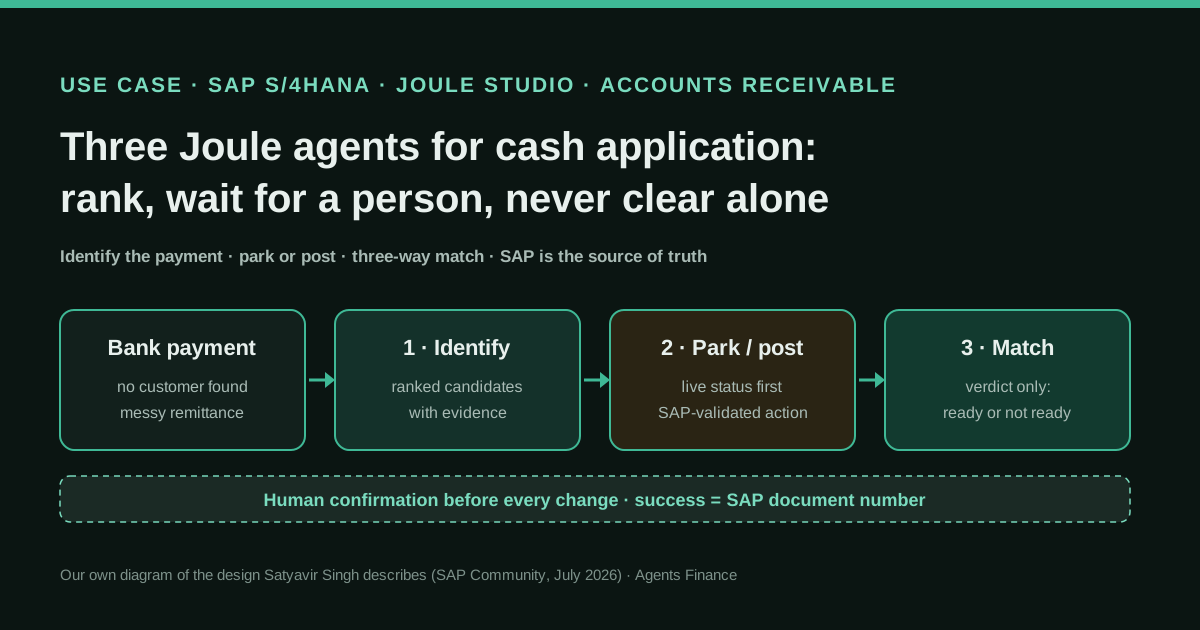
Satyavir Singh, a lead architect for SAP Business AI whose LinkedIn profile lists Wipro as his employer, built three custom Joule agents with customers to cover one cash application cycle in SAP S/4HANA Finance. The first agent finds bank payments whose customer could not be identified, gathers the bank line and remittance text in one view, extracts likely references and shows a ranked shortlist of Business Partners with the evidence for each; a person picks one, the backend re-checks the Business Partner master data and only then is the payment updated. The second agent reads the live posting status before doing anything, explains why an earlier park failed, proposes park, post or hold, and calls SAP's validated actions only after confirmation. The third agent runs a three-way match of open invoices, open payments and remittance against S/4HANA and returns a verdict (completed, ready for clearing or not ready) without clearing. Everything runs inside SAP: Joule, Joule Studio, SAP BTP, the Generative AI Hub in SAP AI Core and S/4HANA.
Reported result
Stated by the author, paraphrasing his customers: fewer misapplied payments, no double postings thanks to live status checks, reconciliation on SAP numbers instead of spreadsheets, a cash figure the CFO trusts and quieter audits. The only measurement he mentions is that exceptions clear "in hours, not days", measured by one customer over six weeks, with no baseline, volumes or rates. No customer, company size or payment volume is named, and the author works for an SAP partner that builds Joule agents.
Mind the evidence. Someone explains how they do it or did it, without verifiable figures. It is documented practice, not proof that it will work in your case.
What has really been tested
On 27 October 2026 we read the author's SAP Community post (28 July 2026) and his public LinkedIn profile, SAP's announcement of the Joule Studio agent builder (December 2025), the Escalation Assistant agent configuration in the SAP-samples repository (Apache-2.0, pinned commit 421ad2f), SAP's Accounts Receivable Assistant and SAP Cash Application pages, the SAP Connect press release of 6 October 2026 and SAP's AI pricing page. The post shows screenshots but publishes no agent configuration, prompts or code, so we have not seen the agents, and we have no SAP system to test Joule Studio. The Python script below was run only on fictitious CSV files; the agent definitions, skill descriptions, context schema and test plan are untested templates.
How to replicate it
Map the cycle before building anything: identification, park or post, and readiness for clearing. Give each step its own agent with the same shape (consolidate context, show evidence, ask for confirmation, call a standard SAP action, report success only when SAP returns a document number). Let the backend filter Business Partner candidates and let the model only rank and explain them. Carry the confirmed customer, payment and document as session context instead of letting each agent re-derive them. Write skill descriptions as routing rules with inputs, outputs and the exact trigger. Keep clearing as a human action and test with the edge cases listed below before any user sees it.
In two sentences
An SAP architect who builds Joule agents for customers explains, with screenshots and a long list of mistakes, how he split cash application in S/4HANA into three agents that rank candidates, wait for a person and stop one step before clearing. It is a detailed first-hand design account rather than a measured result: no customer is named, the feedback is paraphrased and the author’s employer sells this kind of work.
Why this case matters
Cash application is the least glamorous job in accounts receivable and one of the most consequential. A payment that lands on the wrong customer triggers a wrong dunning letter, a credit block, an angry call and a reconciliation that nobody trusts by Friday. Most teams already have matching rules and, if they run SAP, often SAP Cash Application, which learns from accountants’ past matches and proposes or clears automatically above a threshold. What remains is the residue: payments with messy remittance text, no customer number and partial amounts.
That residue is where generative AI is tempting and dangerous, because a language model is good at reading the shopping-list style of a remittance and bad at admitting it does not know. This case is useful because the author started with the dangerous version, a confidence score with automatic application above 90%, watched an AR lead take it apart with one question, and rebuilt it around the opposite idea. It is also one of the few detailed accounts we have found of a custom agent built in Joule Studio for finance, at a moment when SAP is selling the “autonomous enterprise” hard: at SAP Connect on 6 October 2026, Nestlé said its Accounts Receivable Assistant can prioritise collections and recommend next actions.
Who does it
Satyavir Singh signs the post as a lead architect working on SAP Business AI, Joule and SAP BTP, and says everything in it is based on work with real customers. His public LinkedIn profile lists Wipro as his employer, and colleagues there have published Joule agents for asset management and EHS in SAP Discovery Center. The post itself does not mention Wipro, does not name any customer and does not give volumes. So read him as an implementer describing his own pattern: well placed to know what broke in user acceptance testing, and with a commercial reason to present the design favourably.
Tools and architecture
The stack is deliberately all-SAP. Joule is the chat surface; Joule Studio, part of SAP Build, is where each agent, its skills, guardrails and prompts are defined; SAP BTP provides runtime, identity and extensibility; the Generative AI Hub in SAP AI Core serves the models; and S/4HANA Finance is the single source of truth for Business Partners, bank data, open items, parking, posting and clearing. The author kept third-party tools out on purpose, because finance customers want to know where their data goes and an all-SAP boundary shortened the conversations with security, audit and IT.
SAP’s own description of the agent builder explains why this is possible: an agent has a name and description that Joule uses to route requests, an expertise and instructions block, and tools that can be Joule skills (deterministic steps), document-grounding resource groups, MCP servers, a calculator or other agents as sub-agents. Agents run with principal propagation, so the user’s SAP authorisations apply to every call, and SAP says human-in-the-loop oversight is on by default for critical decisions.
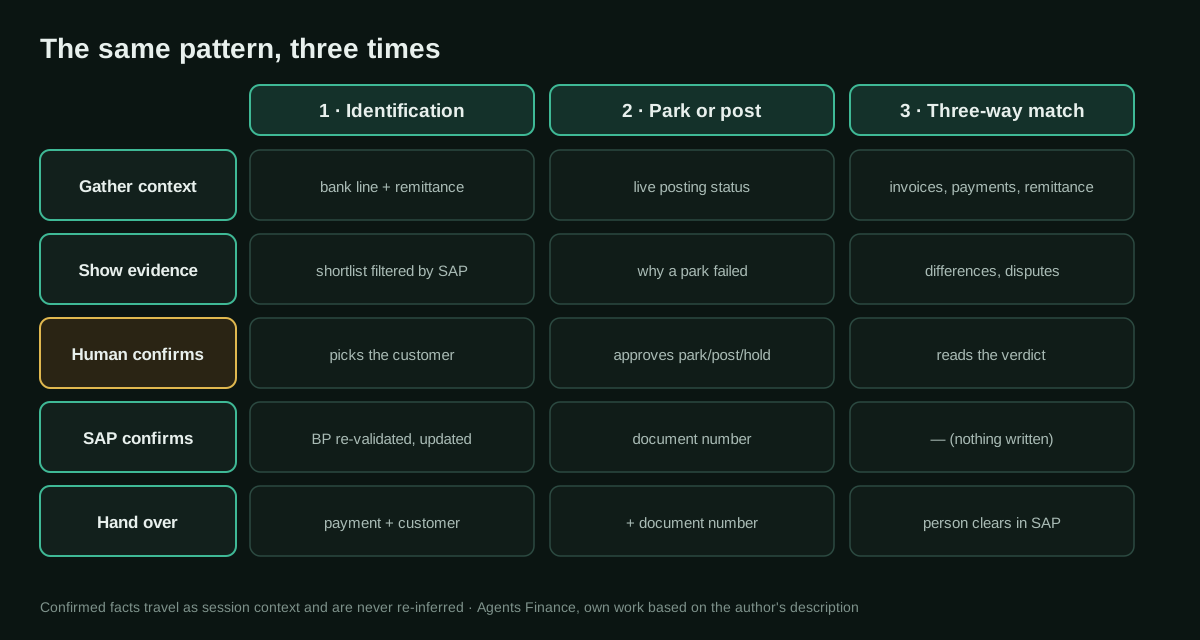
The three agents, step by step
1. Identification: rank, explain, wait
The first agent starts with the problem list: bank statement lines where no customer could be resolved. When the user opens one, the agent puts bank details, date, amount and remittance narrative on a single card, which sounds trivial but replaced hopping between several Fiori apps. It then reads the remittance, extracts likely references and matches them against Business Partner master data, showing a ranked list where each candidate is traceable to something in the text or the master data. If a match cannot be justified, it is not shown. Next to the list it suggests follow-ups, such as flagging a rule for the master data team, an addition that came from watching a user say “okay, now what?” during a demo.
Nothing is written until the user picks the customer and confirms. After that, the backend runs one more validation against the Business Partner, which in testing caught customers with a block or status the user had not noticed. Only then does the agent call the action that updates the payment, and it reports success only when S/4HANA returns success, not when the call was sent.
2. Park or post: ask SAP first
The second agent exists to prevent the classic disaster, a duplicate posting because the agent did not realise the first attempt worked. Before anything else it reads the live posting status from SAP. If a park failed earlier, it says why; if a document already exists, it says so. It then proposes a park with specific values, a post, or a hold with a reason, shows the plan in plain language and calls the action only after confirmation. Success means a document number returned by SAP.
The author defends one choice above all others: for parking and posting he used SAP’s validated actions rather than wrapping his own OData calls in a custom skill. A colleague wanted the extra control over error messages; the author’s answer was that custom code that writes to finance is governance debt, to be maintained at every API change and explained to every auditor.
3. Three-way match: a verdict, not a button
Users asked the third agent to clear items automatically, and the author refused. It confirms the customer, shows the financial overview, pulls open invoices and open payments from SAP, folds in remittance and bank confirmation, computes totals, cash discounts and variances with every number traceable to SAP, and lists blockers plainly, such as a partial payment or an invoice with a dispute on one line, each with a concrete next step. Then it returns one of three verdicts, completed, ready for clearing or not ready, and stops. Clearing stays a business decision.
What made it behave
Three implementation lessons are worth more than the screenshots. First, skill descriptions are prompts: a vague one-liner made Joule call the payment-context skill for reconciliation questions, and rewriting it with inputs, outputs and an exact trigger condition cleaned up the routing. Second, grounding by shortlist: feeding the model a large blob of Business Partner data led to invented BP numbers in production, so the lookup became a backend resource and the model only ranks and explains what the backend has already filtered. Third, session context: when each agent re-resolved the customer from the latest prompt, the identifier occasionally drifted (his example is 100234 becoming 100324), so the confirmed customer, payment and document are now set once and inherited. He also split models by job, a capable one for remittance text and a smaller, faster one for routing and summaries, which he says cut response times and running cost noticeably.
Copy and adapt
The author published no configuration, prompts or code, so everything below is ours, written from his description and from SAP’s public sample format. Adapt the names to your system and keep the human gates.
Prerequisites
- SAP S/4HANA Finance with bank statement processing and open-item management, ideally SAP Cash Application already handling the easy matches.
- Joule deployed and Joule Studio available; SAP says it is open to customers with Joule (paid AI Units or the zero-cost Joule Base SKU) and a BTP enterprise agreement, CPEA or pay-as-you-go.
- Identity set up with SAP Cloud Identity Services so principal propagation applies the user’s own AR authorisations.
- An AR lead who will sit in testing and say no.
1. The format SAP uses for an agent definition (official sample, Apache-2.0)
SAP’s sample repository documents agents built in the Joule Studio agent builder as a description, an expertise block, instructions, additional context, model settings, execution steps, tools and output. This short excerpt from the Escalation Assistant shows how SAP writes a human-in-the-loop rule:
- Every e-mail message you draft must be presented to the end-user for approval before sending it to the customer: the user can provide feedback on the contents of the message until its finally approved.Source: SAP-samples/btp-agentic-ai-use-cases, ESCALATION_ASSISTANT.md, commit 421ad2f. Copyright 2026 SAP SE or an SAP affiliate company and btp-agentic-ai-use-cases contributors, licensed under Apache-2.0.
2. Definitions of the three agents (Agents Finance template based on Satyavir Singh’s design)
# Agent: Payment Identification Assistant
## Description
Finds incoming bank payments with no identified customer in S/4HANA, shows a ranked
shortlist of Business Partners with evidence, and updates the payment only after the
user confirms one candidate and the backend validation passes.

## Expertise
You are an accounts receivable specialist for cash application in SAP S/4HANA.
You read remittance text and explain matches. You never decide on your own.

## Instructions
1. List unidentified payments using the "Get Unidentified Payments" skill.
2. For the chosen payment, call "Get Payment Context" once and show bank, date,
   amount, currency and remittance text in one card.
3. Call "Get BP Candidates" with the extracted references. Rank only the candidates
   it returns. For each, show the evidence (reference found, amount match, name).
   If there is no evidence, say "no candidate" and suggest a master data follow-up.
4. Ask the user to pick a candidate. Wait. Never pick for the user.
5. Call "Validate Business Partner". If it reports a block or status, stop and say so.
6. Call the standard update action. Report success only if SAP returns success.
7. Store payment_id and bp_id in session context and hand over to the
   Parking and Posting Agent.

## Never
- Apply a payment above any confidence score.
- Show a Business Partner number that did not come from a skill result.
- Re-resolve a customer already confirmed in this session.
# Agent: Parking and Posting Agent
## Description
For a payment whose customer is confirmed in session context, reads the live posting
status, proposes park, post or hold with values, and calls the SAP-validated action
only after the user confirms.
## Instructions
1. Read payment_id and bp_id from session context. Do not ask the model to infer them.
2. Call "Get Posting Status" before anything else. If a document exists, report its
number and stop. If an earlier park failed, show the SAP message.
3. Propose exactly one of: PARK (with values), POST (with values), HOLD (with reason).
4. Show the plan in plain language and ask for confirmation. Wait.
5. Call the SAP-validated park or post action. Success = a document number from SAP.
6. Store document_no in session context and hand over to the Reconciliation Agent.
## Never
- Retry a failed or uncertain action without reading the status again.
- Use a custom write skill when a validated SAP action exists.# Agent: Three-Way Match Readiness Agent
## Description
For a confirmed customer, compares open invoices, open payments and remittance from
S/4HANA and returns COMPLETED, READY_FOR_CLEARING or NOT_READY_FOR_CLEARING with
blockers. It never clears.
## Instructions
1. Read bp_id, payment_id and document_no from session context.
2. Show the customer overview (balance, overdue, disputes) first.
3. Pull open invoices and open payments with skills; take remittance and bank
confirmation from SAP, never from a spreadsheet.
4. Compute totals, cash discounts and differences with the calculator tool. Every
figure must cite the SAP document it comes from.
5. List each blocker with a concrete next step, e.g. "invoice X has a dispute on
line 3: resolve or exclude before clearing".
6. Return the verdict and stop. Clearing is done by a person in SAP.3. Skill descriptions as routing rules (Agents Finance template)
The author’s lesson in practice: a vague description against one that states trigger, inputs and outputs.
# Too vague: Joule also picked it for reconciliation questions
- name: Get Payment Context
  description: Gets payment information.

# Routing rule: when, with what, returning what, and when not
- name: Get Payment Context
  description: >-
    Use only when a bank payment ID is known and its posting status has not yet
    been retrieved in this session. Input: payment_id. Returns bank account, value
    date, amount, currency, payer name and remittance text for that one payment.
    Do not use for open items, customer balances or reconciliation.
- name: Get BP Candidates
  description: >-
    Use after Get Payment Context, to shortlist Business Partners for one payment.
    Input: payment_id and extracted references (document numbers, names, customer
    numbers). Returns at most 5 Business Partners filtered by the backend, each with
    the evidence that matched. The model may rank these only; never add others.
- name: Get Posting Status
  description: >-
    Use before any park, post or hold proposal. Input: payment_id. Returns the live
    status in S/4HANA: no document, parked (document number), posted (document
    number) or failed (SAP message). Never use cached results.
4. Session context carried between agents (Agents Finance template)
{
  "session_id": "AR-2026-10-27-0142",
  "confirmed_by": "user-id-from-identity-service",
  "payment_id": "BNK-0001",
  "bp_id": "100234",
  "bp_confirmed_at": "2026-10-27T09:14:05Z",
  "bp_validation": "passed",
  "document_no": null,
  "posting_status": "not_posted",
  "rule": "Fields set after a human confirmation are read-only for every later agent."
}
5. Deterministic checks beside the agents (Agents Finance template, MIT-0)
A script to run on CSV exports while you pilot: it builds the evidence-backed shortlist the identification agent should see, and it computes the three-way verdict independently, so you can compare the agent’s answer with a deterministic one. It never posts or clears.
#!/usr/bin/env python3
# Agents Finance template based on Satyavir Singh's cash application design
# (SAP Community, 28 Jul 2026). Licence: MIT-0. Not SAP code. Read-only:
# it never posts, parks or clears anything; it only prepares evidence.
"""Two deterministic checks to run beside a cash application agent.

candidates: shortlist Business Partners for each unidentified bank payment,
            with the evidence behind each candidate (the LLM ranks only this).
match:      three-way match (open invoices, open payments, remittance) for a
            customer a human has already confirmed. Returns a verdict:
            COMPLETED, READY_FOR_CLEARING or NOT_READY_FOR_CLEARING.
Inputs are CSV exports (for example from S/4HANA open-item and bank-statement
reports). Amounts use a dot as decimal separator.
"""
import argparse, csv, json, re, sys
from decimal import Decimal
from difflib import SequenceMatcher

def read(path):
    with open(path, newline="", encoding="utf-8") as f:
        return list(csv.DictReader(f))

def dec(x):
    return Decimal((x or "0").strip() or "0")

def norm(s):
    return re.sub(r"[^a-z0-9 ]", " ", (s or "").lower()).split()

def candidates(args):
    payments, bps, items = read(args.payments), read(args.partners), read(args.open_items)
    out = []
    for p in payments:
        text = " ".join([p.get("payer_name", ""), p.get("remittance_text", "")])
        tokens, amount = set(norm(text)), dec(p["amount"])
        found = []
        for bp in bps:
            ev, score = [], 0
            if bp["bp_id"] in tokens:
                ev.append("BP number in remittance text"); score += 50
            for d in [i for i in items if i["bp_id"] == bp["bp_id"]]:
                if d["doc_no"] in tokens or (d.get("reference") and d["reference"].lower() in tokens):
                    ev.append(f"open item {d['doc_no']} quoted in text"); score += 40
                if dec(d["amount"]) == amount:
                    ev.append(f"amount equals open item {d['doc_no']}"); score += 20
            names = [bp["name"]] + [a for a in bp.get("aliases", "").split("|") if a]
            sim = max(SequenceMatcher(None, " ".join(norm(n)), " ".join(norm(p.get("payer_name", "")))).ratio() for n in names)
            if sim >= 0.8:
                ev.append(f"payer name similar to '{bp['name']}' ({sim:.2f})"); score += int(sim * 20)
            if ev:
                warn = ["BP is BLOCKED: do not apply without the master data team"] if bp.get("blocked", "").lower() in ("x", "yes", "true", "1") else []
                found.append({"bp_id": bp["bp_id"], "name": bp["name"], "score": score, "evidence": ev, "warnings": warn})
        found.sort(key=lambda c: -c["score"])
        out.append({"payment_id": p["payment_id"], "amount": str(amount), "candidates": found[: args.top],
                    "note": "no candidate with evidence: leave unidentified" if not found else "human must pick and confirm"})
    json.dump(out, sys.stdout, indent=2); print()

def match(args):
    inv = [i for i in read(args.invoices) if i["bp_id"] == args.bp]
    pay = [p for p in read(args.open_payments) if p["bp_id"] == args.bp]
    rem = [r for r in read(args.remittance) if r["payment_id"] in {p["payment_id"] for p in pay}]
    tol, blockers = dec(args.tolerance), []
    if not inv and not pay:
        print(json.dumps({"bp_id": args.bp, "verdict": "COMPLETED", "blockers": []}, indent=2)); return
    open_docs = {i["doc_no"]: i for i in inv}
    for r in rem:
        d = open_docs.get(r["doc_no"])
        if d is None:
            blockers.append(f"remittance cites {r['doc_no']}, which is not an open invoice of {args.bp}")
            continue
        if d.get("dispute", "").lower() in ("x", "yes", "true", "1"):
            blockers.append(f"invoice {r['doc_no']} has an open dispute: resolve or exclude before clearing")
        due = dec(d["amount"]) - dec(r.get("discount"))
        if abs(due - dec(r["amount_paid"])) > tol:
            blockers.append(f"invoice {r['doc_no']}: paid {r['amount_paid']} vs {due} due after discount (partial or short payment)")
    paid = sum(dec(p["amount"]) for p in pay)
    applied = sum(dec(r["amount_paid"]) for r in rem)
    if abs(paid - applied) > tol:
        blockers.append(f"payments {paid} vs remittance lines {applied}: {paid - applied} unexplained")
    verdict = "NOT_READY_FOR_CLEARING" if blockers else "READY_FOR_CLEARING"
    print(json.dumps({"bp_id": args.bp, "verdict": verdict, "payments_total": str(paid),
                      "remittance_total": str(applied), "blockers": blockers,
                      "next": "a person clears in SAP; this script never clears"}, indent=2))

ap = argparse.ArgumentParser(description=__doc__, formatter_class=argparse.RawDescriptionHelpFormatter)
sub = ap.add_subparsers(required=True)
c = sub.add_parser("candidates"); c.set_defaults(fn=candidates)
c.add_argument("--payments", required=True); c.add_argument("--partners", required=True)
c.add_argument("--open-items", required=True); c.add_argument("--top", type=int, default=5)
m = sub.add_parser("match"); m.set_defaults(fn=match)
m.add_argument("--bp", required=True); m.add_argument("--invoices", required=True)
m.add_argument("--open-payments", required=True); m.add_argument("--remittance", required=True)
m.add_argument("--tolerance", default="0.00")
a = ap.parse_args(); a.fn(a)
Input files (fictitious data) and how to run it:
payment_id,amount,currency,value_date,payer_name,remittance_text
BNK-0001,1180.00,EUR,2026-10-05,ACME IBERICA SL,PAGO FRA 90001234 Y 90001240
BNK-0003,2400.00,EUR,2026-10-06,NORTHWIND TRADING,INV 90001301 cust 100324bp_id,doc_no,amount,due_date,reference,dispute
100234,90001234,700.00,2026-10-01,PO-77,
100234,90001240,500.00,2026-10-10,PO-78,x
100324,90001301,2400.00,2026-10-03,,python3 cash_app_checks.py candidates --payments bank_payments.csv \
--partners partners.csv --open-items open_items.csv
python3 cash_app_checks.py match --bp 100234 --invoices open_items.csv \
--open-payments open_payments.csv --remittance remittance.csv --tolerance 0.006. Test plan before any user sees it (Agents Finance template)
UAT — cash application agents (each case must end with the expected behaviour)
[ ] Confident and wrong: remittance names customer A, the amount matches customer B
    -> both shown with their evidence, nothing applied
[ ] No evidence at all ("thanks for everything") -> "no candidate", master data follow-up
[ ] Blocked Business Partner chosen by the user -> backend validation stops the update
[ ] Earlier park failed -> agent shows the SAP message and does not retry blindly
[ ] Document already posted -> agent reports the number, proposes nothing
[ ] Timeout on the update call -> agent re-reads status before any new attempt
[ ] Customer number drift (100234 vs 100324) -> later agents read session context
[ ] Partial payment and cash discount -> NOT_READY with the exact difference
[ ] Invoice with an open dispute -> NOT_READY, "resolve or exclude" next step
[ ] User without clearing authorisation -> principal propagation blocks the action
[ ] Every figure in the summary opens the SAP document it came from
A concrete example (fictional)
A transfer of €1,180.00 arrives from “ACME IBERICA SL” with the text “PAGO FRA 90001234 Y 90001240”. The identification agent shows one candidate, Business Partner 100234, with three pieces of evidence: both invoice numbers appear in the text and the payer name matches. The AR specialist confirms it, the backend validation passes and S/4HANA updates the payment. The parking agent reads the status, finds no document, proposes posting and, after confirmation, returns the SAP document number. The match agent then finds that invoice 90001234 (€700.00) was paid with a €14.00 cash discount, but invoice 90001240 (€500.00) received €494.00 and carries an open dispute. Verdict: not ready for clearing, with two blockers and two next steps. The specialist calls the customer; nothing has been cleared on a guess.
Results stated by the source
The author paraphrases his customers: payments are no longer misapplied at the source, double postings stopped because of the live status check, reconciliation moved from Friday spreadsheets to SAP figures, the CFO trusts the daily cash number and audits are quieter because every action has a user confirmation and an SAP document number. The one measurement he cites is that exceptions now clear in hours rather than days, measured by one customer over six weeks. He gives no baseline, no volumes, no hit rates and no costs, and none of this has been checked by a third party.
Limitations and risks
- Unnamed customers and commercial interest. We could not verify any deployment. The author’s employer builds Joule agents, and the post works as a showcase.
- Cost. Custom Joule Studio agents run on consumption pricing through BTP agreements (compute, memory, workflow execution, tokens), and SAP’s standard Joule agents consume AI Units per action. SAP does not publish the price of an AI Unit, so you cannot estimate the cost per payment from public information.
- Overlap with what you may already own. SAP Cash Application and the standard Receivables and Payables Clearing Agent already propose matches and clearing. A custom agent makes sense for the residue they leave, not as a replacement.
- Confirmation fatigue. The design relies on people reading what they confirm. If the queue is long, a confirm button becomes a rubber stamp; measure how often users override the top candidate.
- The model still reads free text. Shortlisting by the backend removes invented Business Partners, but the extraction of references from remittance can still miss or misread them; the evidence column is what protects you.
Common mistakes
- Building one agent first and thinking about the handoffs later; the author says the cycle has to be designed before it is split.
- Auto-applying above a confidence threshold; a confident wrong match is the expensive case.
- Feeding the model the whole customer master instead of a filtered shortlist.
- Writing to finance through custom skills when an SAP-validated action exists.
- Letting each agent re-identify the customer from the latest message.
- Treating a fired API call as success instead of waiting for the SAP document number.
- Reconciling against an exported workbook rather than live open items.
Conclusions
This is not a story about an agent that clears receivables by itself; it is the opposite, and that is why it is worth reading. The useful parts are portable to any ERP: the backend shortlists and the model explains, every change waits for a person, success is what the system of record says, confirmed facts are never re-inferred, and the last step produces a verdict instead of pressing the button. If you run SAP, start where Cash Application stops and give your AR lead the test plan above. If you do not, the same pattern works with an MCP connector and the script in this entry. Either way, ask for the measurements the post does not give: override rates, exception ageing and duplicate postings before and after.
Sources
- SAP Community (Satyavir Singh) — From Payment Chaos to Cash Confidence: Three Joule Agents, One Cash Application Cycle (opens in a new tab) (primary)
- Satyavir Singh on LinkedIn — public profile (employer listed: Wipro) (opens in a new tab)
- SAP Community (Michael Ameling, SAP) — Agent builder in Joule Studio is now generally available (19 December 2025) (opens in a new tab)
- SAP-samples on GitHub — btp-agentic-ai-use-cases, Escalation Assistant agent configuration (Apache-2.0, commit 421ad2f) (opens in a new tab)
- SAP — Accounts Receivable Assistant (standard Joule agents, including the Receivables and Payables Clearing Agent) (opens in a new tab)
- SAP — SAP Cash Application (machine-learning matching of incoming payments) (opens in a new tab)
- SAP press release via Nasdaq — SAP Puts the Autonomous Enterprise to Work (SAP Connect, 6 October 2026) (opens in a new tab)
- SAP — SAP AI commercial model and pricing (AI Units, Joule Studio) (opens in a new tab)
We wrote this entry in our own words from the sources above and checked that the links worked on October 27, 2026. Is anything incorrect? Tell us.
Share this entry
This entry is part of the guide: AI agents for accounting