What it is about
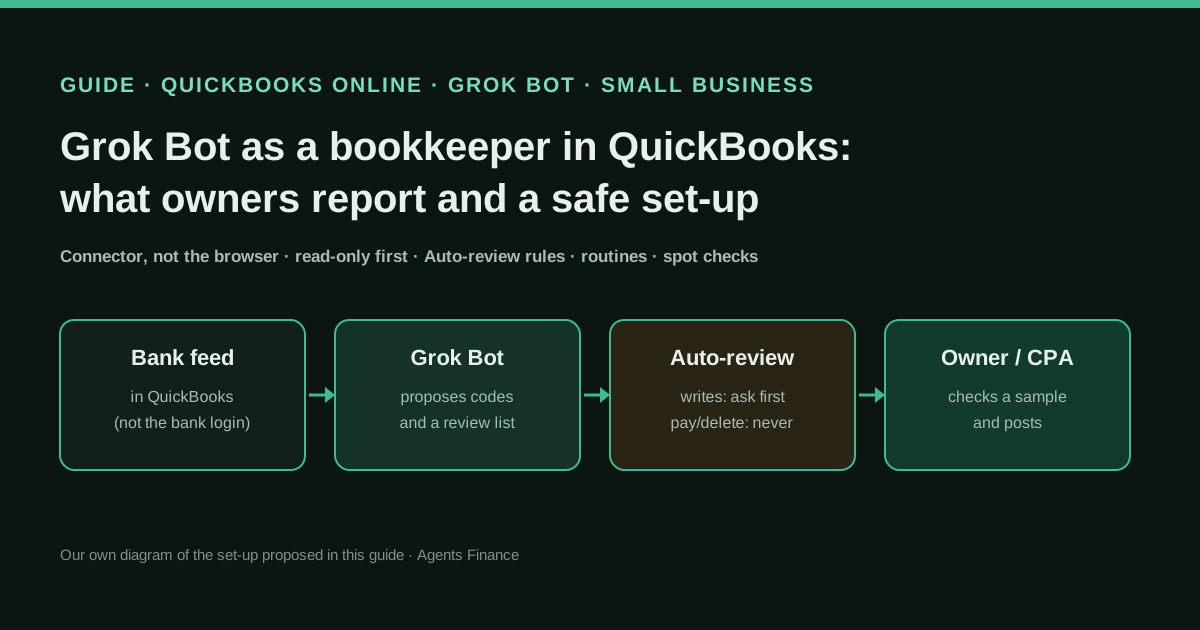
Explains how small-business owners are using Grok Bot, the agent from SpaceXSI (xAI) that works on its own cloud computer, to keep their books in QuickBooks Online: cleaning up old records, entering vendor bills from PDFs, reviewing the bank feed every day and running a month-end checklist. It separates what xAI documents (a QuickBooks Online connector, routines, an Auto-review agent that checks actions against rules you write) from what owners claim, explains why QuickBooks blocks the bot when it signs in through its browser, and turns it all into a set-up where the bot proposes and a person checks and posts.
What it offers, according to the source
There are no audited results: this is a guide. Owners report outcomes on X that we could not verify: Paul Reardon says the bot put his QuickBooks right in about two weeks after three forensic quotes of $14,000–$21,000 and that his company is now in SBA loan underwriting; another owner says teaching a bot to enter PDF vendor bills took 15 minutes. At least three users report that QuickBooks Online blocked the bot when it used the browser, and Cursor’s forum staff point to a connector or API route instead.
Mind the evidence. Described by the project’s own documentation or README. It says what the project claims to do and how it is used, not that it works in your case: we have not tested it.
What has really been tested
On 26 October 2026 we read the Grok Bot changelog, product page, pricing and the Grok Bot 101 guide, the two Cursor forum threads, xAI’s Above the Line story and the README, licence and .env.example of Intuit’s QuickBooks Online MCP server (commit 31a1dd5), and we read the owners’ posts on X directly. We could not see what the QuickBooks Online connector is allowed to read or change, because xAI does not document it. We have not connected Grok Bot to a QuickBooks company. The spot-check script was run only on fictitious data; the other templates are untested proposals.
How to apply it
Create one bookkeeping bot, connect QuickBooks Online through the connector (never by handing the bot your password), and give it read-only work first: reports, lists and a review list in a CSV. Write the approval rules in Auto-review, add a daily feed-review routine and a month-end checklist routine, and check a sample of its proposals with the spot-check script. Let it write drafts in QuickBooks only when your checks reach the accuracy bar you set, and never let it pay, delete or file. Templates in “Copy and adapt”.
- Create one bot for the books only, and keep bank, card and personal logins away from the shared computer that all your bots use.
- Connect QuickBooks Online through Grok Bot’s connector or an API-based MCP server and read the permission screen; do not let the bot sign in to QuickBooks with your password in its browser.
- Paste the Auto-review rules: reading is allowed, any write in QuickBooks asks first, and paying, deleting, voiding, filing or changing bank details is never allowed.
- Give it read-only work for the first weeks: a daily review list of feed transactions with proposed accounts, as a CSV you check.
- Run the spot-check script on every review list and record your verdicts; turn every correction into a written rule.
- Only when the checks reach your bar, let it create drafts in QuickBooks with Ask first, and keep the month-end sign-off with a person.
In two sentences
Since mid-October 2026, “I let Grok Bot do my QuickBooks” has become one of the most repeated small-business stories on X, from a forensic clean-up before an SBA loan to a bot that types vendor bills in from PDFs. The useful lesson is less glamorous: the owners who keep going connect QuickBooks through a connector, check the bot’s work against a sample, and never let it move money.
Why this is the trend, and why now
Three things happened in the same fortnight. On 11 October the Grok Bot changelog listed QuickBooks Online as available to connect, alongside paying with X Money or Stripe Link. On 22 and 24 October Elon Musk posted “Try Grok Bot” twice; the first post passed 7.5 million impressions and both collected hundreds of replies from people describing what their bots do, many of them bookkeeping. And in the same days, QuickBooks Online started showing up in complaints: users whose bot reconciled their books through the browser for a couple of weeks and then got locked out.
We counted about 470 posts on X in the seven days to 26 October that mention Grok Bot together with QuickBooks, bookkeeping, Xero, reconciling, invoices or accounting. That is a lot of anecdotes and very little method. This guide supplies the method.
Grok Bot is treated here like any other agent we cover: we describe what its maker documents, what users claim and where the risks are. It is not a recommendation over Claude, ChatGPT or Hermes Agent, which appear in other entries doing similar work.
What owners report
None of these claims are audited. They are short public posts, quoted with their authors’ own numbers, and they are the best first-hand evidence available today.
| Who | What they say the bot does | Result they state | Our caveat |
|---|---|---|---|
| Paul Reardon, business owner | Found and fixed errors left by several bookkeepers in QuickBooks | Done in about 2 weeks instead of three forensic quotes of $14,000–$21,000; company now in SBA underwriting | One post, no detail on how; underwriting is not approval |
| @cop8triotess, business owner | Bot “Maverick” enters vendor invoices received as PDFs into QuickBooks Online | 15 minutes to teach, mostly spent studying invoices already entered | No error rate given |
| Jarret Willey, tax strategist | Weekday routines pull bank and card transactions, suggest categories from past coding, flag missing receipts; month-end checklist and a plain-language P&L summary | No figures | The clearest description of a workflow, and the base of our routines |
| @jarrodatl, business owner | Bookkeeping bot categorises in QuickBooks | Checked every categorisation by hand until it earned his trust | The right habit, and the one we automate below |
| Ryland Beard, runs a bookkeeping firm | A team of three bots does all his own bookkeeping through the Switchbooks connector | About 10 hours a week saved | He founded Switchbooks, so he has a commercial interest |
| @TAftermath2020 and @DrumRom | Bot reconciled QuickBooks through its web browser | QuickBooks blocked the bot; one moved to Xero | Two independent reports of the same failure |
The pattern is consistent. Where the bot works on its own computer through a browser, it is fast to set up and fragile. Where it works through a connector, the owners talk about routines and review lists rather than magic.
Ryland Beard added a useful warning in another reply on 22 October: asked whether a model can be trusted with double-entry accounting, he answered that it cannot on its own, because its memory and context fade over time. His answer is a ledger tool underneath; ours is QuickBooks itself plus written rules and spot checks. Either way, the ledger has to be the source of truth, not the chat.
A different kind of story is xAI’s own case study of Above the Line, an audiovisual production company in Southern California. Its founder had Grok Bot build an internal tool for quotes, inventory and incoming payments that replaced a paid subscription; quotes went from 2–3 a week to about 10–12, according to the company. It is a vendor-published story about sales and quoting rather than bookkeeping, and the producers still review every quote, but it explains why some owners on X talk about “cancelling QuickBooks”. Before you do that, ask how your accountant will receive a ledger they can close and file from.
What xAI documents, and what it does not
As of 26 October 2026, the official pages say:
- Plans. Grok Bot is included with Premium ($30/month billed monthly), Super ($100/month, 3.5× Premium usage) and Ultra ($200/month, 12× Premium usage), and with the Teams and Enterprise plans (contact sales). Premium includes the bot’s own computer, signing in to your tools and routines on a schedule.
- Routines. A bot can run on a schedule or on triggers, and you can show it a workflow once so it saves it as a routine.
- Auto-review. You write rules in plain language; a separate review agent checks proposed actions and allows, blocks or escalates them to you. Since early October the rules are called Custom Rules, approval cards show when an “Ask first” rule paused an action, and “Always allow” adds a rule.
- Irreversible actions. Before sending, posting, buying or deleting, a bot checks your own messages for approval; after a bank or brokerage connector returns data, it asks before sharing it anywhere else (both added on 11 October).
- One shared computer. All your bots share one persistent cloud computer, so a site you log into with one bot is reachable by every other bot. Isolation is per user, not per bot.
What is not documented is the part that matters most for your books: which QuickBooks Online data the connector can read and which records it can create, change or delete. Treat it as able to write until the permission screen tells you otherwise, and write your rules accordingly.
Why QuickBooks blocks the bot’s browser
Grok Bot works in a browser on its own cloud computer, not in your Chrome. On 17 October a user wrote on the Cursor forum that his bot had reconciled QuickBooks “fine for a couple of weeks until QuickBooks blocked access”. A Cursor staff member replied the same day that QuickBooks was most likely flagging the bot’s cloud browser as automated traffic, that a native connector is the more reliable path, and that an MCP server that talks to the API avoids browser checks. An August feature request in the same forum had already asked for a QuickBooks Online connector with a real read-only option.
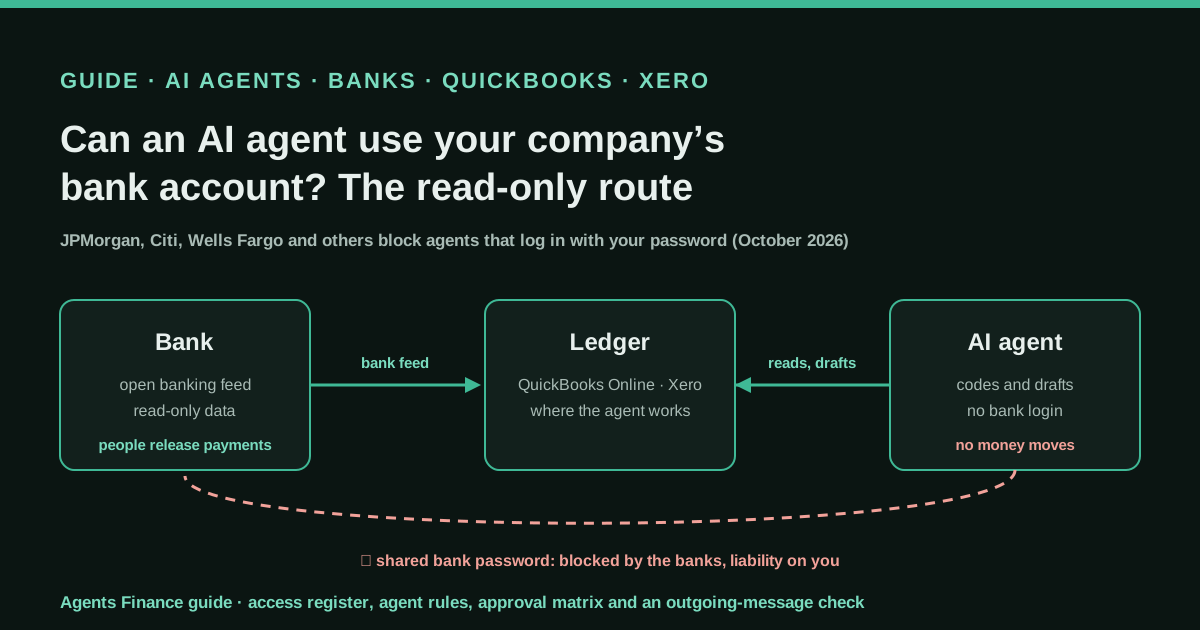
The practical rule follows: do not run your books through the bot’s browser. Use the connector or an API-based MCP server, and do not try to get around QuickBooks’ bot protection. Besides the lock-outs, a browser session gives the bot everything your login can do, and there is no read-only switch.
A safe set-up in four stages
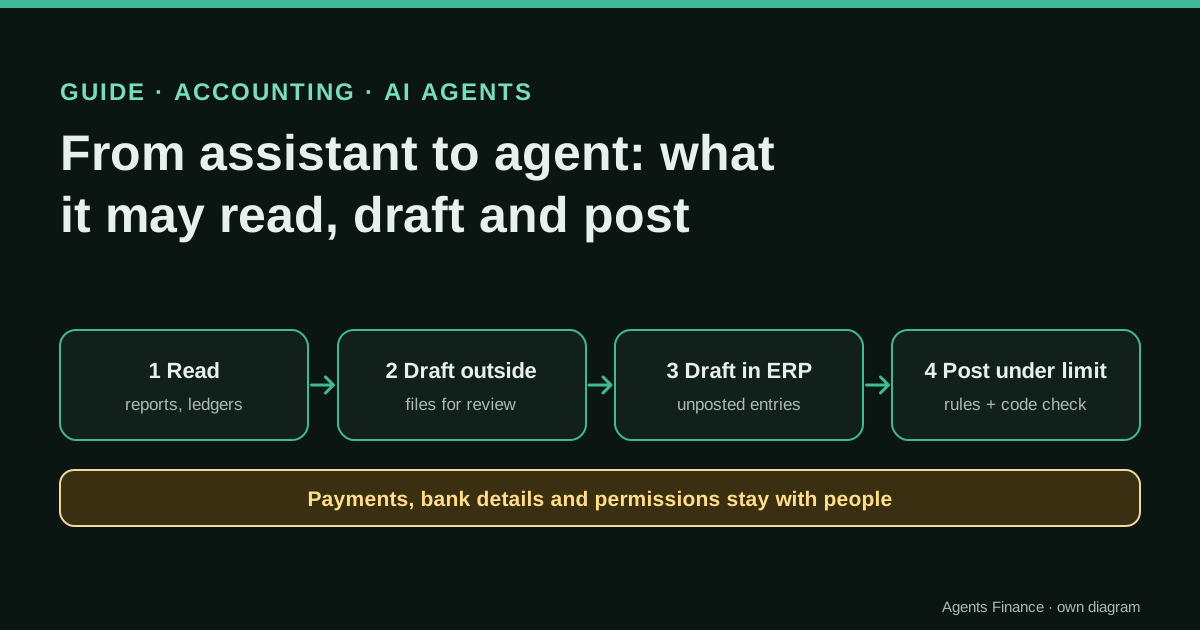
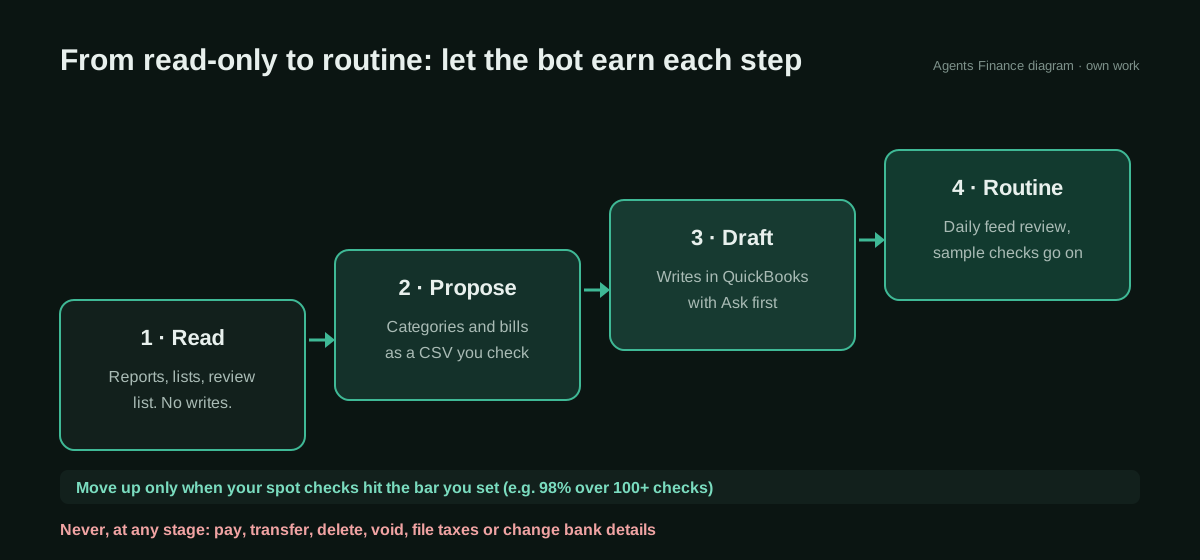
Stage 1, read. The bot reads reports and lists and writes nothing in QuickBooks. Its output is a review list: uncategorised items, duplicates, missing receipts, unusual amounts.
Stage 2, propose. It proposes an account for every feed transaction and a coded bill for every PDF, as a CSV. You check a sample with the script below and record your verdicts.
Stage 3, draft. When your checks reach the bar you set (we suggest at least 98% correct over 100 or more checks), the bot may create records in QuickBooks, each one behind an “Ask first” approval.
Stage 4, routine. The daily review runs on a schedule and the month-end checklist runs on the first working day. The random sample shrinks but never reaches zero, and new payees and large amounts are always checked.
At no stage does the bot pay, transfer, delete, void, file taxes or change bank details. That keeps it consistent with what US banks now expect from agents (see our guide on agents and company bank accounts) and with the bot’s own approval design.
Copy and adapt
Prerequisites
- A QuickBooks Online company where you are an admin, and a Grok Bot plan.
- The bank and cards connected to QuickBooks through its bank feeds, not to the bot.
- Python 3 for the spot-check script (no extra packages).
- Optional, for technical teams: an Intuit Developer account if you take the MCP-server route.
1. Instructions for the bookkeeping bot (Agents Finance template)
Agents Finance template based on Jarret Willey’s description and on xAI’s documented features. Paste it into the bot’s profile or first message and replace the variables:
# Role
You are the bookkeeping bot for {{COMPANY}}. You keep QuickBooks Online
accurate and you prepare work for a person to approve. You are not the
accountant and you do not give tax advice.

# Sources of truth
- QuickBooks Online (connected through the connector) is the ledger.
- The chart of accounts and the coding of the last 12 months are the rules.
- Receipts and bills arrive at {{BILLS_INBOX}}.

# Stage
Current stage: {{STAGE}}  (1 read · 2 propose · 3 draft · 4 routine)
- Stage 1–2: do not create, edit or delete anything in QuickBooks.
- Stage 3–4: you may create drafts only; every write waits for approval.

# Every review list
Return a CSV with: txn_id, date, payee, amount, proposed_account,
confidence (0–1) and a one-line reason that cites a past transaction
or a rule. Put anything you are unsure about at the top.

# Never
Pay, transfer, refund, delete, void, file a return, change bank or
vendor payment details, or share bank data outside this chat.
If a task needs one of these, stop and ask {{OWNER}}.
2. Auto-review rules (Agents Finance template)
Paste them into the Auto-review rules in Settings (saved as Custom Rules), in plain language as xAI’s guide suggests:
QuickBooks: reading reports, lists, transactions and attachments is allowed.
QuickBooks: ask me first before creating or editing any record (bill, expense,
journal entry, invoice, category, rule, vendor, customer).
QuickBooks: never delete, void, record a payment, change bank details,
change settings or reconcile an account without my message in this chat.
Money: never pay, transfer, buy or top up anything for the bookkeeping bot.
Sharing: never send bank, payroll or customer data by email, Slack or X.
Logins: do not sign in to QuickBooks or any bank in the browser; use the
QuickBooks Online connector only.
3. Two routines (Agents Finance template)
Create them from the bot’s Routines tab; the text is what you type as the routine’s instruction:
Daily, weekdays at 08:00 — "Feed review"
Read yesterday's bank and card transactions in QuickBooks Online.
For each one, propose an account from past coding and the chart of
accounts, with confidence and a reason. Flag duplicates, missing receipts,
new payees and anything over {{THRESHOLD}}. Send me the review list as a
CSV. Change nothing in QuickBooks.

Monthly, first working day at 09:00 — "Close checklist"
For last month, list: uncategorised transactions, possible duplicates,
bills without attachments, bank and card balances in QuickBooks against
the statement balances I upload, and open items older than 30 days.
Draft a plain-language P&L summary with the five biggest movements versus
the previous month. Send it as a Page. Change nothing in QuickBooks.
4. Read-only QuickBooks MCP server for technical teams
Adapted from the README of Intuit’s quickbooks-online-mcp-server (commit 31a1dd5, Apache-2.0). We only set the three DISABLE flags to true, which per the README removes the create, update and delete tools while read tools stay available. Grok Bot’s guide says it supports the same MCP servers as Cursor; we have not tested this server inside Grok Bot. Production needs an Intuit app and a public HTTPS callback for the first authorisation; start in the sandbox.
{
  "mcpServers": {
    "quickbooks": {
      "command": "node",
      "args": ["path/to/mcp-quickbooks-online/dist/index.js"],
      "env": {
        "QUICKBOOKS_CLIENT_ID": "your_client_id",
        "QUICKBOOKS_CLIENT_SECRET": "your_client_secret",
        "QUICKBOOKS_REFRESH_TOKEN": "your_refresh_token",
        "QUICKBOOKS_REALM_ID": "your_realm_id",
        "QUICKBOOKS_ENVIRONMENT": "sandbox",
        "QUICKBOOKS_DISABLE_WRITE": "true",
        "QUICKBOOKS_DISABLE_UPDATE": "true",
        "QUICKBOOKS_DISABLE_DELETE": "true"
      }
    }
  }
}
5. Spot-check script (Agents Finance template, MIT-0)
Picks what a person must check from the bot’s review list (every large amount, every new payee, every low-confidence line, plus a random sample) and scores your verdicts. Tested only on fictitious data:
#!/usr/bin/env python3
"""Agents Finance template (MIT-0): pick which of an agent's proposed
bookkeeping entries a person must check, and score the checks.

  python3 review_sample.py pick proposals.csv --history reviewed.csv \
      --threshold 1000 --min-confidence 0.8 --sample 0.2 --seed 2026-10 \
      --out review_list.csv
  python3 review_sample.py score reviewed.csv --target 0.98 --min-reviewed 100

proposals.csv columns: txn_id,date,payee,amount,proposed_account,confidence
reviewed.csv columns:  the same plus verdict (ok | fix) and correct_account
"""
import argparse
import csv
import random
import sys
from collections import Counter, defaultdict

REQUIRED = ["txn_id", "date", "payee", "amount", "proposed_account", "confidence"]


def read_rows(path):
    with open(path, newline="", encoding="utf-8") as f:
        rows = list(csv.DictReader(f))
    missing = [c for c in REQUIRED if rows and c not in rows[0]]
    if missing:
        sys.exit(f"{path}: missing columns {missing}")
    return rows


def norm(payee):
    return " ".join(payee.lower().split())


def pick(args):
    rows = read_rows(args.proposals)
    known = set()
    if args.history:
        known = {norm(r["payee"]) for r in read_rows(args.history)
                 if r.get("verdict", "").strip().lower() == "ok"}
    must, rest = [], []
    for r in rows:
        reasons = []
        if abs(float(r["amount"])) >= args.threshold:
            reasons.append("amount")
        if norm(r["payee"]) not in known:
            reasons.append("new payee")
        if float(r["confidence"]) < args.min_confidence:
            reasons.append("low confidence")
        if reasons:
            r["why"] = "; ".join(reasons)
            must.append(r)
        else:
            rest.append(r)
    rng = random.Random(args.seed)
    k = round(len(rest) * args.sample)
    for r in rng.sample(rest, k):
        r["why"] = "random sample"
        must.append(r)
    must.sort(key=lambda r: (r["date"], r["txn_id"]))
    cols = REQUIRED + ["why", "verdict", "correct_account"]
    with open(args.out, "w", newline="", encoding="utf-8") as f:
        w = csv.DictWriter(f, fieldnames=cols, extrasaction="ignore")
        w.writeheader()
        for r in must:
            w.writerow({**r, "verdict": "", "correct_account": ""})
    print(f"{len(rows)} proposals, {len(must)} to review "
          f"({len(must) - k} required, {k} random) -> {args.out}")


def score(args):
    rows = [r for r in read_rows(args.reviewed)
            if r.get("verdict", "").strip().lower() in ("ok", "fix")]
    if not rows:
        sys.exit("no reviewed rows (verdict must be ok or fix)")
    ok = sum(r["verdict"].strip().lower() == "ok" for r in rows)
    rate = ok / len(rows)
    print(f"reviewed {len(rows)}, correct {ok}, accuracy {rate:.1%}")
    misses = defaultdict(Counter)
    for r in rows:
        if r["verdict"].strip().lower() == "fix":
            misses[r["proposed_account"]][r.get("correct_account", "?")] += 1
    for acct, c in sorted(misses.items()):
        fixes = ", ".join(f"{a} x{n}" for a, n in c.most_common())
        print(f"  agent said {acct!r}, you corrected to: {fixes}")
    if len(rows) < args.min_reviewed:
        print(f"keep the current sample: fewer than {args.min_reviewed} checks")
    elif rate >= args.target:
        print(f"meets the {args.target:.0%} bar: you may lower the random sample")
    else:
        print(f"below the {args.target:.0%} bar: keep or raise the sample, "
              "and turn the corrections above into rules")


def main():
    p = argparse.ArgumentParser()
    sub = p.add_subparsers(dest="cmd", required=True)
    a = sub.add_parser("pick")
    a.add_argument("proposals")
    a.add_argument("--history")
    a.add_argument("--threshold", type=float, default=1000)
    a.add_argument("--min-confidence", type=float, default=0.8)
    a.add_argument("--sample", type=float, default=0.2)
    a.add_argument("--seed", default="period")
    a.add_argument("--out", default="review_list.csv")
    b = sub.add_parser("score")
    b.add_argument("reviewed")
    b.add_argument("--target", type=float, default=0.98)
    b.add_argument("--min-reviewed", type=int, default=100)
    args = p.parse_args()
    pick(args) if args.cmd == "pick" else score(args)


if __name__ == "__main__":
    main()
6. Monthly sign-off checklist (Agents Finance template)
- [ ] Bank and card balances in QuickBooks match the statements (you, not the bot, opened them)
- [ ] Spot-check score for the month recorded; corrections turned into rules
- [ ] No records created outside approved drafts (check QuickBooks' audit log)
- [ ] No deletes, voids, payments or bank-detail changes by the bot's connection
- [ ] Uncategorised and suspense accounts at zero or explained
- [ ] P&L summary read and the big movements make sense to you
- [ ] Accountant has what they need to close and file
A concrete example (fictional)
A landscaping company with one bank account and two cards gets 300 feed transactions a month. In week one the bot returns a review list each morning; the script flags every payee it has not seen approved before, so the owner checks 60% of lines and corrects ten, mostly fuel booked as repairs. Each correction becomes a rule in the bot’s instructions. By the second month the new-payee flags have fallen, the random sample is 20% and the score is above the bar over 120 checks, so the owner moves the bot to stage 3: it creates the bills from PDFs as drafts, each behind an approval card. Payments still go out from the bank’s own portal.
Limitations and risks
- The connector’s permissions are not documented. Read the QuickBooks permission screen and assume write access until proven otherwise.
- Shared logins. Every bot on your account can reach a site any bot has logged into. Keep the bank out of the bot’s computer entirely and connect the bank to QuickBooks.
- Memory is not a ledger. Bots learn from your corrections, but the rules you want enforced must be written down and checked.
- Claims are anecdotes. The success stories are single posts; failures are less likely to be posted.
- Usage limits. Plans include weekly usage; daily routines on a large ledger will use part of it.
Common mistakes
- Letting the bot sign in to QuickBooks in its browser with your password.
- Skipping the read-only weeks because the first results look good.
- Approving “Always allow” on a write rule during a busy day.
- Checking only the transactions the bot was unsure about; confident mistakes are the expensive ones.
- Cancelling the accounting software before agreeing with your accountant how they will get the ledger.
Conclusions
Grok Bot can already do useful bookkeeping work for a small business, and the owners who report the best results describe the same shape: a connector into QuickBooks, a daily list of proposals, and a person who checks. Start read-only, write your rules, measure the bot with a sample and promote it one stage at a time. The QuickBooks lock-outs are a reminder that the browser is the wrong door for a ledger.
Sources
- SpaceXSI — Grok Bot changelog (v0.70.2, 11 October 2026: “QuickBooks Online is available to connect”) (opens in a new tab) (primary)
- SpaceXSI — Grok Bot product page, pricing and FAQ (opens in a new tab)
- SpaceXSI — Grok Bot 101 (permissions, review agent and shared computer) (opens in a new tab)
- Cursor Community Forum — Grok Bot Chrome Extension (QuickBooks blocked the bot; staff reply, 17 October 2026) (opens in a new tab)
- Cursor Community Forum — Grok Bot: QuickBooks Online as a first-party Cursor MCP connector (opens in a new tab)
- Intuit on GitHub — quickbooks-online-mcp-server (Apache-2.0) (opens in a new tab)
- Paul Reardon on X — QuickBooks fixed for an SBA loan instead of a $14,000–$21,000 forensic clean-up (opens in a new tab)
- @cop8triotess on X — a bot that enters PDF vendor invoices into QuickBooks Online (opens in a new tab)
- Jarret Willey on X — daily feed review and a month-end close checklist with Grok Bot (opens in a new tab)
- @TAftermath2020 on X — QuickBooks Online blocked the bot’s IP (opens in a new tab)
- @DrumRom on X — moved from QuickBooks to Xero after the bot was blocked (opens in a new tab)
- @jarrodatl on X — checked every categorisation by hand until the bot earned trust (opens in a new tab)
- Ryland Beard (founder of Switchbooks) on X — a team of bots does his bookkeeping (opens in a new tab)
- SpaceXSI — How Above the Line more than doubled its sales pipeline in one month with Grok Bot (vendor case study) (opens in a new tab)
We wrote this entry in our own words from the sources above and checked that the links worked on October 26, 2026. Is anything incorrect? Tell us.
Share this entry
This entry is part of the guide: AI agents for accounting · MCP for accounting and ERPs