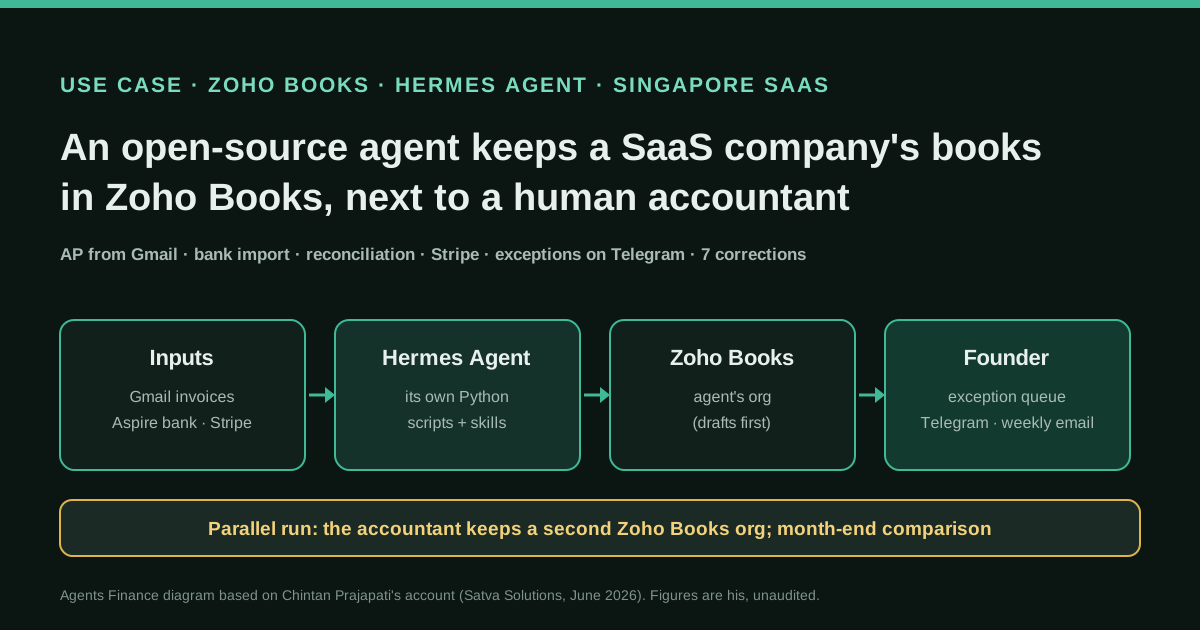
What they do and how
Chintan Prajapati runs a Singapore SaaS company whose books used to be done once a year by an incorporation service. He hired an in-house accountant for monthly books and, in parallel, set up a second Zoho Books organisation kept by Hermes Agent, the open-source agent from Nous Research. The agent reads invoices and statements forwarded to a Gmail address, extracts them, posts supplier bills in their original currency, imports bank and card lines from Aspire into Zoho, proposes matches, chases missing receipts with one weekly email per cardholder, and stages Stripe charges, refunds and payouts for posting. It asks the founder on Telegram when it is unsure. There is no MCP server: the agent wrote its own Python scripts against the official APIs and saved them as skills that now run on a schedule.
Reported result
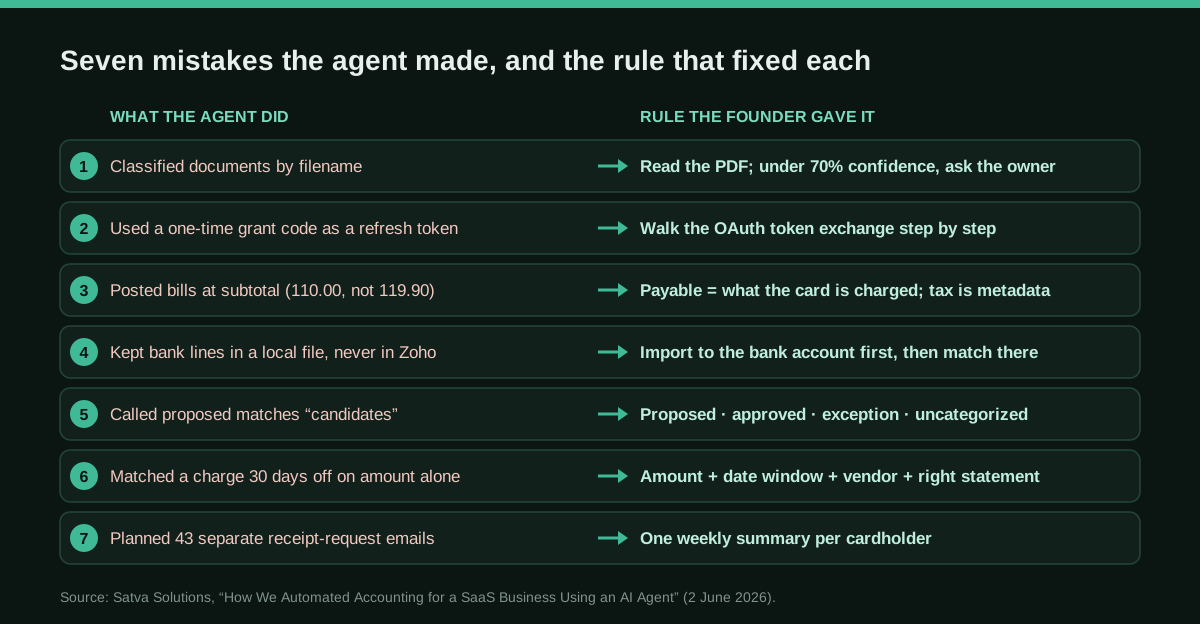
Stated by Chintan Prajapati: about 6–8 hours of active set-up over one or two days; 89 transactions extracted from two months of statements; 145 Stripe balance transactions and 36 payouts backfilled into 357 clearing rows; an estimated drop from 7–13 hours a month of routine bookkeeping to 45–65 minutes of exception review (85–90%), with set-up paid back in under a month. These are his estimates for a company of this size, not measured or audited, and the comparison with the accountant's books is ongoing. He lists seven errors the agent made, including bills posted at the subtotal instead of the amount actually charged.
Stated figures. An identified person or organization states that they have used it. The results are stated by the source; we have not audited them.
What has really been tested
On 25 and 26 October 2026 we read Chintan Prajapati's article (2 June 2026) and the LinkedIn post by his colleague Kathaan Shah that retells it, both from Satva Solutions, so there is no independent second source. We checked Hermes Agent's licence, skill format, scheduled jobs and approval settings in its official docs and repository (commit ff29484), the Zoho Books OAuth flow, scopes and bank-transaction endpoints in Zoho's API docs, and Nous Portal prices on the official website. We have not seen his scripts, skills or books, and the SaaS company is not named in the article. The two Python scripts that work on files were run only on fictitious data; the Zoho sync script was run only against a local fake server; the rest are untested templates.
How to replicate it
Open a second Zoho Books organisation (or a sandbox) so the agent never touches the books your accountant signs. Give Hermes Agent a Gmail address for documents, read-only keys for the bank and Stripe, and a Zoho connection whose first token exchange you do yourself. Write your accounting rules into a skill before it posts anything: full payable amount on bills, live chart of accounts, currencies and taxes at the start of every run, bank lines imported into Zoho before matching, a strict matching rule and an exception queue in accounting language. Keep posting in draft until you approve, schedule the jobs, and compare both sets of books every month end.
In two sentences
The founder of a Singapore SaaS company connected Hermes Agent, the open-source agent from Nous Research, to Gmail, his bank, Stripe and a second Zoho Books organisation, and lets it do supplier bills, bank imports, reconciliation and receipt chasing while a human accountant keeps a parallel set of books for comparison. It is a first-hand account with his own estimates and an honest list of seven mistakes, every one of which was the agent “reasoning from code, not from accounting”.
Why this case, and why now
Hermes Agent is one of the most talked-about agents of the autumn. Its GitHub repository passed 250,000 stars, and X counted close to 7,000 posts mentioning it in the seven days to 25 October 2026, with Nous Research’s community collecting stories of people using it at work. Most of those stories are one-liners. Finance teams that want to know what a general-purpose agent does to real books need a longer account, with the failures included.
This is that account. It was written by Chintan Prajapati on his firm’s blog on 2 June 2026 and retold in August by a colleague on LinkedIn. It matters for three reasons. The agent is a generalist with no accounting skill out of the box. The set-up has no MCP server at all, because the agent wrote its own API scripts. And the founder ran it alongside a human accountant on a separate Zoho Books organisation, which is the safest way we have seen to try an agent on a live company.
Who does it
Chintan Prajapati is CEO of Satva Solutions, a firm that builds accounting integrations and now sells agentic accounting workflows. He also owns a SaaS company incorporated in Singapore. The article does not name it, so neither do we. For its first years an incorporation service did its accounts once a year, with no monthly close and no direct line to the accountant. As the business grew he wanted monthly cash flow, recurring revenue and income versus expenses, and he kept finding duplicate card charges, cancelled subscriptions still billing and supplier overcharges that sat unnoticed for months.
So he did two things at once. He hired an in-house accountant to keep the books monthly in Zoho Books. Then he opened a second Zoho Books organisation for the same company and gave it to an agent, planning to compare both every month end and learn from every difference.
Keep his commercial interest in mind. The article ends with an offer to build the same pipeline for readers, and the figures are his own estimates.
Tools and architecture
The principle was that each system keeps its job and the agent moves data between them:
- Zoho Books, the second organisation, is the system of record on the agent’s side, with posting in draft until he confirms.
- Gmail is the document inbox. He forwarded a quarter of supplier bills and bank and card statements to a dedicated address, with labels for inbox, payables, bank, credit cards, processed and “Ask Business Owner”.
- Aspire supplies the business account and two corporate cards, his own and a colleague’s, as PDF statements.
- Stripe supplies revenue: subscriptions, charges, refunds and payouts. The agent reads it through a read-only restricted key. He chose that deliberately over OAuth for a single-company, server-side job.
- Telegram is where the agent asks him questions.
- Hermes Agent sits in the middle. Out of the box it had 91 general skills, of which about ten mattered here: Gmail, Google Workspace, OCR and document parsing, browser automation and scheduling. There was no accounting skill. He wrote no code himself. The agent wrote Python scripts against the Zoho Books, Gmail, Stripe and Telegram APIs, kept them in a working folder and saved the reusable patterns as Hermes skills, so next month’s run needs no retraining.
Step by step, with what went wrong
He describes nine stages, and for most of them the first version was wrong in an instructive way.
- Email intake. The first classifier looked only at the email subject and attachment filename, and its confidence stuck at 60–70%. He told the agent to read the first one or two pages of every PDF and to send anything under 70% confidence to him. The “ask the owner” queue “shrank to almost nothing”.
- Extraction. Vendor, date, currency, lines and totals went into JSONL and CSV. It pulled 89 transactions from two months of Aspire statements and clean lines from four supplier bills, and this worked first time.
- Chart of accounts and Zoho connection. This was the most painful step. He gave the agent what he thought was a refresh token but was a one-time grant code, and authentication kept failing. Then bills failed with “Account does not exist”, because the 72-account CSV he had uploaded carried IDs from a different test organisation. The fix was a script that pulls the live chart of accounts, currencies and tax codes from Zoho at the start of every run.
- Multi-currency. Suppliers bill in USD, GBP and INR against an SGD base. The agent checked that those currencies were active and posts each bill in its original currency.
- Supplier bills. This was the serious error. With no tax code mapped, the agent posted two hosting bills at USD 110.00 instead of the USD 119.90 that would hit the card, because “no tax code, no tax” looked clean to it. The reconciliation would have been off by USD 9.90 per bill. His rule: a bill is posted at the full amount the supplier is paid, and the tax breakdown is kept as metadata.
- Bank import. The agent had extracted the 89 transactions into a local “staging” file and never sent them to Zoho, because its posting loop only covered suppliers and bills. Now it imports statement lines into the Zoho bank account first, uncategorised, and matches them there. He also had it make re-runs idempotent, and a second run created zero duplicates.
- Reconciliation. The agent called proposed matches “candidates”, so he made it use the words accountants use: proposed, approved, exception, uncategorised. Worse, it matched a platform fee to a card charge 30 days away because the amounts were equal, when the card actually used had no statement loaded yet. The new rule requires exact amount, date proximity, a fuzzy vendor-name match and the right statement, and says to leave it as an exception otherwise. The output became “two confident matches plus one honest exception”.
- Receipts. The agent wanted to send 43 separate emails for 43 missing receipts. Now each cardholder gets one weekly summary with a table of outstanding items and a request ID that ties each reply back to its transaction. It runs every Friday at 08:00 IST. Requests for files that live in portals, such as a Shopify Partner payout CSV, give the exact URL, period and export steps.
- Stripe. With the read-only key it backfilled 145 balance transactions and 36 payouts and generated 357 clearing rows ready to post. By then it had learned his mapping preferences, and he “barely had to step in”.
Everything now runs as scheduled jobs. Gmail intake runs every two hours, Stripe and Shopify App Store syncs every six hours, Shopify Partner payout requests every few days and the receipt summary every Friday. He only works the exception queue.
Copy and adapt
Satva did not publish its scripts, skills or prompts, so nothing below is theirs. Hermes Agent itself is MIT-licensed. Everything here is an Agents Finance template based on the rules Chintan Prajapati describes, written for Hermes Agent’s documented formats (SKILL.md, AGENTS.md, ~/.hermes/config.yaml, hermes cron). The three Python scripts are released under MIT-0. Use a sandbox or a second organisation, never your live books, until you trust it.
Prerequisites
- Hermes Agent installed (
curl -fsSL https://hermes-agent.nousresearch.com/install.sh | bashor the desktop app) and a model provider you are allowed to send financial data to. Hermes sends tool results to that provider. - A Zoho Books organisation for the agent, plus a Zoho “Self Client” in the Zoho API console. Do the first exchange of the grant code for a refresh token yourself; the code is valid for minutes and works once.
- Separate tokens: a read-only one (
ZohoBooks.accountants.READ,ZohoBooks.settings.READ,ZohoBooks.banking.READ,ZohoBooks.bills.READ) for the daily jobs, and a write token for bills and banking only when you are ready to approve drafts. - A dedicated Gmail address, a read-only restricted Stripe key and a Telegram bot connected to Hermes.
1. AGENTS.md for the bookkeeping folder (Agents Finance template)
Hermes loads AGENTS.md from the working directory at the start of each session.
# Bookkeeping workspace: <Company> (agent's Zoho Books organisation)

## Scope
- You keep the SECOND Zoho Books organisation (id in ZOHO_ORG_ID). Never use credentials for the accountant's organisation.
- Base currency: <SGD>. Suppliers may bill in <USD, GBP, INR>: post in the original currency.
- Sources: Gmail label Accounting/Inbox, bank and card statements (PDF), Stripe (read-only key).

## Rules that are not negotiable
1. Before any posting, run scripts/sync_zoho_settings.py and use only account, currency and tax IDs from zoho_settings.json.
2. A supplier bill is posted at the TOTAL the supplier will be paid. Never drop a tax line because a tax code is missing: post the total, record the tax breakdown in the notes and add the bill to the exception queue.
3. Bank and card lines go into the Zoho bank account first (uncategorized). Matching happens in Zoho, never only in a local file.
4. A match needs exact amount, date within 3 days, vendor name agreement and the statement of the card that was actually used. If any is missing, it is an exception.
5. Classify documents by reading the PDF, not the filename. Confidence under 70% -> label "Ask Business Owner" and ask me on Telegram.
6. Everything you create stays in draft until I approve it. Re-runs must not create duplicates.

## Language
Write for accountants: proposed match, approved match, exception, uncategorized. Not "candidate", "record", "payload".

## People
One weekly email per cardholder with a table of missing receipts and a request ID per line. Never one email per receipt.
2. Skill: Zoho Books month-end routine (Agents Finance template)
Save it as ~/.hermes/skills/zoho-books-bookkeeping/SKILL.md, with the scripts in scripts/ next to it.
---
name: zoho-books-bookkeeping
description: Weekly and month-end bookkeeping for one Zoho Books organisation - sync settings, import bank lines, propose matches, queue exceptions
version: 1.0.0
author: Agents Finance template
license: MIT-0
metadata:
  hermes:
    tags: [Accounting, Zoho Books, Reconciliation]
required_environment_variables:
  - name: ZOHO_ORG_ID
    prompt: "Zoho Books organization_id of the agent's organisation"
  - name: ZOHO_CLIENT_ID
    prompt: "Self Client ID"
  - name: ZOHO_CLIENT_SECRET
    prompt: "Self Client secret"
  - name: ZOHO_REFRESH_TOKEN
    prompt: "Refresh token (read-only scopes for scheduled runs)"
---

# Zoho Books bookkeeping

## When to Use
Weekly reconciliation, the Friday receipt summary and the month-end comparison with the accountant's books.

## Procedure
1. Run `python scripts/sync_zoho_settings.py zoho_settings.json`. Stop if it fails.
2. Export the period's bank and card lines, posted bills and expenses, and the list of statements already ingested, to bank.csv, docs.csv and statements.csv.
3. Run `python scripts/match_bank_lines.py bank.csv docs.csv statements.csv proposals.csv`.
4. Send me on Telegram: counts by status and every exception with its reason. Do not approve anything yourself.
5. For "uncategorized" lines, add them to the cardholder's weekly receipt table.
6. At month end, ask me for both trial balances and run `python scripts/compare_books.py accountant_tb.csv agent_tb.csv`. Explain each difference in one line.

## Pitfalls
- A grant code is not a refresh token. If auth fails with invalid_code, ask me to redo the exchange; never loop.
- A missing tax code is an exception, not a reason to change the amount.
- "Processed locally" is not "posted": check the line exists in Zoho.

## Verification
The number of uncategorized lines in Zoho for the period equals the number of lines in the receipt tables.
3. Live settings sync (Agents Finance template, MIT-0)
Read-only. It refreshes the access token and downloads the chart of accounts, currencies and taxes, so nothing is posted against a stale export. It uses Zoho’s documented endpoints. For other data centres (EU, India…) change both URLs.
#!/usr/bin/env python3
# sync_zoho_settings.py: Agents Finance template based on the "sync settings
# from live Zoho" step Chintan Prajapati describes (Satva Solutions, June 2026).
# Licence: MIT-0. Read-only: it refreshes the access token and downloads the
# chart of accounts, currencies and taxes, so the agent never posts against a
# stale CSV. Scopes it needs: ZohoBooks.accountants.READ, ZohoBooks.settings.READ
import json
import os
import sys
import urllib.parse
import urllib.request
from datetime import datetime, timezone

ACCOUNTS_URL = os.environ.get("ZOHO_ACCOUNTS_URL", "https://accounts.zoho.com")
API_URL = os.environ.get("ZOHO_API_URL", "https://www.zohoapis.com/books/v3")


def access_token():
    # The refresh token is long-lived; the one-time grant code (valid for minutes)
    # is exchanged only once, by a person, when the connection is set up.
    params = urllib.parse.urlencode({
        "refresh_token": os.environ["ZOHO_REFRESH_TOKEN"],
        "client_id": os.environ["ZOHO_CLIENT_ID"],
        "client_secret": os.environ["ZOHO_CLIENT_SECRET"],
        "grant_type": "refresh_token",
    })
    req = urllib.request.Request(f"{ACCOUNTS_URL}/oauth/v2/token?{params}", method="POST")
    with urllib.request.urlopen(req, timeout=30) as r:
        body = json.load(r)
    if "access_token" not in body:
        sys.exit(f"token refresh failed: {body.get('error', 'unknown error')}")
    return body["access_token"]


def get(token, path, key):
    org = os.environ["ZOHO_ORG_ID"]
    items, page = [], 1
    while True:
        url = f"{API_URL}/{path}?organization_id={org}&page={page}&per_page=200"
        req = urllib.request.Request(url, headers={"Authorization": f"Zoho-oauthtoken {token}"})
        with urllib.request.urlopen(req, timeout=30) as r:
            body = json.load(r)
        if body.get("code") != 0:
            sys.exit(f"{path}: {body.get('message')}")
        items += body.get(key, [])
        if not body.get("page_context", {}).get("has_more_page"):
            return items
        page += 1


def main(out_path):
    token = access_token()
    snapshot = {
        "taken_at": datetime.now(timezone.utc).isoformat(timespec="seconds"),
        "organization_id": os.environ["ZOHO_ORG_ID"],
        "accounts": [{"account_id": a["account_id"], "account_name": a["account_name"],
                      "account_type": a.get("account_type"), "is_active": a.get("is_active")}
                     for a in get(token, "chartofaccounts", "chartofaccounts")],
        "currencies": [{"currency_id": c["currency_id"], "currency_code": c["currency_code"]}
                       for c in get(token, "settings/currencies", "currencies")],
        "taxes": [{"tax_id": t["tax_id"], "tax_name": t["tax_name"],
                   "tax_percentage": t.get("tax_percentage")}
                  for t in get(token, "settings/taxes", "taxes")],
    }
    with open(out_path, "w", encoding="utf-8") as f:
        json.dump(snapshot, f, indent=2, ensure_ascii=False)
    print(f"{len(snapshot['accounts'])} accounts, {len(snapshot['currencies'])} currencies, "
          f"{len(snapshot['taxes'])} taxes -> {out_path}")


if __name__ == "__main__":
    main(sys.argv[1] if len(sys.argv) > 1 else "zoho_settings.json")
4. Matching rule as code (Agents Finance template, MIT-0)
This is the rule from step 7, written so it can be tested: exact amount, a date window, a vendor-name match and the right card statement. Anything ambiguous becomes an exception, and it never writes to Zoho.
#!/usr/bin/env python3
# match_bank_lines.py: Agents Finance template based on the matching rule
# Chintan Prajapati describes (Satva Solutions, June 2026). Licence: MIT-0.
# Proposes matches between bank/card lines and posted bills or expenses.
# It never writes to Zoho Books: it only produces a CSV for a human to approve.
import csv
import sys
from datetime import date
from difflib import SequenceMatcher

DATE_WINDOW_DAYS = 3        # maximum distance between bill date and charge date
VENDOR_MIN_SIMILARITY = 0.6  # fuzzy match on the vendor name (0 to 1)


def norm(text):
    return " ".join("".join(c.lower() if c.isalnum() else " " for c in text).split())


def vendor_score(vendor, description):
    v, d = norm(vendor), norm(description)
    if v and v in d:
        return 1.0
    return SequenceMatcher(None, v, d).ratio()


def load(path):
    with open(path, newline="", encoding="utf-8") as f:
        return list(csv.DictReader(f))


def main(bank_csv, docs_csv, statements_csv, out_csv):
    bank = load(bank_csv)            # line_id,date,amount,currency,description,card
    docs = load(docs_csv)            # doc_id,date,total,currency,vendor,paid_with
    ingested = {r["card"] for r in load(statements_csv)}  # card,period
    used_lines = set()
    rows = []
    for doc in docs:
        result = {"doc_id": doc["doc_id"], "vendor": doc["vendor"],
                  "total": doc["total"], "line_id": "", "status": "", "reason": ""}
        if doc["paid_with"] not in ingested:
            result.update(status="exception",
                          reason=f"statement for {doc['paid_with']} not ingested yet")
            rows.append(result)
            continue
        candidates = []
        for line in bank:
            if line["line_id"] in used_lines or line["card"] != doc["paid_with"]:
                continue
            if line["currency"] != doc["currency"]:
                continue
            if abs(float(line["amount"]) - float(doc["total"])) > 0.005:
                continue
            gap = abs((date.fromisoformat(line["date"]) - date.fromisoformat(doc["date"])).days)
            if gap > DATE_WINDOW_DAYS:
                continue
            score = vendor_score(doc["vendor"], line["description"])
            if score < VENDOR_MIN_SIMILARITY:
                continue
            candidates.append((gap, -score, line["line_id"]))
        if len(candidates) == 1:
            line_id = candidates[0][2]
            used_lines.add(line_id)
            result.update(line_id=line_id, status="proposed match",
                          reason="amount, date and vendor agree")
        elif len(candidates) > 1:
            result.update(status="exception",
                          reason=f"{len(candidates)} possible lines: a person must choose")
        else:
            result.update(status="exception", reason="no line meets all the rules")
        rows.append(result)
    for line in bank:
        if line["line_id"] not in used_lines and line["card"] in ingested:
            rows.append({"doc_id": "", "vendor": "", "total": line["amount"],
                         "line_id": line["line_id"], "status": "uncategorized",
                         "reason": "no receipt or bill: request it from the cardholder"})
    with open(out_csv, "w", newline="", encoding="utf-8") as f:
        writer = csv.DictWriter(f, fieldnames=list(rows[0].keys()))
        writer.writeheader()
        writer.writerows(rows)
    counts = {}
    for r in rows:
        counts[r["status"]] = counts.get(r["status"], 0) + 1
    print(", ".join(f"{k}: {v}" for k, v in sorted(counts.items())))


if __name__ == "__main__":
    if len(sys.argv) != 5:
        sys.exit("usage: match_bank_lines.py bank.csv docs.csv statements.csv out.csv")
    main(*sys.argv[1:])
5. Month-end parallel run (Agents Finance template, MIT-0)
This script compares the accountant’s trial balance with the agent’s, account by account, largest gap first.
#!/usr/bin/env python3
# compare_books.py: Agents Finance template for the month-end parallel run
# (accountant's Zoho Books organisation vs the agent's). Licence: MIT-0.
# Input: two trial balance exports as CSV with columns account,debit,credit.
import csv
import sys

TOLERANCE = 0.01


def balances(path):
    out = {}
    with open(path, newline="", encoding="utf-8") as f:
        for row in csv.DictReader(f):
            net = float(row["debit"] or 0) - float(row["credit"] or 0)
            key = row["account"].strip().lower()
            out[key] = out.get(key, 0.0) + net
    return out


def main(human_csv, agent_csv):
    human, agent = balances(human_csv), balances(agent_csv)
    for name, book in (("accountant", human), ("agent", agent)):
        total = round(sum(book.values()), 2)
        if abs(total) > TOLERANCE:
            print(f"WARNING: the {name} trial balance does not balance ({total:+.2f})")
    diffs = []
    for account in sorted(set(human) | set(agent)):
        h, a = human.get(account, 0.0), agent.get(account, 0.0)
        if abs(h - a) > TOLERANCE:
            diffs.append((abs(h - a), account, h, a))
    if not diffs:
        print("Both sets of books agree account by account.")
        return
    print(f"{len(diffs)} account(s) differ (largest first):")
    for gap, account, h, a in sorted(diffs, reverse=True):
        print(f"  {account}: accountant {h:,.2f} | agent {a:,.2f} | gap {gap:,.2f}")


if __name__ == "__main__":
    if len(sys.argv) != 3:
        sys.exit("usage: compare_books.py accountant_tb.csv agent_tb.csv")
    main(*sys.argv[1:])
6. Approvals, credentials and schedule (Agents Finance template)
In ~/.hermes/config.yaml, keep dangerous commands behind approval. Make scheduled runs refuse them rather than approve them, and pass the Zoho variables only to the scripts that need them:
approvals:
  mode: manual        # always ask before dangerous shell commands
  cron_mode: deny     # a scheduled run that hits one stops instead of approving itself
terminal:
  env_passthrough:
    - ZOHO_ORG_ID
    - ZOHO_CLIENT_ID
    - ZOHO_CLIENT_SECRET
    - ZOHO_REFRESH_TOKEN
Then create the jobs, using the times Satva describes and adjusting them to yours:
hermes cron create "every 2h" "Process new documents in the Gmail label Accounting/Inbox" \
  --skill zoho-books-bookkeeping --name "gmail-intake"
hermes cron create "0 8 * * 5" "Send each cardholder the weekly table of missing receipts" \
  --skill zoho-books-bookkeeping --name "receipt-summary"
hermes cron create "0 9 3 * *" "Month-end: sync settings, propose matches, compare both trial balances" \
  --skill zoho-books-bookkeeping --name "month-end-check"
A concrete example (fictional)
We ran the matching script on made-up data that mirrors the article’s cases. The data had two IONOS bills of USD 119.90 a month apart, a Shopify fee of SGD 42.51 dated 30 days before the card charge with the same amount, a second Shopify fee paid with a card whose statement had not been loaded, and an unexplained USD 15.00 charge. The output had two proposed matches, two exceptions (“no line meets all the rules” and “statement for card-sales not ingested yet”) and two uncategorized lines for the receipt email. The comparison script, given two trial balances where the agent had split USD 19.80 of tax out of hosting, reported both accounts with their gap. In a real month that is the conversation the founder has with his accountant.
Results stated by the source
All figures are Chintan Prajapati’s:
- Set-up: about 6–8 hours of active work over one or two days. The largest parts were OAuth and chart-of-accounts trouble (about 1.5 hours) and reconciliation logic (about 1.5 hours).
- Volume: 89 bank and card transactions from two months; 145 Stripe balance transactions and 36 payouts turned into 357 clearing rows.
- Time: an estimated 7–13 hours a month of manual work (statements, bills, reconciliation, Stripe, receipts) down to 45–65 minutes of exception review. That is roughly 85–90%, with break-even in under a month. He estimates this for a company with two or three bank accounts, one payment processor and 10–20 supplier bills a month.
- Quality: seven corrections turned it, in his words, from a “demo that crashes in production” into a “junior accountant who needs a senior to review their work”.
No error rate, close time or month-end comparison result is published.
Limitations and risks
- One source, with an interest. Both accounts come from Satva Solutions, which sells this service. The company is unnamed and nobody outside has checked the books.
- Small volume. Four supplier bills and 89 bank lines are enough to find the failure modes. They are not enough to show the error rate at scale.
- Judgement stays human. He says so himself. The agent cannot decide between cost of sales, a prepayment and a write-off, interpret input tax or a treaty, handle intercompany or odd FX, or decide materiality and how much evidence is enough.
- Scripts written by the agent. They become your controls, so somebody has to read them, version them and re-test them when the agent edits a skill.
- Data leaves the building. Hermes sends tool results to the model provider you choose. Bank statements and supplier bills are confidential, so pick a provider and contract accordingly, or use a local model.
- Credentials. Zoho refresh tokens do not expire until revoked. Keep the scheduled jobs on read-only scopes and revoke tokens you no longer use.
Common mistakes
- Letting the agent work in the same organisation your accountant signs off.
- Uploading a chart of accounts once and trusting it forever.
- Letting a missing tax code change the amount of a bill.
- Treating a local file as if it were posted to the ledger.
- Matching on amount alone, or matching when the right statement is not loaded yet.
- Sending people one message per missing receipt.
- Turning approvals off (
approvals.mode: off, YOLO mode) to make scheduled jobs “just work”.
Conclusions
The most useful thing in this case is not the 85–90% estimate. It is the list of seven mistakes, because every company that tries a general agent on its books will meet the same ones. The agent was good at the mechanical work: reading PDFs, extracting lines, handling currencies, pulling Stripe. Each time it went wrong, it was missing an accounting rule that nobody had written down. Write those rules first, in an AGENTS.md and a skill. Run the agent in a second organisation, and let the month-end comparison with your accountant decide when it has earned more trust. For a controller or a firm, that turns “should we try Hermes Agent?” into a project with a clear exit test.
Sources
- Satva Solutions (Chintan Prajapati) — How We Automated Accounting for a SaaS Business Using an AI Agent (2 June 2026) (opens in a new tab) (primary)
- Kathaan Shah (Satva Solutions) on LinkedIn — “We gave an AI agent our own company's books. It made 7 mistakes.” (August 2026) (opens in a new tab)
- NousResearch/hermes-agent on GitHub (MIT licence) (opens in a new tab)
- Hermes Agent docs — Creating Skills (SKILL.md format) (opens in a new tab)
- Hermes Agent docs — Scheduled Tasks (Cron) (opens in a new tab)
- Hermes Agent docs — Security (dangerous command approval) (opens in a new tab)
- Zoho Books API — OAuth (grant code, refresh and access tokens, scopes) (opens in a new tab)
- Zoho Books API — Bank Transactions (match, categorize, exclude) (opens in a new tab)
- Hermes Agent — official website (licence and Nous Portal plans) (opens in a new tab)
We wrote this entry in our own words from the sources above and checked that the links worked on October 26, 2026. Is anything incorrect? Tell us.
Share this entry
This entry is part of the guide: AI agents for accounting