What they do and how
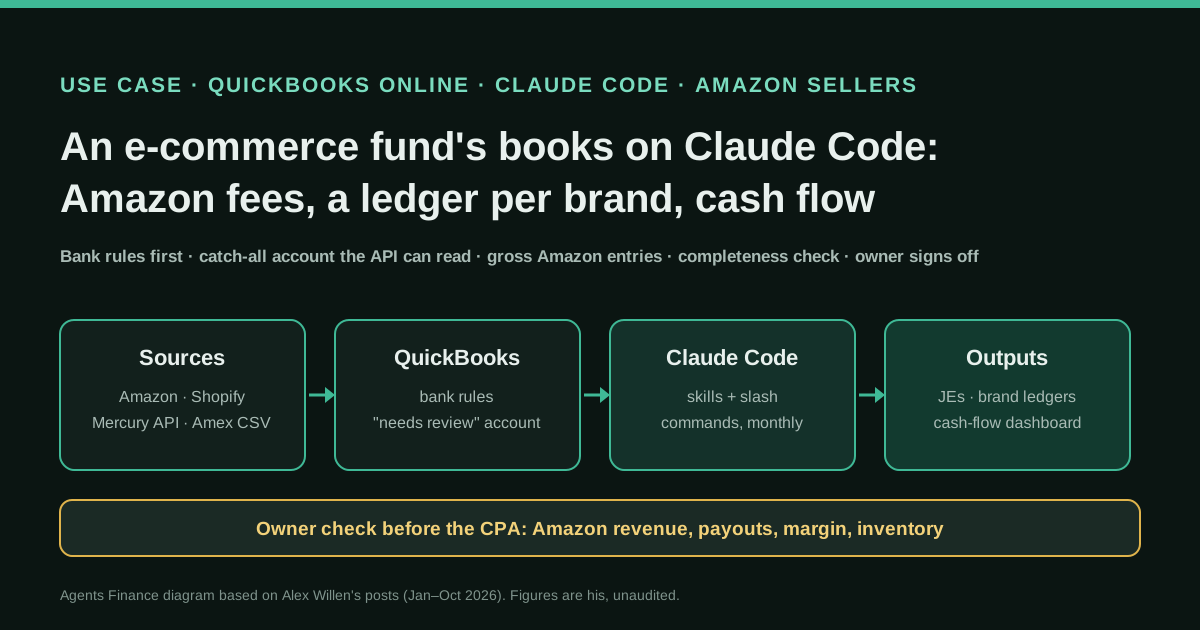
Alex Willen manages a fund that acquires e-commerce brands (about a dozen, mostly sold through Amazon FBA, with at least one also on Shopify) held in three legal entities. All bank and card accounts feed QuickBooks Online, where bank rules categorise most lines and send the rest to a generic category, because the QuickBooks API cannot read transactions still waiting "for review". Once a month Claude Code, connected through the QuickBooks API, recategorises those lines, checks Amazon, Shopify, Meta, bank and card activity, and creates journal entries for the fees Amazon deducts before paying out. A separate skill keeps one Google Sheets ledger per brand from Mercury (API), Amex (a CSV that Claude downloads in a browser after he signs in) and Amazon data, and asks him about anything it cannot attribute. Weekly, an inventory skill updates sales and stock projections that feed a cash-flow dashboard for him and his investors.
Reported result
Stated by Alex Willen: the per-brand ledger job went from two or three hours a month to "a couple of minutes" of answering questions, and across bookkeeping, fee entries, ledgers and projections he says he saves "tens of hours a month". His inventory projection skill went 5 out of 5 on his hardest test cases once he moved to a newer Claude model at maximum reasoning, and the cash-flow dashboard took about half a day to build. He checks the profit and loss account and balance sheet against what he knows of the business before they go to his CPA; there is no audit, error rate or measured close time.
Stated figures. An identified person or organization states that they have used it. The results are stated by the source; we have not audited them.
What has really been tested
On 25 October 2026 we read Alex Willen's replies in JT Pells's thread on X and the other replies to them, and five of his Substack posts (January to August 2026) on bookkeeping, per-brand ledgers, the cash-flow dashboard, scheduled tasks and handing work to agents. We checked the QuickBooks API limit on bank-feed items against a second practitioner and a developer guide, the Amazon settlement report fields in the Selling Partner API docs, Mercury's token types and Claude Cowork's scheduled-task help page. We have not seen his skills, prompts beyond the first one he published, code or books. The two Python scripts under "Copy and adapt" were run only on fictitious data; the other files are untested templates.
How to replicate it
Let bank rules in QuickBooks Online do the obvious lines and park the rest in one "needs review" account the API can read. Create a QuickBooks developer app for your own company and give Claude Code the keys, plus a context file with your entities, brands, supplier-to-brand map and split rules. Turn each monthly job into a skill with a fixed order: start a week before the last booked line, pull every source, drop duplicates, attribute, show you what it cannot place, write, then run a completeness check. Book Amazon payouts gross, from the settlement report, through a clearing account. Keep read-only bank tokens, sign in to card portals yourself, and compare the P&L with numbers you know before anything goes to your accountant.
In two sentences
Alex Willen runs a small fund that buys e-commerce brands, and he has replaced his $10-an-hour bookkeeper with Claude Code working through the QuickBooks Online API: it categorises what the bank rules miss, books the fees Amazon takes out of each payout, keeps a separate ledger for every brand and refreshes cash-flow projections for him and his investors. It is a first-hand case with clear limits (a simple, all-cash business and an owner who knows his numbers), and the way he splits the work between bank rules, skills, an API key and his own review is easy to copy.
Why this case, and why now
On 17 October 2026, JT Pells, a CPA, asked on X: “If you’ve automated your entire accounting process with AI, I’d love to see how you did it.” The post passed 21,000 views and drew 79 replies, many of them short claims. Willen’s reply was the most specific one, and he had already written up the build on his Substack, The Automated Operator, over the year.
The timing matters. General-purpose agents are moving into small-business books from several directions at once: Claude Code and Claude Cowork scheduled tasks on the owner’s side, and Intuit’s own push: its QuickBooks connector in Claude and plugin in ChatGPT now create and send invoices, look up payroll and benchmark loans. Willen’s case shows what an owner does today without waiting for either vendor: an API key, a few skills and a habit of checking the result.
Who does it
Willen manages a fund that acquires e-commerce brands. He says acquisitions are all cash and the finances are “very simple”: money in from Amazon (most brands are pure Fulfilment by Amazon) and Shopify, money out to suppliers, freight, Amazon ads, insurance and software, money in from investors and out to them as distributions, and escrow payments when he buys a brand. He holds about a dozen brands in three legal entities, because California charges an $800 yearly fee per entity, but he treats every brand as its own business because investors are paid back brand by brand.
Two facts shape the design: the books only need to satisfy his CPA at tax time, since he tracks performance himself; and several brands share one bank account and one card, so the per-brand view has to be rebuilt from the transactions.
Tools and architecture
Stage 1, ChatGPT as a guide (October 2025). Willen first asked ChatGPT to walk him through doing the books himself: cash basis, chart of accounts, how to treat investor capital and acquisitions. It worked, he writes, except for the locations of menus in QuickBooks, but it made him the AI’s “meat puppet”, clicking where he was told. It also showed him that his bookkeeper was keying in every Amazon fee line by hand, detail he did not need.
Stage 2, Claude Code with a QuickBooks API key (by January 2026). Claude Code suggested it should update QuickBooks itself. Getting access meant creating an app in Intuit’s developer portal and completing its security questionnaire, which he calls a pain, even for his own company. From then on he gives Claude the same context he would give a bookkeeper, for example when escrow is released for an acquisition; Claude asks how much of the price was inventory and books the entry.
The QuickBooks rule trick. All accounts feed QuickBooks with bank rules for the recurring lines. Anything else gets a generic category, because, in his words, QuickBooks “does not allow access to uncategorized transactions via API”. Another CPA in the same thread, Timothy LeGendre, confirms that the QuickBooks API does not expose bank-feed items and that a browser agent is the only way to work them in place. Willen’s workaround keeps everything in the API: once a line is booked to the generic account, Claude can read and recategorise it.
Monthly bookkeeping. Claude categorises the generic lines, checks all transactions from Amazon, Shopify, Meta, bank and cards, “makes sure everything is accounted for” and creates the journal entries, including the ones that capture the fees Amazon deducts before depositing money.
One ledger per brand. This skill pulls Mercury through its API, Amazon payments and ad charges through Amazon’s APIs, and Amex by opening a browser on the sign-in page so Willen types his own credentials; Claude then downloads the CSV. It writes to Google Sheets through a Google Cloud service account invited to each sheet like a person.
Projections. An /inventory skill projects 18 months of unit sales and reorder dates per brand, using subagents to fetch Amazon data so the main context stays small. A dashboard built with Claude turns that, plus costs, payment terms (often a 30% deposit and 70% on completion) and Amazon fee models, into how much cash each brand can safely distribute.
Step by step
- Start with rules. In QuickBooks, create bank rules for recurring lines and one catch-all rule to a “needs review” account. Lines in that account are readable and editable by the API.
- Get API access. Create a developer app for your own QuickBooks company and complete Intuit’s questionnaire yourself. Store the keys outside the project folder.
- Write the context once. Entities, brands, which supplier makes which product, how shared costs are split (he splits fund-wide costs such as QuickBooks and insurance equally across brands) and which questions Claude must always ask.
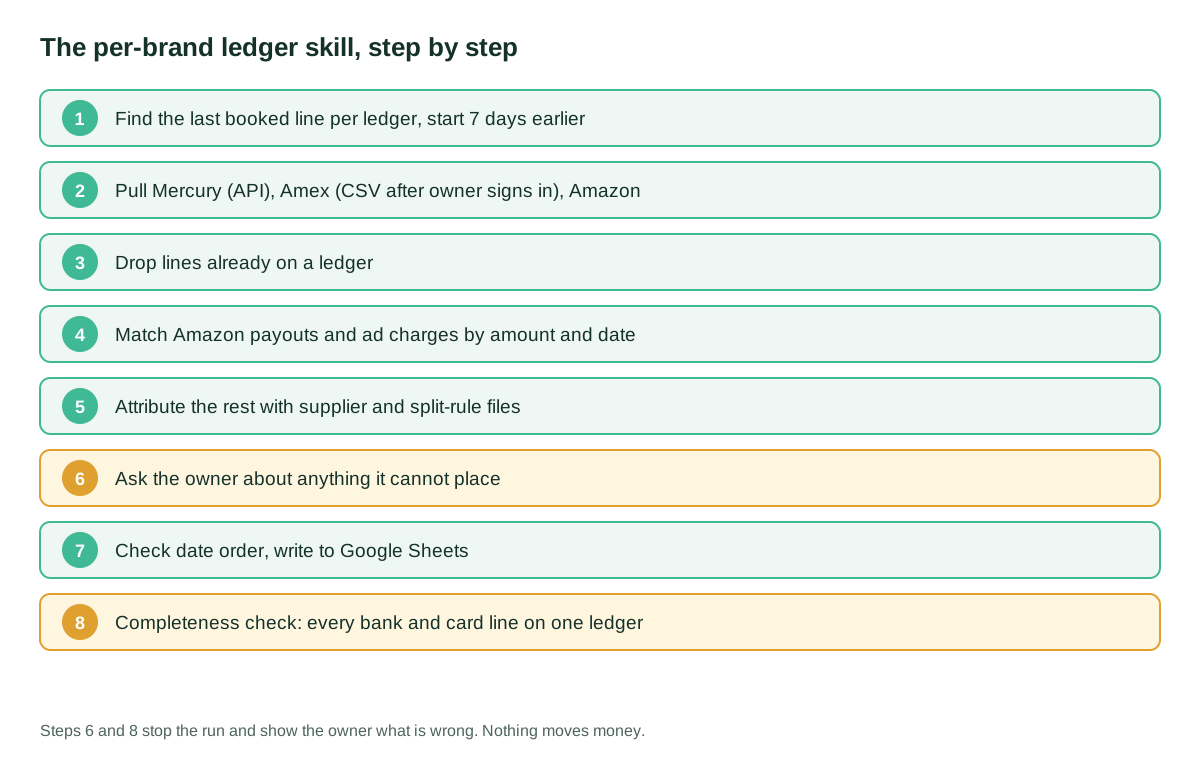
- Turn each job into a skill. Willen’s ledger skill finds the latest line on every ledger and starts a week earlier, pulls every source, drops what is already booked, matches Amazon payouts and ad charges to the bank and card by amount and date, attributes the rest from context, shows him what it cannot place, checks the date order and only then writes, followed by a review pass to make sure every Mercury and Amex line landed somewhere.
- Book Amazon gross. The settlement report lists sales, fees, refunds and promotions behind each payout. Booking them through a clearing account lets the bank deposit match the net while the P&L shows the real cost of selling.
- Schedule what does not need you. He first ran daily jobs from GitHub runners calling
claude -p; when Anthropic changed how that headless use is billed, Claude estimated his cost would go from $100 to $3,000 a month, so he moved them to Claude Cowork scheduled tasks covered by his plan. - Check before it leaves. Before the P&L and balance sheet go to his CPA, he compares them with Amazon revenue and payouts, his expected margin and the inventory he knows he holds.
Copy and adapt
Willen publishes no skills or code; the only prompt he published is his first one to ChatGPT, quoted below as a short extract. Everything else is an Agents Finance template based on his description, for a QuickBooks Online company that sells on Amazon. The two Python scripts were run only on fictitious data. Keep keys out of these files.
Prerequisites
- QuickBooks Online with admin rights and an Intuit developer app for your own company.
- Claude Code on a paid Claude plan (Cowork scheduled tasks are on all paid plans).
- Amazon Seller Central access to settlement reports (download or Selling Partner API).
- Bank and card exports as CSV; a read-only bank token if your bank offers one (Mercury has read-only, read-write and custom tokens; a read-write token can start payments without admin approval, so do not use it here).
- Python 3.10+ (standard library only).
His opening prompt, extract: “I need your help with bookkeeping. My new fund is incredibly simple financially… my only bookkeeping need is to have something to give to my CPA come tax time.” Write yours the same way: what the business is, what the books are for and what you do not need.
1. CLAUDE.md for the bookkeeping project (Agents Finance template)
# Bookkeeping project: rules for Claude

## Business
- Fund with 3 legal entities (A, B, C). Brands per entity: see brands.csv.
- Cash basis. Books are for the CPA at tax time; brand performance lives in the sheets.

## Sources
- QuickBooks Online via API (keys in env vars QBO_*; never print them).
- Bank: Mercury read-only token (env MERCURY_TOKEN). Card: CSV I download, in /inbox.
- Amazon: settlement reports per seller account, one account per brand.
- Supplier -> brand map: suppliers.csv. Shared costs: split equally across brands.

## Rules
- Only recategorise lines in the "Needs review" account. Never edit reconciled lines.
- Journal entries: show me the full entry before posting. Never post to a closed period.
- Anything you cannot attribute with the files above: ask me, do not guess.
- Never move money, create payees or change bank rules.
- After every run, list what you posted, what you skipped and why.
2. Skill for the per-brand ledgers (Agents Finance template)
---
name: brand-ledgers
description: Update one ledger per brand from bank, card and Amazon data, then check completeness. Use when I say "update the ledgers".
---
1. Read every brand ledger and find its latest dated line. Start date = earliest of those minus 7 days.
2. Pull bank lines (API) and card lines (CSV in /inbox) from the start date. If the card CSV is missing, open the card's sign-in page and wait for me to sign in; never ask for my password.
3. Pull Amazon settlement payouts and ad invoices per seller account for the same period.
4. Drop any line already on a ledger (same source, date and amount).
5. Match Amazon payouts to bank credits and ad charges to card lines by exact amount and date (+/- 5 days). One seller account = one brand.
6. Attribute other lines with suppliers.csv; split shared costs equally and mark them split_of = original amount.
7. Show me a table of everything you could not attribute, with your best guess. Wait.
8. Show me the lines you will add per brand. Wait for "go".
9. Write the lines, keep each ledger in date order, then run check_brand_ledgers.py. If it says STOP, show me the output and do not fix anything silently.
3. Amazon settlement to journal entry (Agents Finance template, MIT-0)
It reads a settlement report in the Selling Partner API V2 flat-file format (amount-type, amount-description, amount), maps each charge type to an account, checks that the lines add up to the payout and that the payout is in the bank export, and writes a journal entry CSV for review. It never posts.
#!/usr/bin/env python3
"""Agents Finance template (MIT-0). One Amazon settlement report
(GET_V2_SETTLEMENT_REPORT_DATA_FLAT_FILE_V2, tab-delimited) -> summary
journal entry for review + match of the payout to a bank export. Never posts.
Usage: python3 amazon_settlement_je.py settlement.tsv bank.csv mapping.csv BRAND
"""
import csv, sys
from collections import defaultdict
from datetime import datetime, timedelta
from decimal import Decimal

def money(s):
    s = (s or "0").strip()
    if "," in s and s.rfind(",") > s.rfind("."):   # EU format: 1.234,56 or 95,00
        s = s.replace(".", "").replace(",", ".")
    return Decimal(s.replace(",", ""))

def day(s):
    return datetime.strptime(s.strip()[:10], "%Y-%m-%d").date()

settlement_file, bank_file, mapping_file, brand = sys.argv[1:5]

# mapping.csv: transaction-type,amount-type,amount-description,account
# ("*" in transaction-type = any; specific rows such as Refund win)
with open(mapping_file, newline="") as f:
    mapping = {(r["transaction-type"], r["amount-type"], r["amount-description"]): r["account"]
               for r in csv.DictReader(f)}

rows = list(csv.DictReader(open(settlement_file, newline=""), delimiter="\t"))
header = rows[0]                                # first row carries the totals
settlement_id = header["settlement-id"]
total = money(header["total-amount"])
deposit_date = day(header["deposit-date"])

lines, unmapped = defaultdict(Decimal), []
for r in rows[1:]:
    key = (r["transaction-type"], r["amount-type"], r["amount-description"])
    account = mapping.get(key) or mapping.get(("*",) + key[1:])
    if account is None:
        unmapped.append(key)
        account = "SUSPENSE - ask the owner"
    lines[account] += money(r["amount"])

problems = []
if sum(lines.values()) != total:
    problems.append(f"detail lines add up to {sum(lines.values())}, payout is {total}")
if unmapped:
    problems.append(f"unmapped fee types: {sorted(set(unmapped))}")

match = None
for b in csv.DictReader(open(bank_file, newline="")):  # date,amount,description
    if money(b["amount"]) == total and abs(day(b["date"]) - deposit_date) <= timedelta(days=5):
        match = b
        break
if match is None:
    problems.append(f"no bank credit of {total} within 5 days of {deposit_date}")

# Debit the clearing account with the payout (the bank-feed deposit is matched
# to it later); sales arrive positive -> credit; fees and refunds negative -> debit.
je = [("Amazon clearing", total, Decimal("0"))]
for account, amount in sorted(lines.items()):
    je.append((account, -amount if amount < 0 else Decimal("0"),
               amount if amount > 0 else Decimal("0")))
if sum(d for _, d, _ in je) != sum(c for _, _, c in je):
    problems.append("entry does not balance")

out = f"je_{brand}_{settlement_id}.csv"
with open(out, "w", newline="") as f:
    w = csv.writer(f)
    w.writerow(["JournalNo", "JournalDate", "Account", "Debit", "Credit", "Memo", "Class"])
    for account, d, c in je:
        w.writerow([f"AMZ-{settlement_id}", deposit_date.isoformat(), account,
                    f"{d:.2f}" if d else "", f"{c:.2f}" if c else "",
                    f"Amazon settlement {settlement_id}", brand])

print(f"{brand} settlement {settlement_id}: payout {total} on {deposit_date}")
print("bank match:", f'{match["date"]} {match["description"]}' if match else "NONE")
for account, d, c in je:
    print(f"  {account:<34} {d:>10} {c:>10}")
print("STATUS:", "OK, ready for review" if not problems else "STOP")
for p in problems:
    print("  -", p)
sys.exit(1 if problems else 0)
Example mapping.csv (adjust to your chart of accounts):
transaction-type,amount-type,amount-description,account
Refund,ItemPrice,Principal,Amazon refunds
*,ItemPrice,Principal,Sales - Amazon
*,ItemPrice,Shipping,Sales - Amazon
*,ItemFees,Commission,Amazon referral fees
*,ItemFees,FBAPerUnitFulfillmentFee,Amazon FBA fulfillment fees
*,other-transaction,Storage Fee,Amazon storage fees
*,Promotion,Principal,Amazon promotions
4. Completeness check for the ledgers (Agents Finance template, MIT-0)
Run it after every write. It only reads CSV exports of the bank, the card and each ledger.
#!/usr/bin/env python3
"""Agents Finance template (MIT-0). Every bank and card line since START is on
exactly one brand ledger (or split across several), nothing is on a ledger that
the bank does not show, and each ledger is in date order. Read-only.
Usage: python3 check_brand_ledgers.py START bank.csv card.csv ledgers/*.csv
  bank/card: date,amount,description
  ledger:    date,amount,description,source,split_of
    source = bank | card | manual; split_of = original amount of a shared charge
"""
import csv, sys
from collections import Counter
from decimal import Decimal

start, bank_file, card_file, *ledger_files = sys.argv[1:]
load = lambda p: list(csv.DictReader(open(p, newline="")))
key = lambda r, s: (s, r["date"][:10], Decimal(r["amount"]))

expected = Counter()
for source, path in (("bank", bank_file), ("card", card_file)):
    for r in load(path):
        if r["date"][:10] >= start:
            expected[key(r, source)] += 1

found, splits, problems = Counter(), Counter(), []
for path in ledger_files:
    rows = load(path)
    dates = [r["date"][:10] for r in rows]
    if dates != sorted(dates):
        problems.append(f"{path}: not in date order")
    for r in rows:
        if r["date"][:10] < start or r.get("source") not in ("bank", "card"):
            continue
        if r.get("split_of"):
            splits[(r["source"], r["date"][:10], Decimal(r["split_of"]))] += Decimal(r["amount"])
        else:
            found[key(r, r["source"])] += 1

for k, total in splits.items():
    if total == k[2]:
        found[k] += 1
    else:
        problems.append(f"split lines add up to {total}, original charge is {k[2]}: {k}")
for k, n in (expected - found).items():
    problems.append(f"missing from every ledger ({n}x): {k}")
for k, n in (found - expected).items():
    problems.append(f"on a ledger but not in the {k[0]} export, or duplicated ({n}x): {k}")

print("STATUS:", "OK" if not problems else "STOP, show these to the owner")
for p in problems:
    print("  -", p)
sys.exit(1 if problems else 0)
5. Monthly scheduled task (Agents Finance template)
Paste into a Claude Cowork scheduled task or a Claude Code routine. Cowork scheduled tasks now run in the cloud; they reach local files only while the desktop app is open, so keep the inputs in your Claude account or a connected folder.
On the 3rd of every month at 08:00:
1. Run the brand-ledgers skill up to step 7 and send me the list of lines you
   could not attribute. Do not write anything until I answer.
2. For each Amazon settlement deposited last month, run amazon_settlement_je.py
   and send me the entries with STATUS. Post only the ones I approve.
3. List the QuickBooks lines still in "Needs review" with your proposed account.
4. Finish with: P&L by brand for last month, Amazon payouts vs. bank deposits,
   and anything that moved more than 20% against the prior month.
6. The owner’s sanity check before the books go out (Agents Finance template)
- Amazon revenue in the P&L equals Seller Central’s total for the year, by brand.
- Payouts in the bank equal revenue minus Amazon fees and refunds.
- Gross margin per brand is within the range you expect.
- Inventory at year end ties to the units you hold (Amazon, 3PL, in transit) at cost.
- Investor contributions and distributions are in equity, not income or expense.
- Escrow releases for acquisitions are split into inventory and the business, as in the purchase agreement.
A concrete example (fictional)
A gardening brand’s September settlement shows $1,800.00 of sales, a $60.00 refund, $261.00 of net referral fees, $198.60 of FBA fees, $25.00 of promotions and $20.00 of storage. Amazon deposits $1,235.40. The script finds the deposit in the bank a day later, books a balanced entry (clearing $1,235.40, fees and refunds as debits, sales $1,800.00 as a credit) and says OK. In October, Amazon adds an inbound placement fee that is not in the mapping: the script puts it in suspense, prints STOP and the entry waits for a decision. The ledger check flags a $30.00 QuickBooks charge split $15.00 and $10.00 across two brands, because the halves do not add up.
Results stated by the source
All figures are Alex Willen’s, about his own business, and unaudited:
- The per-brand ledgers took him two or three hours a month; now it is “a couple of minutes giving Claude input on transactions”. He says the review step before writing has been accurate for so long that he no longer reviews it.
- Across the books, Amazon fee entries, ledgers and projections he estimates he saves “tens of hours a month”.
- His
/inventoryprojection skill scored 5/5 on his thorniest test cases once he used a newer Claude model at maximum reasoning; the cash-flow dashboard took about half a day. - When headless
claude -pjobs were going to be billed separately, Claude put his monthly cost at $3,000 instead of $100; moving them to scheduled tasks kept them within his plan. - His previous bookkeeper charged $10 an hour; firms he spoke to pitched $500+ a month. He still uses a CPA for taxes and has ChatGPT “fact check” Claude.
Limitations and risks
- A simple business, one narrator. All-cash acquisitions, few transaction types and an owner who knows his numbers. A reply in the same thread warns that fund accounting and its taxes need to be done “very particularly”; nothing here was reviewed by his CPA in public.
- Review that fades. He stopped reviewing the ledger list before writing. That is fine for a management sheet; for postings to QuickBooks, keep the approval, and keep the completeness check even when nothing has gone wrong for months.
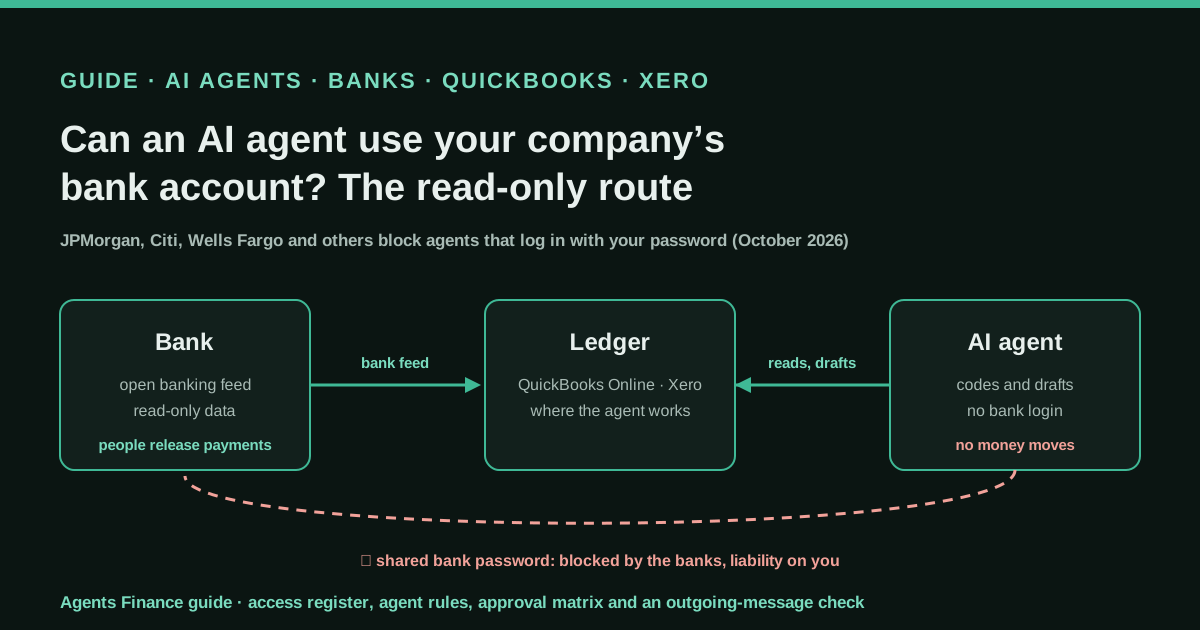
- Credentials. He chose not to give Claude his Amex password and signs in himself. Use read-only bank tokens and never a read-write token for a bookkeeping agent.
- Catch-all accounts hide work. Anything parked in “needs review” is out of the bank feed’s matching; reconcile that account to zero each month.
- Cost and plan rules change. His set-up depended on subscription pricing that changed once already in 2026.
- The vendor route is US-only for now. Intuit says its Claude connector is available to US customers only; outside the US the API route is the one that works.
Common mistakes
- Letting Amazon payouts land as revenue, net of fees, so margins and fee changes are invisible.
- Sharing one card across brands without a split rule, then fixing it by hand every month.
- Asking the agent to “categorise everything” instead of only the lines the rules did not catch.
- Fixing a failed check silently instead of showing the owner what broke.
- Skipping the year-end inventory count because “Amazon has the numbers”: the 3PL and in-transit units do not show there.
Conclusions
Willen’s case is useful because it is ordinary: QuickBooks Online, bank rules, an API key and a handful of skills, run by an owner who knows what his P&L should look like. The parts worth copying are the catch-all account the API can read, gross Amazon entries through a clearing account, one ledger per brand with a completeness check after every write, and a human sign-off before anything reaches the accountant.
Sources
- Alex Willen on X — reply to JT Pells, CPA: “If you've automated your entire accounting process with AI, I'd love to see how you did it” (17 October 2026) (opens in a new tab) (primary)
- Alex Willen on X — “a thousand tasks that each take a little time… I end up saving tens of hours a month” (18 October 2026) (opens in a new tab)
- JT Pells, CPA on X — the thread that asked how people automate their accounting (17 October 2026) (opens in a new tab)
- The Automated Operator (Alex Willen) — Can AI do my Bookkeeping? (22 January 2026) (opens in a new tab)
- The Automated Operator — Updating Financial Ledgers with Claude Code (28 May 2026) (opens in a new tab)
- The Automated Operator — Building a Cashflow Projection Dashboard (14 May 2026) (opens in a new tab)
- The Automated Operator — The Claude-pocalypse, or how I learned to love scheduled tasks (21 May 2026) (opens in a new tab)
- The Automated Operator — Human out of the Loop: Preparing Systems for Autonomy (28 August 2026) (opens in a new tab)
- Timothy LeGendre, CPA on X — “QBO API doesn't allow bank feed items” (18 October 2026) (opens in a new tab)
- Satva Solutions — QuickBooks Online API limitations: bank feed items “For Review” are not available via API (opens in a new tab)
- Amazon Selling Partner API — Settlement reports (GET_V2_SETTLEMENT_REPORT_DATA_FLAT_FILE_V2) (opens in a new tab)
- Mercury API docs — Getting started (read-only, read-write and custom tokens) (opens in a new tab)
- Claude Help Center — Schedule recurring tasks in Claude Cowork (opens in a new tab)
- QuickBooks — QuickBooks expands connector in Claude and plugin in ChatGPT with new sales invoicing, payroll, and lending features (opens in a new tab)
We wrote this entry in our own words from the sources above and checked that the links worked on October 25, 2026. Is anything incorrect? Tell us.
Share this entry
This entry is part of the guide: AI agents for accounting