What it is about
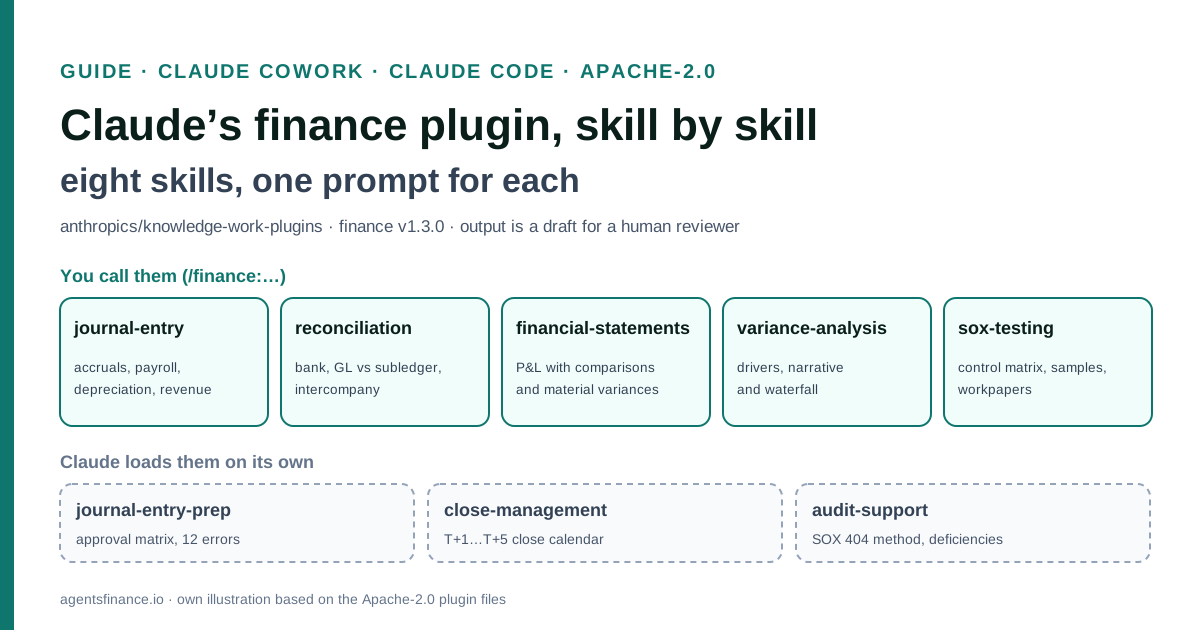
The finance plugin is a free, open package of eight skills that teaches Claude a controller’s month-end routine. Five can be called as commands (journal-entry, reconciliation, financial-statements, variance-analysis and sox-testing) and three are reference skills Claude loads on its own (journal-entry-prep, close-management and audit-support). It works on the files you upload or paste, or on data pulled through MCP connectors, and returns drafts: journal entries with support, reconciliations, an income statement with flux analysis, variance bridges and SOX testing workpapers.
What it offers, according to the source
The repository publishes no results. Three practitioners describe their own tests: Dana Gill, CPA, drafted brokerage journal entries and a Sage Intacct import file from fictional data after about an hour of set-up; a Reddit user completed a bank reconciliation and journal entries after rewriting the plugin’s files because they were too generic; and Shubham Borkar says it produced his company’s February entries from one bank statement in five minutes. None of these figures is audited.
Mind the evidence. Described by the project’s own documentation or README. It says what the project claims to do and how it is used, not that it works in your case: we have not tested it.
What has really been tested
We read every file of the finance folder at commit c71b6f3 (README, plugin.json, .mcp.json, CONNECTORS.md, LICENSE and the eight SKILL.md files), the plugin page, Anthropic’s Cowork and Claude Code documentation and the Claude Academy use case, plus three first-hand reports (a CPA’s test on fictional data, a Reddit post and a LinkedIn post). We have not installed the plugin against a real ledger. The excerpts are copied from the Apache-2.0 files; the prompts, CLAUDE.md and the tie-out script are Agents Finance templates and have not been tested with real data.
How to apply it
Install the plugin from Customize → Plugins in Claude Cowork, or with two commands in Claude Code. Create a project folder with a CLAUDE.md that holds your chart of accounts and conventions, drop in last month’s closed files, run each skill on that closed month, compare the drafts with what was actually booked, and only then use it on an open period, always importing the result yourself after review.
- Install the plugin: Customize → Plugins → Discover in Claude Cowork, or `claude plugin marketplace add anthropics/knowledge-work-plugins` and `claude plugin install finance@knowledge-work-plugins` in Claude Code.
- Create a project folder with CLAUDE.md (chart of accounts, dimensions, materiality, approval matrix, never-post rule), a reference/ folder and one folder per close period.
- Run journal-entry and reconciliation on a month that is already closed and compare every line with what was booked.
- Add financial-statements and variance-analysis once the entries tie, with your own materiality thresholds instead of the examples.
- Use sox-testing and the close calendar only after internal audit or the controller has reviewed the templates, and keep human sign-off on every draft before anything reaches the ERP.
Anthropic’s finance plugin turns Claude into a junior controller that knows the month-end routine: it drafts journal entries, reconciles accounts, builds an income statement with flux analysis, explains variances and prepares SOX testing workpapers. It is free, its eight skills are plain Markdown files under the Apache-2.0 licence, and this guide goes through every one of them with a concrete example and a prompt you can copy.
Why finance teams are looking at it now
The plugin was published at the end of January 2026 in Anthropic’s knowledge-work-plugins repository, which now has more than 33,000 stars on GitHub. Interest has not faded: in the week to 29 October 2026, X’s count endpoint returned 179 posts mentioning the finance plugin or the repository, with a peak of 70 on 25 October, and finance educators such as Nicolas Boucher still recommend it to their audiences. Anthropic also features it in Claude Academy as the starting point for reconciling intercompany balances and drafting journal entries.
The questions people ask are practical: what each command really does, whether it needs an ERP connection, and how much to trust the output. The answers are in the files, so we read all of them.
A note on evidence: this guide is based on the plugin’s own documentation (documentacion). The three experiences quoted below are first-hand but not audited, and one of them comes from someone who sells set-up services.
What is inside the plugin
The manifest (.claude-plugin/plugin.json) names it finance, version 1.3.0, by Anthropic. The folder holds eight skills:
| Skill | How you use it | What it produces |
|---|---|---|
journal-entry |
Command, <entry type> [period] |
Journal entry with debits and credits, supporting calculation, reversal flag and a review checklist |
reconciliation |
Command, <account> [period] |
Bank, GL-to-subledger or intercompany reconciliation with categorised and aged reconciling items |
financial-statements |
Command, <period-type> <period> |
Income statement with prior-period and budget columns, key metrics and a list of material variances |
variance-analysis |
Command, <line item> <period> vs <comparison> |
Price/volume or rate/mix decomposition, narrative and a waterfall bridge |
sox-testing |
Command, <control area> [period] |
Control matrix, sample selection, testing workpaper and deficiency evaluation |
journal-entry-prep |
Loaded by Claude | Standard entries, documentation rules, an example approval matrix and 12 common errors |
close-management |
Loaded by Claude | A 5-day close checklist, a dependency map, status definitions and a 3-day close variant |
audit-support |
Loaded by Claude | SOX 404 methodology, sample sizes by risk, workpaper standards and deficiency classification |
The last three carry user-invocable: false in their frontmatter, which, according to the Claude Code documentation, hides them from the / menu: Claude reads them when a task needs them.
Two details save confusion. First, the plugin README and the plugin page still list /income-statement and describe “commands”, but on 13 March 2026 Anthropic migrated commands to skills and the income statement now lives in financial-statements. Second, the usage lines inside some skills show short names (/je, /sox, /flux) that do not exist as skills. In Claude Code, plugin skills run as /plugin-name:skill-name, so you type /finance:journal-entry; in Cowork you type / or click + and pick the skill from the list.
Architecture and connectors
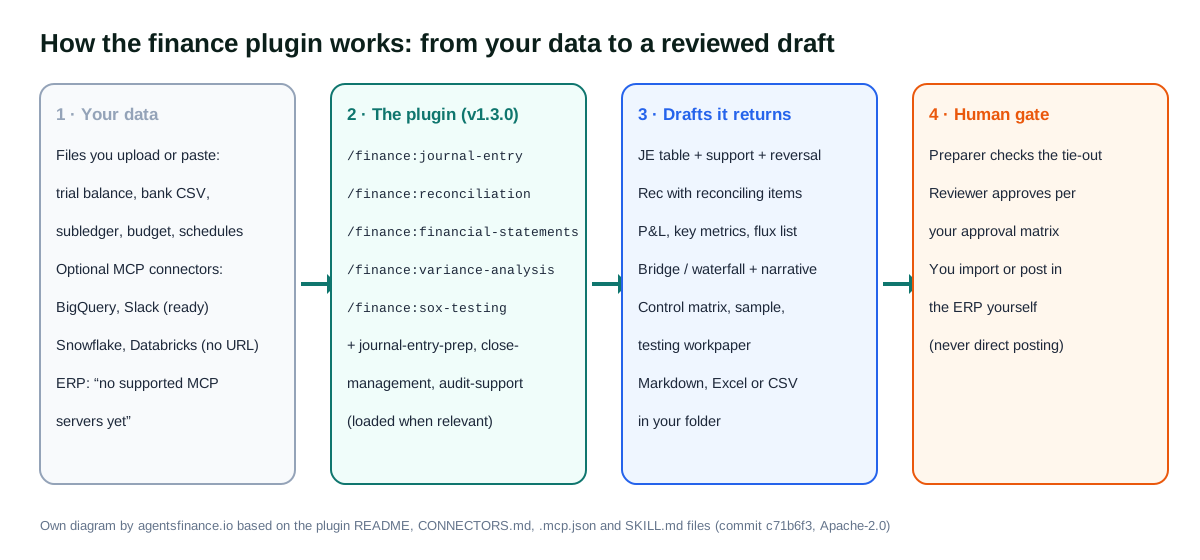
The plugin is tool-agnostic. Its files refer to categories such as ~~erp or ~~data warehouse, and CONNECTORS.md explains what fills each one. This is where expectations need adjusting:
- ERP / accounting: “no supported MCP servers yet”. NetSuite, SAP, QuickBooks and Xero appear only as “other options”, meaning you would add your own server.
- Data warehouse: BigQuery comes with its endpoint; Snowflake and Databricks are declared with an empty URL (“placeholder”).
- Chat: Slack is configured. Gmail and Google Calendar are declared without a URL, and the Microsoft 365 entries were removed in June 2026 because they were broken.
So, out of the box, the realistic set-up is files: a trial balance export, a bank CSV, a subledger aging, a budget. Every command workflow says so explicitly: if nothing is connected, it asks you to “paste trial balance data or upload a spreadsheet”. Nicolas Boucher made the same point on X on 23 October: you do not need connectors, upload your files and the plugin works.
Installation and prerequisites
- Claude Cowork (the Claude desktop app, paid plans): open Customize → Plugins → Discover, choose Finance and click Install. Anthropic’s Cowork guide notes that installing does not sign you in to any connector; you connect them afterwards from the plugin’s Connectors tab. When we checked on 29 October, Anthropic’s pricing page said that “Claude Cowork is now just Claude”, rolling out to Pro and Max first, so the menu names may change.
- Claude Code: add the marketplace and install, as shown in “Copy and adapt”. Choose the user scope for yourself or the project scope if the whole close team works from one repository.
- A project folder. Cowork works inside the folder you point it at. Dana Gill’s structure is a good start:
CLAUDE.mdat the root,reference/for the chart of accounts and the GL workbook, andclose/2026-10/for each period. - Your own rules. Every threshold in the skills is an example (and in US dollars). Write your materiality, approval limits and account conventions into
CLAUDE.mdbefore the first run.
Note that the content is US-centric: ASC 606, ASC 220/210/230 with their IAS 1 and IAS 7 equivalents, FICA and 401(k) in payroll, and SOX. Teams under IFRS or local GAAP can use the structure, but should tell Claude which framework and tax rules apply.
Each function with an example and a prompt
The prompts below are Agents Finance templates based on the skill files. Replace the placeholders in capitals, keep the data in your project folder and review every output.
1. /finance:journal-entry: accruals, depreciation, prepaids, payroll and revenue
The skill accepts five entry types (ap-accrual, fixed-assets, prepaid, payroll, revenue) and a period such as 2026-10, 2026-Q4 or 2026. It gathers the trial balance, subledger detail and last period’s entry of the same type, calculates the amounts, presents the entry in a fixed table and runs an 11-point checklist (balanced, right period, valid accounts, reversal set, within the preparer’s authority…). It ends with posting instructions “for the user’s ERP”.
Example. A SaaS company has three vendors who delivered in October but have not invoiced: a cloud provider, a marketing agency and an external auditor working on the interim review. The controller wants the AP accrual, auto-reversing on 1 November.
/finance:journal-entry ap-accrual 2026-10

Use the files in close/2026-10/ap/: open_pos.csv (PO, vendor, amount, goods received date) and
contracts_unbilled.xlsx. Use the account codes in reference/chart_of_accounts.csv only; if an expense
does not map to an existing account, stop and ask me. Accrue only goods or services received on or
before 31 October. Set the entry to auto-reverse on 1 November. Compare it with last month's accrual
in close/2026-09/ap/je_ap_accrual.csv and explain any vendor that moves more than 20%.
Output: the entry table, the calculation per vendor, and an import CSV with the columns of
reference/je_import_template.csv. Do not post anything.
Case: prepaid amortisation from a schedule.
/finance:journal-entry prepaid 2026-10

Amortise every line in reference/prepaid_schedule.xlsx for October (straight-line by month between
start and end date). Flag items that ended, were cancelled or are below 500 in total and should have
been expensed. Show the expense by department and the closing prepaid balance per item, and check
that the closing balance ties to GL account 1400 in close/2026-10/trial_balance.csv.
2. /finance:reconciliation: bank, subledger and intercompany
This skill is a method rather than a script: it covers GL-to-subledger reconciliations (AR, AP, fixed assets, inventory, prepaids, accruals), bank reconciliations in the classic two-sided format and intercompany reconciliations. It sorts reconciling items into three categories (timing differences, adjustments required and items requiring investigation), ages them in four buckets (0–30, 31–60, 61–90 and 90+ days) and proposes escalation triggers, such as any item above $10,000 going to a supervisor. The rule that matters most: an unreconciled difference of any amount means you “cannot close”.
Example. The treasurer needs the October bank reconciliation for the main operating account.
/finance:reconciliation cash-operating 2026-10

Bank statement: close/2026-10/bank/statement_oct.csv. GL detail for account 1010:
close/2026-10/bank/gl_1010_oct.csv. Match by amount and date (±3 days) and then by reference.
Produce the standard format (balance per bank, deposits in transit, outstanding checks, balance per
GL, unrecorded fees and interest) and the difference, which must be 0.00. Classify every reconciling
item as timing, adjustment required or investigate, with its age in days. For adjustments, draft the
journal entry but do not post it. Save the reconciliation as recs/2026-10/bank_operating.xlsx.
Case: an intercompany break between two entities with different currencies, based on the scenario Claude Academy uses.
/finance:reconciliation intercompany 2026-10

Reconcile the receivable of ENTITY_A from ENTITY_B with ENTITY_B's payable to ENTITY_A, using the two
subledger exports in close/2026-10/intercompany/. Convert both to EUR at the month-end rate in
reference/fx_rates_2026-10.csv (do not look rates up online). Sort the differences into timing,
FX, rounding (under 25 EUR) and true breaks. For each true break, propose the entry, the entity that
should book it and the evidence I need from the other side.
3. /finance:financial-statements: the income statement with comparisons
The argument is a period type (monthly, quarterly, annual or ytd) and a period. The workflow builds an income statement with current, prior period, variance in amount and percentage and budget columns; a key-metrics block (growth, gross, operating and net margin, opex as a percentage of revenue, effective tax rate); and a table of material variances with a proposed action. The skill also carries reference formats for the balance sheet and the indirect cash flow statement, GAAP presentation notes and a list of period-end adjustments and reclassifications.
Example. The October management pack.
/finance:financial-statements monthly 2026-10

Use close/2026-10/trial_balance.csv for October, close/2026-09/trial_balance.csv for September,
last year's October from reference/tb_2025-10.csv and the budget in reference/budget_2026.xlsx.
Map accounts to lines with reference/pl_mapping.csv. Present in thousands of EUR. Material variance:
more than 50,000 EUR or 10%, whichever comes first. Add the key metrics block and, for each material
variance, one question I should ask the budget owner. Under IFRS, keep the function-of-expense layout
we use in reference/pl_layout.xlsx.
Case: a quarter-end balance sheet and cash flow, using the reference formats.
/finance:financial-statements quarterly 2026-Q3

Besides the income statement, prepare a comparative balance sheet (30 Sep 2026 vs 31 Dec 2025) and an
indirect-method cash flow statement for the nine months, following the reference formats in the
skill. List every reclassification you make (for example, current portion of long-term debt) and
check that the cash at the end of the cash flow equals cash on the balance sheet.
4. /finance:variance-analysis: drivers, narrative and the waterfall
The richest of the five skills. It decomposes variances by price and volume (with a worked example: 11,000 units at $48 against a budget of 10,000 at $50 gives +$50,000 volume and −$22,000 price), by rate and mix, by headcount and compensation, or by spend category. Its example thresholds are 10% against budget, 15% against prior period, 5% against forecast and 20% month on month. It asks for narratives that state the driver, whether it is temporary or a trend and the action, warns against vague explanations, and draws a text waterfall that must reconcile from the starting to the ending value. It also includes forecast accuracy (MAPE) and trend patterns such as a budget that is always favourable.
Example. Operating expenses are over budget in October.
/finance:variance-analysis opex 2026-10 vs budget

Actuals by cost center and account: close/2026-10/opex_actuals.csv. Budget:
reference/budget_2026.xlsx, sheet Opex. Headcount by department (actual and budget):
reference/headcount_2026-10.csv. Split the variance into headcount-driven, volume-driven,
discretionary, contractual, one-time and timing. For salaries, separate headcount, rate and timing
effects. Give a waterfall from budget to actual with at most seven bars and a two-sentence narrative
for each variance above 10% or 20,000 EUR. Mark anything you cannot explain from the data as
"needs owner input" instead of guessing.
Case: revenue price, volume and mix by product.
/finance:variance-analysis revenue 2026-Q3 vs 2026-Q2

Units and net price per product are in close/2026-Q3/revenue_by_sku.csv and
close/2026-Q2/revenue_by_sku.csv. Do a three-way price, volume and mix decomposition and verify
that the effects add up to the total variance. Then compute last four quarters' forecast accuracy
(MAPE) from reference/forecast_history.csv and say whether our forecasts show a consistent bias.
5. /finance:sox-testing: controls, samples and workpapers
The control area can be revenue-recognition, procure-to-pay (or p2p), payroll, financial-close, treasury, fixed-assets, inventory, itgc, entity-level, journal-entries or a specific control ID. The skill returns a control matrix with type, frequency, risk and assertions (the CEAVOP mnemonic), sample sizes by frequency (two of four for a quarterly control, 20 to 40 for a daily one, 25 to 60 for transaction-level controls), the sample itself with its selection method, a testing workpaper with procedures, expected evidence and sign-off lines, and the deficiency framework: deficiency, significant deficiency or material weakness.
SOX applies to companies listed in the US, but the same method is useful to any internal control function or to a company preparing for an audit.
Example. Quarterly testing of procure-to-pay.
/finance:sox-testing procure-to-pay 2026-Q3

Our P2P controls are listed in reference/rcm_p2p.xlsx (control ID, description, owner, frequency).
The population of paid invoices for the quarter is in close/2026-Q3/ap_payments.csv. For the
three-way match control, select a random sample of 25 with a fixed seed so the selection can be
re-performed, and add up to 5 targeted items (payments over 100,000 EUR or paid on the last two
days of the quarter), documenting why. Produce one workpaper per key control with the test steps
pre-filled and the result columns empty. Do not conclude on effectiveness: that is my job.
6. journal-entry-prep: the reviewer’s rulebook
You do not call it, but Claude loads it whenever an entry is involved. It describes the standard entries (AP accruals, depreciation, prepaids, payroll, revenue under the ASC 606 five-step model), the seven pieces of documentation every entry should carry, an example approval matrix (manual entries under $50,000 approved by the accounting manager, $50,000 to $250,000 by the controller, above $250,000 by the CFO) and twelve common errors, from a missing reversal to suspiciously round estimates. Its best use is as a second pair of eyes over entries a person prepared.
Example. Reviewing the manual entries of the month before posting.
Review the manual journal entries in close/2026-10/manual_jes.csv against the journal entry review
checklist and the common-errors list you use for journal entry preparation. Use our approval matrix
in CLAUDE.md, not the example one. For each entry, return: OK or the specific issue (unbalanced,
wrong period, missing reversal, duplicate, round-number estimate, wrong FX date, missing support,
approver below the required level). Do not modify the file.
7. close-management: the close calendar and its dependencies
This skill holds a full close playbook: pre-close tasks, a day-by-day checklist from T+1 to T+5, a five-level dependency map (cash, payroll and accruals first; reconciliations second; balance sheet reconciliations and the preliminary trial balance third; tax, consolidation and draft statements fourth; review, hard close and reporting last), status definitions, metrics to track and a 3-day close variant with its prerequisites. Claude uses it when you ask to plan, track or speed up a close.
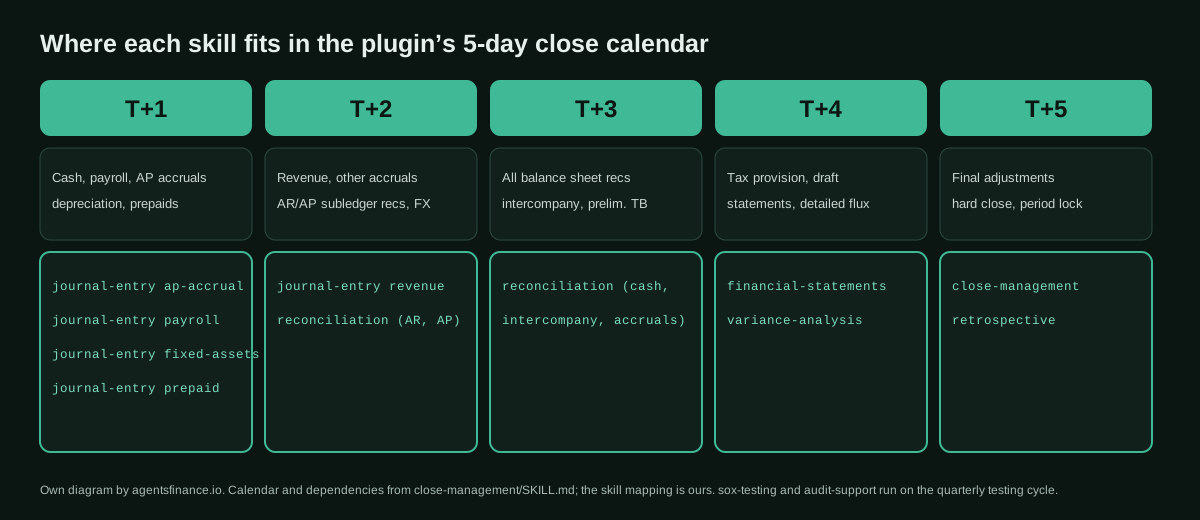
Example. Building the November close calendar for a team of five.
Plan the November 2026 close using the 5-day close checklist and dependency map. Our team and
their tasks are in reference/close_owners.csv; bank holidays are in reference/holidays.csv.
Produce a close calendar (task, owner, deadline as a date, dependency, status Not Started) as
close/2026-11/close_tracker.xlsx, mark the critical path, and list which tasks we would need to
automate or move into the month to reach the 3-day close variant.
8. audit-support: SOX 404 method and deficiency classification
The reference behind sox-testing: scoping significant accounts, relevant assertions by account type, design versus operating effectiveness, four sampling methods (random, targeted, haphazard and systematic), a sample-size table by frequency and risk, workpaper and evidence standards, the three levels of deficiency with their indicators, aggregation and a five-step remediation plan. It is useful on its own when an exception appears.
Example. An exception in the bank reconciliation control.
In our Q3 test of control FC-04 (monthly bank reconciliation reviewed by the controller), 1 of 3
samples (August) had no evidence of review before the 10th business day. The reconciliation itself
had no errors. Using the deficiency classification and aggregation guidance you follow for audit
support, tell me which facts I still need to classify this exception, the questions to ask about
compensating controls, and draft a remediation plan with root cause, action, owner, date and how we
will re-test it. Do not decide the final classification.
Copy and adapt
1. Install in Claude Code. Commands from the plugin README (© Anthropic, Apache-2.0, unmodified):
claude plugin marketplace add anthropics/knowledge-work-plugins
claude plugin install finance@knowledge-work-plugins
2. The connectors it declares. Extract of finance/.mcp.json (© Anthropic, Apache-2.0; the Slack, Gmail and Google Calendar entries are omitted). Empty URLs are placeholders you must fill in with your own server:
{
  "mcpServers": {
    "snowflake": {
      "type": "http",
      "url": ""
    },
    "databricks": {
      "type": "http",
      "url": ""
    },
    "bigquery": {
      "type": "http",
      "url": "https://bigquery.googleapis.com/mcp"
    }
  }
}
3. The journal entry format the skill returns. From journal-entry/SKILL.md, step 3 (© Anthropic, Apache-2.0, unmodified). It is a good standard for any entry, with or without AI:
Journal Entry: [Type] — [Period]
Prepared by: [User]
Date: [Period end date]

| Line | Account Code | Account Name | Debit | Credit | Department | Memo |
|------|-------------|--------------|-------|--------|------------|------|
| 1    | XXXX        | [Name]       | X,XXX |        | [Dept]     | [Detail] |
| 2    | XXXX        | [Name]       |       | X,XXX  | [Dept]     | [Detail] |
|      |             | **Total**    | X,XXX | X,XXX  |            |      |

Supporting Detail:
- [Calculation basis and assumptions]
- [Reference to supporting schedule or documentation]

Reversal: [Yes/No — if yes, specify reversal date]
4. A CLAUDE.md for the close folder. Agents Finance template based on the plugin’s skills and on Dana Gill’s recommendations; untested with real data. Replace every value in capitals:
# Finance close project: COMPANY_NAME

## Entity and framework
- Legal entity: COMPANY_NAME, functional currency EUR, framework IFRS (or LOCAL_GAAP).
- Fiscal year: January to December. Current close period: see the folder name in close/.

## Reference files
- reference/chart_of_accounts.csv: the only valid account codes. Never create accounts.
- reference/je_import_template.csv: column layout for ERP_NAME journal imports.
- reference/pl_mapping.csv: account to income statement line.

## Thresholds (these replace the examples in the finance plugin)
- Materiality for flux: MATERIALITY_AMOUNT EUR or 10%, whichever comes first.
- Reconciling items: over 5,000 EUR to the controller; any unexplained difference blocks the close.
- Approval matrix: up to 25,000 EUR accounting manager; up to 150,000 EUR controller; above, CFO.

## Always
- Show calculations and the source file for every amount.
- Set accruals to auto-reverse on the first day of the next period.
- Write outputs to the period folder as CSV or XLSX, never over source files.

## Never
- Never post to the ERP or call a write tool. I import after review.
- Never look up exchange rates or prices online; use reference/fx_rates_*.csv.
- Never put personal data (employee names, bank account numbers) in summaries.
5. A tie-out check before you import. Agents Finance template (Python 3, standard library only); it checks that each entry balances, falls in the period and uses valid accounts. Untested with real data:
# check_je.py: usage  python3 check_je.py je_import.csv chart_of_accounts.csv 2026-10
import csv, sys
from collections import defaultdict
from decimal import Decimal

je_file, coa_file, period = sys.argv[1], sys.argv[2], sys.argv[3]
valid = {row["account"] for row in csv.DictReader(open(coa_file, newline="", encoding="utf-8"))}
totals = defaultdict(lambda: [Decimal("0"), Decimal("0")])
problems = []

for n, row in enumerate(csv.DictReader(open(je_file, newline="", encoding="utf-8")), start=2):
    d = Decimal(row.get("debit") or "0")
    c = Decimal(row.get("credit") or "0")
    totals[row["entry_id"]][0] += d
    totals[row["entry_id"]][1] += c
    if row["account"] not in valid:
        problems.append(f"line {n}: account {row['account']} is not in the chart of accounts")
    if not row["date"].startswith(period):
        problems.append(f"line {n}: date {row['date']} is outside period {period}")
    if d and c:
        problems.append(f"line {n}: both debit and credit filled")

for entry, (d, c) in totals.items():
    if d != c:
        problems.append(f"entry {entry}: debits {d} != credits {c}")

print("\n".join(problems) if problems else f"OK: {len(totals)} entries balanced, period {period}")
sys.exit(1 if problems else 0)
Results declared so far
- Dana Gill, CPA (The AI Smart CPA, 3 June 2026). She tested the journal entry function on a family-office workflow, brokerage roll-forward entries, using fictional data that Claude generated. Setup took “roughly an hour the first time and minutes after that”; the run produced a Sage Intacct import CSV plus a reconciliation of the portfolio values, and the first upload may fail on field names, which Cowork fixes when you paste the error back. Her rule: never let Cowork post directly to the GL. Evidence: experience on fictional data.
- Reddit user u/Lanky-Accountant-943 (r/ClaudeAI, 12 February 2026). Reports that Cowork completed a bank reconciliation and drafted journal entries, catching and correcting its own issues, but only after “completely” rewriting the command and skill files of the finance plugin, which they found too superficial. Evidence: unverified experience.
- Shubham Borkar (LinkedIn, 2 March 2026). Says the plugin turned one bank statement of his company’s February into double-entry entries, identified vendors from raw bank descriptions, split gateway charges for Indian GST and flagged a ₹0.05 rounding difference, in “5 minutes” and “7 sheets”. He offers Cowork set-up services, so he has a commercial interest. Evidence: statement, not audited.
Limitations and risks
- It drafts, it does not sign. Every skill opens with the same warning: it “does not provide financial advice” and outputs must be reviewed by qualified professionals.
- Generic content. The thresholds, the approval matrix and the sample sizes are illustrative and in US dollars. The Reddit tester’s complaint is fair: without your own rules, the output is a textbook.
- No ERP connector. The category is empty in
CONNECTORS.md. Anything you connect yourself becomes your responsibility, including what it is allowed to write. - Outdated labels. The README and plugin page mention
/income-statement; the skill isfinancial-statements. Some usage lines inside the files show short commands that do not exist. - Data and privacy. You are giving Claude ledgers, payroll and bank data. Check your plan’s data terms and your company policy first, and remove personal data you do not need.
- Audit trail. If entries drafted by AI reach the books, your auditors will ask how they were prepared and reviewed. Discuss it before scaling up, as Dana Gill recommends.
Common mistakes
- Running it first on an open month instead of a closed one you can compare against.
- Keeping the example thresholds ($10,000, 10%, $50,000) instead of your own materiality.
- Expecting it to read the ERP because the ERP is mentioned in the README.
- Asking for the income statement with
/income-statement, which no longer exists. - Letting Claude look up exchange rates instead of giving it the rates file you trust.
- Treating the
sox-testingworkpaper as a conclusion: the skill leaves the conclusion to the tester and the reviewer, and so should you. - Not recording what it got wrong. A short note in
CLAUDE.mdafter each close is what makes the next one better.
Conclusions
The finance plugin is not a product with hidden logic: it is a well-organised controller’s manual in eight Markdown files that Claude follows. That is its strength, because you can read, audit and rewrite every rule, and its limit, because the defaults are generic and US-oriented. Teams that get value from it do the same three things: they write their own conventions into CLAUDE.md, test on a closed period and keep a human gate before the ERP. Start with journal-entry and reconciliation on last month, add financial-statements and variance-analysis when the numbers tie, and leave sox-testing for when internal audit has reviewed the templates.
Sources
- GitHub — anthropics/knowledge-work-plugins, finance plugin v1.3.0 (commit c71b6f3, Apache-2.0) (opens in a new tab) (primary)
- Claude — Finance plugin page (opens in a new tab)
- Claude documentation — Install plugins in Cowork (opens in a new tab)
- Claude Code documentation — Skills (plugin skills run as /plugin-name:skill-name) (opens in a new tab)
- Claude Academy — Reconcile and draft the journal entries (opens in a new tab)
- The AI Smart CPA (Dana Gill, CPA) — A practical test of Claude Cowork’s journal entry workflow (opens in a new tab)
- Reddit r/ClaudeAI — Cowork for Accounting: successful bank reconciliation and journal entries (opens in a new tab)
- LinkedIn — Shubham Borkar: February accounting with Claude Cowork’s Finance plugin (opens in a new tab)
- X — Nicolas Boucher: you don’t need connectors to use the Finance plugin (opens in a new tab)
We wrote this entry in our own words from the sources above and checked that the links worked on October 29, 2026. Is anything incorrect? Tell us.
Share this entry
This entry is part of the guide: AI agents for accounting · MCP for accounting and ERPs
 Claude Cowork
 Claude Duet
 Claude Code
 QuickBooks (Intuit)
 Xero
 Zoho Books
 Claude
 Oracle NetSuite
 Pigment AI
 Pigment