What they do and how
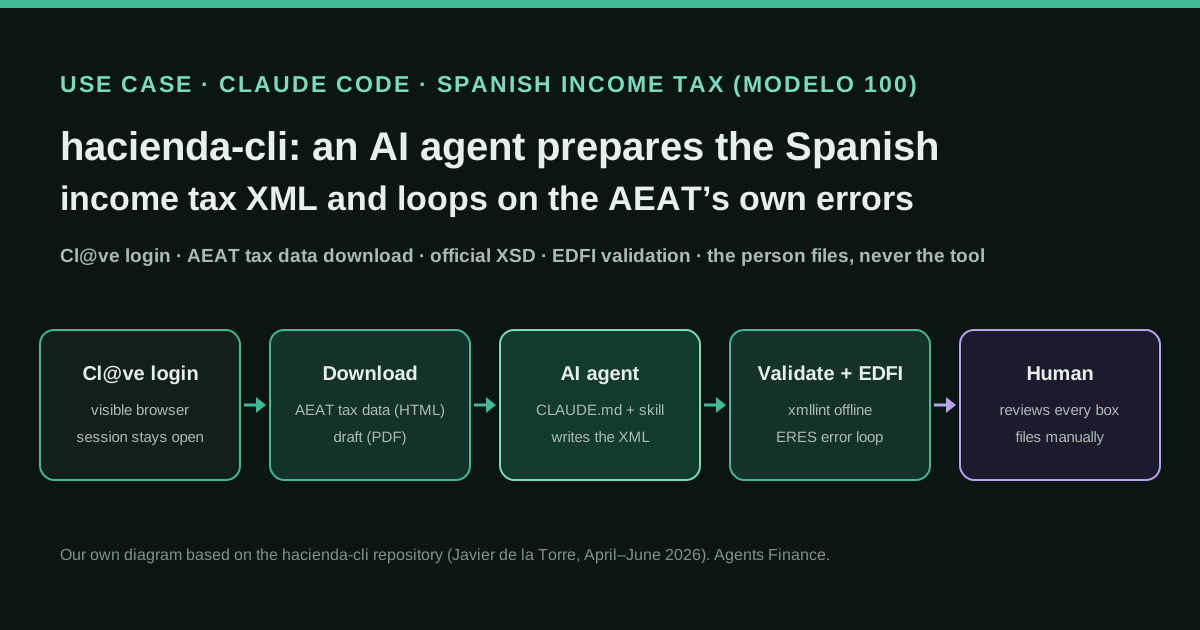
Spanish taxpayers with several brokers, funds, crypto or property sales usually gather documents with help from AI but then retype everything into Renta WEB. Javier de la Torre built a minimal command-line bridge: the person logs in with Cl@ve in a visible browser, the CLI downloads the tax data the AEAT already holds (HTML) and the current draft (PDF), the AI agent reconciles them with bank and broker documents and writes a Modelo 100 XML that conforms to the official schema, the CLI validates it offline and imports it into EDFI, the AEAT service that recalculates every box and returns errors, and the agent fixes the XML and re-uploads until it is accepted. The person reviews the result in the AEAT website and decides whether to file it manually.
Reported result
Stated by the author: what used to take him “a whole afternoon” of copying figures and checking boxes became a process in which the agent did the heavy lifting and he only reviewed and approved. He publishes no amounts, no count of iterations and no confirmation of later AEAT checks. The project had 20 GitHub stars and three merged community pull requests when we checked it; one LinkedIn commenter reported that login and download worked as promised but that building the first XML from about 1,300 broker transactions was still the hard part.
Mind the evidence. Someone explains how they do it or did it, without verifiable figures. It is documented practice, not proof that it will work in your case.
What has really been tested
On 21 October 2026 we read the repository at commit 3536716 (README, CLAUDE.md, the irpf-declaracion skill, docs/index.md, the EDFI upload script, the CLI source and package.json), the npm page, the Show HN post and the author’s LinkedIn launch post with its comments, and we checked that the AEAT documents XML import through EDFI. We have not run hacienda-cli against the AEAT (it needs a real Cl@ve identity), have not seen the author’s return and cannot verify that any XML it produced was correct. The licence is inconsistent: the LICENSE file is MIT while the README, package.json and the author’s posts say AGPL-3.0-or-later. The Copy and adapt templates written by us are untested proposals. This is not tax advice.
How to replicate it
Only if you can judge your own return: install Node.js 20+, xmllint and the CLI from the repository, run hacienda login and hacienda download 100, put the downloaded HTML and PDF plus your broker, bank and crypto reports in a private working folder, and ask an agent that reads CLAUDE.md and the irpf-declaracion skill to build the XML section by section. Validate offline, convert to ISO-8859-1, upload to EDFI with zeroed Resultados, feed the calculated values from the ERES messages back into Resultados and repeat until accepted. Then review every box in Renta WEB yourself and file manually, or hand the reconciled file to a tax adviser.
In two sentences
Javier de la Torre, co-founder of the geospatial company CARTO, writes that he prepared his 2025 Spanish income tax return with an AI agent and released hacienda-cli, a small open-source command-line tool that gives the agent the two things it lacked: the data the Spanish tax agency (AEAT) already holds about him, and the agency’s own validation of an XML return. It is a first-hand account with no audited figures, but the repository publishes everything needed to replicate the method — the CLI, the official schemas, a detailed CLAUDE.md and a Claude skill — and it deliberately stops before filing or signing.
Who does it and why it matters
Most cases in this directory are companies closing their books. This one is a household, and the problem is very Spanish: the AEAT offers a pre-filled draft (borrador) in Renta WEB, but anyone with foreign brokers, investment funds, crypto, dividends with foreign withholding or a property sale ends up typing dozens of operations into a long web form. In his write-up, published as docs/index.md in the repository, de la Torre describes the two phases: gathering documents, where an agent “is already a marvel”, and entering everything into the AEAT website, which he calls hell — slow, tedious and error-prone, with no way of knowing whether your figures match the agency’s until the end.
His insight is that the second phase does not need a person typing. The AEAT already accepts a return as an externally generated XML file through a service called EDFI, documented on its technical help pages for commercial software vendors. EDFI recalculates every box on the server and returns errors when something is missing or does not add up. If an agent can write that XML and read those errors, it can iterate on its own.
He has no commercial interest in a tax product: the README states that the tool is unofficial, has no relationship with the AEAT and is provided “as is”. In his LinkedIn launch post he invites feedback “for me and for CARTO” from people building agent tooling. We contrasted the repository with that post, its comments, the Show HN submission on Hacker News and the AEAT’s EDFI documentation.
Tools and architecture
The design principle is written at the top of CLAUDE.md: the CLI is “deliberately minimal” and all tax logic belongs to the AI agent, not the CLI. The tool has five commands:
| Command | What it does |
|---|---|
hacienda login |
Opens a visible Chromium window; you authenticate with Cl@ve; the browser stays open |
hacienda download 100 |
Saves your AEAT tax data as HTML and the current draft as PDF |
hacienda validate 100 decl.xml |
Validates the XML against the official XSD offline with xmllint |
hacienda upload 100 decl.xml |
Imports the XML into EDFI and prints errors and warnings |
hacienda info 100 |
Shows paths to the schema, the field dictionary and the AEAT URLs |
Under the hood it is Node.js and TypeScript with Playwright. Two constraints shape the architecture. First, the AEAT detects headless browsers, so the browser must be visible. Second, the session lives inside that browser process, so login leaves Chromium running and download and upload attach to it through the Chrome DevTools Protocol. The CLI never stores credentials.
The repository also ships the official 2025 Modelo 100 schema (Renta2025.xsd, plus a corrected copy because the agency’s regular expressions break xmllint) and a dictionary of about 4,000 fields with their XPath, type and label. On top sits the knowledge layer for the agent: a CLAUDE.md with the XML skeleton, data types, enum values, the strict order of sections and field mappings for shares, funds, unlisted shares, property sales, crypto, rentals, pension plans and double taxation; and a skill, .claude/skills/irpf-declaracion/SKILL.md, that turns it into a six-phase workflow.
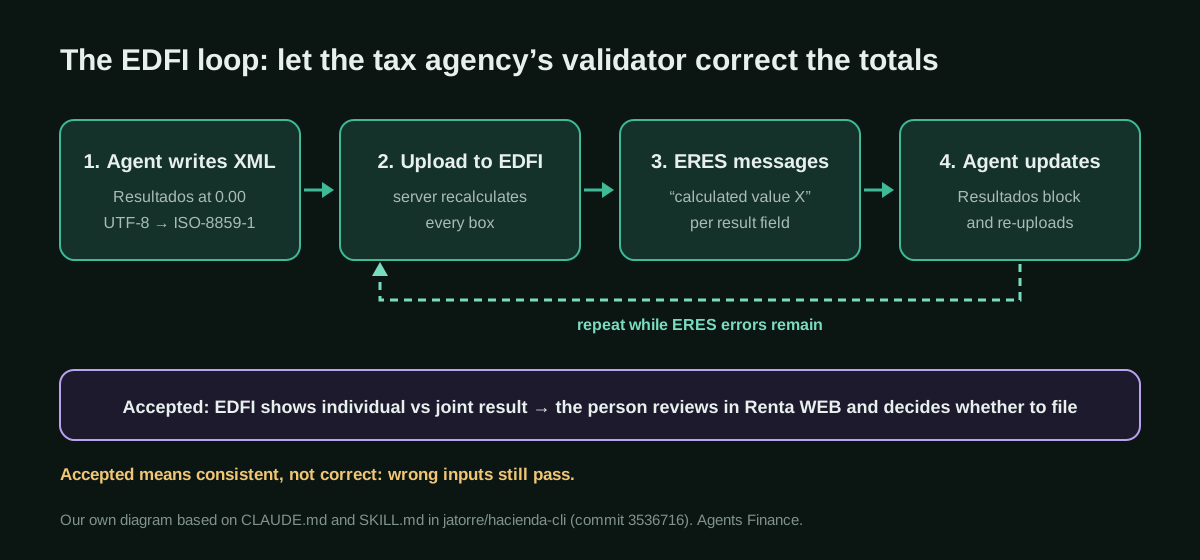
How it works, step by step
- Log in. You run
hacienda loginand complete Cl@ve yourself. The README says the documented flow supports Cl@ve only (the older npm README also mentioned a digital certificate). - Download what the AEAT knows.
hacienda download 100producesdatos-fiscales-100-2025.htmlandborrador-100-2025.pdf. A community pull request added a clear message for the first visit of each campaign, when Renta WEB asks for personal choices (marital status, children, data transfers) that cannot be automated. - Analyse and ask. The skill tells the agent to summarise employment income, interest and dividends, sales, fund redemptions, properties, donations and mortgages from the HTML, and then to ask about what the AEAT usually does not have: foreign brokers (DEGIRO, Interactive Brokers, eToro, Trading 212, XTB, Revolut), crypto exchanges, rental income, private equity, foreign employment and pension contributions.
- Gather missing data. For each operation the agent collects acquisition and transmission dates and values from annual broker reports, exchange CSVs (FIFO), notarial deeds or pension certificates.
- Write the XML. The agent builds a file that conforms to the XSD:
ISO-8859-1encoding, sections in strict order insideTomaDatosAmpliada, booleans as0/1, dates asdd/mm/yyyy, and traps such asFECHA1NAmeaning the transmission date for unlisted shares but the acquisition date for property. - Validate offline, then upload with minimal results. The first upload carries
Resultadosat zero on purpose. - Iterate on ERES errors. EDFI recalculates every box and answers with
ERESmessages that state the value it calculated. The agent copies those values intoResultadosand uploads again until the file is accepted. Non-ERES errors (encoding, missing spouse data, wrong dates) are listed in the skill with their fixes. - Review and decide. EDFI shows the individual and joint results and which is more favourable. You review in the browser and, if everything matches, file manually.
Copy and adapt
Everything below is reproduced from github.com/jatorre/hacienda-cli at commit 3536716 (17 June 2026), © 2026 Javier de la Torre and contributors. Licence note: the LICENSE file is MIT, while the README, package.json and the author’s posts say AGPL-3.0-or-later. Both allow reproduction with attribution; if you redistribute modified code, assume the stricter AGPL terms until the author clarifies. The code is identical in the English and Spanish versions of this page, and comments inside it are in Spanish because that is how the author wrote it. We left out the example amounts in CLAUDE.md and use our own round figures, labelled as example data.
Prerequisites
- A Spanish tax identity with Cl@ve access, and enough tax knowledge to review every box yourself.
- Node.js 20 or later, Git and
xmllint(on Debian or Ubuntu, packagelibxml2-utils; on macOS it ships with the system). - A desktop session: the browser must be visible, so this does not run on a headless server.
- An AI coding agent that reads
CLAUDE.mdand skills in.claude/skills/(the repository is laid out for Claude Code). Decide beforehand whether you are willing to send your tax data to that provider: the README says that choice and its privacy risk are yours.
Install (from the README)
git clone https://github.com/jatorre/hacienda-cli.git
cd hacienda-cli
npm install
npm run build
npm link
npm install also downloads Chromium for Playwright (postinstall).
The recommended flow (from the README)
1. hacienda login
2. hacienda download 100
3. Tu agente o tú analizáis:
   - datos-fiscales-100-2025.html
   - borrador-100-2025.pdf
   - documentación externa: bancos, brokers, exchanges, etc.
4. Generáis un XML conforme al XSD oficial
5. hacienda validate 100 decl.xml
6. hacienda upload 100 decl.xml
7. Revisas el resultado en el navegador
8. Si todo cuadra, decides tú si presentarlo manualmente en la AEAT
The skill: phases 4 and 5 (excerpt of SKILL.md)
The full skill is in .claude/skills/irpf-declaracion/SKILL.md. Its header is the line that matters most: “CRITICAL: Never present, sign, or submit the declaration. Only prepare and validate.”
### Phase 4: Generate XML

Read `CLAUDE.md` in the repo root for the complete XSD field mapping and technical reference.

Key rules:
- File encoding: **ISO-8859-1** (convert with `iconv -f UTF-8 -t ISO-8859-1`)
- Element order within TomaDatosAmpliada is strict (xs:sequence) — see CLAUDE.md for order
- `tipo_logico` = `"0"` or `"1"` (NOT "S"/"N")
- `tipo_SINO_Exclusivo` = `"SI"` or `"NO"`
- Dates: `dd/mm/yyyy`
- If married (ECIVIL=2), include `<Conyuge>` in DatosIdentificativos AND a second `<TomaDatosAmpliada titular="3">` with codigoCA
- B11/B13 elements need `valor="total"` attribute
- GPAcciones: G2B_DE = entity name (NOT ISIN), G2B_B = acquisition, G2B_C = gain
- GPOtrosElementos: FECHA1NA = transmission, FECHA2NA = acquisition (reversed!)
- Start with minimal Resultados (BLGGRAV=0, CDIF=0, RESULTADO=0) — EDFI will calculate the correct values

### Phase 5: Upload and Iterate (ERES Cycle)

Convert to ISO-8859-1 and upload:
    iconv -f UTF-8 -t ISO-8859-1 declaracion.xml > declaracion-latin1.xml
    node scripts/edfi-upload.mjs declaracion-latin1.xml

The ERES cycle:
1. First upload with zeroed Resultados → EDFI returns ERES errors with calculated values
2. Parse ERES values: `ERES[FIELD_NAME] ... calculado el valor X`
3. Map ERES fields to the correct Resultados XML elements (see CLAUDE.md for mapping)
4. Update the Resultados section with calculated values
5. Re-upload → if more ERES appear, repeat; if accepted, done

Common non-ERES errors:
- **ENC**: File not ISO-8859-1. Convert with iconv.
- **EXML004**: Missing cónyuge data (NIF, birthdate, sex, CA required if married)
- **100R235**: FECHA1NA must be in 2025 (in GPOtrosElementos, FECHA1NA = transmission date)
- **100R545**: Don't set REGIMEN=1 in RendimientoTrabajo (it triggers pension plan validation)
- **E254**: Data value mismatch — the error shows expected vs declared values
- **100S040**: Missing catastral revision mark (C_REV field)
(In the original, the two shell commands of Phase 5 sit in a nested fenced block; we indented them so this block copies cleanly.)
The XML skeleton and minimal results (excerpt of CLAUDE.md)
From CLAUDE.md. The ... are the author’s; codigoCA="12" is Madrid (05 is the Canary Islands).
<?xml version="1.0" encoding="ISO-8859-1"?>
<Declaracion modelo="100" ejercicio="2025" periodo="0A" versionxsd="1.02">
  <Aux>
    <Idioma>E</Idioma>
    <VERSION>1.02</VERSION>
  </Aux>
  <DatosIdentificativos>
    <Declarante>...</Declarante>
    <Conyuge>...</Conyuge>           <!-- si casado -->
    <Hijos PH18="SI">...</Hijos>    <!-- si tiene hijos menores -->
  </DatosIdentificativos>
  <AsignacionTributaria>             <!-- opcional -->
    <FINESSOCIALES>SI</FINESSOCIALES>
  </AsignacionTributaria>
  <DatosEconomicos codigoCADeclaracion="12" TIPOTRIBUTACION="1">
    <TomaDatosAmpliada titular="2" nif="..." codigoCA="12">
      <RdtoTrabajo>...</RdtoTrabajo>
      <RdtoCapitalMobiliario>...</RdtoCapitalMobiliario>
      <Inmuebles>...</Inmuebles>
      <GPFondos>...</GPFondos>
      <GPAcciones>...</GPAcciones>
      <GPOtrosInmuebles>...</GPOtrosInmuebles>      <!-- ANTES de GPOtrosElementos -->
      <GPOtrosElementos>...</GPOtrosElementos>
      <CalculoImpuesto>...</CalculoImpuesto>         <!-- doble imposición -->
      <AnexoA>...</AnexoA>                           <!-- donativos -->
    </TomaDatosAmpliada>
    <TomaDatosAmpliada titular="3" nif="..." codigoCA="12">
      <!-- cónyuge: vacío si tributación individual -->
    </TomaDatosAmpliada>
    <Resultados>...</Resultados>
  </DatosEconomicos>
</Declaracion><Resultados>
<BaseLiquidableRes><BLGGRAV>0.00</BLGGRAV></BaseLiquidableRes>
<CalculoImpuestoRes>
<CuotaDiferencialRes><CDIF>0.00</CDIF></CuotaDiferencialRes>
<RESULTADO>0.00</RESULTADO>
</CalculoImpuestoRes>
</Resultados>Example: one listed-share sale (Agents Finance example data, mapping from CLAUDE.md)
A sale with a transmission value of €12,000.00 and an acquisition value of €9,000.00, so a €3,000.00 gain. The element names and their meaning come from the author’s mapping; the figures are ours.
<EntidadAccion>
  <G2B_DE>EXAMPLE CORP</G2B_DE>          <!-- entity name, not the ISIN -->
  <G2B_A valor="12000.00">               <!-- valor = total transmission value -->
    <ENTIDAD>EXAMPLE CORP</ENTIDAD>
    <TRANSACCION>
      <IT>12000.00</IT>                  <!-- transmission value -->
      <IA>9000.00</IA>                   <!-- acquisition value -->
    </TRANSACCION>
  </G2B_A>
  <G2B_B>9000.00</G2B_B>                 <!-- total acquisition -->
  <G2B_C>3000.00</G2B_C>                 <!-- gain (0 if loss) -->
  <G2B_D>3000.00</G2B_D>                 <!-- reduced gain -->
</EntidadAccion>
Agents Finance template based on the repository: one command per iteration
The README and skill describe validate, convert and upload as separate commands. This script, written by us and not tested against the AEAT, chains them so each iteration of the loop is one call. It assumes hacienda login is already running and that you are inside the cloned repository.
#!/usr/bin/env bash
# edfi-iteracion.sh: Agents Finance template based on jatorre/hacienda-cli (untested)
# Usage: ./edfi-iteracion.sh declaracion.xml   (UTF-8 XML written by your agent)
set -euo pipefail
src="${1:?Usage: $0 declaracion.xml}"
latin1="${src%.xml}-latin1.xml"
log="edfi-$(date +%Y%m%d-%H%M%S).log"

# 1) Offline check against the corrected official schema
xmllint --schema data/Renta2025-fixed.xsd "$src" --noout

# 2) EDFI requires ISO-8859-1 (the XML declaration must already say so)
iconv -f UTF-8 -t ISO-8859-1 "$src" > "$latin1"

# 3) Import into EDFI through the open browser session and keep the output
node scripts/edfi-upload.mjs "$latin1" | tee "$log"

# 4) List the values EDFI calculated, for the agent and for you to review
grep -E "ERES" "$log" || echo "No ERES messages in this upload."
Agents Finance template: kick-off prompt for the agent
Also written by us. Paste it into your agent from the root of the cloned repository, with your documents in a private mis-datos/ folder that you keep out of version control.
You are helping me prepare, NOT file, my Spanish IRPF return (Modelo 100, campaign {{YEAR}}).
Read CLAUDE.md and .claude/skills/irpf-declaracion/SKILL.md first and follow them.

Inputs in ./mis-datos/:
- datos-fiscales-100-{{YEAR}}.html and borrador-100-{{YEAR}}.pdf (downloaded with hacienda download 100)
- {{LIST OF BROKER, BANK, EXCHANGE AND PENSION DOCUMENTS}}

Rules:
1. Before writing any XML, give me a reconciliation table: every item in the AEAT data, every item
   in my documents, and the differences between them. Wait for my answers on each difference.
2. Never use synthetic acquisition or transmission values. If a value is missing, stop and ask me.
3. Keep a file notas-casillas.md that says, for each XML element you fill, which document and page
   the figure comes from.
4. Write declaracion.xml in UTF-8 with the ISO-8859-1 declaration, run ./edfi-iteracion.sh and
   iterate on ERES messages. After each upload, list which Resultados values you changed and why.
5. Never click "Presentar", never sign, and never change anything in Renta WEB. When EDFI accepts
   the file, summarise the individual and joint results and stop.
Replace {{YEAR}} and the document list. The second rule is our deliberate change from the skill, explained in the risks below.
Results stated by the author
De la Torre’s claim is qualitative: the process that used to cost him a whole afternoon of copying figures and checking boxes became one in which the agent did the heavy lifting and he reviewed and approved. He does not publish his return, the number of EDFI iterations, how long the agent took or whether the AEAT later queried anything. The repository itself is the stronger evidence: a working CLI that others have used and patched (three merged pull requests from two other contributors, one of them about the first-time screens of a new campaign). Under the launch post, one reader confirmed that login and download did what they promised but said his real obstacle was producing a first XML from about 1,300 transactions he had in a spreadsheet, because the AEAT does not let you export the draft as XML.
Limitations and risks
- It is not an API. The CLI automates AEAT web pages; a change of URL, selector or campaign (the paths include
RW25) can break it, and the schema shipped is for the 2025 campaign. - An accepted XML is not a correct return. The README is explicit: EDFI acceptance only means the file passed the import and its calculations; it does not certify that what you declared is complete or right.
- The ERES loop can hide mistakes. Copying the server’s calculated results into
Resultadosmakes the file consistent, not true. Wrong inputs still produce an “accepted” return. - Synthetic values. When only a net gain or loss is known, the skill suggests inventing acquisition and transmission values (
IA = abs(G/P) + 1000). The net result is preserved, but the declared values do not match reality; we removed that from our prompt template and recommend asking for the real figures. - A missing mapping. The skill points to
CLAUDE.mdfor the mapping between ERES fields andResultadoselements, but the file we read only documents the minimal results block and the message format, so the agent has to work out that mapping itself. - Privacy. The downloaded HTML and PDF contain your full tax picture. Sending them to a cloud model is your decision, as the README warns.
- Out of scope. The skill itself says self-employed returns, with quarterly VAT and income tax filings, are beyond basic help, and the wealth tax (Modelo 714) part is still in development.
Common mistakes
- Saving the XML as UTF-8 and getting an
ENCerror: convert withiconv. - Putting
GPOtrosInmueblesafterGPOtrosElementos, or any section out of order: the schema is a strict sequence. - Swapping dates:
FECHA1NAis the sale date for unlisted shares but the acquisition date for property. - Using
S/Ninstead of0/1for logical fields, or forgetting thevalorsubtotal on interest and dividends. - Married couples: leaving out the spouse block, which the AEAT requires even for individual filing.
- Closing the Chromium window between commands: the session is lost and you must log in again.
Conclusions
hacienda-cli is a clean example of a pattern we keep seeing in finance: the agent is good at the messy reconciliation, but it needs a deterministic checker it can call and learn from — here, the tax agency’s own validator. The author keeps the person in control at both ends (logging in and filing), and the files are public, so a technical taxpayer can replicate the loop this season. Treat what EDFI accepts as a well-formed draft, check every figure against your documents, and keep a tax adviser in the loop if your situation is complex.
Sources
- GitHub — jatorre/hacienda-cli (README, CLAUDE.md, skill and docs; page in Spanish) (opens in a new tab) (primary)
- Javier de la Torre — “Cómo he hecho la declaración de la renta con un agente de IA” (docs/index.md in the repo, in Spanish) (opens in a new tab)
- Javier de la Torre on LinkedIn — launch post and comments (14 Apr 2026, in Spanish) (opens in a new tab)
- Hacker News — Show HN: Hacienda-CLI (14 Apr 2026) (opens in a new tab)
- AEAT — Filing the return with an externally generated file (EDFI technical help, in Spanish) (opens in a new tab)
- npm — hacienda-cli 1.0.1 (opens in a new tab)
We wrote this entry in our own words from the sources above and checked that the links worked on October 21, 2026. Is anything incorrect? Tell us.