What they do and how
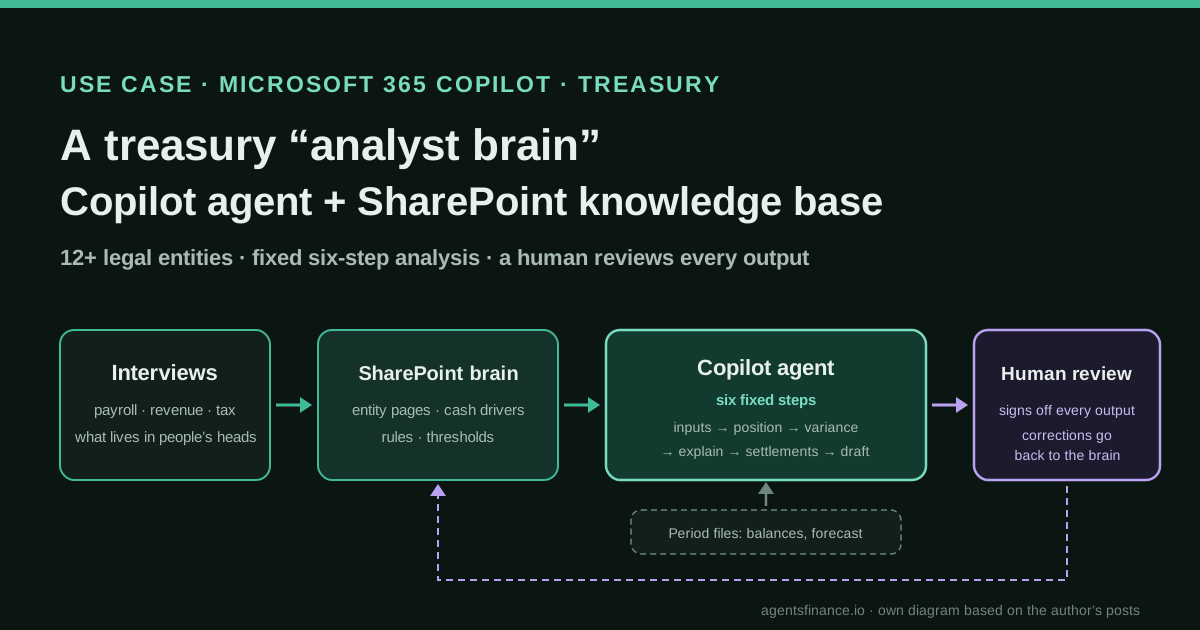
A treasury team took over cash management for a group of a dozen-plus legal entities: positioning, forecasting, inter-unit settlements and monthly reporting, about half a full-time job, with no new hire. Its lead built the analyst as a Copilot agent that reads a SharePoint knowledge base about the business and follows a fixed six-step analysis. The first version was shallow; it improved when he interviewed the people who understand payroll, revenue and other drivers and added what they knew to the knowledge base. A person reviews every output.
Reported result
Stated by the author: the team now completes "an insightful first-pass analysis in minutes" instead of what used to take a team member days every month. He gives no hours, error rates or forecast-accuracy figures, and nothing is audited or confirmed by his employer. His carry-forward agent "has the potential" to save time each period (no result claimed), and his SOP-capture system is, in his words, designed but not proven.
Stated figures. An identified person or organization states that they have used it. The results are stated by the source; we have not audited them.
What has really been tested
On 20 October 2026 we read the five LinkedIn posts and the author's public profile, checked the publication dates in the pages' metadata, and read Microsoft's documentation on Agent Builder knowledge sources, agent instructions and Power Automate email triggers. We have not seen his agent, knowledge base, instructions or data, and nobody has confirmed anything to us. The six-step instruction set, knowledge-base template, carry-forward rules and rubric scores below are our own examples, not his.
How to replicate it
Pick one recurring treasury analysis and score it first for AI suitability and value. Build a SharePoint library that explains each entity, its normal cash pattern and its drivers, and fill it by interviewing the people who know the business, not only by copying procedures. Create a Copilot agent with that library as knowledge and a fixed, numbered analysis procedure as instructions; feed it the period's balances and forecast as files; test it on past months and keep a human reviewing every output. Only then add Power Automate alerts and Teams routing.
In two sentences
A corporate treasury team that inherited the cash management of a dozen-plus legal entities, with no extra headcount, built its missing analyst as a Microsoft Copilot agent that reads a SharePoint knowledge base and follows a fixed six-step procedure. The lesson its author keeps repeating is that the agent only became useful when the knowledge base captured what experienced people knew about the cash drivers, which says more about documentation than about models.
Who does it and why it is interesting
Phil Capodice describes himself on LinkedIn as AVP, Treasury Transformation, and his profile places him at Voya Financial since October 2023, leading what he calls “AI agentification” across corporate treasury, after treasury consulting roles at Accenture and PwC. Between August and October 2026 he published a series of short first-person posts about agents he has built for treasury and financial reporting. The posts do not name his employer, the entities or the volumes, so we treat this as one practitioner’s account, not as a company case.
The main post, of 19 August 2026, starts with a familiar problem. His team “inherited full cash management responsibilities” for a group of “a dozen-plus legal entities”: cash positioning, forecasting, inter-unit settlements and monthly reporting. He sizes the work at roughly half of a full-time employee. Hiring was not an option, so he “built” the analyst: a Copilot agent grounded in a SharePoint knowledge base and running “a fixed six-step analysis instruction set”.
Why it matters for this directory:
- It uses tools many finance teams already pay for. In a later post he stresses that the whole set-up runs on a Copilot agent grounded on SharePoint, Power Automate and Teams, with “no new license anywhere”. Most treasury cases we cover involve a specialist platform or custom code.
- The bottleneck was knowledge, not the model. “The fix wasn’t a better prompt or a bigger model”, he writes; it came from interviews.
- He publishes what did not work. The first knowledge base was too thin, and the first version of his carry-forward agent was inconsistent. Both failures are instructive.
What he built, piece by piece
Across the five posts there are four things, at different stages of maturity.
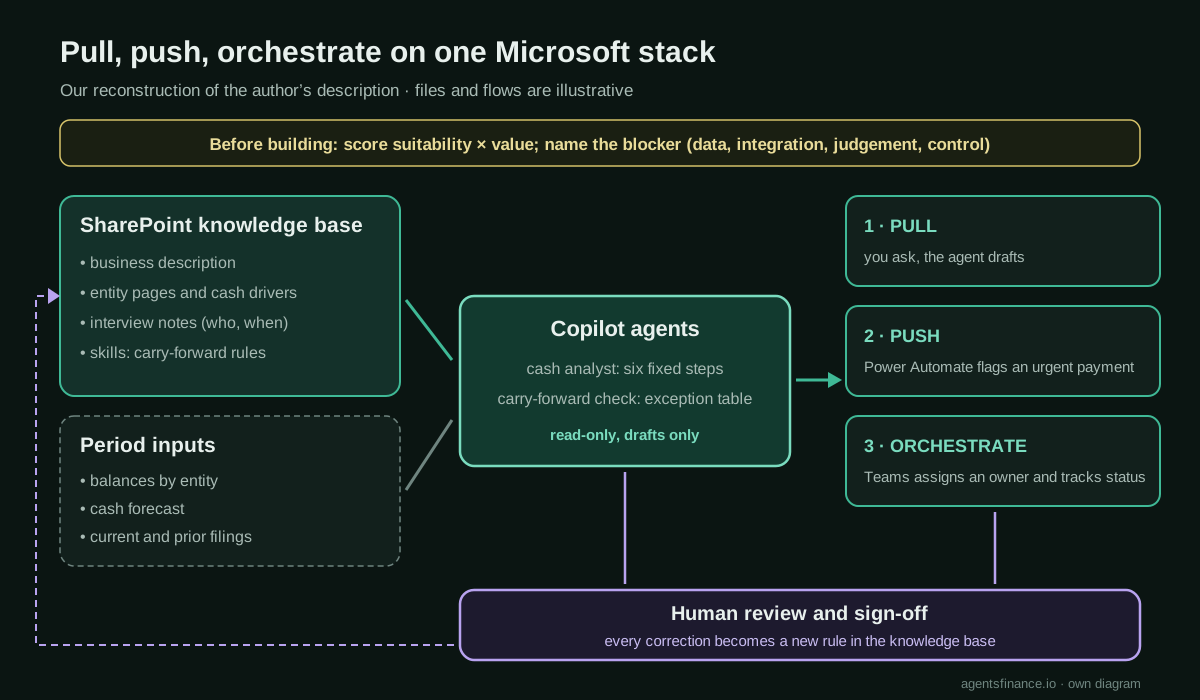
1. The cash analyst agent (in use). The first version had documentation of the business and its “expected cash-flow behavior”. It was “accurate at a high level” but did not produce the insight a skilled cash manager would. He then sat with the people who understand the drivers of payroll, revenue and other flows, wrote down “the things that lived only in their heads” and fed them back into the knowledge base. “That’s when it got good.”
2. The carry-forward check agent (built, results not claimed). At the start of each reporting period, someone has to check by eye that the opening figures of a 100-plus-page report tie to the prior period’s closing figures, and that disclosures stay continuous. His agent receives the current and prior filings, works out an approach, compares them section by section and returns a table of what matched, what changed and which exceptions need attention. His first instruction, “check the documents for consistency”, flagged things that were fine and missed things that were not. What worked was “documenting the process as a skill”: how prior-period numbers trace to the current period, what counts as a real difference versus a formatting change, and what to do when a number legitimately changed. He notes that the output table doubles as the audit trail.
3. A suitability rubric (a method). Before building, he scores finance processes on two axes: how suitable AI is for the process and how much value it would release. The quadrant that deserves attention is high value, low suitability: the pain is real but the data is trapped, the integration does not exist or the judgement has never been written down. He changed the rubric to name the blocker (data, integration, judgement or control) and to label those cases as a process redesign, not an AI automation, because otherwise you end up with “an agent that automates a broken handoff and makes it faster to be wrong”.
4. Pull, push, orchestrate (a pattern). In a talk to finance colleagues he showed three rungs on the same Microsoft stack: pull (you ask the agent, grounded on a shared mailbox and SharePoint, and it drafts or summarises), push (a Power Automate flow classifies each message as it lands and flags an urgent payment before anyone opens the inbox) and orchestrate (Teams assigns each item to an owner, tracks it to resolution and posts status). He says he ran the same ladder on a group inbox, a cash forecast and a cross-period reconciliation.
A fifth post, of 14 October, describes a system to capture treasury procedures on video, have AI check the capture for gaps and draft standard SOPs with permanent IDs for every step, control and exception. He is explicit: “designed and being built, not proven”.
Tools and architecture
What the sources support, and what is our inference:
- Agent: a Microsoft Copilot agent. The posts do not say whether it was made in Microsoft 365 Copilot’s Agent Builder or in Copilot Studio, nor which model it uses.
- Knowledge: a SharePoint knowledge base with the business description, expected cash behaviour and interview notes. Microsoft’s documentation for Agent Builder allows up to 100 SharePoint files and one SharePoint list per agent, respects existing permissions and sensitivity labels, and does not work as a knowledge source if Restricted SharePoint Search is enabled. It also notes that agents answer Excel-based questions best when the data sits in one sheet.
- Instructions: a fixed six-step procedure. In Agent Builder the instructions field is limited to 8,000 characters, which is plenty for a numbered analysis but not for a whole treasury manual: the manual belongs in the knowledge base.
- Automation and routing: Power Automate and Teams for the push and orchestrate rungs.
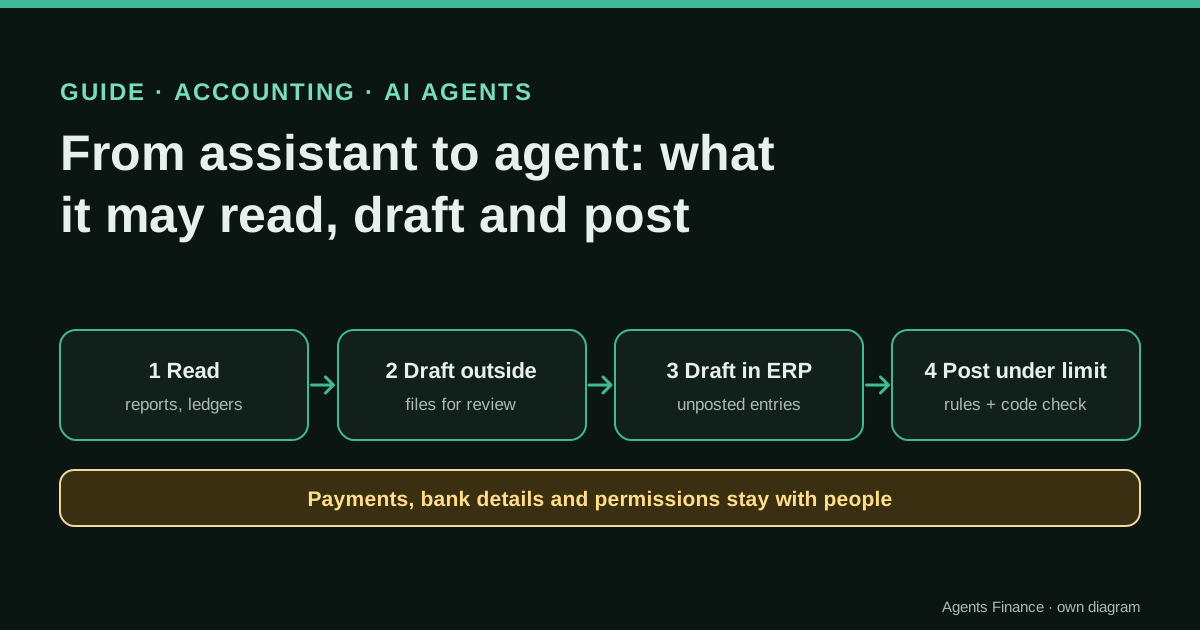
- Control: a human reviews every output. The posts do not say the agent posts entries, moves cash or writes to any treasury or ERP system, and we would not suggest it should.
Step by step to replicate it
These steps are ours, built from his description and Microsoft’s documentation.
- Score the process first. Rate candidate processes 1–5 for AI suitability (are the inputs digital, is the judgement written down, can the output be checked?) and 1–5 for value (hours, risk, frequency). Name the blocker for anything below 3 on suitability. Start with one recurring analysis, such as the monthly cash variance review.
- Design the knowledge base as documents an analyst would read. One page per entity: what it does, its bank accounts, its normal monthly cash pattern, its payroll and tax calendar, recurring inter-unit settlements, known one-offs and who to ask. Plus one page of group-wide rules: minimum balances, settlement conventions, materiality thresholds.
- Interview the people who know. Ask payroll, revenue, AP and tax colleagues what makes cash move in a way the documentation does not show: timing quirks, seasonal patterns, clients who always pay late, months when a bonus or tax payment lands. Add their answers, attributed and dated, to the entity pages.
- Write the six-step instructions (our example is below) and keep them short and fixed, so every month’s analysis has the same shape and can be compared.
- Create the agent. In Microsoft 365 Copilot choose New agent, then Skip to configure; give it a name, a precise description and the instructions, and add the SharePoint folder or site by URL as knowledge. Keep the period’s figures as separate files you attach or point to each month.
- Back-test on closed months. Run it on two or three months your team already analysed by hand and compare: what did it miss, what did it invent, what did it explain better? Fix the knowledge base before you touch the instructions.
- Put review into the routine. A named person signs off each output, and every correction goes back into the knowledge base as a new rule or driver.
- Only then push and orchestrate. Add a Power Automate flow that alerts when a condition is met (for example a payment flagged urgent), filtering in the trigger itself, which Microsoft recommends so that runs do not consume your plan’s quota for nothing; then route items through Teams.
Concrete example: a six-step instruction set
He did not publish his six steps. This is our own version for a monthly multi-entity cash review, written to stay well under the 8,000-character limit:
You are the cash analyst for the treasury team. Use only the files provided for
this period and the knowledge base. Never invent a figure; if a number is not in
the files, say so.

Step 1 - Inputs. List the files you used, their dates and the entities covered.
Stop and report if any entity, bank account or the forecast file is missing.
Step 2 - Position. For each entity, give opening and closing balance and compare
the closing balance with its minimum operating balance from the knowledge base.
Step 3 - Variance. For each entity, compare actual net cash flow with the
forecast and list every variance above the materiality threshold in the
knowledge base, split by driver (payroll, customer receipts, supplier payments,
tax, inter-unit, other).
Step 4 - Explanation. Explain each variance using the drivers and calendars in
the entity's page. Cite the document. If the knowledge base does not explain it,
write "UNEXPLAINED" and do not guess.
Step 5 - Inter-unit settlements. List settlements due, settled and outstanding,
and any amount that does not match between the two entities.
Step 6 - Draft. Write a one-page summary for the monthly report and a list of
questions for the team, ordered by amount. Mark the whole output as a draft for
human review.
The important design choices are the “UNEXPLAINED” rule, which turns gaps in the knowledge base into a visible to-do list instead of plausible fiction, and step 1, which stops the run when an input is missing.
For the carry-forward agent, the equivalent “skill” would be a short document with rules such as: an opening balance must equal the prior closing balance exactly unless a restatement note exists; a change in rounding, units or column order is formatting, not a difference; a reclassified line must appear with both the old and new caption; every exception goes in the table with page references for both documents.
Results stated by the source
- The cash analysis: “an insightful first-pass analysis in minutes when it would have taken a team member days every month”, according to the author. No measurements, no accuracy rate, no count of entities beyond “a dozen-plus”.
- The scope it covers: roughly half of a full-time employee’s workload, his own estimate.
- The carry-forward agent: the first attempt was inconsistent; the skill-based version does the first pass and “has the potential” to give back time each period. No figures.
- The ladder: shown to colleagues on a group inbox, a cash forecast and a reconciliation, with no results given.
- The SOP system: not proven, by his own account.
His employer has not confirmed any of this, and these are posts by someone whose job is to promote this transformation internally, so read them as a practitioner’s report.
Limitations and risks
- Single source. Everything comes from the author’s own posts. We found no talk recording, article or company statement that corroborates the details.
- Unknown inputs. We do not know how balances and forecasts reach the agent (exports, Kyriba reports, spreadsheets) or how fresh they are. A stale export analysed fluently is still stale.
- Shared knowledge, shared risk. A SharePoint library becomes the agent’s truth. If a page is wrong or out of date, every analysis inherits the error. Permissions also matter: the agent respects them, so the person using it must have access to every page it needs, and nobody should gain access they should not have.
- Licensing. Microsoft’s documentation says SharePoint and OneDrive knowledge requires the signed-in user to have a Microsoft 365 Copilot licence, and that available sources vary by licence. “No new license” holds only where those licences are already in place.
- Key-person risk moves, it does not disappear. The interviews reduce dependence on people’s memory, but someone must own the knowledge base and keep it current.
Common mistakes
- Writing a better prompt instead of a better knowledge base. His own first version failed for that reason.
- Vague instructions such as “check for consistency”. Define what a real difference is and what to do with a legitimate change.
- Automating a high-value process that is not ready. If the data is trapped or the judgement is undocumented, redesign the process first.
- Skipping the back-test. Compare against months already analysed by people before trusting a new month.
- Letting the draft become the report. Keep the human sign-off explicit, and keep the agent read-only.
Conclusions
This is not a story about a clever model. It is a story about a treasury lead who treated the agent as a new analyst who needs onboarding: a written description of the business, the unwritten knowledge of the people who run it, a fixed method and a reviewer. The same pattern appears in his carry-forward agent, where documenting the procedure as a skill turned an inconsistent tool into a useful first pass. For a team on Microsoft 365, the barrier to trying it is low; the real work is the interviews and the upkeep of the knowledge base, and that work is worth doing even before any agent reads it.
Sources
- Phil Capodice on LinkedIn — My team got handed close to a full analyst's workload and zero headcount to cover it, so I built an analyst brain and agent instead (19 Aug 2026) (opens in a new tab) (primary)
- Phil Capodice on LinkedIn — a Copilot agent for the carry-forward consistency check between reporting periods (2 Sep 2026) (opens in a new tab)
- Phil Capodice on LinkedIn — an agent-based rubric that scores treasury processes for AI suitability and value (26 Aug 2026) (opens in a new tab)
- Phil Capodice on LinkedIn — pull, push, orchestrate: the same ladder with a Copilot agent on SharePoint, Power Automate and Teams (30 Sep 2026) (opens in a new tab)
- Phil Capodice on LinkedIn — capturing treasury SOPs on camera with AI gap checks (designed, not proven; 14 Oct 2026) (opens in a new tab)
- Phil Capodice — LinkedIn profile (AVP, Treasury Transformation) (opens in a new tab)
- Microsoft Learn — Add knowledge sources to an agent in Agent Builder (SharePoint limits, permissions) (opens in a new tab)
- Microsoft Learn — Build agents in Agent Builder (fields and the 8,000-character instructions limit) (opens in a new tab)
- Microsoft Learn — Trigger a cloud flow based on email properties in Power Automate (opens in a new tab)
We wrote this entry in our own words from the sources above and checked that the links worked on October 20, 2026. Is anything incorrect? Tell us.