What it is about
Explains how a small business or its accountant can use Manus, a general AI agent, on a Xero organisation through the Xero connector that Manus runs for you: answering questions from the books, pulling the P&L, balance sheet, trial balance and aged receivables, listing overdue invoices with reminder drafts, drafting sales invoices, quotes and bills, preparing month-end checks and sending a monthly pack on a schedule. It also places Cue, the new Manus app for personal agents with their own wallet, outside the company books. Based on Manus's and Xero's documentation and on our own reading of the connector's open-source code.
What it offers, according to the source
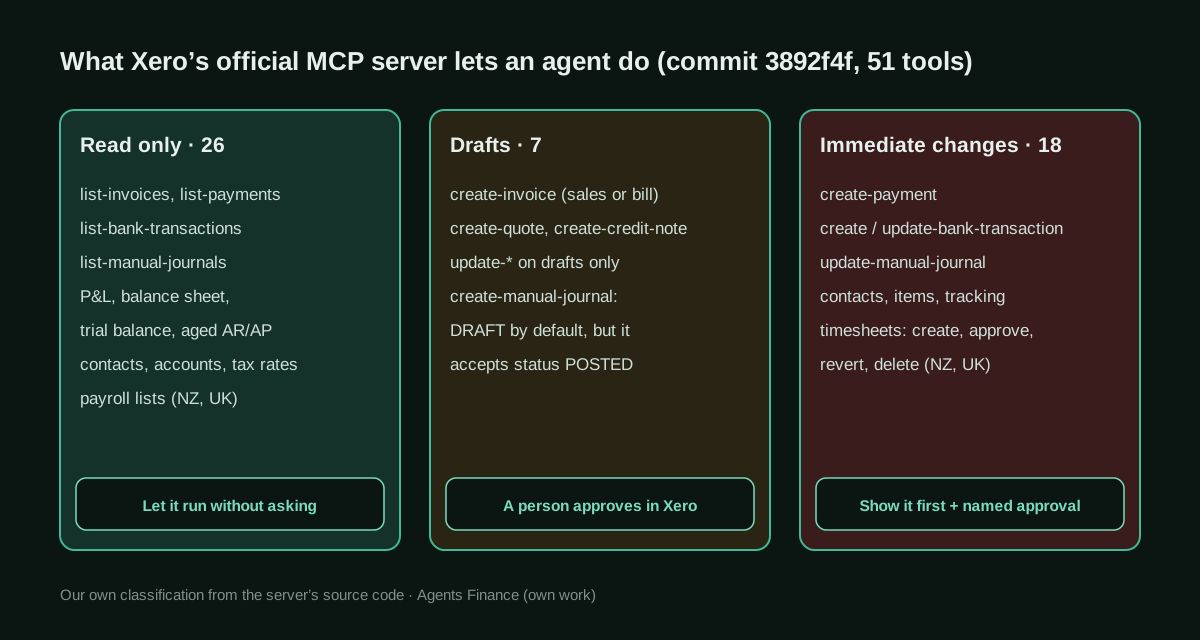
There are no measured results: this is a guide. Manus documents what the connector does and warns that recording payments and bank transactions, editing bank transactions, posting manual journals and approving or deleting timesheets change the books immediately. Our reading of the Xero MCP server source at commit 3892f4f found 51 tools: 26 read-only, 7 that create or edit drafts (the manual journal accepts a POSTED status if the agent passes it) and 18 that change data as soon as they run. The only first-hand Cue account we found is a personal subscription audit whose first pass missed items.
Mind the evidence. Described by the project’s own documentation or README. It says what the project claims to do and how it is used, not that it works in your case: we have not tested it.
What has really been tested
On 28 October 2026 we read Manus's Xero connector page, the Manus 2.0 announcement, the Automations, Projects, Mail Manus and Custom MCP documentation, the Help Center pricing article, Manus's LinkedIn post on Cue finances and Xero's Custom Connections page. We cloned XeroAPI/xero-mcp-server at commit 3892f4f and classified every registered tool from the source (handlers set DRAFT on invoices, quotes and credit notes and AUTHORISED on bank transactions; manual journals take an optional status); several tool names in the source differ from the README. We have not connected Manus or Cue to a Xero organisation. The review script was run only on fictitious CSVs; the instructions and prompts are untested proposals.
How to apply it
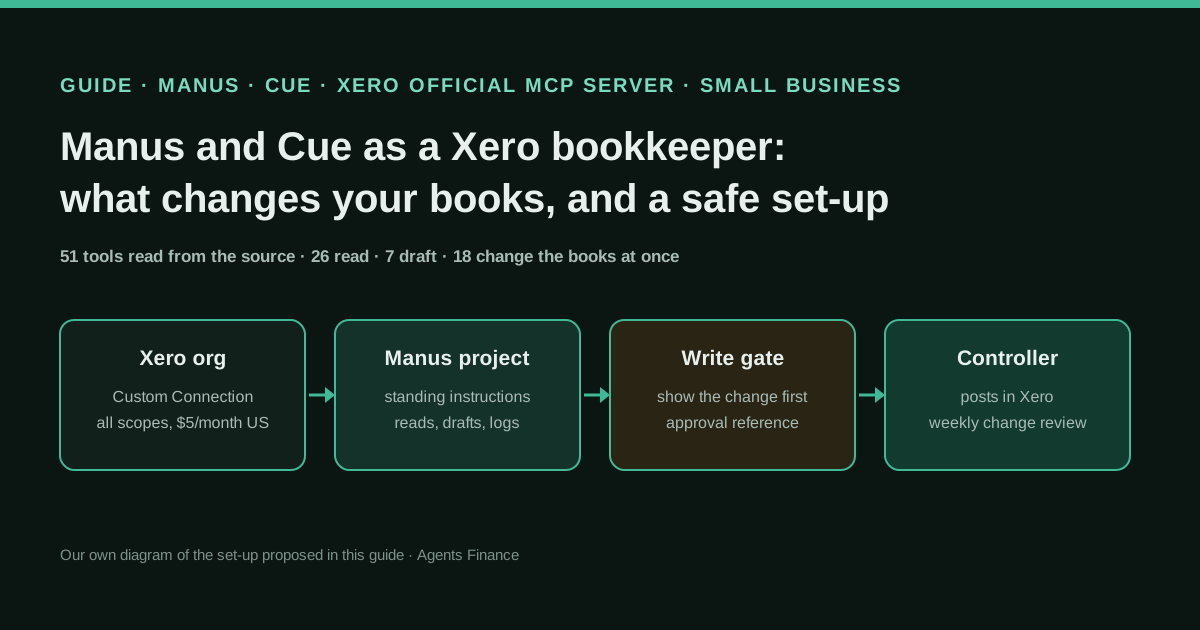
Start on Xero's Demo Company, create a Custom Connection with the scopes Manus asks for, and connect it in Manus Connectors. Create a Manus project with the standing instructions below, so every task shows the change and waits for an approval reference before any of the 18 immediate tools; schedule a monthly pack and a weekly month-end check; let a triggered task turn supplier invoice emails into draft bills. Every Friday, export the agent's change log and run the review script. Keep Cue and its wallet away from the company organisation. Templates in “Copy and adapt”.
- Check the prerequisites: a Xero organisation in Australia, New Zealand, the UK or the US (Custom Connections are not offered elsewhere), a Manus plan and a person who will approve changes.
- Create a Custom Connection on Xero's Demo Company with the scopes Manus asks for, and connect it in Manus Connectors.
- Create a Manus project with the standing instructions and the write-gate table, so immediate changes need an approval reference.
- Add three automations: a monthly pack, a weekly month-end check and a triggered task that turns supplier invoice emails into draft bills.
- Every Friday, export the agent's change log and Xero's list of new payments, bank transactions and journals, and run the review script.
- Move to the real organisation only after several clean weeks, and keep Cue's personal agents and wallet out of it.
In two sentences
Manus, the general-purpose AI agent, now ships Xero as a ready-made connector that runs Xero’s own open-source MCP server, and its new Cue app gives personal agents their own wallet and Plaid-powered spending features. The useful question for a finance team is not whether it can read your books, which it can, but which of its 51 tools change them without a draft, and how to put a named person in front of those.
Why this is the trend, and why now
Manus launched Manus 2.0 on 28 September 2026 with three pieces that matter for bookkeeping: Automations, which start a task on a schedule or when something happens in a connected app (a new email, a calendar event, a webhook); Cloud Computer, a dedicated environment for work that must run around the clock; and Cue, a separate app for personal agents, each with its own email address, phone number, wallet and computer, able to pay “within the budget you set”. On 1 October Manus added that Cue can track subscriptions and spending trends and “put your bank accounts on autopilot”, powered by Plaid. Cue is in early access with invite codes.
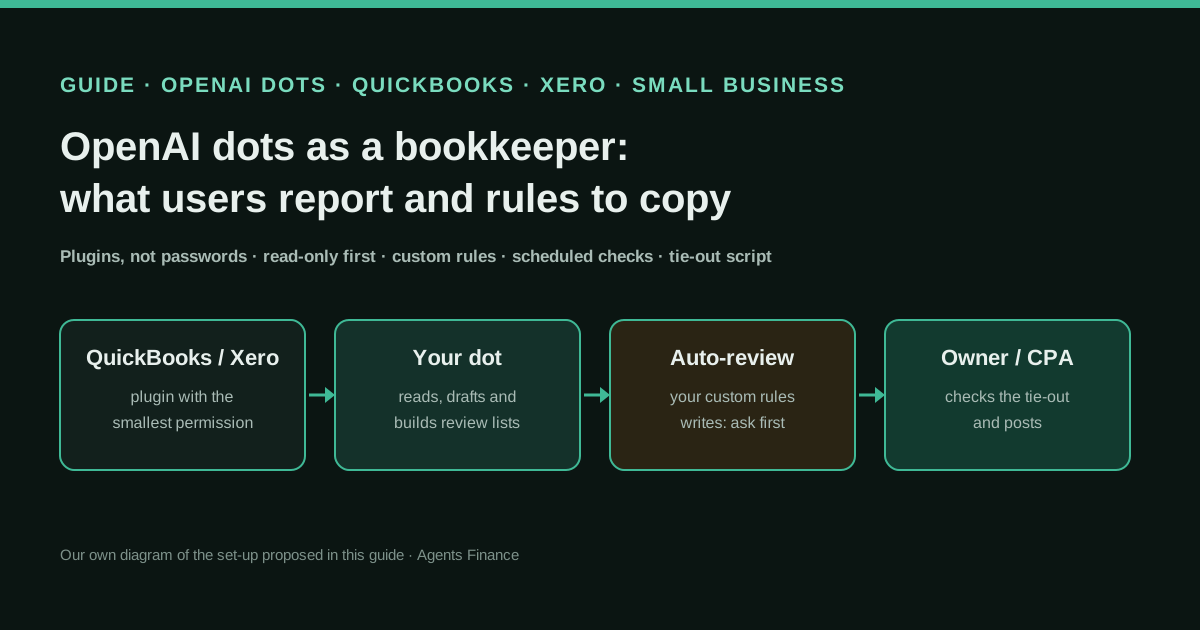
Manus belongs to the same wave as OpenAI dots, Meta Muse, Claude Duet and Grok Bot: agents that keep working between conversations. We counted about 200 posts on X in the week to 28 October mentioning Cue or Manus 2.0, far fewer than for dots, but Manus is one of the agents our readers keep asking about, and it is the one with the most explicit Xero documentation.
What users report
First-hand finance accounts are scarce. The most detailed one is personal, not company bookkeeping: Michael Petychakis, a CTO who says he is not affiliated with Manus, gave Cue and another agent the same task, finding every subscription in his personal mailboxes and saying what to cancel. Cue’s first pass was “bad”, in his words; after he pointed at what it had missed, the second pass recovered a couple of subscriptions the other agent had not found. His conclusion is useful for anyone auditing spend: the job is retrieval and matching across years of receipts, and a cancel list is only a decision when each line carries the email, the amount and the renewal date.
The same author reports a cost lesson: with his own Anthropic key plugged into Manus 2.0, tidying a few Google Drive folders used $15 in ten minutes. On Manus’s own plans, tasks use credits according to their complexity, so long background runs deserve a budget.
We found no named company describing Manus on its Xero books. Treat the rest of this guide as documentation plus our own reading of the code.
What Manus documents about Xero
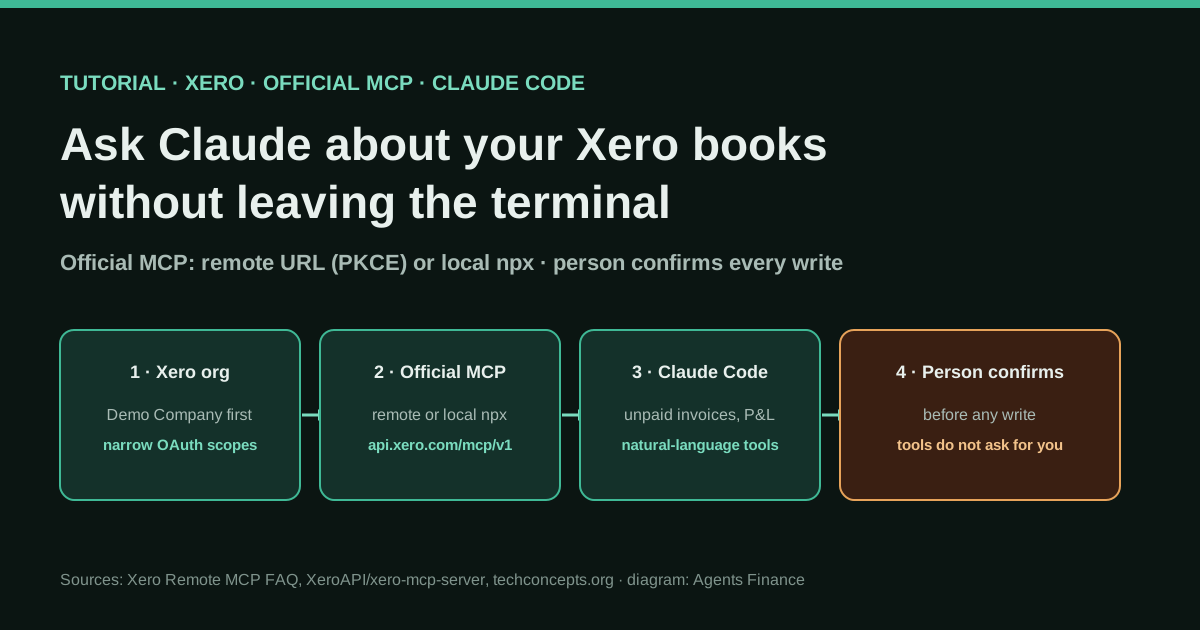
How it connects. Manus runs @xeroapi/xero-mcp-server, the MIT-licensed server Xero publishes on GitHub, so there is nothing to host and no URL to paste. You create a Custom Connection in your Xero developer account, add every scope listed in Xero’s guide, get it approved by the person who authorises it, and paste the Client ID and Client Secret into Manus. Manus says the connection needs every scope on Xero’s list, which means you cannot trim it to read-only inside Manus; if you need a strictly read-only connection, run the server yourself with fewer scopes (our Claude Code tutorial shows how).
Where it works. Xero offers Custom Connections only to organisations in Australia, New Zealand, the UK and the US, at $5 a month in the US (£5 in the UK, AU$10 including GST, NZ$10 excluding GST) per connection, and free on the Demo Company. Payroll tools work only in New Zealand and the UK.
What it does. Manus’s page lists questions about income and expenses, the P&L, balance sheet and trial balance, overdue invoices with a reminder drafted for each customer, invoices and quotes from a few lines or a spreadsheet, month-end checks for the accountant (possible duplicates, missing references, unusual amounts) and a monthly report on a schedule. Its sample prompts end with “Don’t change anything” or “Don’t send anything”, which is the right habit.
What changes your books immediately. This is the part to read twice. New invoices, quotes and credit notes are saved as drafts. But Manus states that recording payments and bank transactions, editing bank transactions, posting manual journals and approving or deleting payroll timesheets “change your books right away”, and asks you to have Manus show the change and confirm first.
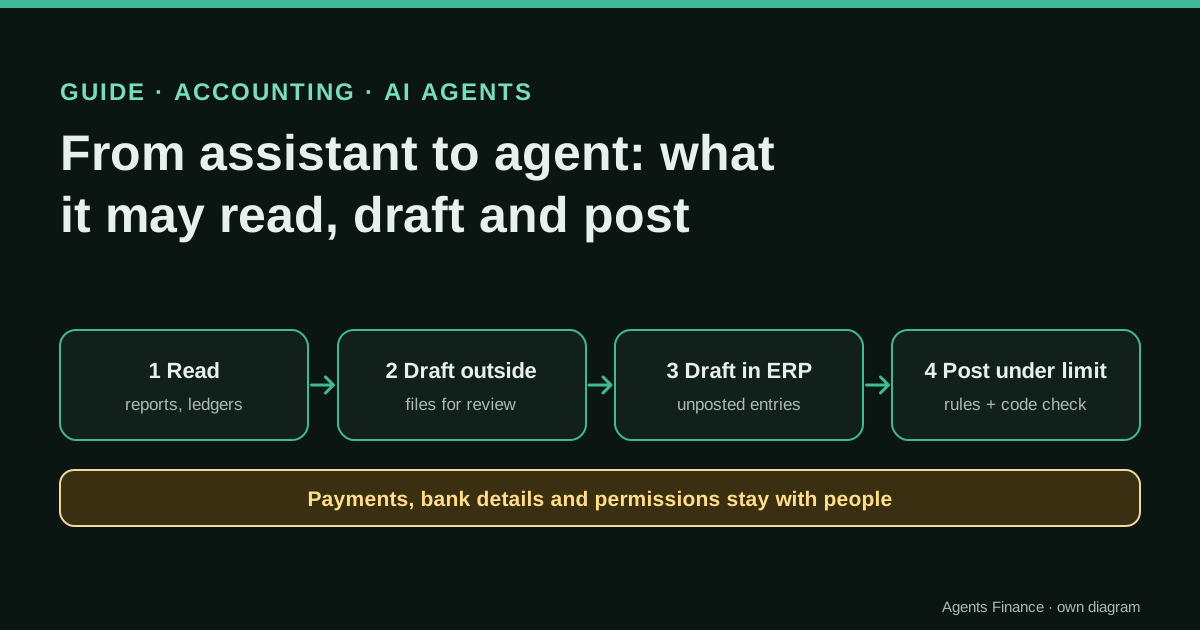
What the code says: 51 tools in three groups
We cloned the server at commit 3892f4f (26 October 2026) and classified every tool it registers. The result matches Manus’s warning and adds detail.
- 26 read-only tools: invoice, payment, bank-transaction, manual-journal, contact, account, item, quote, credit-note and tax-rate lists, the P&L, balance sheet, trial balance, aged receivables and payables by contact, tracking categories and the payroll lists.
- 7 draft tools:
create-invoice(sales invoices or, with type ACCPAY, supplier bills),create-quoteandcreate-credit-noteset status DRAFT in the code, and the threeupdate-*tools refuse to edit anything that is no longer a draft.create-manual-journalis a draft by default, but its parameters accept DRAFT, POSTED, DELETED, VOIDED or ARCHIVED, so an agent can post a journal if it decides to pass POSTED. - 18 tools that change data at once:
create-payment,create-bank-transaction(the handler sets AUTHORISED),update-bank-transaction,update-manual-journal, contact, item and tracking-category changes, and six payroll timesheet tools including approve, revert and delete.
Two details for whoever maintains the setup. Several tool names in the source differ from the README (for example create-timesheet, approve-timesheet and delete-timesheet instead of the README’s *-payroll-timesheet names), so check the names your agent’s activity log actually shows. And contact and item edits look harmless but are master data: a changed bank account on a supplier contact is a classic fraud path.
Where Cue fits, and where it does not
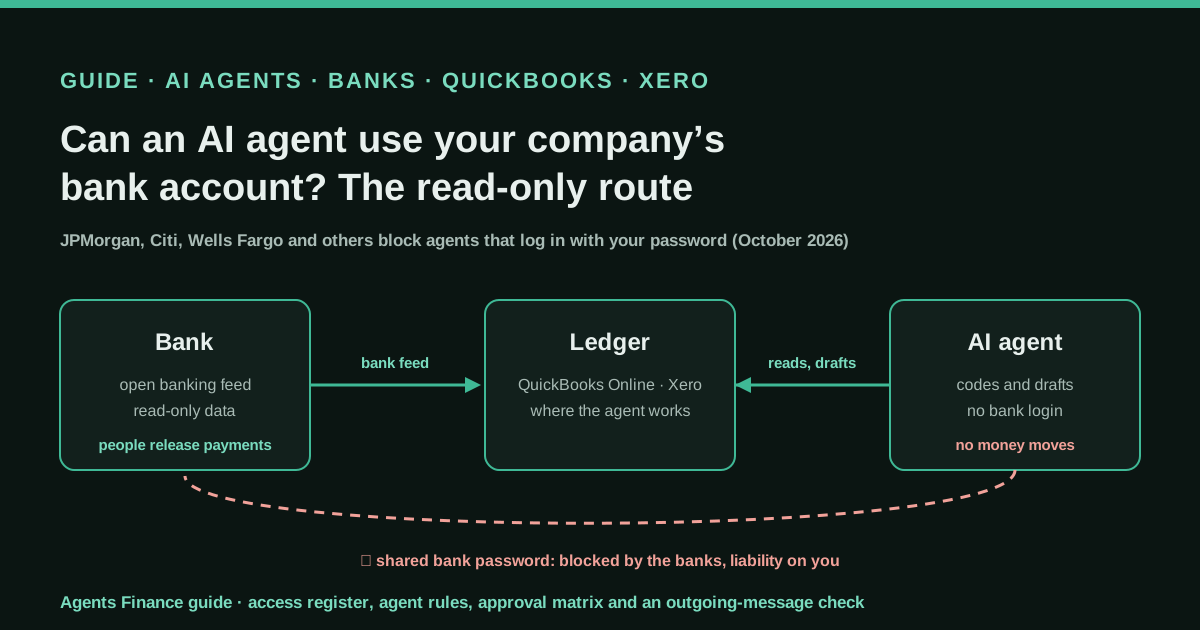
Cue’s agents have a wallet that can pay within a budget, and Cue’s finance features connect bank accounts through Plaid. That is designed for personal life: subscriptions, spending trends, a restaurant order. Keep it away from the company organisation. A personal agent with a wallet and the company’s Xero connection in the same place makes it too easy for a “helpful” payment to land in the wrong books, and our guide to agents and bank accounts explains why banks are wary of agents logging in as customers. For company work, use Manus itself, with a project, a log and approvals.
A safe set-up in four stages
- Week 0, Demo Company. Create the Custom Connection on Xero’s Demo Company, connect it in Manus and ask which organisation and reports it can see. If more than one person will use it, prefer a Team plan: Manus lists the data-training opt-out under Team.
- Weeks 1–2, read and report. Create a project with the standing instructions below and add the monthly pack and the weekly month-end check. Nothing writes. Compare each figure with the same report in Xero.
- Weeks 2–4, drafts. Turn on the triggered task that reads supplier invoice emails and creates draft bills. A person approves each bill in Xero. Keep the change log from day one.
- Then, the real organisation with a write gate. Connect the real organisation only when the drafts have been clean for several weeks. Every immediate tool needs an approval reference given by a named person in that task, with a maximum amount. Run the review script every Friday.
Copy and adapt
Prerequisites
- A Xero organisation in Australia, New Zealand, the UK or the US, plus Xero’s Demo Company for testing.
- A Manus plan (Free allows 2 scheduled automations; Pro and Team allow 20), and a named approver.
- Python 3.9 or later for the review script; no extra packages.
- No secrets in chats or files: the Client Secret goes only into the Manus connector form.
1. Project master instruction (Agents Finance template)
Paste it as the master instruction of a Manus project called, for example, “Xero bookkeeping”.
You help {{COMPANY}} with bookkeeping in Xero through the Xero connector.
Organisation: {{XERO_ORG_NAME}}. Approver: {{APPROVER_NAME}}. Currency: {{CURRENCY}}.

Default: read and report. Do not change anything in Xero unless the request
says so explicitly.

Allowed without asking: any list-* or report tool; tables and summaries in the task.
Drafts only: invoices, bills (ACCPAY), quotes and credit notes. Always save as
DRAFT, never approve or send. Manual journals: status DRAFT only, never POSTED.

Write gate. Before create-payment, create-bank-transaction, update-bank-transaction,
update-manual-journal, any contact, item or tracking change, or any timesheet
tool: show the exact change (tool, contact, account, amount, date) and stop.
Continue only if the approver replies in this task with "APPROVED <ref>" and
the amount is within the limit they state. Never change a contact's bank details.

Log. After every create-* or update-* call, append one line to the change log
file in this project: run_at, tool, object_id, contact, amount, status_after,
approval_ref (blank if none). Never edit earlier lines.

If a figure does not match a Xero report, say so and stop. Never guess an
account code or tax rate: list the options and ask.
2. Write-gate table (Agents Finance template based on the server’s source at commit 3892f4f)
read_without_asking:   # 26 tools
  - list-*            # invoices, payments, bank transactions, journals, reports…
  - get-timesheet
drafts_person_approves_in_xero:   # 7 tools
  - create-invoice     # type ACCREC (sales) or ACCPAY (bill), status DRAFT
  - create-quote
  - create-credit-note
  - update-invoice     # refuses non-draft invoices
  - update-quote
  - update-credit-note
  - create-manual-journal   # DRAFT by default; POSTED only with approval
show_change_then_named_approval:   # 18 tools
  - create-payment
  - create-bank-transaction    # created as AUTHORISED
  - update-bank-transaction
  - update-manual-journal
  - create-contact
  - update-contact             # never bank details
  - create-item
  - update-item
  - create-tracking-category
  - update-tracking-category
  - create-tracking-options
  - update-tracking-options
  - create-timesheet           # payroll, NZ and UK only
  - add-timesheet-line
  - update-timesheet-line
  - approve-timesheet
  - revert-timesheet
  - delete-timesheet
3. Three automation prompts (Agents Finance template)
[Schedule] On the 1st of every month at 09:00 {{TIMEZONE}}:
From Xero, pull last month's profit and loss, balance sheet, trial balance and
aged receivables. Check that trial-balance debits equal credits. Give me one page:
main changes against the previous month, the five largest expense movements with
amounts, customers more than 30 days late. Don't change anything in Xero.
[Schedule] Every Friday at 16:00 {{TIMEZONE}}:
List this week's bank transactions and manual journals in Xero. Flag possible
duplicates (same contact and amount within 3 days), lines with no reference and
amounts above 3x the usual monthly figure for that account. Table for the
accountant. Then attach this week's change log. Don't change anything.[Triggered task] When a new email arrives in {{AP_MAILBOX}}
Only if: it has a PDF attachment and the sender is in the approved supplier list.
Extract supplier, invoice number, date, due date, net, tax and total. Find the
contact in Xero (do not create one). Create a DRAFT bill (ACCPAY) with the
supplier's usual account code from the last three bills; if unsure, leave the
line uncoded. Reply in the task with the draft link and log the change.
If the supplier's bank details in the PDF differ from earlier bills, stop and
flag it for {{APPROVER_NAME}}.4. Change-review script (Agents Finance template, MIT-0)
Run it every Friday on the agent’s change log, your approvals list and, if you can, a list of payments, bank transactions and journals exported from Xero for the week. It flags immediate changes with no matching approval, amounts above the approved limit, drafts left in another status and Xero entries the agent did not log.
#!/usr/bin/env python3
"""Weekly review of what an AI agent changed in Xero.

Agents Finance template (MIT-0). Compares the agent's change log with your
approvals and, optionally, with a list of transactions exported from Xero.
Python 3.9+, standard library only.

  python xero_change_review.py agent_log.csv approvals.csv [xero_export.csv]

agent_log.csv : run_at,tool,object_id,contact,amount,status_after,approval_ref
approvals.csv : approval_ref,approver,tool,contact,max_amount,approved_at
xero_export.csv (optional): object_id,type,date,amount
Exit code 1 if anything needs attention.
"""
import csv
import sys
from decimal import Decimal, InvalidOperation

# Tool names as registered in the source of Xero's MCP server
# (XeroAPI/xero-mcp-server, commit 3892f4f) that change the books as soon
# as they run. Rename them if your agent's activity log shows other names.
IMMEDIATE = {
    "create-payment", "create-bank-transaction", "update-bank-transaction",
    "update-manual-journal", "create-contact", "update-contact",
    "create-item", "update-item", "create-tracking-category",
    "update-tracking-category", "create-tracking-options",
    "update-tracking-options", "create-timesheet", "add-timesheet-line",
    "update-timesheet-line", "approve-timesheet", "revert-timesheet",
    "delete-timesheet",
}
# Tools that create or edit drafts only (the manual journal is a draft
# unless the agent passes status POSTED).
DRAFT = {
    "create-invoice", "update-invoice", "create-quote", "update-quote",
    "create-credit-note", "update-credit-note", "create-manual-journal",
}


def money(value):
    try:
        return Decimal(str(value).replace(",", "").strip() or "0")
    except InvalidOperation:
        return None


def read(path):
    with open(path, newline="", encoding="utf-8-sig") as fh:
        return list(csv.DictReader(fh))


def main(argv):
    if len(argv) not in (3, 4):
        print(__doc__)
        return 2
    log = read(argv[1])
    approvals = {a["approval_ref"].strip(): a for a in read(argv[2])}
    findings = []

    for row in log:
        tool = row["tool"].strip()
        tool_needs_approval = False
        ref = row.get("approval_ref", "").strip()
        status = row.get("status_after", "").strip().upper()
        amount = money(row.get("amount", ""))
        where = f'{row["run_at"]} {tool} {row["object_id"]} {row.get("contact", "")}'.strip()

        if tool.startswith(("list-", "get-")):
            continue
        if tool in DRAFT:
            if status not in ("DRAFT", ""):
                if tool == "create-manual-journal" and status == "POSTED":
                    tool_needs_approval = True
                else:
                    findings.append(("RED", where, f"draft tool left status {status}"))
                    continue
            else:
                findings.append(("REVIEW", where, "draft waiting for a person in Xero"))
                continue
        elif tool in IMMEDIATE:
            tool_needs_approval = True
        else:
            findings.append(("RED", where, "unknown tool: check what it does"))
            continue

        if tool_needs_approval:
            appr = approvals.get(ref)
            if not ref or appr is None:
                findings.append(("RED", where, "changed the books with no approval"))
            elif appr["tool"].strip() != tool:
                findings.append(("RED", where, f'approval {ref} is for {appr["tool"]}'))
            elif appr.get("contact", "").strip() and appr["contact"].strip() != row.get("contact", "").strip():
                findings.append(("RED", where, f"approval {ref} is for another contact"))
            elif amount is None or amount > money(appr["max_amount"]):
                findings.append(("RED", where, f'amount above approved {appr["max_amount"]}'))
            else:
                findings.append(("OK", where, f'approved by {appr["approver"]} ({ref})'))

    if len(argv) == 4:
        logged = {r["object_id"].strip() for r in log}
        for x in read(argv[3]):
            if x["object_id"].strip() not in logged:
                findings.append(("RED", f'{x["date"]} {x["type"]} {x["object_id"]}',
                                 "in Xero but missing from the agent log"))

    order = {"RED": 0, "REVIEW": 1, "OK": 2}
    for level, where, why in sorted(findings, key=lambda f: order[f[0]]):
        print(f"{level:<7}{where} | {why}")
    reds = sum(1 for f in findings if f[0] == "RED")
    print(f"\n{len(findings)} lines, {reds} need attention")
    return 1 if reds else 0


if __name__ == "__main__":
    sys.exit(main(sys.argv))
Fictitious input to try it:
run_at,tool,object_id,contact,amount,status_after,approval_ref
2026-10-26 09:05,create-invoice,INV-0431,Lakeside Dental,2486.00,DRAFT,
2026-10-26 09:20,create-payment,PAY-1001,Orbit Fitness,2150.00,AUTHORISED,A-17
2026-10-27 10:11,create-bank-transaction,BT-5521,Office Supplies Co.,412.80,AUTHORISED,
2026-10-27 16:40,create-manual-journal,MJ-0099,,1250.00,POSTED,A-18approval_ref,approver,tool,contact,max_amount,approved_at
A-17,Controller,create-payment,Orbit Fitness,2150.00,2026-10-26 09:18
A-18,Controller,create-manual-journal,,1000.00,2026-10-27 16:30On our fictitious files it returns the bank transaction with no approval and the journal posted above its approved limit as RED, the invoice draft as REVIEW and the payment as OK, and exits with code 1.
5. Weekly log (Agents Finance template)
| Week | Runs checked | RED | Fixed how | Instruction changed | Signed |
|------|--------------|-----|-----------|---------------------|--------|
| 2026-W44 | 12 | 1 | Journal reversed, re-posted at approved amount | Added "journals POSTED only with APPROVED ref" | {{APPROVER}} |
A concrete example (fictional)
A five-person design studio in the UK connects Manus to Xero’s Demo Company in week 0 and its real organisation in week 4. On 1 November the monthly pack arrives: revenue up on October, two customers more than 30 days late, reminders drafted but not sent. On Tuesday a supplier invoice email triggers a draft bill; the PDF shows a new bank account, so the task stops and flags it, and the office manager calls the supplier on a known number before approving anything. On Friday the review script shows one RED line: a bank transaction for a card fee that Manus recorded after a vague “tidy up the fees” request, with no approval reference. The controller deletes it, records it properly, and adds to the project instruction that card fees are reconciled by a person.
Limitations and risks
- All scopes, one organisation. In Manus the Custom Connection carries every scope Xero lists, so the only write controls are your instructions, your approvals and your review. An instruction is not a technical permission; the agent can still misread it.
- The log is written by the agent. That is why the script also compares against Xero’s own lists. Without the export, a missing log line goes unnoticed.
- Region and cost. No Custom Connections outside Australia, New Zealand, the UK and the US; each connection costs a monthly fee, and long automations use Manus credits.
- Untested by us. We read documentation and code; we did not connect Manus or Cue to a Xero organisation. Behaviour can change with any server or connector update.
- Personal agents with wallets. Cue can pay within a budget. Keep it out of company finance unless your controls are designed for it.
Common mistakes
- Connecting the real organisation first, instead of the free Demo Company.
- Asking “fix the fees” or “tidy up the bank” without saying “don’t change anything” or naming the tool and amount.
- Letting the agent create contacts when a bill arrives from an unknown sender: that is how fake suppliers enter the ledger.
- Assuming manual journals are always drafts. The default is draft; POSTED is one parameter away.
- Mixing Cue’s personal agents and the company Xero connection in the same account.
Conclusions
Manus with Xero is one of the best-documented agent-plus-ledger combinations available today: Manus says plainly what is a draft and what is not, and Xero’s server is open source, so anyone can check. That transparency is the opportunity. Use it to let the agent read, report and draft freely, put a named approval in front of the 18 tools that change your books at once, and check its work every week against Xero, not against its own summary. Cue is interesting for personal spending, but it belongs outside the company books.
Sources
- Manus — Xero AI and MCP: invoices, reports and bookkeeping (connector page) (opens in a new tab) (primary)
- Manus — Introducing Manus 2.0 (Automations, Cloud Computer, Cue), 28 September 2026 (opens in a new tab)
- Manus Documentation — Automations (schedules, triggered tasks, advanced automations) (opens in a new tab)
- Manus Documentation — Projects (master instruction and knowledge base) (opens in a new tab)
- Manus Documentation — Mail Manus (workflow emails for invoices and receipts) (opens in a new tab)
- Manus Help Center — What is the current membership pricing for Manus? (opens in a new tab)
- Manus on LinkedIn — You can now manage your finances with Cue (powered by Plaid), 1 October 2026 (opens in a new tab)
- GitHub — XeroAPI/xero-mcp-server (MIT), source read at commit 3892f4f (opens in a new tab)
- Xero Developer — Custom Development and Custom Connections (price and regions) (opens in a new tab)
- Michael Petychakis on X — the same subscription-audit task on Cue and on another agent (29 September 2026) (opens in a new tab)
- Michael Petychakis on X — Manus 2.0 with his own Anthropic key used $15 in ten minutes tidying Drive folders (opens in a new tab)
We wrote this entry in our own words from the sources above and checked that the links worked on October 28, 2026. Is anything incorrect? Tell us.
Share this entry
This entry is part of the guide: AI agents for accounting · MCP for accounting and ERPs