What they do and how
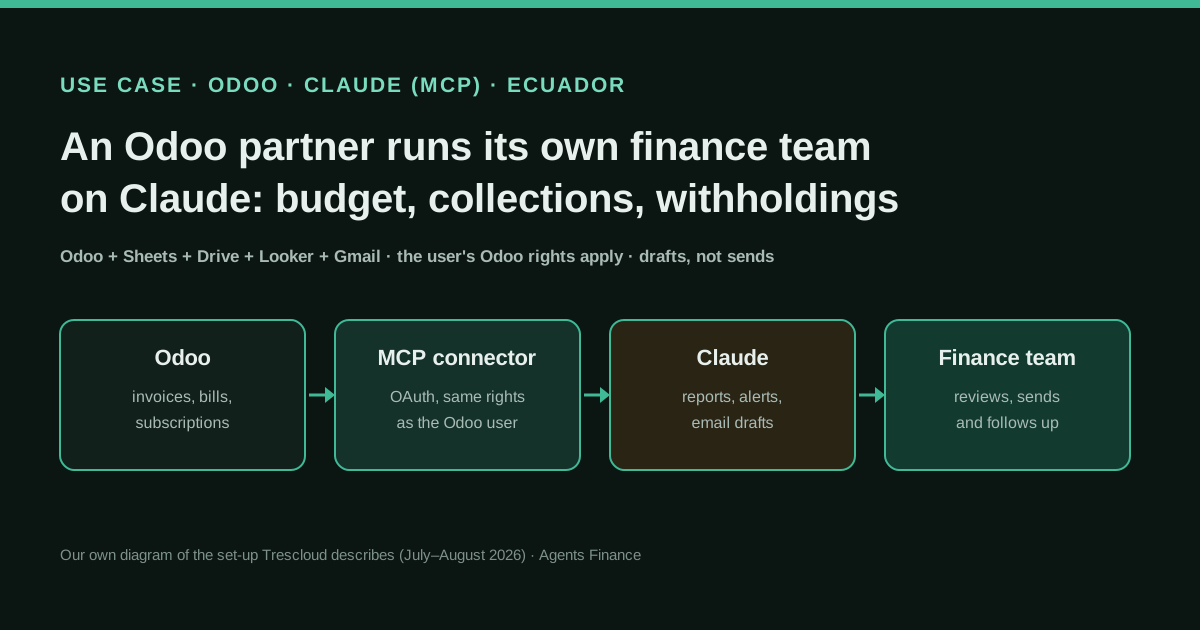
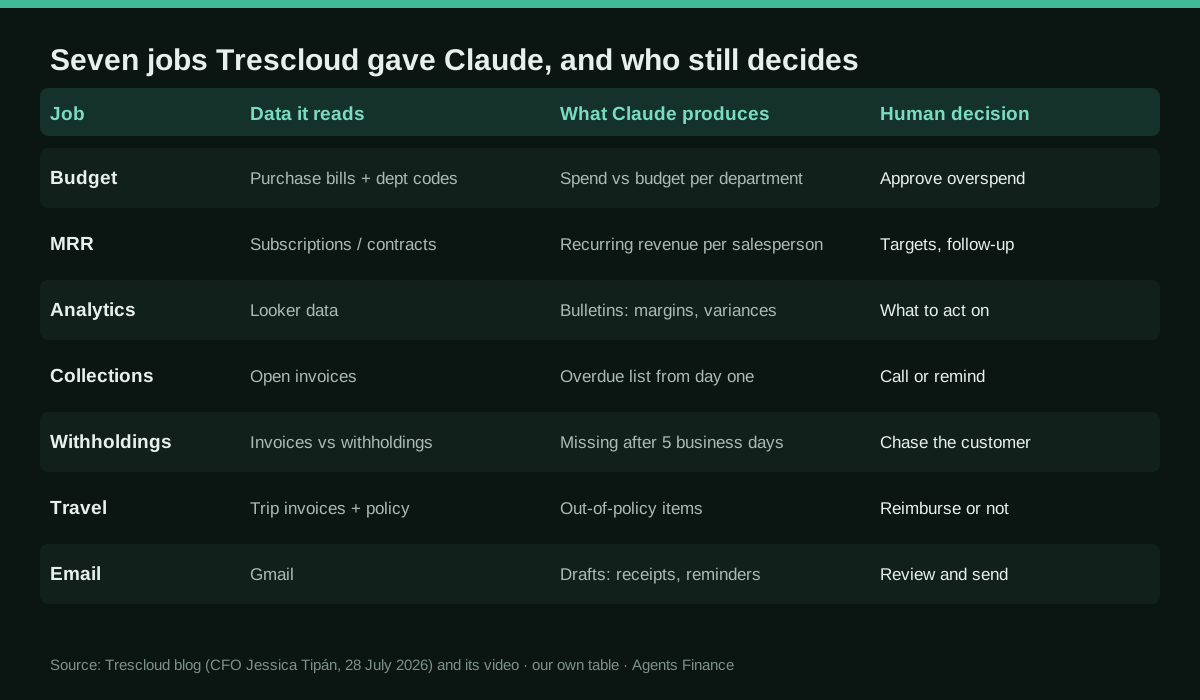
Trescloud implements Odoo in Ecuador, Panama and Miami. Its CFO, Jessica Tipán, explains how the company's own finance team works with Claude connected to Odoo, spreadsheets, Drive, Looker and Gmail, which Trescloud packages for clients as Trescloud IA. The operating budget is structured by activity and department code and tied live to purchase bills in Odoo, so the team asks how the budget is going and gets progress by department. An MRR dashboard shows recurring revenue, contracts and progress against target per salesperson. Claude turns analytic-accounting data from Looker into bulletins with margins and explained variances. A live overdue-receivables report and a subscription audit flag customers with open balances from the first day late and active subscriptions that stopped being invoiced. A report shows customer withholdings that have not arrived, which Odoo's standard filters do not show directly. Claude checks trip invoices against the rules for lodging, meals, transport and sundries, and drafts emails in Gmail for payment receipts, withholding requests and collection reminders. A companion video shows the connection: an integration created in Odoo, its server URL, client ID and secret pasted into a Claude custom connector, and an OAuth sign-in with the Odoo user's own permissions.
Reported result
Stated by Trescloud's CFO: budget answers that used to take days to consolidate now come instantly; MRR views take minutes instead of days in Excel; analytic bulletins take a fraction of the days they used to; collections moved from reactive to proactive, with alerts from the first day overdue; subscriptions that were not invoiced on time no longer go unnoticed for weeks; travel-invoice checks are faster and more consistent. She says it is the real operation of their finance team, not a demo. There are no measured hours, error rates, amounts or costs, nothing has been checked by a third party, and the company sells the same service.
Mind the evidence. Someone explains how they do it or did it, without verifiable figures. It is documented practice, not proof that it will work in your case.
What has really been tested
On 26 and 27 October 2026 we read the CFO's article (28 July 2026), the LinkedIn post with the transcript of its video (31 July 2026), the YouTube video on the Claude–Odoo MCP connection (29 July 2026, auto-generated Spanish captions) and the Trescloud IA page. We checked Claude's custom-connector and Gmail-connector documentation, the customer-withholding section of Odoo's Ecuador localization docs, Odoo's deprecation notice for XML-RPC and JSON-RPC, article 8 of Ecuador's SRI regulation on sales and withholding receipts, and Claude's prices on the official pricing page. We have not seen Trescloud's Odoo, its prompts, its reports or its integration module, and the video does not say whether the Odoo integrations menu is standard Odoo or Trescloud's own module. The Python script below was run only on fictitious CSV files and against a local fake XML-RPC server; the prompts, project instructions and policy file are untested templates.
How to replicate it
Start with read-only questions. Create a dedicated Odoo user whose access rights match what the AI may see, connect Claude to Odoo through an MCP connector with OAuth (Trescloud's integration, Odoo's own MCP if your edition has one, or an open-source server you trust), and allow without asking only the read tools. Write the rules into a Claude project: cite record numbers, never post or send, and keep a Gmail connection for drafts only. Then add one control at a time: budget versus actual by department, overdue receivables, missing customer withholdings after five business days, subscriptions past their next invoice date and a travel-policy check. Run a deterministic script alongside Claude for the lists that must be complete.
In two sentences
Trescloud, an Odoo partner from Ecuador, connected Claude to its own Odoo, spreadsheets, Looker and Gmail, and its CFO describes seven jobs the finance team now hands to it: budget tracking, MRR, analytic bulletins, collections, missing customer withholdings, travel-invoice checks and email drafts. It is a first-hand account with no measured figures from a company that sells the same set-up, so read it as a well-described map of what to try, not as proof of savings.
Why this case matters
Most stories about AI agents in accounting this autumn come from QuickBooks and Xero users in the United States. This one comes from a Latin American Odoo shop that is also its own first customer, and it touches problems that exist in many countries but rarely appear in vendor demos: withholding receipts that customers must issue within days, subscriptions that silently stop being invoiced, and travel expenses that have to fit a rulebook.
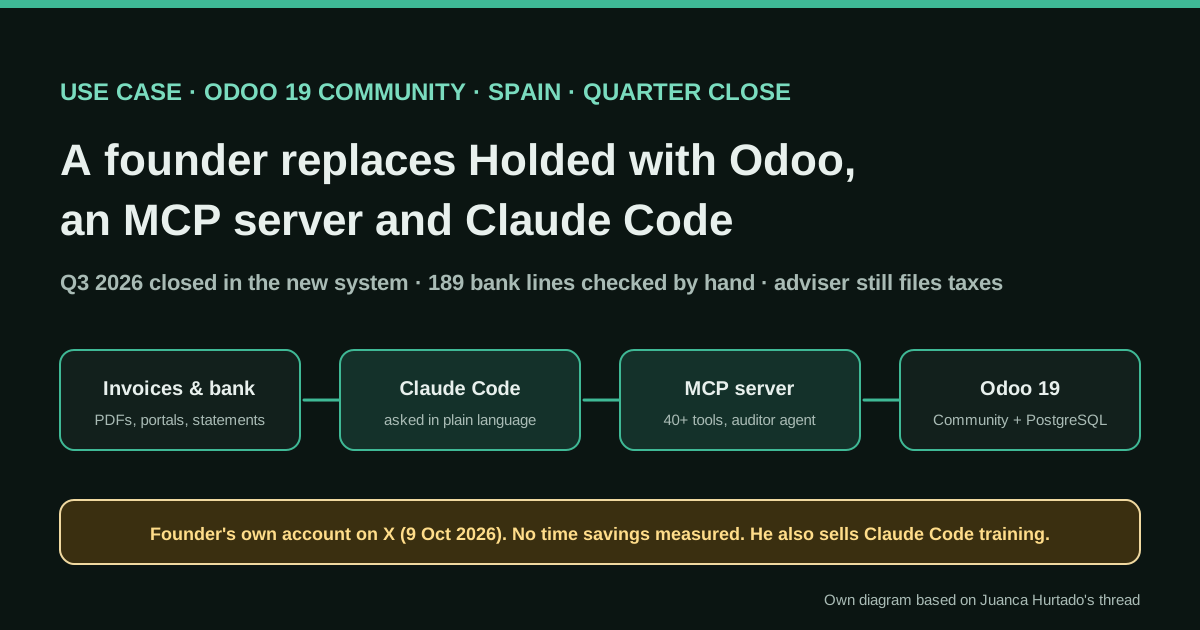
It is also a clean example of the pattern we see in the strongest cases in this directory: the AI reads the ERP through a connector that inherits the user’s permissions, produces lists and drafts, and people decide. Nobody claims that Claude posts entries or sends money. Compare it with the Spanish founder who moved from Holded to Odoo Community with Claude Code, who does let the agent write, with an auditor agent in front.
Who does it
Trescloud describes itself as an Odoo Gold Partner since 2011, with more than 15 years of work and presence in Ecuador, Panama and Miami. The article is signed by its CFO, Jessica Tipán, and was published on the company blog on 28 July 2026, tagged “Contabilidad Ecuatoriana”, “Odoo Enterprise” and “16.0”. Three days later the company posted a short video on LinkedIn in which an AI avatar of the CFO tells the same story, and on 29 July it published a YouTube video, presented by an avatar of solutions architect Castor Calle, showing how Claude is connected to Odoo over MCP.
Commercial interest. Trescloud sells this as Trescloud IA to Odoo users on version 16 or later, whether they are its clients or another partner’s. Its product page includes an “hours recovered” calculator whose numbers are inputs you move with sliders, not results from any customer. We use none of those numbers here.
Tools and architecture
The pieces, as the article and video describe them:
- Odoo holds purchase bills (with activity and department codes for the budget), customer invoices, subscriptions and the Ecuadorian tax documents.
- Claude is connected to Odoo through a custom connector over MCP. In the video, an administrator opens an Integrations menu in Odoo, creates an integration for Claude (the same menu offers Gemini, ChatGPT and n8n), copies the server URL, client ID and client secret, and adds them as a custom connector in Claude. The user then signs in to Odoo in the browser and allows access.
- Permissions follow the Odoo user. “If the user only has access to sales, they will not be able to query purchasing information,” the presenter says. The video recommends setting the read-only tool to “Always allow” so Claude does not ask on every read.
- Spreadsheets, Drive and Looker hold the budget structure and the analytic-accounting data that Claude turns into bulletins.
- Gmail is connected so Claude can prepare drafts: payment receipts, requests for missing withholdings and collection reminders.
Two things are not said: whether the Integrations menu is standard Odoo or Trescloud’s own module, and whether any connector can write to Odoo. We assume read-only use because every example is a report, an alert or a draft.
The seven jobs, one by one
1. Budget in real time. The operating budget is organised by activities and department codes and connected live to purchase invoicing in Odoo. The team asks “how are we doing on the budget?” and gets actual progress by department, instead of a report that took days to consolidate. The hard part is not the AI: it is coding every bill with an activity and a department, which is what makes the question answerable.
2. MRR per salesperson. A dashboard connected to Odoo shows recurring revenue, contract detail and progress against target for each salesperson, “generated in minutes instead of days of work in Excel”.
3. Analytic bulletins. Analytic accounting is consolidated in Looker, and Claude turns it into interactive bulletins: comparisons, margins by business line and explained variances. In the video, the CFO’s avatar adds that it even suggests paths to take “like a strategic consultant”. That is the part to review hardest.
4. Collections from day one. A live overdue-receivables report shows which customers owe what and since when, and a subscription audit catches active subscriptions that stopped being invoiced on time, “something that could go unnoticed for weeks”.
5. Missing customer withholdings. In Ecuador, a customer that is a withholding agent must issue the withholding receipt when it pays or books the invoice, and have it available within five business days of receiving the sales invoice (article 8 of the SRI regulation on sales and withholding receipts). In Odoo’s Ecuadorian localization, a customer withholding is registered from the posted invoice with Add Withhold. Trescloud built a report of invoices with no withholding yet, “a figure that Odoo’s native filters simply cannot show directly”, so the team can chase it before it becomes a tax problem.
6. Travel invoices against the rules. When staff travel, Claude checks every invoice from the trip against the rules for lodging, meals, transport and sundries and flags what does not fit. The LinkedIn post calls them “internal and legal” rules. The team also uses it to search for hotels and flights.
7. Email drafts. With Gmail connected, Claude drafts the repetitive emails: sending payment receipts, asking for missing withholdings, reminding customers of overdue invoices.
What the source does not tell you
There are no numbers: no hours saved, no count of withholdings recovered, no error rate, no cost. The prompts, the report definitions and the integration module are not published. The presenters in both videos are AI avatars, so the videos are produced marketing, even if the CFO signs the text. And the account comes from a company that sells exactly this service. The value is in the list of jobs and in the permission model, which you can check yourself.
Copy and adapt
Trescloud did not publish files, prompts or code, so nothing below is theirs. Everything is an Agents Finance template based on the jobs and the connection the CFO and the video describe. The Python script is released under MIT-0; the rest is free to use and adapt. Use a test database or a read-only user until you trust the outputs.
Prerequisites
- An Odoo database you may connect to an AI provider, and a dedicated Odoo user for the AI whose access rights cover only what it should see. The connector inherits that user’s rights.
- An MCP connection to Odoo: the integration your partner provides, Odoo’s own MCP if your edition has it, or an open-source server you have reviewed (see the community MCP server for Odoo). Custom connectors are available on Claude’s Free plan (one connector) and on paid plans, and Claude reaches them from Anthropic’s cloud, so the server must be reachable from the internet.
- For the script: Python 3.9+ and either CSV exports from Odoo list views or an API key for the read-only user.
1. Connection checklist (Agents Finance template based on the video)
ODOO (administrator)
[ ] Create a user "AI reader" with only the menus and companies the AI may see.
[ ] Create the AI integration / MCP server and copy: server URL, client ID, client secret.
[ ] Keep the secret in a password manager, never in a chat or a shared doc.

CLAUDE (Customize > Connectors > Add custom connector)
[ ] Name it after the company and the role, e.g. "Odoo - AI reader".
[ ] Paste the server URL; use your own OAuth client with the client ID and secret.
[ ] Connect and sign in to Odoo as "AI reader", not as an administrator.
[ ] Tool permissions: "Always allow" only for read tools; "Ask" or disabled for anything that writes.
[ ] Do not use Research with write tools enabled: it can call tools without asking.

GMAIL (Google Workspace connector)
[ ] Connect only the mailbox that sends finance emails.
[ ] Keep the default approval before send, reply or forward. The team sends, Claude drafts.

EVERY QUARTER
[ ] Review the AI user's rights, the connector list and who has access to the Claude project.
2. Claude project instructions (Agents Finance template)
Paste this into the instructions of a Claude project used by the finance team.
# Finance assistant for <COMPANY> (Odoo, read-only)

## Role
You help the finance team answer questions from Odoo, the budget spreadsheet and Looker exports.
You never post, edit, delete, reconcile or pay anything in Odoo. You never send email: you only create drafts.

## Rules
- Every figure you give must cite its source: Odoo record numbers (invoice, bill, subscription), report name and date range, or file name and tab.
- If the data does not answer the question, say what is missing. Do not estimate.
- State the period and the currency for every amount. Our fiscal year runs <FISCAL_YEAR>.
- Budget: actuals are purchase bills by department code and activity code. Bills without a code go in a separate "uncoded" line; never spread them.
- Collections: an invoice is overdue from the day after its due date. Group by customer and by 1-30, 31-60, 61-90 and 90+ days.
- Customer withholdings (Ecuador): flag posted customer invoices with no withholding registered after <WITHHOLD_DAYS> business days from the invoice date, excluding customers in the exempt list. Holidays: <HOLIDAYS_FILE>.
- Subscriptions: flag active subscriptions whose next invoice date has passed.
- Recommendations go in a separate section titled "For the team to decide".

## Output
1. Short answer (3 lines).
2. Table with the figures and their sources.
3. Exceptions and missing data.
4. For the team to decide.
3. Five prompts (Agents Finance templates)
BUDGET
How are we doing on the <YEAR> operating budget up to <DATE>? For each department code: budget, actual from
posted purchase bills, % used and the 3 largest bills. Add a separate line for bills with no department or
activity code, listing their numbers.

COLLECTIONS
List customers with overdue balances as of <DATE>, grouped by 1-30, 31-60, 61-90 and 90+ days, with invoice
numbers and amounts. Then list active subscriptions whose next invoice date is before <DATE>.

MISSING WITHHOLDINGS
List posted customer invoices dated before <CUTOFF_DATE> that have no customer withholding registered.
Exclude the customers in the attached exempt list. For each: customer, invoice number, date, total and
business days elapsed.

TRAVEL INVOICES
Attached are the invoices for trip <TRIP_CODE> (<CITY>, <DATES>) and our travel policy. Classify each invoice
as lodging, meals, transport or sundries, check it against the policy limits and dates, and list anything
outside the policy or outside the trip dates. Do not decide reimbursements.

EMAIL DRAFTS
For each customer in the missing-withholdings list, create a Gmail draft (do not send) to the billing
contact in Odoo, in Spanish, polite and short, quoting the invoice number, date and total, and asking for the
withholding receipt. Put all drafts in one list so I can review them.
4. Deterministic checks script (Agents Finance template, MIT-0)
Lists that must be complete (every overdue invoice, every missing withholding) are better produced by code and then explained by Claude. This script reads CSV exports from Odoo list views, or fetches posted customer invoices through Odoo’s external API with a read-only key, and writes review files. XML-RPC is deprecated since Odoo 19 and scheduled for removal in Odoo 22 (Online 21.1); on newer versions use the JSON-2 API or the CSV exports. Withholdings come from a CSV export because the field names depend on your localization modules.
#!/usr/bin/env python3
# Agents Finance template based on the controls Trescloud describes (2026). Licence: MIT-0.
# Read-only checks on Odoo exports: receivables ageing, customer withholdings not yet
# received after N business days, and subscriptions whose next invoice date has passed.
# Input: CSV exports from Odoo list views (or --fetch-invoices via the external API).
# Output: CSV files for review. It never writes to Odoo and never sends anything.
import argparse, csv, datetime as dt, os, sys
from collections import defaultdict

def d(s):
    s = (s or "").strip()[:10]
    return dt.date.fromisoformat(s) if s else None

def money(s):
    s = (s or "0").replace(",", "").strip()
    return round(float(s or 0), 2)

def business_days_between(start, end, holidays):
    # business days after `start` up to and including `end` (Mon-Fri, minus holidays)
    n, day = 0, start
    while day < end:
        day += dt.timedelta(days=1)
        if day.weekday() < 5 and day not in holidays:
            n += 1
    return n

def read_csv(path):
    with open(path, newline="", encoding="utf-8-sig") as f:
        return list(csv.DictReader(f))

def write_csv(path, rows, fields):
    with open(path, "w", newline="", encoding="utf-8") as f:
        w = csv.DictWriter(f, fieldnames=fields)
        w.writeheader()
        w.writerows(rows)

def fetch_invoices(url, db, user, key, out):
    # Odoo external RPC API (XML-RPC). Deprecated since Odoo 19 and scheduled for removal
    # in Odoo 22 / Online 21.1: on 19+ prefer the JSON-2 API. Use a read-only user's API key.
    import xmlrpc.client
    uid = xmlrpc.client.ServerProxy(f"{url}/xmlrpc/2/common").authenticate(db, user, key, {})
    if not uid:
        sys.exit("Authentication failed")
    m = xmlrpc.client.ServerProxy(f"{url}/xmlrpc/2/object")
    recs = m.execute_kw(db, uid, key, "account.move", "search_read",
        [[["move_type", "=", "out_invoice"], ["state", "=", "posted"]]],
        {"fields": ["name", "partner_id", "invoice_date", "invoice_date_due",
                    "amount_total", "amount_residual", "payment_state"]})
    rows = [{"number": r["name"], "customer": (r["partner_id"] or [0, ""])[1],
             "invoice_date": r["invoice_date"] or "", "due_date": r["invoice_date_due"] or "",
             "total": r["amount_total"], "residual": r["amount_residual"]} for r in recs]
    write_csv(out, rows, ["number", "customer", "invoice_date", "due_date", "total", "residual"])
    return out

def main():
    p = argparse.ArgumentParser(description=__doc__)
    p.add_argument("--invoices", required=True, help="CSV: number,customer,invoice_date,due_date,total,residual")
    p.add_argument("--withholds", help="CSV: invoice_number,withhold_number,date,amount")
    p.add_argument("--subscriptions", help="CSV: reference,customer,next_invoice_date,status")
    p.add_argument("--holidays", help="text file, one YYYY-MM-DD per line")
    p.add_argument("--today", default=dt.date.today().isoformat())
    p.add_argument("--withhold-days", type=int, default=5)
    p.add_argument("--exempt", help="text file, one customer name per line that never withholds")
    p.add_argument("--out", default="out")
    p.add_argument("--fetch-invoices", action="store_true", help="read invoices from Odoo first (env ODOO_URL, ODOO_DB, ODOO_USER, ODOO_KEY)")
    a = p.parse_args()
    today = d(a.today)
    os.makedirs(a.out, exist_ok=True)
    if a.fetch_invoices:
        fetch_invoices(os.environ["ODOO_URL"], os.environ["ODOO_DB"], os.environ["ODOO_USER"],
                       os.environ["ODOO_KEY"], a.invoices)
    holidays = set()
    if a.holidays:
        holidays = {d(x) for x in open(a.holidays) if x.strip() and not x.startswith("#")}
    exempt = set()
    if a.exempt:
        exempt = {x.strip().lower() for x in open(a.exempt, encoding="utf-8") if x.strip()}

    inv = read_csv(a.invoices)
    # 1) Receivables ageing by customer (days past due date)
    buckets = ["current", "1-30", "31-60", "61-90", "90+"]
    ageing = defaultdict(lambda: dict.fromkeys(buckets, 0.0))
    detail = []
    for r in inv:
        res = money(r["residual"])
        if res <= 0:
            continue
        due = d(r["due_date"]) or d(r["invoice_date"])
        late = (today - due).days
        b = "current" if late <= 0 else "1-30" if late <= 30 else "31-60" if late <= 60 else "61-90" if late <= 90 else "90+"
        ageing[r["customer"]][b] += res
        if late > 0:
            detail.append({"customer": r["customer"], "number": r["number"], "due_date": due.isoformat(),
                           "days_late": late, "residual": f"{res:.2f}"})
    rows = []
    for c, v in sorted(ageing.items(), key=lambda kv: -sum(kv[1].values())):
        row = {"customer": c, **{k: f"{x:.2f}" for k, x in v.items()}}
        row["total"] = f"{sum(v.values()):.2f}"
        rows.append(row)
    write_csv(f"{a.out}/ar_ageing.csv", rows, ["customer"] + buckets + ["total"])
    write_csv(f"{a.out}/ar_overdue_detail.csv", sorted(detail, key=lambda x: -x["days_late"]),
              ["customer", "number", "due_date", "days_late", "residual"])
    summary = [f"Open receivables: {sum(money(r['total']) for r in rows):.2f} across {len(rows)} customers",
               f"Overdue invoices: {len(detail)}"]

    # 2) Customer withholdings not received after N business days
    if a.withholds:
        got = defaultdict(float)
        for w in read_csv(a.withholds):
            got[w["invoice_number"].strip()] += money(w["amount"])
        missing = []
        for r in inv:
            if r["customer"].strip().lower() in exempt or r["number"].strip() in got:
                continue
            idate = d(r["invoice_date"])
            n = business_days_between(idate, today, holidays)
            if n > a.withhold_days:
                missing.append({"customer": r["customer"], "number": r["number"],
                                "invoice_date": idate.isoformat(), "business_days": n,
                                "total": f"{money(r['total']):.2f}"})
        write_csv(f"{a.out}/withholds_missing.csv", sorted(missing, key=lambda x: -x["business_days"]),
                  ["customer", "number", "invoice_date", "business_days", "total"])
        summary.append(f"Invoices with no withholding after {a.withhold_days} business days: {len(missing)}")

    # 3) Subscriptions whose next invoice date has passed
    if a.subscriptions:
        late_subs = []
        for s in read_csv(a.subscriptions):
            if s.get("status", "").strip().lower() not in ("in progress", "en progreso", "active", "activa"):
                continue
            nxt = d(s["next_invoice_date"])
            if nxt and nxt < today:
                late_subs.append({"reference": s["reference"], "customer": s["customer"],
                                  "next_invoice_date": nxt.isoformat(), "days_late": (today - nxt).days})
        write_csv(f"{a.out}/subscriptions_not_invoiced.csv", sorted(late_subs, key=lambda x: -x["days_late"]),
                  ["reference", "customer", "next_invoice_date", "days_late"])
        summary.append(f"Active subscriptions past their next invoice date: {len(late_subs)}")

    open(f"{a.out}/summary.txt", "w").write("\n".join(summary) + "\n")
    print("\n".join(summary))

if __name__ == "__main__":
    main()
Input columns and a holidays file (fictitious data):
number,customer,invoice_date,due_date,total,residual
FAC 001-001-000000101,Cliente Ficticio Andes,2026-09-01,2026-10-01,1120.00,1120.00
FAC 001-001-000000103,Cliente Ficticio Andes,2026-10-20,2026-11-19,2240.00,2240.00
FAC 001-001-000000105,Cliente Ficticio Sierra,2026-07-15,2026-08-14,3360.00,3360.00
python3 odoo_finance_checks.py --invoices invoices.csv --withholds withholds.csv \
--subscriptions subscriptions.csv --holidays holidays.txt --exempt exempt.txt \
--today 2026-10-26 --out out
# Output with our fictitious files:
# Open receivables: 6809.60 across 3 customers
# Overdue invoices: 3
# Invoices with no withholding after 5 business days: 2
# Active subscriptions past their next invoice date: 15. Travel policy file (Agents Finance template)
Attach this to the travel prompt. Fill in your own limits; we do not publish legal or tax amounts.
policy: travel-expenses
version: <YYYY-MM-DD>
currency: USD
categories:
  lodging:   { max_per_night: <AMOUNT>, needs: [invoice in company name, dates within trip] }
  meals:     { max_per_day: <AMOUNT>, alcohol: not_reimbursable }
  transport: { allowed: [taxi, bus, flight economy, mileage], mileage_rate: <RATE> }
  sundries:  { max_per_trip: <AMOUNT>, needs: [description] }
rules:
  - invoice date must fall within the trip dates plus one day
  - every invoice must carry the company's tax ID
  - anything above a limit goes to the approver, never auto-rejected
approver: <ROLE>
6. Monthly review (Agents Finance template)
[ ] Compare Claude's overdue list with the script's ar_overdue_detail.csv: same invoices, same totals.
[ ] Every missing withholding has a draft email or a note explaining why not.
[ ] Subscriptions past their next invoice date: invoice, pause or close; record the decision.
[ ] Budget: the "uncoded" line is zero or explained.
[ ] Spot-check 5 figures from the month's bulletins against Odoo reports.
[ ] Review Claude tool permissions and the AI user's Odoo rights.
A concrete example (fictional)
On 26 October a finance assistant runs the script on the exports and gets two invoices with no withholding after five business days and one subscription that should have been invoiced on 1 October. She asks Claude, in the project, to explain the list and draft the two withholding emails. Claude cites the invoice numbers, notes that one customer is in the exempt list and was skipped, and leaves two drafts in Gmail. She checks them against Odoo, edits one and sends both. The subscription goes to the account manager. Nothing in Odoo was changed by the AI.
Results stated by the source
All stated by Trescloud’s CFO, none measured: the budget question is answered “instantly” instead of with a report that took days; MRR views take minutes instead of days; analytic bulletins take “a fraction” of the time with “the same (or greater) precision”; collections are proactive, with alerts from the first day late; travel-invoice checks are faster and more consistent; repetitive emails no longer have to be written by hand.
Limitations and risks
- Evidence. One company describing its own use, with a commercial interest and no figures.
- Completeness. A chat answer can miss records. Use a script or a saved Odoo report for lists that must be complete, and let Claude explain them.
- Permissions. The connector sees what the Odoo user sees. An administrator connection exposes everything, including payroll if it lives in Odoo.
- Automatic approvals. “Always allow” is reasonable for read tools only. Research mode can call connector tools without asking.
- Email. Drafts are safe; automatic sending is not. Keep approval before sending.
- Country rules. The five-business-day withholding rule is Ecuadorian. Other countries have different documents and deadlines.
- APIs. If you build your own scripts, plan for the end of XML-RPC and JSON-RPC in Odoo 22.
Common mistakes
- Asking for the budget before every bill carries a department and activity code.
- Connecting Claude as the Odoo administrator “to test”, and never changing it.
- Treating the bulletin’s recommendations as decisions.
- Chasing withholdings from customers who are not withholding agents: keep an exempt list.
- Forgetting public holidays when counting business days.
Conclusions
Trescloud’s account is light on proof and heavy on useful detail. The pattern it describes, an Odoo user with limited rights, a connector that inherits them, read tools allowed and everything else approved, plus a team that keeps the decisions, is the right place for most finance teams on Odoo to start. Add a script for the lists that must be complete, and measure your own time before and after, because this source does not.
Sources
- Trescloud blog (Jessica Tipán, CFO) — ¿Cómo modernizamos el Área Financiera de Trescloud con IA? (page in Spanish) (opens in a new tab) (primary)
- Trescloud on LinkedIn — post and video with the CFO's account (31 July 2026, in Spanish) (opens in a new tab)
- Trescloud on YouTube — Conexión de Claude con Odoo por MCP (29 July 2026, in Spanish) (opens in a new tab)
- Trescloud — IA para Odoo (Trescloud IA product page, in Spanish) (opens in a new tab)
- Claude Help Center — Get started with custom connectors using remote MCP (opens in a new tab)
- Claude Help Center — Use Google Workspace connectors (Gmail) (opens in a new tab)
- Odoo 18 documentation — Ecuador fiscal localization (customer withholding) (opens in a new tab)
- Odoo 19 documentation — External RPC API (deprecation notice) (opens in a new tab)
- SRI — Reglamento de Comprobantes de Venta, Retención y Documentos Complementarios, art. 8 (PDF, in Spanish) (opens in a new tab)
We wrote this entry in our own words from the sources above and checked that the links worked on October 27, 2026. Is anything incorrect? Tell us.
Share this entry
This entry is part of the guide: AI agents for accounting · MCP for accounting and ERPs