What they do and how
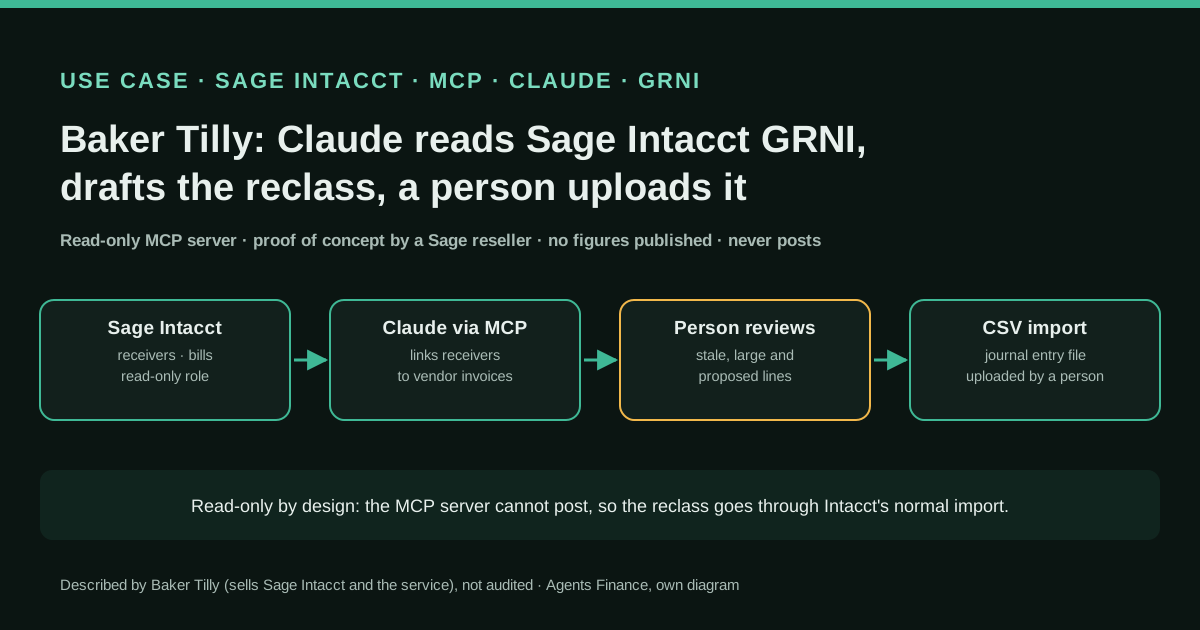
Baker Tilly, an advisory and accounting firm that resells and implements Sage Intacct, built a proof of concept around one month-end question: what is sitting in goods received not invoiced (GRNI) that should not be there, and where should each balance be reclassified by expense account and dimensions? Claude, connected to the Sage Intacct MCP Server, queried purchasing data, found receivers, linked them to their vendor invoices and compared amounts, separating legitimate open GRNI (goods received, invoice still to come) from residual balances left by differences between a receiver and its invoice. The firm turned the analysis into a GRNI dashboard summarised by vendor, job and item, with links back to the transactions in Sage Intacct. Because the MCP connection is read-only, Claude cannot post: it prepared the reclassification entries in the organisation's own Sage Intacct journal entry import format, and a person reviews and uploads them.
Reported result
Baker Tilly gives no hours saved, balances cleared or error rates; it describes the move as "from hours of manual reconciliation to reclass-ready in minutes", which is a headline, not a measurement. It does not name the client or say whether the proof of concept went into production; its own guide says such a proof of concept "isn't finished automation or a production deployment". Baker Tilly sells Sage Intacct and a paid Sage AI Accelerator engagement built on this connection, so the account is both experience and marketing.
Mind the evidence. Someone explains how they do it or did it, without verifiable figures. It is documented practice, not proof that it will work in your case.
What has really been tested
On 25 October 2026 we read Baker Tilly's proof-of-concept article, its guide for finance leaders and its webcast page, Sage Intacct's help pages on purchasing workflows and journal entry imports, Sage's developer portal summary of the MCP Server (the portal blocked our server, so we relied on its indexed text and on theFinanceStack's set-up notes) and Claude's connector authentication docs. We confirmed that https://mcp.intacct.com/mcp answers with 401 and publishes OAuth metadata. We have no Sage Intacct tenant, so we did not connect Claude to it. The Python script under "Copy and adapt" was run on the fictitious data shown; every file in that section is an Agents Finance template based on the sources, not Baker Tilly's material, which is not published.
How to replicate it
You need Sage Intacct with the AI Gateway available in your region, a Purchasing workflow in which receivers post to a GRNI account, and Claude on a plan that allows custom connectors. Have an administrator create a read-only role limited to Purchasing, Accounts Payable and the General Ledger for the entities in scope, register an OAuth client and add https://mcp.intacct.com/mcp as a custom connector. Try it in a sandbox first. Ask one question (open receivers by age and receivers whose invoices do not match), export the answer, run the matching and reclass script, and have the person who owns GRNI review every proposed line before uploading the CSV through Sage Intacct's import.
In two sentences
Baker Tilly built a proof of concept in which Claude reads receivers and vendor invoices from Sage Intacct through Sage’s read-only MCP server, works out which goods received not invoiced (GRNI) balances are legitimate and which are leftovers, and prepares the reclassification entries in the company’s own journal import format so a person can check and upload them. There are no figures and the firm sells the service, but the design is a useful pattern for any controller: let the AI read and prepare, and keep posting in human hands.
Who does it and why it matters
Baker Tilly is a US advisory, tax and assurance firm and a Sage Intacct value-added reseller; its site claims more than 2,000 implementations. In September 2026 two of its people published a pair of articles on the Sage Intacct MCP Server, the connector Sage launched as part of its AI Gateway so that outside AI applications such as Claude or ChatGPT can query Intacct data. Joel Headdings wrote the guide for finance leaders on 1 September; Baran Sönmez described the proof of concept on 2 September; and John Campbell presented a webcast on 9 October that covered how Claude connects to Intacct, sandbox use and the firm’s paid “Sage AI Accelerator” engagement.
The case matters for three reasons. GRNI is a real month-end headache in any company that receives goods before the supplier’s invoice: the balance sheet account fills up with small residues nobody owns. Sage Intacct is a mid-market ERP, and we had not yet covered a hands-on use of its MCP connector. And the design shows that there is a lot of value between “show me the data” and “let the AI post to my ledger”, as Baker Tilly puts it. Keep the commercial angle in mind: the firm sells both Intacct and the consulting engagement built around this connector, and it does not name the client.
What GRNI is in Sage Intacct and why it gets stuck
In a Sage Intacct Purchasing workflow where the invoice arrives after the goods, Sage’s own help describes the accounting: posting the receiver debits inventory (or the expense) and credits the GRNI account; converting the receiver into a vendor invoice debits GRNI and credits accounts payable. If both amounts are equal, GRNI goes back to zero for that receipt. If the supplier bills a different price, an extra freight line or a partial quantity, a residue stays behind. For inventory items, Sage recommends a value-only inventory adjustment linked to the receiver to correct the cost. For non-stock purchases and services, the residue usually needs a journal entry to the right expense account, with the same dimensions as the original line.
Add receivers that were never invoiced (sometimes because the goods were returned, sometimes because the purchase order was closed outside the workflow) and GRNI becomes an account that takes hours of exports and lookups every month. That is the question Baker Tilly asked Claude.
How the proof of concept works
According to Baker Tilly, Claude queried purchasing data directly from Sage Intacct through the MCP server, identified receivers, connected each one to its related vendor invoices and compared the amounts. That comparison split GRNI into two groups: legitimate open balances, where goods have arrived and the invoice simply has not yet, and residual balances caused by differences between a receiver and its invoice. For the second group, the work went one step further: for each balance it identified where to reclassify it, using the appropriate expense account and dimensions.
The firm then turned the analysis into a GRNI dashboard where a finance user could “reconcile, review, reclass, and reveal” the underlying activity, summarised by vendor, job and item, with transaction details linked back to Sage Intacct. Baker Tilly does not say how the dashboard was built.
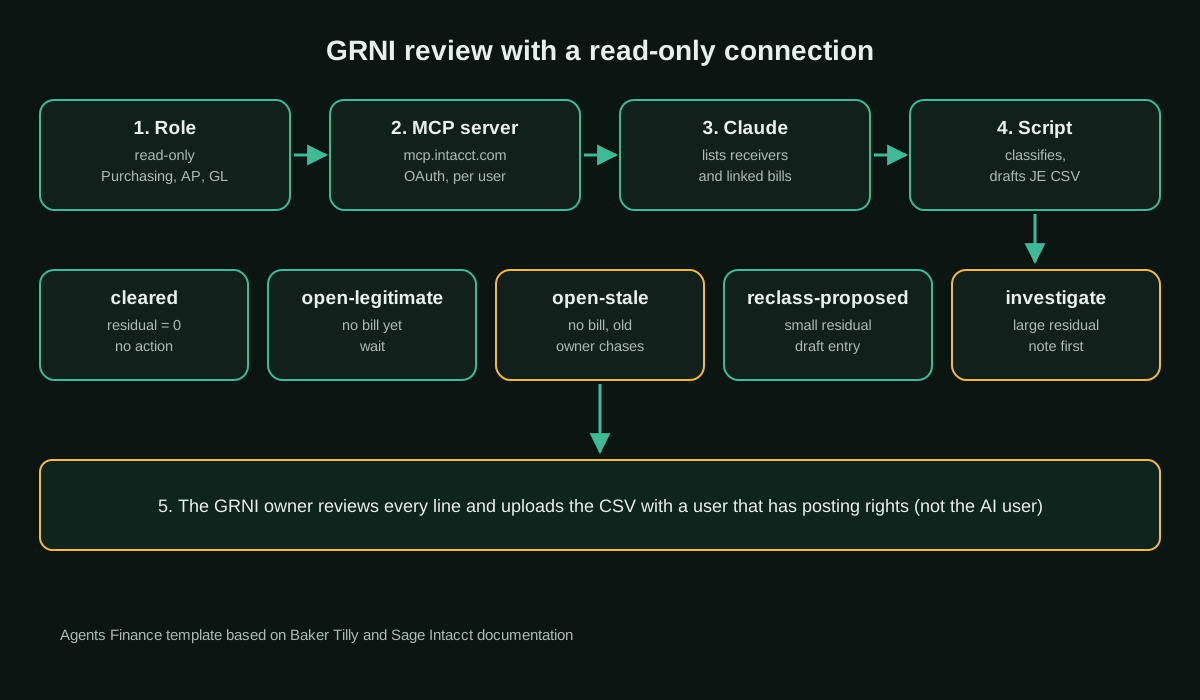
The last step is the one we find most practical. The Sage Intacct MCP Server is read-only, so Claude could not post the entries. Instead it prepared them in the organisation’s actual Sage Intacct journal entry import format, for human review and upload through Intacct’s standard CSV import. The permission boundary is enforced by the system, not by a promise in a prompt.
What the connector can and cannot do
Sage’s developer portal describes the MCP Server as read-only access to Intacct data and object metadata, with filtering, sorting, pagination and aggregation, covering accounts payable, accounts receivable, cash management, general ledger, purchasing and order entry, with OAuth 2.0 sign-in. Writes go through Intacct’s REST APIs, a separate connection with a different risk profile. We confirmed that the endpoint, https://mcp.intacct.com/mcp, answers unauthenticated requests with 401 and publishes standard OAuth protected-resource metadata.
Baker Tilly’s guide adds three points that matter for GRNI work:
- The role is the boundary. The AI sees exactly what the signed-in user’s Intacct role can see; a connection built on a convenient admin role “is the most common way a well-intentioned pilot ends up with more reach than anyone approved”.
- Dimensions live on lines. Project, department, location and class sit on line-level records such as bill lines and journal entry lines, so a question about a job is answered from the line detail.
- Read-only is not risk-free. Data still goes to the AI provider, prompts may be retained, and the model can misread correct data. An AI answer does not become audit evidence because the data came from the ERP.
According to theFinanceStack’s set-up notes, the server does not support automatic client registration, so you need an OAuth client ID and secret from Sage, with Claude’s callback address registered as a redirect URI, before you can add it as a custom connector in Claude. On 21 October 2026 Sage Intacct was not in Claude’s connector directory.
Step by step
Putting together Baker Tilly’s description, Sage’s help and the connector notes, this is the sequence we would follow:
- Confirm the accounting. Check which Purchasing transaction definitions post to GRNI, which account they use and whether price differences on stock items are corrected with value-only adjustments. The AI cannot fix a workflow that skips steps.
- Create a dedicated read-only role. Purchasing, Accounts Payable and General Ledger read access for the entities in scope; no payroll, no administration.
- Register the OAuth client and add the connector. Do it first in a sandbox company, as Baker Tilly recommends in its engagement.
- Ask one narrow question. Open receivers with age, and receivers whose linked invoices do not add up to the received amount, with vendor, item and line dimensions.
- Do the arithmetic outside the model. Export the answer to CSV and let a deterministic script classify balances and draft the entry, so totals are reproducible.
- Review and upload. The person who owns GRNI checks every proposed line, investigates stale and large items, and uploads the CSV through Intacct’s import.
- Measure. Track hours spent and the GRNI balance before and after for a few closes, because the source gives no numbers.
Copy and adapt
Prerequisites: Sage Intacct with the AI Gateway enabled, an administrator who can create roles, Claude on a plan that allows custom connectors, and Python 3.10 or later for the script. Baker Tilly has not published its prompts, dashboard or files, so everything below is an Agents Finance template based on Baker Tilly’s description and Sage Intacct’s documentation. Use fictitious or sandbox data first, and never paste the OAuth client secret into a prompt, a file or a repository.
1. Read-only role checklist (Agents Finance template)
# Agents Finance template based on Baker Tilly's least-privilege guidance
role_name: AI-GRNI-READONLY
purpose: "Month-end GRNI review through the Sage Intacct MCP Server"
modules:
  purchasing: read        # receivers, purchase orders, vendor invoices
  accounts_payable: read  # bills and bill lines
  general_ledger: read    # GRNI account activity and journal lines
  everything_else: none   # no payroll, no cash management, no company admin
entities: ["US-OPS"]      # only the entities in scope
sandbox_first: true
owner_of_output: "GRNI account owner (named person)"
review_rule: "No CSV is uploaded without line-by-line review by the owner"
revoke_when: ["pilot ends", "user leaves", "secret rotated"]
2. Connector set-up (Agents Finance template)
MCP server URL:    https://mcp.intacct.com/mcp
Authentication:    OAuth 2.0, client ID and secret issued as described in Sage's set-up guide
Redirect URI:      https://claude.ai/api/mcp/auth_callback
Claude (Pro/Max):  Customize > Connectors > Add custom connector > URL + Advanced settings
Claude (Team/Ent): an Owner adds it under Organization settings > Connectors
Each user:         Connect, then sign in to Sage Intacct with the read-only role
3. Instructions for the GRNI review session (Agents Finance template)
# GRNI review — instructions for Claude (Sage Intacct MCP, read-only)

## Scope
- Entity: {{ENTITY}}. Period end: {{PERIOD_END}}. GRNI account: {{GRNI_ACCOUNT}}.
- You can only read. Never suggest that anything has been posted or changed.

## Steps
1. List every receiver posted to {{GRNI_ACCOUNT}} up to {{PERIOD_END}} that is not fully
   converted, with receiver ID, PO, vendor ID, item, receipt date, amount and the line
   dimensions (department, location, project, class).
2. For each receiver, list the vendor invoices converted from it and their amounts.
3. Return both lists as CSV with exactly these headers:
   receivers: receiver_id,po_id,vendor_id,item_id,project_id,dept_id,location_id,receipt_date,amount,expense_acct
   invoices:  invoice_id,receiver_id,vendor_id,invoice_date,amount
4. Do not total, net or classify the balances yourself: the script does the arithmetic.
5. For each receiver where you are unsure of the link or the expense account, add it to a
   separate list called QUESTIONS with the reason.

## Never
- Never include OAuth secrets, tokens, bank details or employee data in any output.
- Never propose an entry for a stock item; flag it for a value-only inventory adjustment.
4. Script: classify GRNI and draft the reclass entry (Agents Finance template)
The script reads the two CSV files, marks each receiver as cleared, open-legitimate, open-stale, reclass-proposed or investigate, and writes a draft journal entry only for small residues under a tolerance you set. It stops if the entry does not balance. It never connects to Sage Intacct.
#!/usr/bin/env python3
"""GRNI review and reclass draft for Sage Intacct (Agents Finance template).

Reads two CSV exports (receivers and vendor invoices linked to them),
classifies every receiver's GRNI balance and writes:
  - grni_review.csv : one row per receiver with status and reason
  - grni_reclass_je.csv : a DRAFT journal entry in Sage Intacct's
    GL journal entry CSV import layout, for a person to review and upload.
It never connects to Sage Intacct and never posts anything.
"""
import csv
import sys
from collections import defaultdict
from datetime import date
from decimal import Decimal, ROUND_HALF_UP

# ---- settings: adapt to your chart of accounts and policy ----
GRNI_ACCT = "2050"            # your GRNI / accrued receipts account
JOURNAL = "GJ"                # journal symbol, max 4 characters
STALE_DAYS = 60               # uninvoiced receivers older than this go to review
RESIDUAL_TOLERANCE = Decimal("50.00")  # auto-propose reclass only below this
CENT = Decimal("0.01")


def money(value: str) -> Decimal:
    return Decimal(value or "0").quantize(CENT, ROUND_HALF_UP)


def main(receivers_path: str, invoices_path: str, as_of: str) -> int:
    as_of_date = date.fromisoformat(as_of)
    invoiced = defaultdict(Decimal)
    invoice_ids = defaultdict(list)
    with open(invoices_path, newline="", encoding="utf-8") as f:
        for row in csv.DictReader(f):
            invoiced[row["receiver_id"]] += money(row["amount"])
            invoice_ids[row["receiver_id"]].append(row["invoice_id"])

    review_rows, je_lines = [], []
    with open(receivers_path, newline="", encoding="utf-8") as f:
        for r in csv.DictReader(f):
            received = money(r["amount"])
            billed = invoiced.get(r["receiver_id"], Decimal("0"))
            residual = received - billed          # > 0: GRNI still has a credit balance
            age = (as_of_date - date.fromisoformat(r["receipt_date"])).days
            if not invoice_ids.get(r["receiver_id"]):
                status = "open-stale" if age > STALE_DAYS else "open-legitimate"
                reason = f"no vendor invoice, {age} days since receipt"
            elif residual == 0:
                status, reason = "cleared", "invoice equals receiver"
            elif abs(residual) <= RESIDUAL_TOLERANCE:
                status = "reclass-proposed"
                reason = f"residual {residual} after invoice(s) {' '.join(invoice_ids[r['receiver_id']])}"
                expense_side = {"ACCT_NO": r["expense_acct"]}
                grni_side = {"ACCT_NO": GRNI_ACCT}
                amt = abs(residual)
                # residual > 0: debit GRNI, credit expense; residual < 0: the reverse
                debit_side, credit_side = (grni_side, expense_side) if residual > 0 else (expense_side, grni_side)
                for side, dr, cr in ((debit_side, amt, ""), (credit_side, "", amt)):
                    je_lines.append({
                        **side,
                        "DEPT_ID": r["dept_id"], "LOCATION_ID": r["location_id"],
                        "GLENTRY_PROJECTID": r["project_id"], "GLENTRY_VENDORID": r["vendor_id"],
                        "DOCUMENT": r["receiver_id"],
                        "MEMO": f"GRNI residual {r['receiver_id']} PO {r['po_id']}",
                        "DEBIT": dr, "CREDIT": cr,
                    })
            else:
                status = "investigate"
                reason = f"residual {residual} above tolerance {RESIDUAL_TOLERANCE}"
            review_rows.append({"receiver_id": r["receiver_id"], "po_id": r["po_id"],
                                "vendor_id": r["vendor_id"], "received": received,
                                "invoiced": billed, "residual": residual, "age_days": age,
                                "status": status, "reason": reason})

    with open("grni_review.csv", "w", newline="", encoding="utf-8") as f:
        w = csv.DictWriter(f, fieldnames=list(review_rows[0].keys()))
        w.writeheader()
        w.writerows(review_rows)

    total_dr = sum((Decimal(l["DEBIT"]) for l in je_lines if l["DEBIT"] != ""), Decimal("0"))
    total_cr = sum((Decimal(l["CREDIT"]) for l in je_lines if l["CREDIT"] != ""), Decimal("0"))
    if total_dr != total_cr:
        print(f"STOP: draft entry does not balance ({total_dr} vs {total_cr})")
        return 1

    header = ["JOURNAL", "DATE", "DESCRIPTION", "LINE_NO", "ACCT_NO", "DEPT_ID", "LOCATION_ID",
              "GLENTRY_PROJECTID", "GLENTRY_VENDORID", "DOCUMENT", "MEMO", "DEBIT", "CREDIT"]
    with open("grni_reclass_je.csv", "w", newline="", encoding="utf-8") as f:
        w = csv.DictWriter(f, fieldnames=header)
        w.writeheader()
        for n, line in enumerate(je_lines, start=1):
            first = n == 1
            w.writerow({"JOURNAL": JOURNAL if first else "",
                        "DATE": as_of_date.strftime("%m/%d/%Y") if first else "",
                        "DESCRIPTION": f"GRNI reclass {as_of}"[:30] if first else "",
                        "LINE_NO": n, **line})

    counts = defaultdict(int)
    for row in review_rows:
        counts[row["status"]] += 1
    print("receivers by status:", dict(counts))
    print(f"draft entry: {len(je_lines)} lines, debits {total_dr} = credits {total_cr}")
    print("nothing was posted; review grni_review.csv and grni_reclass_je.csv")
    return 0


if __name__ == "__main__":
    if len(sys.argv) != 4:
        sys.exit("usage: grni_reclass.py receivers.csv invoices.csv YYYY-MM-DD")
    sys.exit(main(*sys.argv[1:]))
Fictitious input files to test it:
receiver_id,po_id,vendor_id,item_id,project_id,dept_id,location_id,receipt_date,amount,expense_acct
RCV-1001,PO-501,V-ACME,SVC-MAINT,PRJ-01,OPS,HQ,2026-09-12,1200.00,6100
RCV-1002,PO-502,V-BOLT,MAT-PIPE,PRJ-02,FIELD,EAST,2026-09-20,845.50,5200
RCV-1003,PO-503,V-ACME,SVC-MAINT,PRJ-01,OPS,HQ,2026-07-02,300.00,6100
RCV-1004,PO-504,V-CORE,MAT-WIRE,PRJ-03,FIELD,WEST,2026-09-28,2000.00,5200
RCV-1005,PO-505,V-BOLT,MAT-PIPE,PRJ-02,FIELD,EAST,2026-10-15,410.00,5200invoice_id,receiver_id,vendor_id,invoice_date,amount
BILL-9001,RCV-1001,V-ACME,2026-09-30,1200.00
BILL-9002,RCV-1002,V-BOLT,2026-10-03,832.25
BILL-9003,RCV-1004,V-CORE,2026-10-06,1850.00
BILL-9004,RCV-1004,V-CORE,2026-10-08,190.00python3 grni_reclass.py receivers.csv invoices.csv 2026-10-31
# receivers by status: {'cleared': 1, 'reclass-proposed': 2, 'open-stale': 1, 'open-legitimate': 1}
# draft entry: 4 lines, debits 53.25 = credits 53.25
# nothing was posted; review grni_review.csv and grni_reclass_je.csv5. The draft import file it produces
The headers are field names from Sage Intacct’s journal entry import help: JOURNAL (up to 4 characters), DATE, DESCRIPTION (up to 30), LINE_NO and ACCT_NO are required, and every line needs a DEBIT or a CREDIT. DEPT_ID, LOCATION_ID, GLENTRY_PROJECTID, GLENTRY_VENDORID, DOCUMENT and MEMO are optional. Download the template from your own company, because it contains your dimensions, and keep its exact headers.
JOURNAL,DATE,DESCRIPTION,LINE_NO,ACCT_NO,DEPT_ID,LOCATION_ID,GLENTRY_PROJECTID,GLENTRY_VENDORID,DOCUMENT,MEMO,DEBIT,CREDIT
GJ,10/31/2026,GRNI reclass 2026-10-31,1,2050,FIELD,EAST,PRJ-02,V-BOLT,RCV-1002,GRNI residual RCV-1002 PO PO-502,13.25,
,,,2,5200,FIELD,EAST,PRJ-02,V-BOLT,RCV-1002,GRNI residual RCV-1002 PO PO-502,,13.25
,,,3,5200,FIELD,WEST,PRJ-03,V-CORE,RCV-1004,GRNI residual RCV-1004 PO PO-504,40.00,
,,,4,2050,FIELD,WEST,PRJ-03,V-CORE,RCV-1004,GRNI residual RCV-1004 PO PO-504,,40.00
6. Reviewer checklist (Agents Finance template)
- [ ] The two CSV files cover every receiver posted to GRNI up to period end (total ties to the GL balance)
- [ ] Every "reclass-proposed" line: expense account and dimensions match the original receiver line
- [ ] No stock item is reclassed by journal; those get a value-only inventory adjustment
- [ ] Every "open-stale" receiver has an owner and an action (chase the invoice, return, close the PO)
- [ ] Every "investigate" line has a note before the close
- [ ] The CSV headers match the company's own downloaded template
- [ ] Debits equal credits; the upload is done by a person with posting rights, not by the AI user
A concrete example
Run on the fictitious files above, as at 31 October 2026, the script finds five receivers. RCV-1001 is cleared: received and invoiced at 1,200.00. RCV-1005 is legitimate open GRNI: 410.00 received 16 days ago and no invoice yet, so nothing is done. RCV-1003 is stale: 300.00 received 121 days ago with no invoice, so it goes to a person, because the right answer could be a missing bill, a return or a cancelled order. RCV-1002 left a residue of 13.25 because the supplier billed less than the receiver; RCV-1004 was billed 40.00 more across two invoices. Both are under the 50.00 tolerance, so the script proposes a four-line entry for 53.25 that moves each residue to the expense account with the receiver’s department, location, project and vendor. A person approves it or not.
Results stated by the source
Baker Tilly describes the proof of concept qualitatively. It says the GRNI question, which normally requires reports, exports, lookups and spreadsheet reconciliation, became an AI-assisted workflow; that the dashboard summarised GRNI by vendor, job and item and surfaced the transactions needing attention; and that the reclass entries were prepared in the organisation’s real import format. It gives no hours, amounts, accuracy or client name, and its guide is clear that a proof of concept may end in “proceeding, revising the concept, or stopping”.
Limitations and risks
- Evidence. A reseller’s description of its own proof of concept, with no figures and no named client; treat it as a design, not proof of savings.
- Availability and cost. The AI Gateway is not in every country; Sage’s May 2026 release listed the United States, the United Kingdom, Canada, Australia and South Africa. We could not confirm its price.
- Data leaves the ERP. Purchasing and vendor data goes to the AI provider; check your Claude plan’s data terms before connecting production.
- Model errors. The model can mislink a receiver to the wrong invoice or miss lines when results are paginated. That is why the arithmetic goes in a script and the totals are tied to the GL.
- Accounting judgement. Stale receivers and stock items need people and the correct Intacct transaction, not a journal.
Common mistakes
- Connecting with an admin role “just for the pilot”.
- Letting the model net and total balances in the chat instead of in a reproducible file.
- Reclassing inventory price differences by journal, which breaks the inventory valuation report.
- Using a generic CSV template instead of the company’s own, so dimensions are lost.
- Treating the reclass file as final because the data came from the ERP.
Conclusions
The Baker Tilly case is not a story about an AI that closes the books. It is a narrower and more useful pattern: a read-only connection lets Claude do the tedious part of a GRNI reconciliation, matching receivers to invoices and drafting the entry, while posting stays in Sage Intacct’s normal import with a person in charge. If you run Intacct, start with a sandbox, a dedicated role and one question, measure the time against your current close, and only then decide whether it deserves a dashboard.
Sources
- Baker Tilly — From asking questions to reimagining finance workflows with Sage Intacct MCP (Baran Sönmez, 2 September 2026) (opens in a new tab) (primary)
- Baker Tilly — Sage Intacct MCP Server: what finance leaders need to know (Joel Headdings, 1 September 2026) (opens in a new tab)
- Baker Tilly — Sage AI Gateway + Baker Tilly AI Consulting Services (webcast, John Campbell, 9 October 2026) (opens in a new tab)
- Sage Intacct Developer Portal — Sage Intacct AI Gateway and MCP Server overview (opens in a new tab)
- Sage Intacct Help — Best practices for transaction workflows that impact inventory (receiver posts to GRNI) (opens in a new tab)
- Sage Intacct Help — CSV import: General Ledger journal entries (field definitions) (opens in a new tab)
- Sage Intacct Help — CSV import: line number examples (opens in a new tab)
- theFinanceStack — Sage Intacct MCP server: read-only access and OAuth setup (October 2026) (opens in a new tab)
- Claude Docs — Authentication for connectors (OAuth callback for remote MCP servers) (opens in a new tab)
We wrote this entry in our own words from the sources above and checked that the links worked on October 25, 2026. Is anything incorrect? Tell us.
Share this entry
This entry is part of the guide: AI agents for accounting · MCP for accounting and ERPs