What they do and how
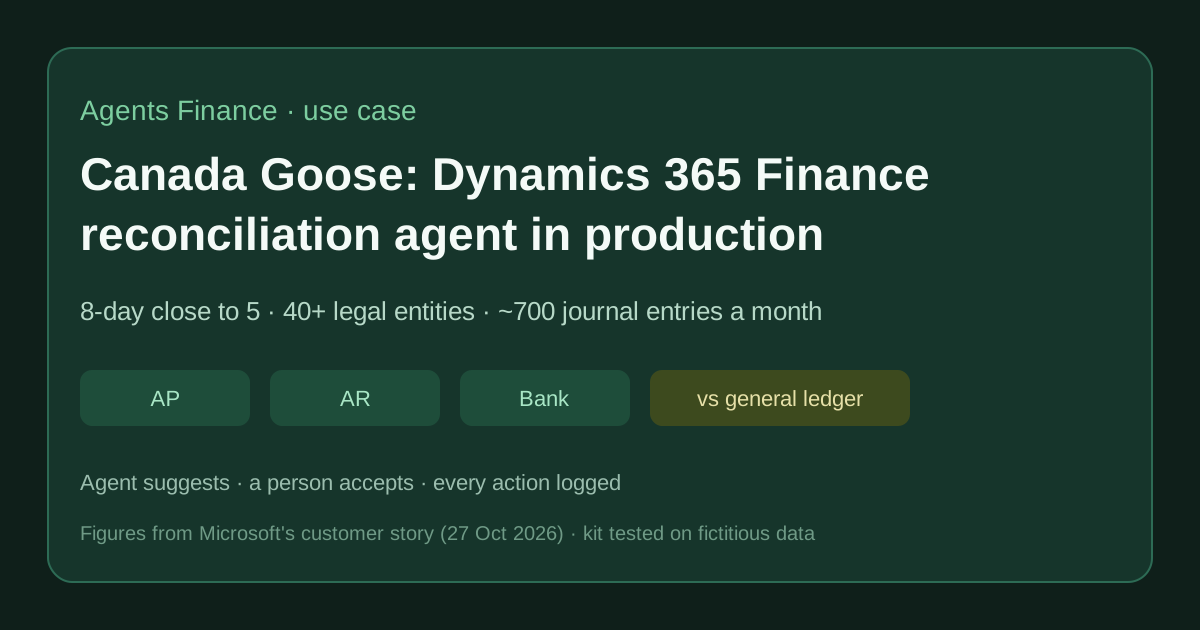
Canada Goose (luxury performance apparel, more than 40 legal entities, a finance team of over 50) moved from AX 2012 to Dynamics 365 Finance, first switching on native features (fixed asset subledger, allocation rules, periodic journals, journal approval workflows), then Power Platform intake, Microsoft Fabric reporting and, last, AI agents. It enabled the built-in account reconciliation agent of Dynamics 365 Finance to reconcile subledgers with the general ledger: the agent continuously matches accounts payable, accounts receivable and bank transactions against the ledger, so differences are found during the month rather than on close day. A separate procurement Q&A agent built in Copilot Studio finished user acceptance testing and was planned to go live in autumn 2026.
Reported result
Stated in Microsoft's customer story: the monthly close went from eight to five business days (37% faster) and moving roughly 700 monthly journal entries from printed sign-off to workflow approvals saves 3,500 minutes a month. The story says the reconciliation agent "runs continuously in production" but gives no figure for the agent itself, and does not say which close step got faster; ERP Leaders notes the figures are Canada Goose's and Microsoft's own, with no outside check and no project cost.
Stated figures. An identified person or organization states that they have used it. The results are stated by the source; we have not audited them.
What has really been tested
On 13 November 2026 we read Microsoft's Canada Goose story, its Portuguese version on Microsoft Source LATAM, the ERP Leaders write-up, the Microsoft Learn pages on the agent (updated 10 November 2026), its set-up guide, the workspace page, the 10.0.46 release notes and the archived 2026 release plan, plus a consultant's explainer (Dr Dynamics), a test-automation vendor's article (Sofy) and a Dynamics Community thread. Canada Goose's configuration, data and agent output are not public. Everything under "Copy and adapt" is an Agents Finance template: recon_shadow_check.py passed its self-test and, on the fictitious exports shipped with it, returned 8 shadow results and 7 flags (2 high, exit code 1); the workbook formulas were recalculated in LibreOffice and gave the same counts. We have not run the agent in a Dynamics 365 tenant.
How to replicate it
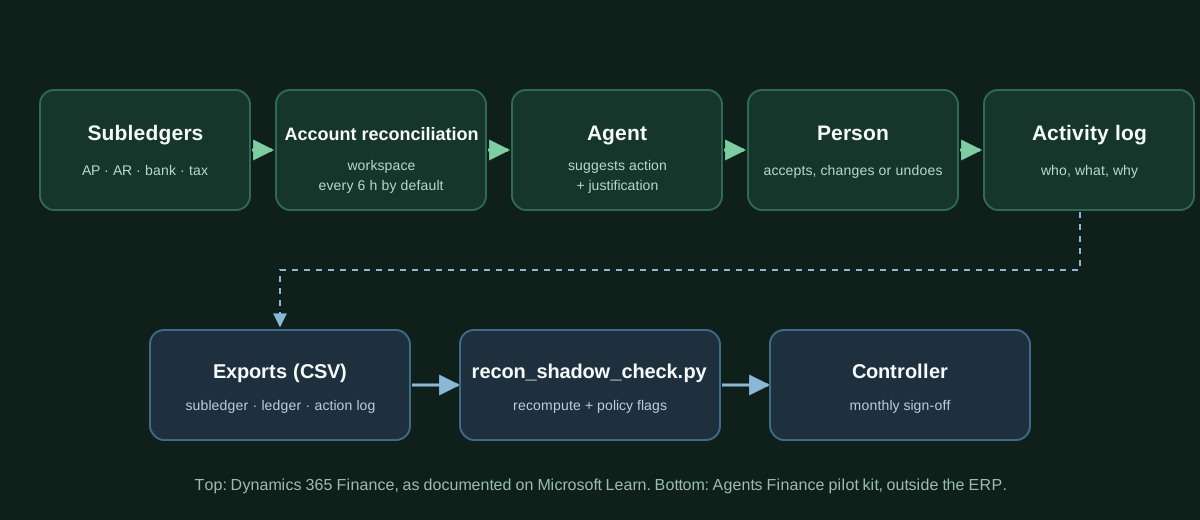
You need Dynamics 365 Finance 10.0.46 or later, the Immersive Home, Agent management and Account reconciliation agent features, the two Copilot packages at the versions Microsoft lists, a dedicated agent identity in Dataverse and Finance, and a decision on cross-region data movement. Start with one module and one legal entity, set the start date after your last manual reconciliation and an exception limit, and keep your old reconciliation running in parallel for one close. Each week export the subledger, the ledger and the action log, run recon_shadow_check.py to recompute exceptions and check the policy (tolerance for accept-without-change, a second reviewer above materiality, comments, bulk groups), and sign off monthly. Widen modules only when the shadow check and the workspace agree.
In two sentences
Canada Goose is the first named company we have found running Microsoft’s account reconciliation agent for Dynamics 365 Finance in production, continuously matching AP, AR and bank against the general ledger across more than 40 legal entities. The close went from eight to five business days, but most of that came from switching on plain ERP features first; below you get what the agent can and cannot do today, our own table of its actions, and a tested kit to pilot it without trusting it blindly.
Who does it and why it matters
Canada Goose is a publicly traded, billion-dollar Canadian maker of luxury performance apparel, selling through retail, wholesale and e-commerce in North America, EMEA and APAC. According to Microsoft’s customer story (27 October 2026), its finance team of more than 50 people runs global accounting from the Canadian headquarters and consolidates more than 40 legal entities.
Before the project, the team worked on AX 2012, the predecessor of Dynamics 365 Finance. Accountants prepared journal entries in Excel, stored them in Box, printed approval packages and collected physical signatures; fixed assets such as sewing and cutting machines lived in Excel with depreciation posted as lump sums; and requests to finance arrived by scattered email. The close took eight business days.
The case matters for three reasons:
- It is a named customer for an agent most teams only know from documentation. We covered the agent itself in October as a short news item, with no customer names. Microsoft Learn still labels it “production ready preview” (page updated 10 November 2026), and the archived 2026 release plan expected general availability in September 2026. A listed company saying it runs it “continuously in production” moves the conversation from “what is it” to “how do we pilot it”.
- The order of the work is the lesson. Canada Goose’s own sequence was: enable system capabilities, redesign processes, train people, and only then add AI. The two figures the story measures (days to close and minutes saved on journal approvals) are tied to the first steps, not to the agent.
- It is a controller’s agent, not a chatbot. The agent sits inside the ERP’s reconciliation workspace, works on the ERP’s own exceptions and leaves an activity log. That is a very different risk profile from pasting a trial balance into a chat window.
What Canada Goose changed, in order
The story describes four layers. We list them because the agent only makes sense on top of the first three.
- Native Dynamics 365 Finance features. Fixed assets moved into their own subledger with automatic depreciation; journal names were standardised; allocation rules at main account level spread transactions by predefined percentages and financial dimensions; periodic journals replaced repetitive monthly set-ups; and journal entries go through approval workflows before posting. Gonzalo Barnes, Senior Manager of Finance Transformation, is quoted saying the team “reviewed feature management, enabled inactive capabilities, and began using features that were already available”.
- Intake and workflow. A Finance Center of Excellence intake built with Microsoft Forms, Power Automate approvals in Teams and email, and a SharePoint list that shows who asked for what, who approved it and who owns it; leadership prioritises the backlog monthly.
- Data. Fabric, fed from Dynamics 365 Finance through Synapse Link, in bronze, silver and gold layers refreshed every three hours. Corporate accounting and FP&A query all entities with SQL or Power BI; the transfer pricing team says its reconciliation went from “hours to minutes”.
- Agents. The built-in account reconciliation agent for subledger-to-ledger reconciliations, in production; a procurement retrieval agent built in Copilot Studio that answers questions such as “how do I get an invoice paid?” from policies in SharePoint, through UAT and planned for an autumn 2026 go-live; Microsoft 365 Copilot Chat used across the company and more than 180 Microsoft 365 Copilot Premium licences. The company is also in Microsoft’s Frontier programme with access to Copilot Cowork.
How the account reconciliation agent works
The agent is a layer on top of the Account reconciliation workspace, which replaced the old SSRS reconciliation reports. According to Microsoft Learn:
- The workspace reconciles the general ledger with the accounts payable, accounts receivable, tax and bank subledgers on a schedule, in the background. A consultant’s explainer (Dr Dynamics, June 2026) says the process runs every six hours by default and the workspace exists from version 10.0.44.
- Exceptions are shown per legal entity and module. Each carries AI-generated Suggested action, Analysis and Justification fields when the agent is enabled.
- The agent’s own page lists two exception types it processes: voucher amount mismatch and pending accounting transferred to general ledger. The 10.0.46 release notes add suggested actions for “In ledger not in subledger” and “In subledger not in ledger”.
- A person submits the action. Grouped (bulk) actions use the agent’s suggestions, show an “AI recommended” label and ask for confirmation (“This action can be undone”). Every addressed exception can be undone with a reason, and the Activity pane shows “Fix suggested by agent” followed by “Reconciled”.
- It runs under a dedicated agent identity, needs Copilot Studio agents that Microsoft publishes automatically (and that data loss prevention policies can block), and may require enabling Move data across regions in the Power Platform admin center. Microsoft also warns that it may update the AI model without notice.
Own table: what you can do with each exception (checked 13 November 2026)
| Exception type (workspace) | Actions available to the person | Does the agent suggest an action? | What to watch |
|---|---|---|---|
| In subledger, not in ledger | Create journal entry, match exceptions, accept without change, view history | Yes, from 10.0.46 (release notes) | Often “pending accounting transferred to GL”: a timing issue, not an error. Do not post a manual entry for it. |
| In ledger, not in subledger | Reverse GL voucher, match exceptions, accept without change, create adjusting journal entry | Yes, from 10.0.46 (release notes) | Usually a manual journal hitting a control account. Fix the cause: block manual entry on that main account. |
| Voucher amount mismatch | Accept without change, create adjusting journal entry (the agent page also lists reverse and link transactions) | Yes (agent page) | The amount you accept without change is a write-off. Cap it in policy. |
Sources: Microsoft Learn pages on the workspace, the agent and 10.0.46. The table is our synthesis; Microsoft’s pages are prerelease documentation and can change.
Results stated by the sources
- Close: from eight to five business days, “a 37% reduction” (Microsoft’s story; 3/8 is 37.5%).
- Manual work: about 700 journal entries a month used to take five minutes each to print and prepare; workflows bring that to zero, “saving 3,500 minutes per month”. ERP Leaders’ arithmetic: about 58 hours a month, under 70 minutes per finance employee.
- The agent itself: no figure. The story says it “runs continuously in production” and lets the team find discrepancies before close day.
- Caveats: the story is published by the vendor, gives no project cost and does not say which close step got faster. ERP Leaders points out that “days to close and hours saved measure different things”. Our reading: the 8-to-5-day result belongs to the whole programme (native features, workflows, data and agent), not to the agent.
A concrete example (fictitious)
Our sample data has two legal entities, EU01 and US01, with AP, AR, bank and tax lines for October. Running the script on it:
- It recomputes 7 exceptions and 1 rounding difference: 3 in subledger not in ledger, 2 in ledger not in subledger, 2 voucher amount mismatches, and a 0.60 rounding on an AR invoice.
- On the action log it raises 2 high flags. A bank line of -145.90 was “accepted without change” although the agent had suggested linking transactions, and the policy allows only 5.00. A 27,000 correction on AP invoice APINV-1004 was created and reviewed by the same person, above the 10,000 materiality.
- It raises 4 medium flags: an action without a reason comment; a reversal that was undone; a bulk group whose total (27,860) exceeds the 25,000 group limit; and a 27,300 AP invoice that is in the subledger but not in the ledger, for which the log has no action at all.
- Agent agreement by type: 2 of 2 kept for voucher mismatches, 1 of 2 for “in subledger not in ledger”.
That last medium flag is the one that matters. As Sofy, a test-automation vendor, puts it, “an exception that never appears is the most dangerous outcome”, because nothing on screen shows it is missing. A shadow check outside the ERP is how you see what the workspace did not show you.
Copy and adapt
Everything here is an Agents Finance template based on Microsoft’s Canada Goose story and the Microsoft Learn documentation, MIT-0, with fictitious data. Neither Microsoft nor Canada Goose published these files.
Download the folder: /downloads/#case-canada-goose-dynamics-365-finance-reconciliation-agent-close-2026 (script, example CSVs, policy, bilingual workbook and prompts).
Prerequisites: Python 3.9+ (standard library only); exports of subledger lines, ledger lines for the subledger control accounts and the action log, mapped to the columns in the README; optionally LibreOffice or Excel for the workbook.
1. Agent settings to agree before you switch it on
# Agents Finance template - account reconciliation agent pilot (D365 Finance)
prerequisites:
  finance_version: "10.0.46 or later"
  features: ["Immersive Home", "Agent management", "(Production ready preview) Account reconciliation agent"]
  packages:
    copilot_for_finance_and_operations_apps: "1.0.3048.2 or later"
    copilot_in_dynamics_365_finance: "1.0.3049.1 or later"
  copilot_studio_agent_published: true     # check DLP policies
  move_data_across_regions: "reviewed by data protection before enabling"
identity:
  dedicated_agent_user: true
  dataverse_roles: ["Finance and Operations basic user", "Account reconciliation agent role", "Environment maker"]
  finance_roles: ["Account reconciliation agent", "System user"]
pilot_scope:
  legal_entities: ["EU01"]                 # one entity first
  modules_in_priority_order: ["Accounts payable"]
  start_date: "first day after the last manually reconciled period"
  exception_limit: { type: monthly, value: 500 }
  alerts: { limit_thresholds: [50, 75, 90], notify_if_run_skipped: true }
parallel_run:
  keep_previous_reconciliation_for_closes: 1
2. The policy the script checks
{
  "rounding_tolerance": "1.00",
  "accept_tolerance": "5.00",
  "materiality": "10000.00",
  "bulk_group_materiality": "25000.00"
}
Values are examples: set them with your controller and auditor, per currency if you need to.
3. Run the shadow check
python3 recon_shadow_check.py --self-test
python3 recon_shadow_check.py \
  --subledger subledger.example.csv --ledger ledger.example.csv \
  --actions agent-actions.example.csv --policy policy.example.json --out-dir out
echo "exit code: $?"   # 1 = at least one high flag
Expected output with the sample data (excerpt):
[HIGH] no_second_reviewer EU01 AP APINV-1004: create_journal_entry for 27000.00 without an independent reviewer (materiality 10000.00).
[HIGH] accept_over_tolerance EU01 BANK BNK-5003: Accepted without change with a difference of 145.90 (policy allows 5.00).
[MEDIUM] no_comment US01 AP APINV-7002: No reason comment: the audit trail will not say why.
[MEDIUM] undone US01 AR GJ-0950: Action was undone: check the reason and the final state.
[MEDIUM] bulk_group_over_materiality   group G2: Bulk group of 2 exceptions totals 27860.00 (policy 25000.00): split it or get a second review.
[MEDIUM] unaddressed US01 AP APINV-7003: Shadow check finds in_subledger_not_in_ledger for -27300.00 but the action log has no row for it.
The core of the recomputation, so you can see there is no magic:
for k in sorted(set(sub) | set(gl)):
    s, g = sub.get(k), gl.get(k)
    if g is None:
        issue, diff = "in_subledger_not_in_ledger", s
    elif s is None:
        issue, diff = "in_ledger_not_in_subledger", -g
    else:
        diff = s - g
        if diff == 0:
            continue
        issue = "rounding" if abs(diff) <= tol else "voucher_amount_mismatch"
The key is legal entity + area + voucher + main account. If your subledger and ledger use different voucher numbers for the same document, add a mapping column before running it.
4. Workbook formulas you can reuse
The workbook has five sheets: setup checklist (13 steps with the Microsoft Learn page for each), pilot log, policy, KPIs and monthly sign-off. Two of the KPI formulas:
Accepted without change above tolerance:
=SUMPRODUCT(('Pilot log'!I2:I500="Accept without change")*(ABS('Pilot log'!G2:G500)>'Policy'!B3))

Journal entries or reversals at or above materiality without an independent reviewer:
=SUMPRODUCT((('Pilot log'!I2:I500="Create journal entry")+('Pilot log'!I2:I500="Reverse"))*(ABS('Pilot log'!G2:G500)>='Policy'!B4)*(('Pilot log'!K2:K500="")+('Pilot log'!K2:K500='Pilot log'!J2:J500)>0))
Recalculated in LibreOffice on the sample log, they return 1 and 1, the same as the script.
5. A reviewer prompt for the weekly memo
Use it in the assistant your company already approved, with the script outputs only:
You are helping a controller review a pilot of a subledger-to-general-ledger reconciliation agent.
Attached: summary.json, flags.csv and shadow-exceptions.csv from recon_shadow_check.py for {{LEGAL_ENTITY}}, week {{WEEK}}.
Rules:
- Use only the numbers in the files. If something is not in the files, write "not in the data".
- Do not propose journal entries. Do not say an exception is resolved unless the log says so.
Write, in this order:
1. Three lines: how many shadow exceptions by type, how many flags by severity, agent agreement rate by issue type.
2. A table of every HIGH flag: voucher, area, amount, what the policy says, who must act.
3. A table of MEDIUM flags grouped by code.
4. Two questions the controller should ask the team this week.
Step by step: a four-week pilot
- Week 0, admin. Tick the checklist sheet: version, features, packages, the Copilot Studio agent published, the agent identity with only the listed roles, and a written decision on cross-region data movement. In a Dynamics Community thread an admin could not find the “Account reconciliation agent role” in Power Platform; check roles before the first run, not during close.
- Week 0, scope. One legal entity, accounts payable only, start date after your last manual reconciliation, a monthly exception limit with alerts. Keep the old reconciliation running.
- Weeks 1–3. Every week, export the three files, run the script, and clear high flags. Read the agent’s justification on every override: that is your training data for the policy, not for the agent.
- Week 4, close. Fill the sign-off sheet: open exceptions at close, total accepted without change, high flags still open. Widen to AR and bank only if the shadow check found nothing the workspace missed.
Limitations and risks
- Preview label. The pages are “prerelease documentation and subject to change”. The model behind the agent can change without notice, according to Microsoft. Re-run your test month after each update.
- Narrow scope. Today the agent proposes actions for a few exception types, in AP, AR, tax and bank. Inventory, fixed assets, project accounting and intercompany are on the roadmap, not in production. For a group with 40+ entities, intercompany is where much of the close pain sits.
- Data residency. Some generative features need cross-region processing. For EU entities this is a data protection decision, not a tick box.
- Cost. The Microsoft Learn pages we read do not state a price for the agent. Microsoft notes that the system agent security role is exempt from finance and operations user licence requirements, but the Copilot Studio side may consume capacity: ask your Microsoft partner before you widen scope.
- Vendor-published case. The figures are Canada Goose’s and Microsoft’s; nobody independent checked them.
Common mistakes
- Treating “accept without change” as harmless. It is a write-off decision; cap it.
- Fixing exceptions instead of causes. If the same main account keeps producing “in ledger, not in subledger”, block manual entry on it.
- Bulk-submitting an AI-recommended group because the label says so. Look at the group total, not the count.
- Switching on every module and entity on day one, then losing the ability to tell agent errors from data migration noise.
- Dropping the old reconciliation before one full close in parallel.
Conclusions
Canada Goose’s result is stated by the vendor, and the agent is the last layer of it: the measured gains are tied to native features, approval workflows and a single data layer. The account reconciliation agent is a good fit for a controller who wants exceptions surfaced during the month and an activity log for auditors, as long as someone checks, outside the ERP, what it did not show. Start narrow, measure agreement and misses with a shadow check, and widen only when both agree.
Newsletter
The next template in this series will be an intercompany reconciliation checklist for multi-entity groups on Dynamics 365 Finance and NetSuite. Subscribe to the newsletter to get it when it ships.
Sources
- Microsoft Customer Stories — Canada Goose transforms global finance and builds an agentic future with Dynamics 365 and Microsoft Copilot Studio (27 October 2026) (opens in a new tab) (primary)
- Microsoft Learn — Account Reconciliation Agent (production ready preview), updated 10 November 2026 (opens in a new tab)
- Microsoft Learn — Set up and configure the Account reconciliation agent (production ready preview) (opens in a new tab)
- Microsoft Learn — Account reconciliation (workspace, exception types, bulk actions) (opens in a new tab)
- Microsoft Learn — What's new or changed in Dynamics 365 Finance 10.0.46 (opens in a new tab)
- Microsoft Learn — Enhancements to Account reconciliation agent (2026 release wave 1, archived) (opens in a new tab)
- ERP Leaders — Microsoft says Canada Goose cut its month-end close to five days from eight (opens in a new tab)
- Microsoft Source LATAM — Canada Goose reduz em 37% o tempo de fechamento contábil (Portuguese) (opens in a new tab)
- Dr Dynamics (Roman Abylkhatov, consultant) — D365 Account Reconciliation Agent Explained (11 June 2026) (opens in a new tab)
- Sofy (test automation vendor) — Testing the D365 Account Reconciliation Agent (opens in a new tab)
- Dynamics Community forum — Account reconciliation workspace (security roles thread) (opens in a new tab)
We wrote this entry in our own words from the sources above and checked that the links worked on November 13, 2026. Is anything incorrect? Tell us.
Share this entry
This entry is part of the guide: AI agents for accounting
 Microsoft Dynamics 365
 Microsoft Copilot Studio
 Microsoft 365 Copilot
 Xero